
Introduction
The DF Models DF06-PRO Mini 1:18 Brushless Truck is an advanced remote-controlled vehicle designed for off-road use. It features a powerful 5000kv brushless motor and a 7.4V LiPo battery, enabling it to reach speeds up to 60 km/h. The integrated control unit ensures precise handling and impressive acceleration, making it suitable for various terrains. This manual provides essential information for the safe and effective setup, operation, and maintenance of your DF06-PRO Mini Brushless Truck.

Image: Front 3/4 view of the DF Models DF06-PRO Mini Brushless Truck, showcasing its robust design and off-road tires.
Safety Warnings
- Age Restriction: This product is not suitable for children under 36 months due to small parts. Recommended age for operation is 14 years and older.
- Battery Safety: Use only the specified LiPo battery and charger. Do not overcharge or short-circuit batteries. Always supervise charging.
- Operating Environment: Operate the vehicle in open areas, away from people, pets, and obstacles. Avoid public roads and water.
- High Speed: This vehicle can reach high speeds. Exercise caution and maintain control at all times.
- Moving Parts: Keep fingers, hair, and loose clothing away from moving parts such as wheels and drivetrain components.
Package Contents
Please verify that all items listed below are included in your package:
- 1 x DF Models DF06-PRO Mini 1:18 Brushless Truck - RTR
- 1 x 2.4 GHz Remote Control
- 1 x 7.4V - 1200mAh LiPo Battery
- 1 x USB Charging Cable
- 1 x User Manual (this document)
- Basic tools (e.g., wheel wrench)

Image: The DF Models DF06-PRO Mini Brushless Truck displayed with its remote control, LiPo battery, and USB charging cable.
Setup
1. Charging the Vehicle Battery
- Connect the LiPo battery to the USB charging cable.
- Plug the USB charging cable into a suitable USB power source (e.g., computer USB port, USB wall adapter).
- The charging indicator on the USB cable will show the charging status. Refer to the charger's instructions for specific light indications.
- Charging time is approximately 90 minutes for a full charge. Do not leave the battery unattended during charging.
- Once fully charged, disconnect the battery from the charger.
2. Installing the Vehicle Battery
- Locate the battery compartment on the vehicle.
- Carefully insert the charged 7.4V LiPo battery into the compartment.
- Connect the battery connector to the vehicle's power connector. Ensure the polarity is correct.
- Securely close the battery compartment cover.
3. Installing Remote Control Batteries
- Open the battery compartment on the back of the 2.4 GHz remote control.
- Insert 4 new AAA batteries, ensuring correct polarity (+/-).
- Close the battery compartment cover securely.
4. Binding the Remote Control to the Vehicle
The vehicle and remote control are typically pre-bound from the factory. If re-binding is necessary:
- Ensure both the vehicle and remote control are powered off.
- Turn on the remote control. The indicator light may flash.
- Turn on the vehicle.
- The indicator lights on both the remote and vehicle should become solid, indicating a successful bind. If not, refer to the troubleshooting section or repeat the steps.
Operating Instructions
1. Basic Controls
- Throttle Trigger: Pull the trigger to accelerate forward. Push the trigger to brake or reverse.
- Steering Wheel: Turn the wheel left or right to steer the vehicle.
2. Dual Speed Function
The remote control features a dual-speed function, allowing you to adjust the maximum speed of the vehicle. This is ideal for both beginners and experienced users.
- Locate the speed switch or dial on your remote control.
- Adjust the setting to a lower speed for easier control, especially in confined spaces or for new drivers.
- Increase the setting for maximum speed performance in open areas.
3. Integrated LED Lighting
The DF06-PRO is equipped with integrated LED lighting for enhanced visibility and exciting night driving. The lights typically activate automatically when the vehicle is powered on.
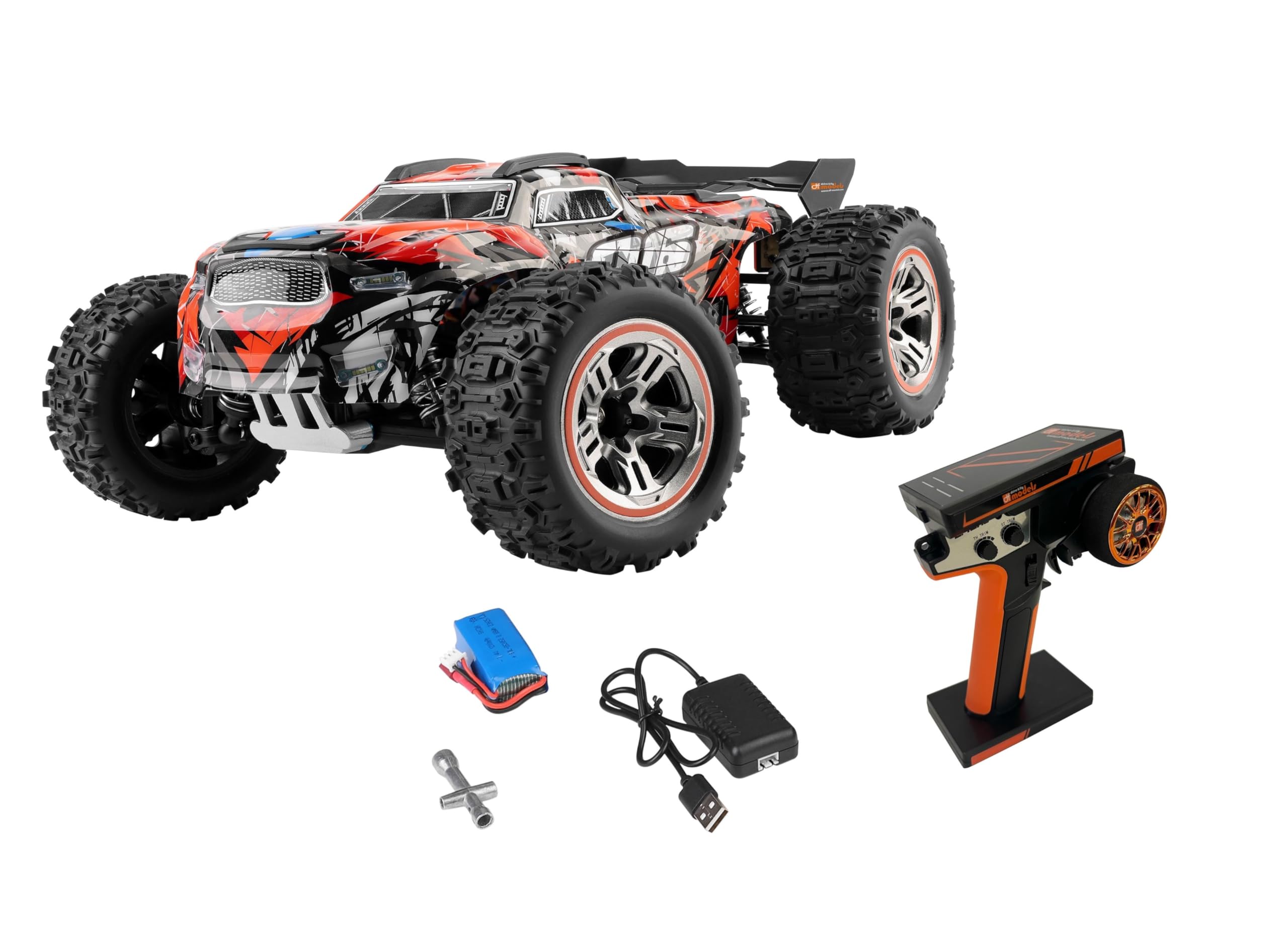
Image: The DF Models DF06-PRO Mini Brushless Truck with its bright LED headlights illuminated, demonstrating its capability for night operation.
4. Smartphone Holder
A smartphone holder is integrated into the remote control, allowing you to attach your smartphone to record action videos during operation. Ensure your smartphone is securely mounted before driving.
Maintenance
- Cleaning: After each use, especially in dirty or dusty conditions, clean the vehicle with a soft brush or compressed air. Avoid using water directly on electronic components.
- Inspections: Regularly check for loose screws, damaged parts, or worn tires. Replace any damaged components promptly.
- Lubrication: Periodically apply a small amount of RC-specific lubricant to moving parts like universal joints and bearings to ensure smooth operation and reduce wear.
- Storage: When not in use, store the vehicle and remote control in a dry, cool place, away from direct sunlight. Remove batteries from the remote control if storing for extended periods.
- Battery Care: Do not store LiPo batteries fully charged or completely discharged. Store them at a 'storage charge' level (around 3.8V per cell) for optimal battery life.
Troubleshooting
| Problem | Possible Cause | Solution |
|---|---|---|
| Vehicle does not respond | Low vehicle battery; Low remote control batteries; Not bound; Power switch off | Charge vehicle battery; Replace remote batteries; Re-bind vehicle and remote; Ensure power switches are ON |
| Short operating time | Battery not fully charged; Old/damaged battery | Ensure battery is fully charged; Consider replacing the LiPo battery |
| Vehicle runs slowly | Low battery; Dual speed setting too low; Obstruction in drivetrain | Charge battery; Adjust dual speed setting on remote; Check for debris in wheels/gears |
| Loss of control/range | Interference; Remote control batteries low; Out of range | Move to an area with less interference; Replace remote batteries; Operate within specified range |
Specifications
- Model Number: 3132
- Scale: 1:18
- Dimensions (L x W x H): 28 x 21 x 11 cm
- Weight: Approximately 800 g
- Max Speed: Up to 60 km/h
- Motor: 5000kv Brushless Motor
- Vehicle Battery: 7.4V - 1200mAh LiPo
- Charging Time: Approximately 90 minutes
- Remote Control: 2.4 GHz
- Remote Control Batteries: 4 x AAA (not included)
- Main Material: Plastic
- Recommended Age: 14 years and up
- Special Features: Integrated LED lighting, High-quality tuning parts (e.g., aluminum shock absorbers, metal drive shafts), Dual speed function, Smartphone holder on remote control.
Warranty and Support
DF Models products are manufactured to high-quality standards. For warranty information, please refer to the documentation provided with your purchase or visit the official DF Models website. If you encounter any issues or require technical assistance, please contact DF Models customer support through their official channels. Keep your proof of purchase for warranty claims.
For spare parts availability, please check with your retailer or the manufacturer's website, as information on spare parts availability is not always readily provided with the product.


