Introduction
The Micfuns Multi Microphone Holder is designed to provide a stable and organized storage solution for up to six wired or wireless microphones. Its robust aluminum construction and thoughtful design ensure your microphones are kept safe and easily accessible, eliminating clutter and protecting your valuable equipment.
Key Features:
- Holds up to 6 microphones, reducing clutter.
- Includes a stable table stand for immediate use.
- Features non-slip silicone padding inside the tray to protect microphones from scratches.
- Equipped with a 5/8"-27 threaded center socket and a 3/8"-16 threaded adapter for wide compatibility with various stands.
- Crafted from high-quality aluminum for durability and long-lasting performance.
- Durable black finish resists chips and scratches.
Product Components
Your Micfuns Multi Microphone Holder package includes the following components:
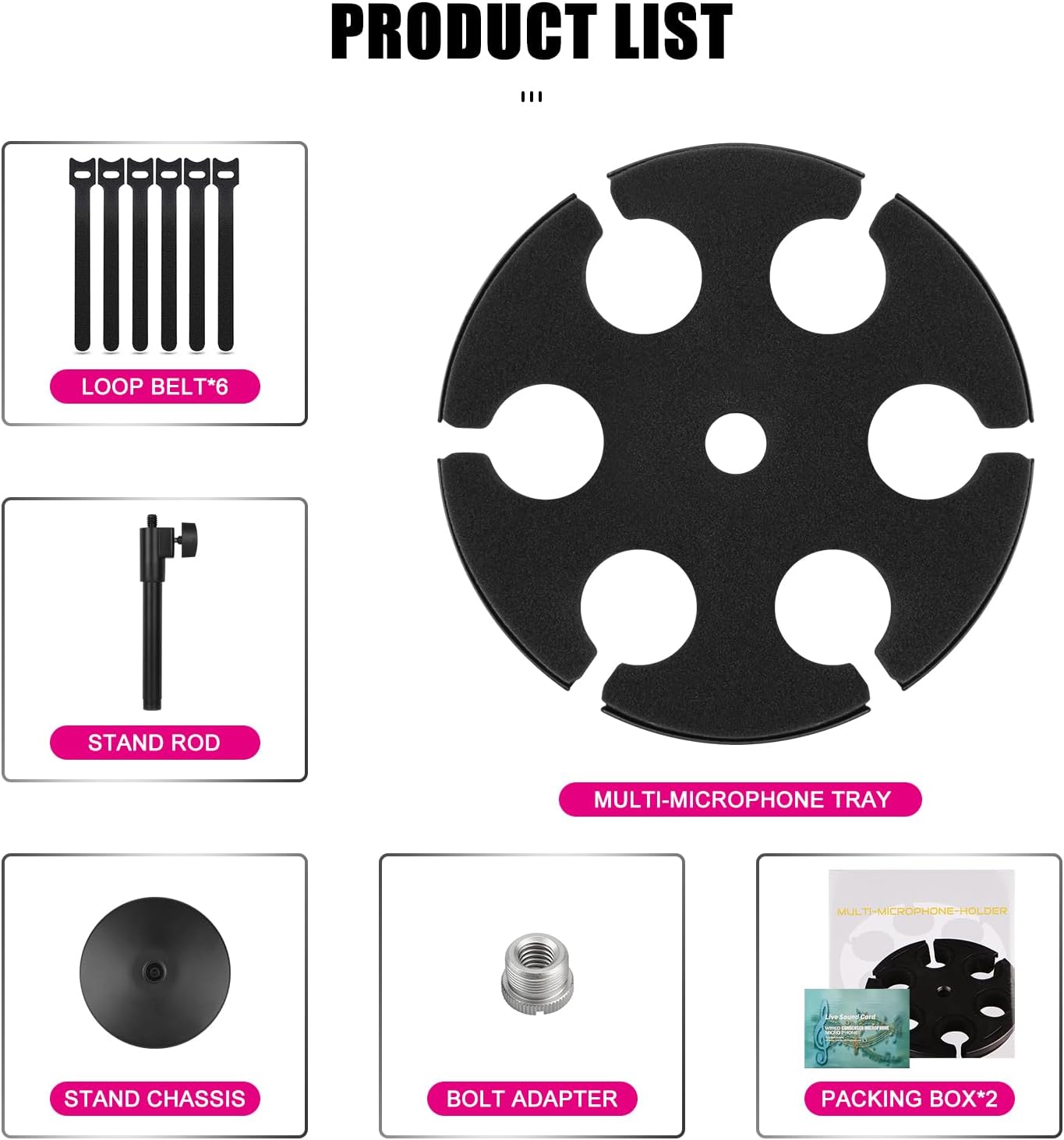
Figure 1: Included Components (Loop Belts, Stand Rod, Multi-Microphone Tray, Stand Chassis, Bolt Adapter, Packing Box)

Figure 2: Individual Components Overview

Figure 3: Product Dimensions
Setup Instructions
Follow these steps to assemble your Micfuns Multi Microphone Holder:
- Place the stand chassis (base) on a flat, stable surface.
- Screw the stand rod into the threaded hole on the top of the stand chassis until secure.
- If needed, attach the 3/8"-16 threaded adapter to the top of the stand rod.
- Carefully place the multi-microphone tray onto the top of the stand rod, ensuring it sits securely. The tray features a central hole that aligns with the stand rod.
- Your microphone holder is now ready for use.
Watch the official setup video for a visual guide:
Video 1: Micfuns MW1 Microphone Stand Assembly and Usage Demonstration
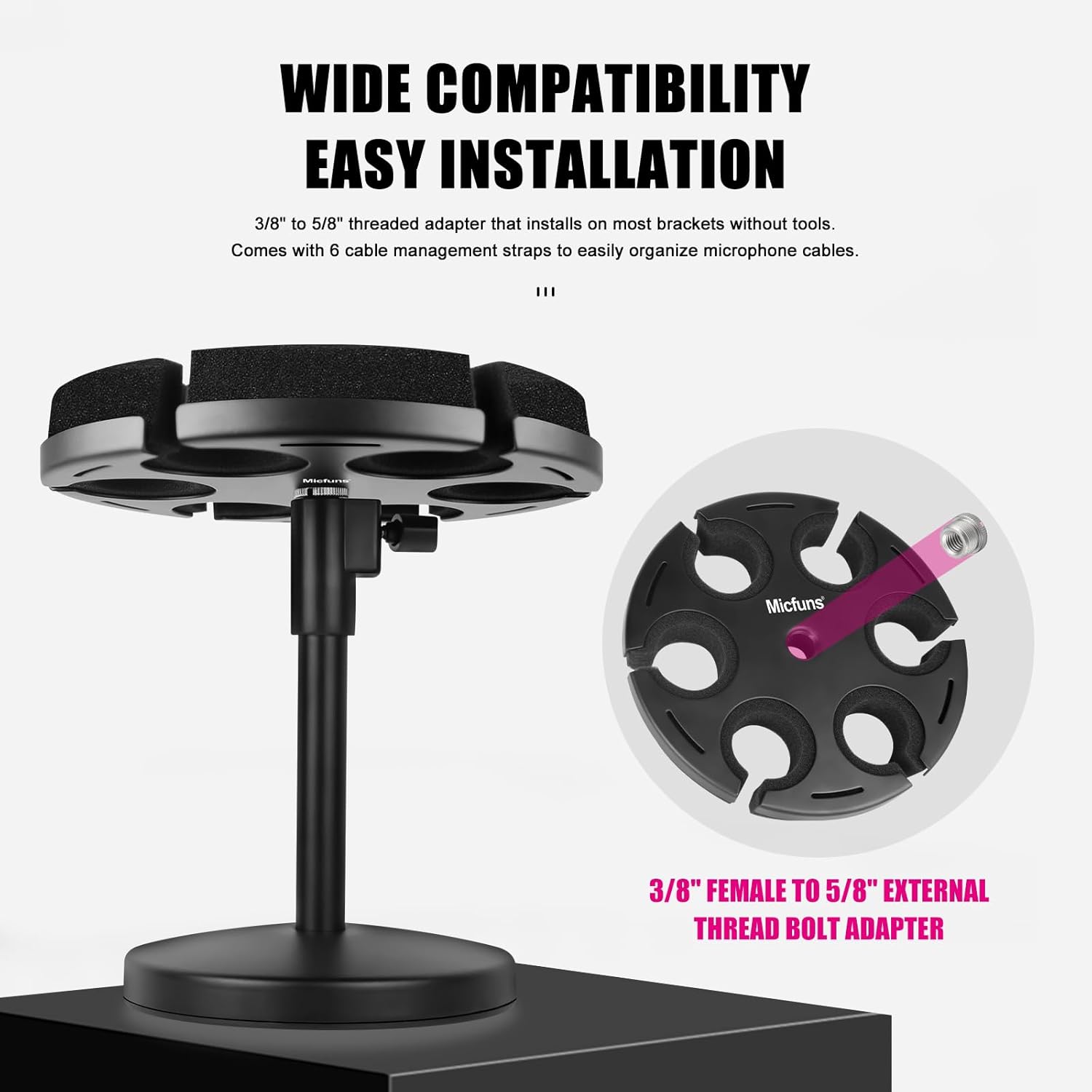
Figure 4: Threaded Adapter for Easy Installation
Operating Instructions
Using your Micfuns Multi Microphone Holder is straightforward:
- Gently insert the base of your microphones into the designated slots on the multi-microphone tray. The foam padding will provide a snug and secure fit.
- Ensure microphones are evenly distributed for optimal balance, especially if not all slots are used.
- Utilize the included loop belts to manage and organize microphone cables, preventing tangles and maintaining a tidy setup.

Figure 5: Holder in Use with Microphones

Figure 6: Foam Padding for Microphone Protection
Maintenance
To ensure the longevity and optimal performance of your Micfuns Multi Microphone Holder, follow these simple maintenance guidelines:
- Cleaning: Wipe down the metal surfaces with a soft, dry cloth. For stubborn marks, a slightly damp cloth can be used, followed by immediate drying. Avoid abrasive cleaners or solvents.
- Foam Care: The silicone padding is designed for durability. If it becomes dusty, gently wipe it with a dry cloth. Avoid pulling or tearing the foam.
- Inspection: Periodically check all threaded connections (stand rod to base, adapter to rod) to ensure they remain tight and secure.
- Storage: When not in use for extended periods, store the holder in a dry, clean environment to prevent dust accumulation.
Troubleshooting
If you encounter any issues with your microphone holder, refer to the following common troubleshooting tips:
- Holder feels unstable: Ensure all components are screwed together tightly. Check that the stand is placed on a flat, level surface.
- Microphones do not fit: The slots are designed for standard microphone sizes. Ensure your microphones' base diameter is compatible with the holder's slots. The foam is flexible but has limits.
- Scratches on microphones: While the foam padding is designed to prevent scratches, ensure microphones are inserted and removed gently. Avoid forcing them into slots.
For issues not covered here, please contact Micfuns customer support.
Product Specifications
| Specification | Detail |
|---|---|
| Brand | micfuns |
| Model Number | MW1 |
| Item Weight | 1.76 pounds (0.8 Kilograms) |
| Package Dimensions | 9.84 x 9.45 x 2.36 inches |
| Material Type | Aluminum |
| Color | Black |
| Style | Desk |
Warranty and Support
Micfuns is committed to providing high-quality products. For specific warranty information regarding your Multi Microphone Holder, please refer to the warranty card included in your product packaging or visit the official Micfuns website.
If you require technical assistance, have questions about product functionality, or need to report a defect, please contact Micfuns customer support through their official channels. Be prepared to provide your product model number (MW1) and purchase details for efficient service.


