
ECOWITT GW3000CA
Ecowitt GW3000 Wi-Fi & Ethernet Weather Station Gateway User Manual
Model: GW3000CA
Introduction
The Ecowitt GW3000 Wi-Fi & Ethernet Weather Station Gateway is a versatile device designed to collect and transmit environmental data. It features built-in 3-in-1 sensors for temperature, humidity, and atmospheric pressure, providing essential indoor measurements. The gateway supports both Wi-Fi and Ethernet connectivity, offering flexible network integration, and includes an SD card port for data storage and management. This manual provides detailed instructions for setting up, operating, and maintaining your GW3000 gateway.

Figure 1: Ecowitt GW3000 Wi-Fi & Ethernet Weather Station Gateway.
Product Overview
The GW3000 gateway is equipped with several key components and indicators to facilitate its operation.

Figure 2: GW3000 Gateway with labeled ports and indicators.
- 1. Antennae: For wireless communication with external sensors.
- 2. RF Status Light: Indicates radio frequency communication status.
- 3. WiFi Status Light: Indicates Wi-Fi connection status.
- 4. SD Card Status Light: Indicates SD card activity.
- 5. Factory Reset Button: Used to restore default settings.
- 6. Ethernet Port: For wired network connection.
- 7. Type-C Port: Power input and data connection.
- 8. Micro SD Card Slot: For inserting an SD card for data logging.
- 9. Temperature, Humidity, and Barometric 3-in-1 Probe: Built-in sensor for indoor measurements.
- 10. USB Power Extension Cord: 0.9 m/2.95 ft. cord for power supply.
Setup Guide
1. Initial Power-Up
- Connect the provided USB power extension cord to the Type-C port on the GW3000 gateway.
- Plug the USB end of the power cord into a standard USB power adapter (not included) or a powered USB port.
- The gateway will power on, and the indicator lights will begin to flash.
2. Wi-Fi Configuration
The GW3000 offers multiple methods for Wi-Fi configuration:
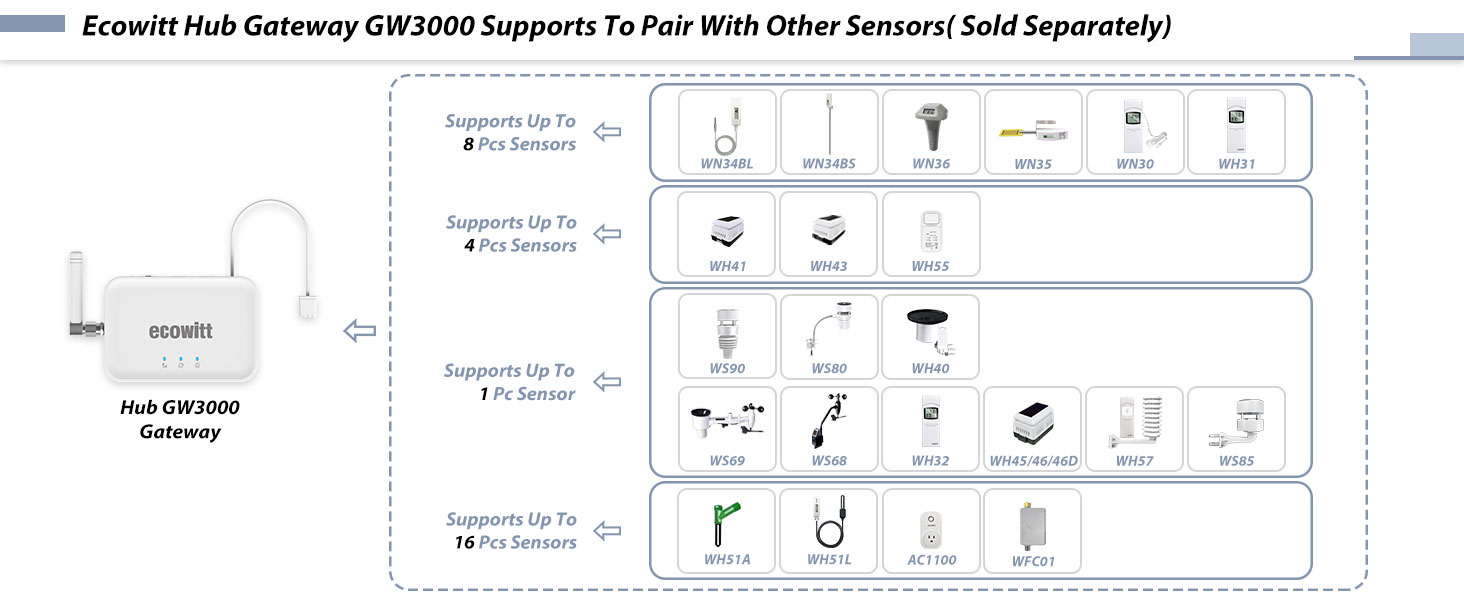
Figure 3: Visual guide to Wi-Fi configuration methods.
- Method A (Web Page via Wi-Fi):
- Connect your phone or computer to the GW3000's Wi-Fi hotspot (usually named "Ecowitt_GW3000_XXXX").
- Open a web browser and navigate to 192.168.4.1 to access the embedded web page.
- Follow the on-screen instructions to configure your home Wi-Fi network.
- Method B (Ethernet Cable):
- Connect an Ethernet cable (sold separately) from the GW3000's Ethernet port to your router.
- The gateway will obtain an IP address via DHCP. You can find this IP address from your router's connected devices list.
- Enter the obtained IP address into a web browser to access the configuration page.
- Method C (Ecowitt APP):
- Download the Ecowitt APP from your device's app store (App Store for iOS, Google Play for Android).
- Scan the QR code located on the bottom of the gateway to initiate the setup process within the app.
- Follow the in-app instructions to complete the Wi-Fi configuration.
3. SD Card Installation (Optional)
The GW3000 supports an SD card for data logging. Ensure the SD card is formatted correctly.
- The SD card file system format must be FAT32. If your card is larger than 32GB, you may need to use a tool like Rufus to format it to FAT32.
- Insert the formatted SD card into the Micro SD Card slot on the GW3000. The system supports hot-swapping (inserting or removing the SD card without restarting).
Operating Instructions
1. Pairing with External Sensors
The GW3000 gateway can collect data from various Ecowitt wireless sensors (sold separately). The gateway automatically detects and pairs with compatible sensors within range.

Figure 4: Compatibility chart for Ecowitt sensors with GW3000.
The GW3000 supports a wide range of Ecowitt sensors, including:
- Up to 8 multi-channel sensors (e.g., WH31, WN30, WN34, WN36, WH55, WN35).
- Up to 16 soil moisture sensors (e.g., WH51A/L, AC1100, WFC01).
- Various outdoor sensors (e.g., WS90, WS85, WS69, WS68, WS80).
- Specific sensors like WH45, WH57, WH40, WH32, WH46.
- Up to 4 WH55 Water leak sensors.
To pair a new sensor, ensure it is powered on and within range of the GW3000. The gateway will typically detect and add the sensor data automatically. Refer to the specific sensor's manual for its pairing instructions if needed.
2. Data Monitoring and Management
Once connected, you can monitor sensor data through the Ecowitt APP or the web interface. The SD card allows for local data storage.
- Ecowitt APP: Provides real-time data display, historical graphs, and alerts.
- Web Interface: Accessible via the gateway's IP address, offering detailed data views and configuration options.
- SD Card Data: The system provides real-time status monitoring of the SD card. Users can download and delete individual files from the SD card via the web interface, offering flexible file management capabilities.
Maintenance
- Cleaning: Wipe the gateway with a soft, dry cloth. Do not use abrasive cleaners or solvents.
- Firmware Updates: Periodically check the Ecowitt website or APP for firmware updates to ensure optimal performance and new features. Follow the provided instructions for updating.
- SD Card Management: Regularly back up data from the SD card to prevent data loss. Ensure the SD card remains formatted as FAT32.
Troubleshooting
| Problem | Possible Cause | Solution |
|---|---|---|
| Gateway not powering on. | No power, faulty cable/adapter. | Check power connection. Try a different USB power adapter or cable. |
| Cannot connect to Wi-Fi. | Incorrect Wi-Fi password, out of range, router issues. | Double-check Wi-Fi password. Move gateway closer to router. Restart router. Try Ethernet connection. |
| Sensors not reporting data. | Sensor out of range, low battery, not paired. | Ensure sensors are within 433 MHz range. Check sensor batteries. Re-pair sensors if necessary. |
| SD card not recognized or data not saving. | Incorrect format, faulty card, full card. | Ensure SD card is FAT32 formatted. Try a different SD card. Check available space. |
If problems persist, please refer to the Ecowitt support resources or contact customer service.
Specifications
| Feature | Detail |
|---|---|
| Model Number | GW3000CA |
| Brand | ECOWITT |
| Connectivity | Wi-Fi, Ethernet (WLAN port) |
| Frequency | 433 MHz (for sensor communication) |
| Built-in Sensors | Temperature, Humidity, Barometric Pressure (3-in-1) |
| Data Storage | SD Card Port (supports FAT32 format) |
| Power Source | Corded Electric (USB Type-C) |
| Material | Plastic |
| Dimensions (Approx.) | 107mm (L) x 87mm (W) x 25mm (H) - excluding antenna and cable. |
| Weight (Approx.) | 230 Grams |
| Recommended Use | Office, Home |

Figure 5: GW3000 Gateway approximate dimensions.
Warranty and Support
For warranty information and technical support, please contact Ecowitt customer service directly or visit their official website. Keep your purchase receipt as proof of purchase for warranty claims.
Manufacturer: ECOWITT
Model: GW3000CA
Related documentsGW3000CA


Ask a question about this manual
Ask about setup, troubleshooting, compatibility, parts, safety, or missing instructions. Manuals+ will review the question and use this page’s manual context to help answer it.