
Introduction
This manual provides detailed instructions for the safe and efficient use of your ELEGOO Mars 5 Ultra 9K MSLA Resin 3D Printer and ELEGOO Mercury Plus 3.0 Wash and Cure Station. Please read this manual thoroughly before operating the devices to ensure optimal performance and longevity.
Important Safety Precautions
- Always wear protective gloves and a mask when handling resin.
- Operate the printer and wash/cure station in a well-ventilated area.
- Keep resin away from direct sunlight and heat sources.
- Do not ingest resin. In case of accidental ingestion, seek medical attention immediately.
- Keep out of reach of children and pets.
- Ensure the power supply is disconnected before performing any maintenance or cleaning.
- Dispose of waste resin and cleaning agents according to local regulations.
Package Contents
Verify that all items listed below are present in your package.

- ELEGOO Mars 5 Ultra 3D Printer
- ELEGOO Mercury Plus 3.0 Wash and Cure Station
- WiFi Antenna
- Build Plate
- Resin Tank
- AI Camera
- USB Flash Disk
- Mask
- Gloves
- Funnel
- Backup Screws
- User Manual (this document)
- Power Adapter
- Tool Kit
- Scraper
ELEGOO Mars 5 Ultra 9K MSLA Resin 3D Printer Overview
The ELEGOO Mars 5 Ultra is a high-performance MSLA resin 3D printer designed for detailed and rapid prototyping. It features advanced technologies for an efficient printing experience.
Key Features:
- 9K Mono LCD Screen: A 7-inch 9K mono LCD with 8520x4320 resolution and 18x18µm XY resolution for exceptional detail.
- High-Speed Printing: Achieves printing speeds up to 150mm/h with a minimum layer printing time of 5.5 seconds, thanks to its innovative tilt release mechanism.
- Intelligent Mechanical Sensor: Provides automatic leveling out of the box and alarm prompts for printing abnormalities.
- AI Camera: Features warp detection, empty build plate detection, real-time monitoring, and time-lapse photography capabilities.
- WiFi Cluster Printing: Supports WiFi connectivity for remote printing, real-time process viewing (with Chitubox software), and OTA firmware upgrades.
- Linux System: Equipped with a new Linux operating system for stable and efficient operation.
- Large Print Size: Offers a build volume of 153.36 x 77.76 x 165 mm³.
Components and Design:


ELEGOO Mercury Plus 3.0 Wash and Cure Station Overview
The ELEGOO Mercury Plus 3.0 is a versatile wash and cure station designed to streamline the post-processing of resin 3D prints. It offers enhanced capacity and broad compatibility.
Key Features:
- Larger Washing Capacity: Features a 7.5L cleaning capacity, an increase from previous versions, accommodating a wider range of model sizes.
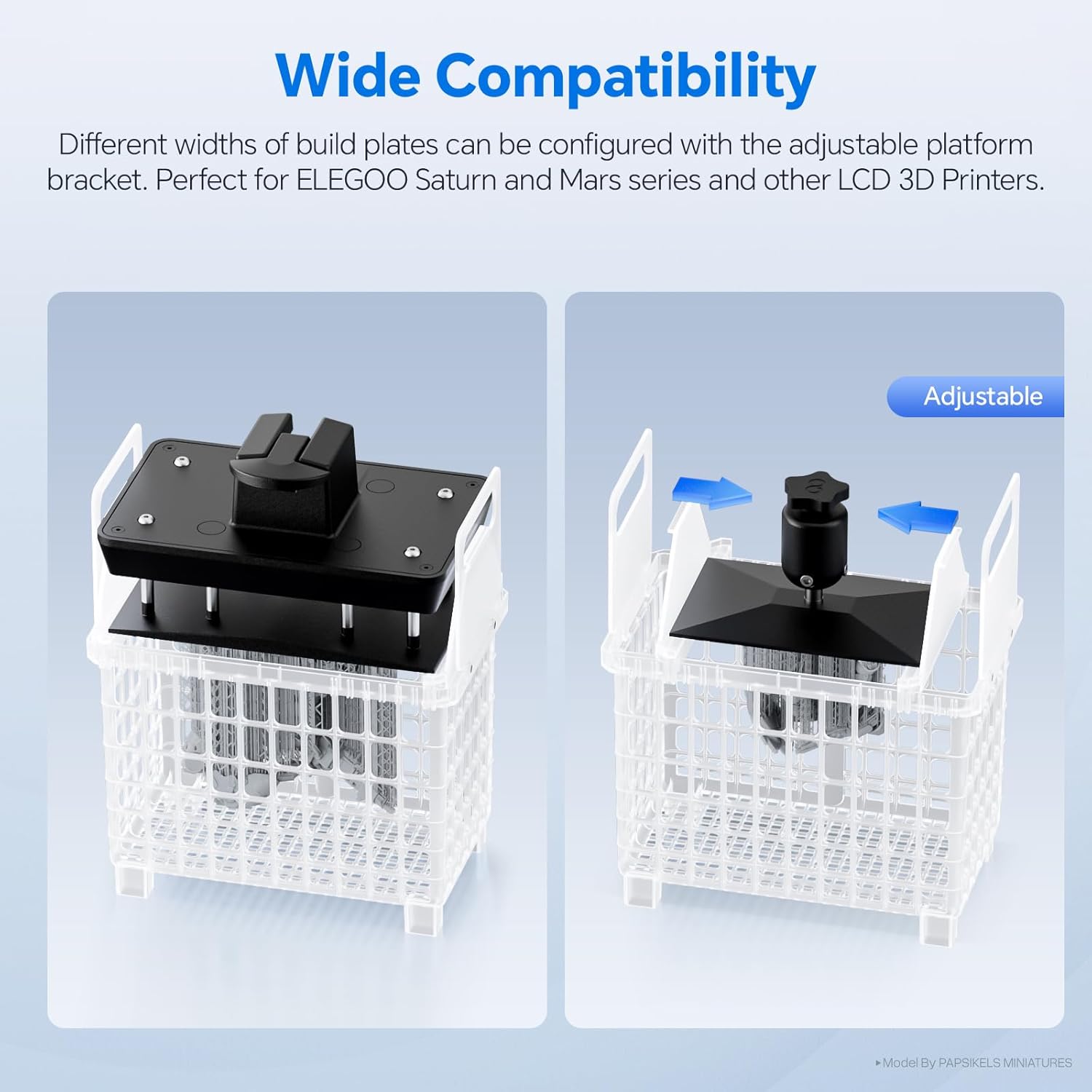
- Wide Compatibility: Designed to be compatible with various build plate widths, including ELEGOO Saturn and Mars series printers, and other LCD 3D printers, via an adjustable platform bracket.
- Dual Functionality: Combines both washing and UV curing functions in a single unit, simplifying the post-processing workflow.
Components and Design:


Setup Guide: ELEGOO Mars 5 Ultra
1. Unpacking and Placement
- Carefully remove the printer from its packaging.
- Place the printer on a stable, level surface in a well-ventilated area, away from direct sunlight.
- Remove all protective films and packaging materials from the printer.
2. Component Installation
- Install WiFi Antenna: Screw the provided WiFi antenna into the designated port on the rear of the printer.
- Install Resin Tank: Place the resin tank onto the LCD screen, ensuring it is properly seated and secured.
- Install Build Plate: Attach the build plate to the Z-axis arm and tighten the securing knob.
- Install AI Camera: If not pre-installed, attach the AI camera to its designated slot.
3. Power Connection and Initial Boot
- Connect the power adapter to the printer and then to a power outlet.
- Turn on the printer using the power switch.
- Follow any on-screen prompts for initial setup.
4. Automatic Leveling
The Mars 5 Ultra features an intelligent mechanical sensor for automatic leveling. This process typically occurs upon initial setup or when prompted by the system. Ensure the build plate is clean and securely attached before initiating leveling.

Setup Guide: ELEGOO Mercury Plus 3.0
1. Unpacking and Placement
- Remove the wash and cure station from its packaging.
- Place it on a stable, level surface.
2. Power Connection
- Connect the power adapter to the station and then to a power outlet.
3. Preparing for Washing
- Fill the washing container with an appropriate cleaning solution (e.g., isopropyl alcohol or ELEGOO Photopolymer Resin Detergent). Do not exceed the MAX fill line.
- Ensure the magnetic stirrer is placed at the bottom of the container.
Operating Guide: ELEGOO Mars 5 Ultra
1. Preparing Your Model (Slicing)
- Download and install a compatible slicing software (e.g., Chitubox) on your computer.
- Import your 3D model (.STL, .OBJ, etc.) into the slicer.
- Adjust print settings such as layer height, exposure time, and support structures. Refer to resin manufacturer guidelines for optimal settings.
- Slice the model and save the output file (.goo or similar) to the provided USB flash drive.
2. Adding Resin
- Ensure the resin tank is clean and free of debris.
- Shake the resin bottle well before opening.
- Carefully pour resin into the tank, ensuring it does not exceed the MAX fill line.
3. Starting a Print
- USB Printing: Insert the USB flash drive into the printer's USB port. On the printer's touchscreen, navigate to the print menu, select your file, and press "Print".
- WiFi Printing: Connect the printer to your local network via WiFi settings. Use compatible software (e.g., Chitubox) on your computer to send print jobs directly to the printer.
- Close the UV-blocking cover before printing begins.
4. Monitoring and Completion
- Monitor the printing process via the AI camera (if enabled) or the printer's display.
- The printer will alert you to any detected abnormalities.
- Once printing is complete, the build plate will rise. Wait for excess resin to drip off before removing the build plate.
Operating Guide: ELEGOO Mercury Plus 3.0
1. Washing Your Print
- After printing, carefully remove the build plate with the printed model.
- You can either remove the model from the build plate and place it in the washing basket, or place the entire build plate (with model attached) into the adjustable bracket.
- Lower the basket/bracket into the washing container filled with cleaning solution.
- Select the "Wash" mode on the station and set the desired time. Start the washing cycle.
- Once complete, remove the model and allow it to air dry or use compressed air.
2. Curing Your Print
- Place the dried, washed model onto the curing turntable inside the station.
- Ensure the transparent cover is securely in place.
- Select the "Cure" mode and set the desired curing time. Start the curing cycle.
- Curing times vary depending on resin type and model size. Refer to resin manufacturer recommendations.
Maintenance
1. Cleaning the Resin Tank
- After each print, inspect the resin tank for cured resin particles.
- Use a plastic scraper to gently remove any cured resin from the FEP film.
- If changing resin types or storing the printer, empty the resin tank and clean it with isopropyl alcohol. Filter unused resin back into its original bottle.
2. FEP Film Replacement
The FEP (Fluorinated Ethylene Propylene) film is a consumable part that will degrade over time. Replace it if you notice cloudiness, scratches, or punctures, as this can affect print quality and cause failures.
- Refer to the printer's specific instructions for FEP film replacement, as the process may vary.
- Ensure the new FEP film is installed correctly and tensioned appropriately.
3. Build Plate Cleaning
- Clean the build plate with isopropyl alcohol after each print to remove any residual resin.
- Ensure the build plate is completely dry before starting a new print.
4. General Cleaning
- Wipe down the exterior of both the printer and wash/cure station with a soft, damp cloth. Avoid using abrasive cleaners.
- Keep the LCD screen clean and free of dust or resin spills. Use a soft, lint-free cloth and screen cleaner if necessary.
5. Resin Disposal
- Never pour liquid resin down the drain.
- Cure waste resin under UV light until solid, then dispose of it as regular plastic waste according to local regulations.
- Dispose of contaminated cleaning solutions responsibly, following local environmental guidelines.
Troubleshooting
This section addresses common issues you might encounter. For more complex problems, please contact ELEGOO support.
Common Printing Issues (Mars 5 Ultra):
| Problem | Possible Cause | Solution |
|---|---|---|
| Prints not sticking to build plate | Improper leveling, insufficient bottom exposure time, cold resin, dirty build plate. | Re-level the build plate. Increase bottom exposure time in slicer. Ensure resin temperature is adequate (20-25°C). Clean build plate thoroughly. |
| Partial prints or layers missing | Insufficient supports, FEP film damage, resin contamination, incorrect exposure settings. | Add more or thicker supports. Inspect and replace FEP film if damaged. Filter resin. Adjust normal exposure time. |
| Warped or deformed prints | Over-curing, insufficient supports, model orientation. | Reduce exposure time. Add more supports. Re-orient the model to minimize large flat surfaces parallel to the build plate. |
| Printer not turning on | Power cable loose, power adapter faulty, power outlet issue. | Check all power connections. Try a different power outlet. Contact support if issue persists. |
Common Wash and Cure Station Issues (Mercury Plus 3.0):
| Problem | Possible Cause | Solution |
|---|---|---|
| Models still sticky after washing/curing | Insufficient washing time, dirty cleaning solution, insufficient curing time, model not fully dry before curing. | Increase washing/curing time. Replace cleaning solution. Ensure model is completely dry before curing. |
| Washing propeller not spinning | Magnetic stirrer not placed correctly, foreign object obstructing, motor issue. | Ensure magnetic stirrer is at the bottom of the container. Check for obstructions. Contact support. |
Technical Specifications
ELEGOO Mars 5 Ultra 9K MSLA Resin 3D Printer:
| Feature | Detail |
|---|---|
| Technology | MSLA (Masked Stereolithography) |
| Light Source | COB (Chip-on-Board) |
| Build Volume | 153.36 x 77.76 x 165 mm³ (6.04 x 3.06 x 6.49 inches) |
| LCD Screen | 7-inch 9K Mono LCD |
| Resolution | 8520 x 4320 pixels |
| XY Resolution | 18 x 18 µm |
| Printing Speed | Up to 150 mm/h |
| Connectivity | USB, WiFi |
| Features | Automatic Leveling, AI Camera, Tilt Release Innovation, Linux System, Cluster Printing |
ELEGOO Mercury Plus 3.0 Wash and Cure Station:
| Feature | Detail |
|---|---|
| Function | Washing and UV Curing |
| Washing Volume | 7.5 Liters |
| Compatibility | ELEGOO Mars and Saturn series, other LCD/SLA/DLP 3D printers |
Warranty and Customer Support
For warranty information, please refer to the warranty card included with your product or visit the official ELEGOO website. If you encounter any issues or require technical assistance, please contact ELEGOO customer support through their official channels. Provide your product model and serial number for faster service.
Official ELEGOO Website: www.elegoo.com