
1. Product Overview
The LOKLiK Fine-Point Blade Kit is designed to enhance the precision and efficiency of your cutting projects with LOKLiK cutting machines. This kit includes two high-performance fine-point blades and a durable blade housing, suitable for a wide range of lightweight to medium-weight materials.

Figure 1.1: The LOKLiK Fine-Point Blade Kit, featuring the blade housing and two fine-point blades.
2. Key Features
- Versatile Material Compatibility: Elevate your crafting precision with this kit, ideal for light to medium-weight materials such as paper, various types of vinyl, decals, cardstock, and reflective film.
- Unmatched Precision: Experience exceptional cutting accuracy with a precision of 0.01 mm, ensuring every cut is crisp, clean, and exactly as intended, whether for intricate designs or multiple materials.
- Premium Quality & Durability: Crafted from high-quality tungsten carbide, a hard metal alloy, these blades offer robust durability and long-lasting sharpness. Designed for consistent, high-quality cuts, they boast a lifespan of up to 500-1500 cuts, depending on the material.
- Effortless Installation: The intuitive design allows for quick and easy installation without the need for complex tools or extensive setup, enabling you to start your projects faster.

Figure 2.1: The LOKLiK cutting machine demonstrating sharp and smooth cuts on a green vinyl sheet.

Figure 2.2: A close-up view of the fine-point blade making a precise cut, highlighting its premium quality and durability.
3. Product Specifications

Figure 3.1: Detailed view of the blade housing, illustrating its dimensions and key design features.
| Attribute | Detail |
|---|---|
| Brand | LOKLIK |
| Model Number | SG-KZJPJ-0039-US-L |
| Package Dimensions | 12.8 x 8.51 x 1.8 cm |
| Product Weight | 18 g |
| Material | Aluminum Alloy, Tungsten Carbide |
| Blade Precision | 0.01 mm |
| Blade Lifespan | Up to 500-1500 cuts (material dependent) |
4. Installation and Blade Replacement
Follow these steps to safely replace the fine-point blades in your LOKLiK cutting machine:
- Step 1: Remove Protective Cover. Carefully take the protective rubber cap off the blade to expose the cutting edge.
- Step 2: Insert Blade. Insert the blade tip outward into the blade housing.
- Step 3: Secure Blade. Rotate and fix the blade securely within the housing.
- Step 4: Install Housing. Place the assembled blade housing into the designated slot in your LOKLiK cutting machine.
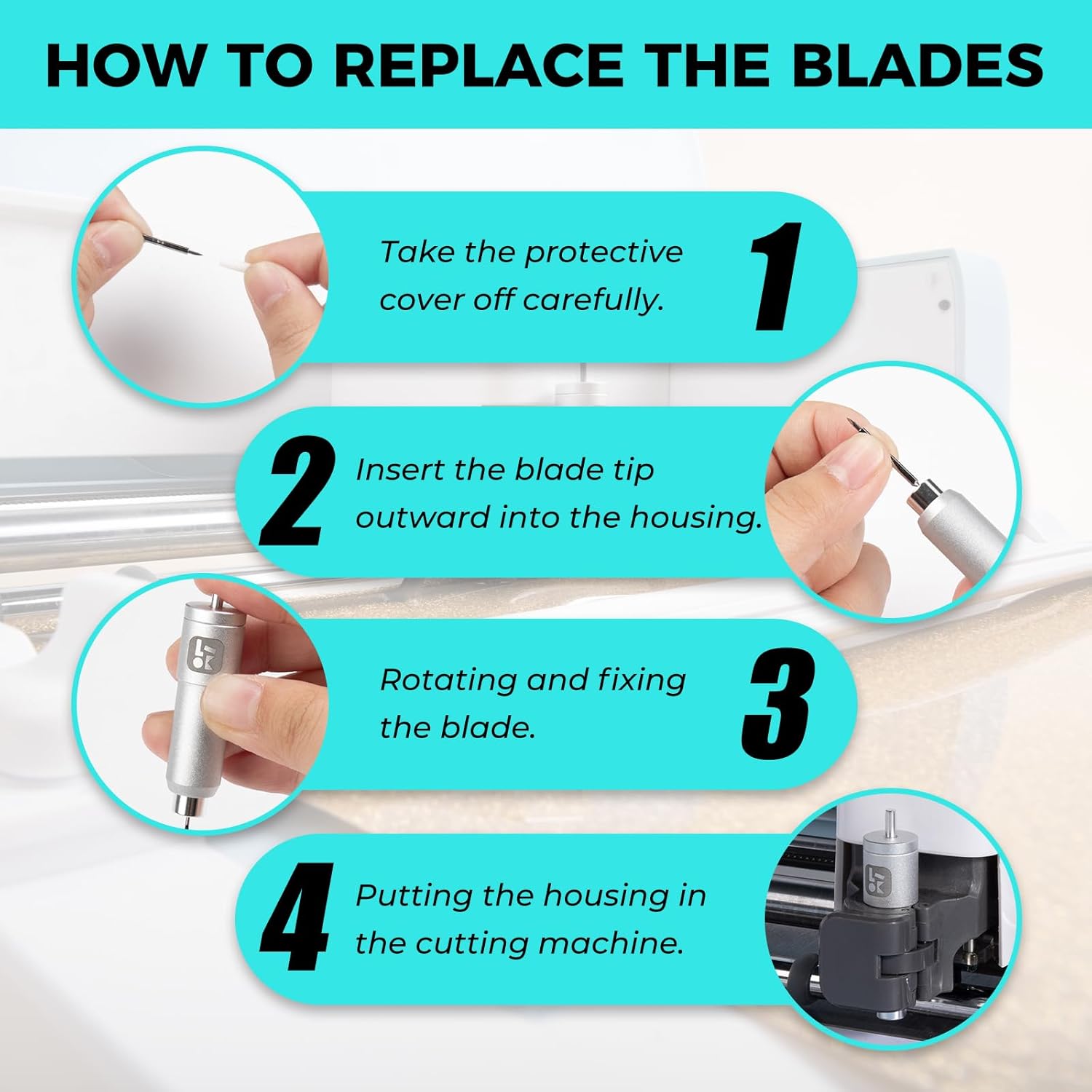
Figure 4.1: Visual instructions for replacing the fine-point blades.
5. Usage and Applications
The LOKLiK Fine-Point Blade Kit is versatile and can be used for a wide array of creative projects. It excels at cutting intricate designs on various materials.

Figure 5.1: Examples of diverse craft projects achievable with the LOKLiK Fine-Point Blade Kit.
5.1. Making a 3D Box
Create custom 3D boxes with precision using your LOKLiK machine and appropriate tools:
- STEP 1:
Use a deep-point blade to cut the outline of the box into the cardboard.
- STEP 2:
Use a scoring stylus to score the folds on the cardboard.
- STEP 3:
Assemble the cut and scored cardboard into a 3D box.

Figure 5.2: Cutting the outline of a 3D box.

Figure 5.3: Scoring the fold lines for the 3D box.

Figure 5.4: Assembling the 3D box.
5.2. How to Make a Greeting Card
Design and create personalized greeting cards with ease:
- STEP 1:
Use a deep-point blade to cut out the cutout design in the middle of the card.
- STEP 2:
Use a foil transfer tip to add sparkling designs to your card.
- STEP 3:
Use a fine-point blade to cut adhesive vinyl to create the desired decorative pattern.

Figure 5.5: Cutting a design into a greeting card.

Figure 5.6: Applying foil designs to the greeting card.

Figure 5.7: Cutting vinyl for decorative patterns on the greeting card.

Figure 5.8: Overview of various LOKLiK cutting machine tools and their applications.
6. Maintenance and Care
To ensure the longevity and optimal performance of your LOKLiK fine-point blades, follow these maintenance guidelines:
- Cleaning: After each use, gently clean any material debris from the blade and housing. Use a soft brush or compressed air to remove small particles. Avoid using harsh chemicals or abrasive materials.
- Storage: Always store the blades with their protective caps on when not in use. Keep them in a dry, safe place, away from direct sunlight and extreme temperatures.
- Inspection: Regularly inspect the blade tip for any signs of wear, dullness, or damage. Replace blades as needed to maintain cutting precision.
7. Safety Information
Please observe the following safety precautions when handling the LOKLiK Fine-Point Blades:
- Sharp Blades: The blades are extremely sharp. Always handle them with extreme care to prevent cuts or injuries.
- Protective Cap: When not in use, ensure the protective rubber cap is securely placed over the blade tip.
- Keep Out of Reach of Children: Due to their small size and sharp nature, keep these blades and all kit components out of the reach of children under three years of age.
- Proper Disposal: Dispose of dull or damaged blades responsibly according to local regulations for sharp objects.
8. Troubleshooting
If you encounter issues with your LOKLiK Fine-Point Blade Kit, consider the following common troubleshooting tips:
- Poor Cut Quality:
- Check if the blade is dull or damaged. Replace if necessary.
- Ensure the blade is correctly installed and secured in the housing.
- Verify that the material is properly placed on the cutting mat and that the mat has sufficient adhesion.
- Adjust cutting pressure settings on your LOKLiK machine according to the material being cut.
- Blade Not Cutting:
- Confirm the blade is fully extended and not obstructed by debris.
- Ensure the blade housing is correctly seated in the machine's carriage.
- Blade Dragging/Tearing Material:
- The blade might be dull; try replacing it.
- The cutting pressure might be too high for the material. Reduce pressure settings.
- The material might be too thick or unsuitable for a fine-point blade. Consider using a deep-point blade for thicker materials.
9. Customer Support
For any further assistance, questions, or concerns regarding your LOKLiK Fine-Point Blade Kit, please do not hesitate to contact our customer support team. We are committed to providing prompt responses and resolving any issues to ensure your complete satisfaction.
Please refer to the contact information provided with your LOKLiK cutting machine or visit the official LOKLiK website for support details.