
1. Introduction
Welcome to the user manual for your new Monster Airmars XKT05 Bluetooth Earphones. These true wireless earphones are designed to provide a convenient and high-quality audio experience. This manual will guide you through the setup, operation, maintenance, and troubleshooting of your device.
1.1 Package Contents
Please ensure all items are present in your package:
- Monster Airmars XKT05 Earphones (Left and Right)
- Charging Case
- USB Charging Cable
- User Manual (this document)
2. Product Overview
The Monster Airmars XKT05 earphones feature a compact and ergonomic design for comfortable, long-lasting wear. They utilize Bluetooth technology for seamless wireless connectivity and offer integrated controls for easy management of audio and calls.
2.1 Earphone Components

Figure 1: Monster Airmars XKT05 Bluetooth Earphones (White) with Charging Case.
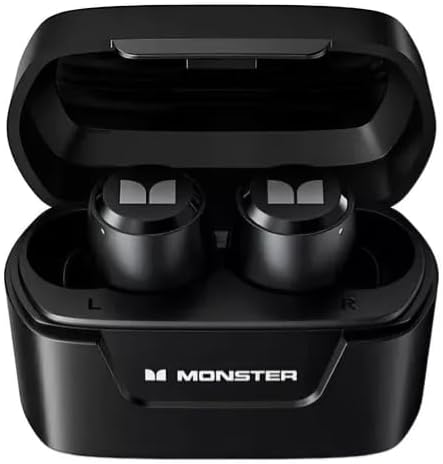
Figure 2: Monster Airmars XKT05 Bluetooth Earphones (Black) inside their Charging Case.

Figure 3: Monster Airmars XKT05 Bluetooth Earphones (Blue) and Retail Box.
The earphones consist of two independent earbuds (left and right) and a portable charging case. Each earbud features a touch-sensitive area for control, and the charging case protects the earbuds while also recharging them.
3. Setup
3.1 Initial Charging
Before first use, fully charge the earphones and the charging case.
- Place both earphones into the charging case.
- Connect the USB charging cable to the charging port on the case and to a USB power source (e.g., computer, wall adapter).
- The indicator light on the case will show charging status. Once fully charged, the light will change or turn off.
A full charge typically takes approximately 1-2 hours.
3.2 Pairing with a Device
To connect your earphones to a smartphone, tablet, or other Bluetooth-enabled device:
- Ensure the earphones are charged.
- Open the charging case. The earphones will automatically enter pairing mode (indicator lights will flash).
- On your device, go to Bluetooth settings and turn Bluetooth on.
- Search for available devices. Select "Monster Airmars XKT05" from the list.
- Once connected, the earphone indicator lights will stop flashing, and your device will confirm the connection.
The earphones will automatically reconnect to the last paired device when removed from the case, if Bluetooth is enabled on the device.
4. Operating Instructions
The Monster Airmars XKT05 earphones feature touch controls for various functions.
4.1 Power On/Off
- Power On: Open the charging case, or long-press the touch area on both earbuds for 3 seconds if they are outside the case and off.
- Power Off: Place the earphones back into the charging case and close the lid, or long-press the touch area on both earbuds for 5 seconds.
4.2 Music Playback
- Play/Pause: Single tap on either earbud.
- Next Track: Double tap on the right earbud.
- Previous Track: Double tap on the left earbud.
- Volume Up: Triple tap on the right earbud.
- Volume Down: Triple tap on the left earbud.
4.3 Call Management
- Answer/End Call: Single tap on either earbud.
- Reject Call: Long-press on either earbud for 2 seconds.
4.4 Voice Assistant
- Activate Voice Assistant (Siri, Google Assistant, etc.): Long-press on either earbud for 3 seconds (when not on a call).
4.5 Controls Overview Table
| Action | Control |
|---|---|
| Power On | Open case / Long-press 3s |
| Power Off | Close case / Long-press 5s |
| Play/Pause | Single tap (either earbud) |
| Next Track | Double tap (right earbud) |
| Previous Track | Double tap (left earbud) |
| Volume Up | Triple tap (right earbud) |
| Volume Down | Triple tap (left earbud) |
| Answer/End Call | Single tap (either earbud) |
| Reject Call | Long-press 2s (either earbud) |
| Activate Voice Assistant | Long-press 3s (either earbud) |
5. Maintenance
5.1 Cleaning
To maintain optimal performance and hygiene:
- Wipe the earphones and charging case with a soft, dry, lint-free cloth.
- Do not use abrasive cleaners, alcohol, or chemical solvents.
- Keep charging contacts clean and free of debris.
5.2 Storage
When not in use, store the earphones in their charging case to protect them and keep them charged. Store in a cool, dry place away from extreme temperatures and direct sunlight.
6. Troubleshooting
If you encounter any issues with your Monster Airmars XKT05 earphones, please refer to the following common problems and solutions:
- Earphones not pairing with device:
- Ensure Bluetooth is enabled on your device.
- Make sure the earphones are charged and in pairing mode (indicator lights flashing).
- Try turning Bluetooth off and on again on your device.
- Forget the device ("Monster Airmars XKT05") from your device's Bluetooth list and try pairing again.
- Restart both your device and the earphones.
- No sound from one or both earbuds:
- Check the volume level on both your device and the earphones.
- Ensure the earphones are properly connected to your device.
- Try placing both earbuds back into the charging case, closing the lid, and then taking them out again.
- Earphones not charging:
- Ensure the charging cable is securely connected to both the case and the power source.
- Check if the power source is working.
- Clean the charging contacts on both the earphones and the case.
- Poor audio quality:
- Ensure the earphones are within the Bluetooth range of your device.
- Avoid obstacles between the earphones and your device.
- Try disconnecting and reconnecting the earphones.
7. Specifications
| Feature | Detail |
|---|---|
| Model Name | Airmars XKT05 |
| Connectivity Technology | Wireless (Bluetooth) |
| Wireless Communication Technology | Bluetooth |
| Included Components | Charging Cable, Charging Case, Earphones |
| Material | Plastic |
| Control Type | Touch |
| Water Resistance Level | Not water resistant |
| Power Source | Battery |
| Ear Placement | In-Ear |
| Impedance | 10 Ohm |
| Manufacturer | Monster |
8. Warranty Information
The Monster Airmars XKT05 Bluetooth Earphones come with a manufacturer's warranty of 3 months from the date of purchase. This warranty covers defects in materials and workmanship under normal use.
The warranty does not cover damage caused by misuse, accident, unauthorized modification, or normal wear and tear. Please retain your proof of purchase for warranty claims.
9. Customer Support
For further assistance, technical support, or warranty inquiries, please refer to the contact information provided with your product packaging or visit the official Monster support website. When contacting support, please have your product model (XKT05) and proof of purchase ready.