
1. Introduction
This manual provides detailed instructions for the assembly, operation, and maintenance of your WLIVE Farmhouse End Table Set of 2 with Charging Station. Please read this manual thoroughly before assembly and use to ensure proper function and safety.
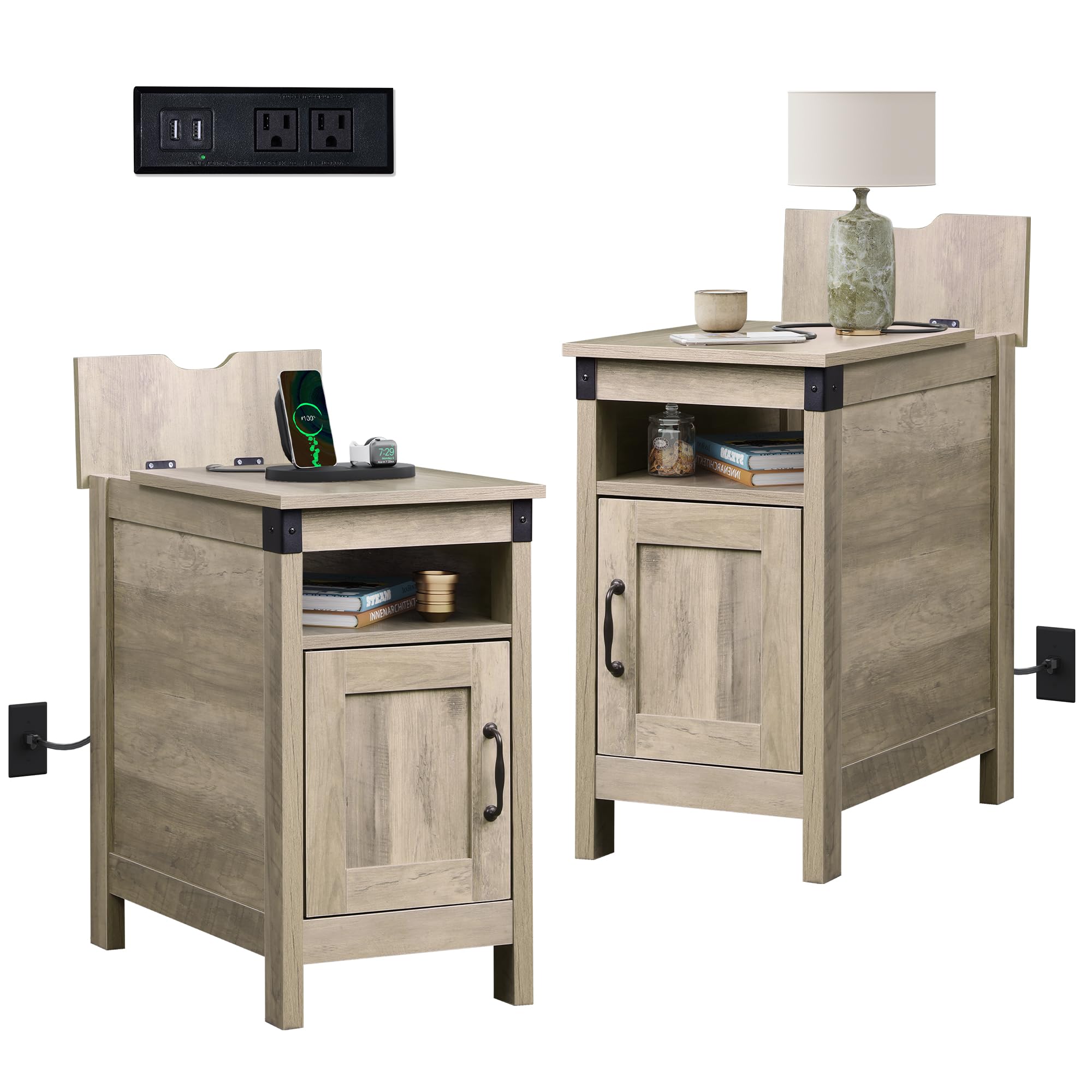
Figure 1: WLIVE Farmhouse End Table in a living room setting.
The WLIVE Farmhouse End Table is designed to offer convenient storage and charging capabilities in various living spaces. Its compact design makes it suitable for placement beside sofas, beds, or in narrow areas.
Video 1: Overview of the WLIVE Side Table features and design.
2. Safety Information
- Ensure all parts are present and undamaged before assembly. Do not use if any parts are missing or broken.
- Keep small parts away from children during assembly to prevent choking hazards.
- Place the table on a flat, stable surface to prevent tipping.
- Do not overload the table or shelves. Refer to the 'Specifications' section for weight limits.
- For electrical safety, use the charging station only indoors. Do not expose to water or excessive moisture.
- Do not attempt to modify the electrical components of the charging station.
3. Package Contents
Verify that all components listed below are included in your package. Each component is typically marked with a number for easy identification during assembly.
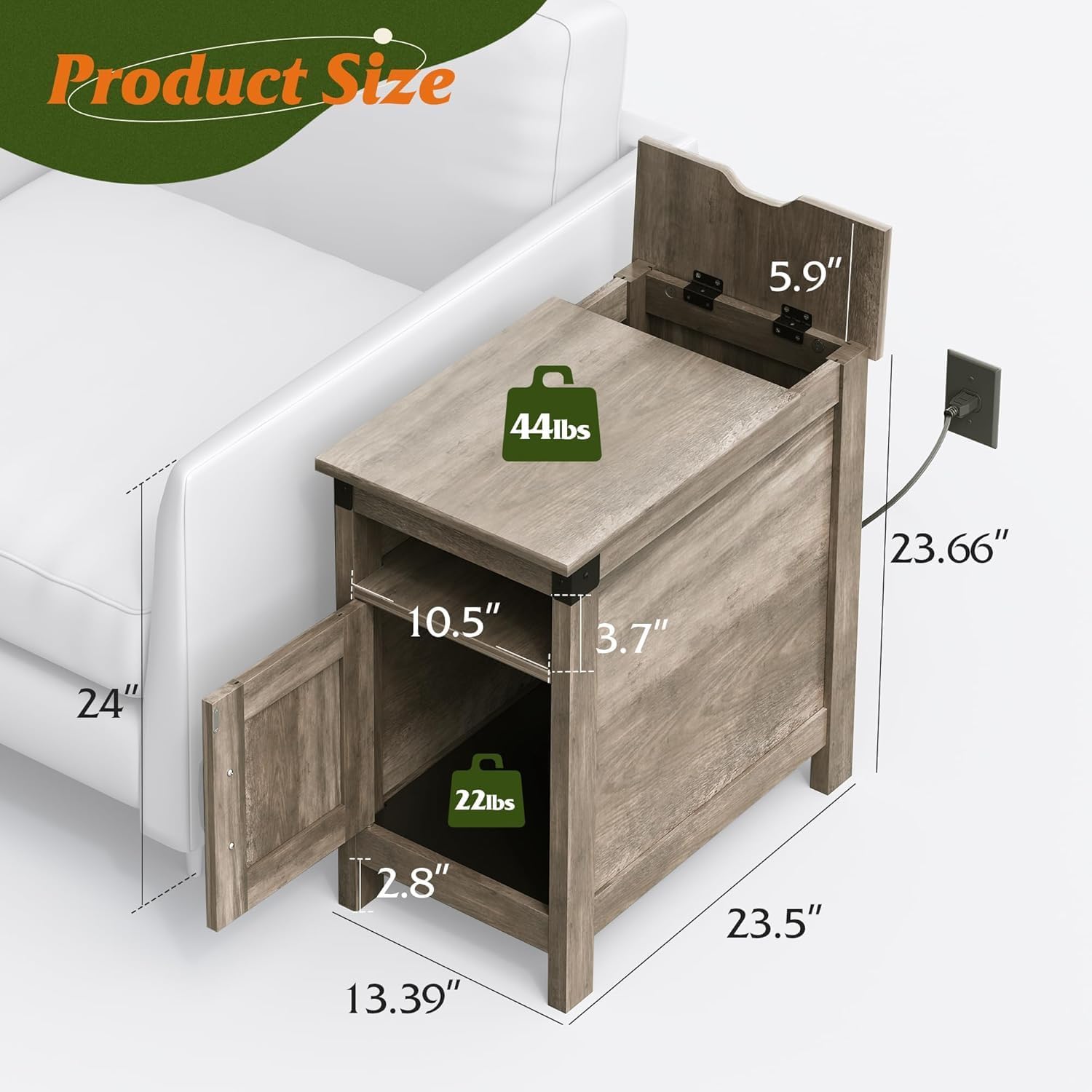
Figure 2: Product dimensions and internal storage layout.
Refer to the included assembly guide for a complete list of parts and hardware.
4. Assembly Instructions
Follow the step-by-step instructions provided in the separate assembly guide included with your product. Each component is numbered to facilitate the process. For visual assistance, refer to the assembly video if available.

Figure 3: Example assembly diagram.
Key Assembly Tips:
- Lay out all parts on a soft, clean surface to prevent scratches.
- Do not overtighten screws during initial assembly; tighten fully once the structure is stable.
- Ensure the charging station unit is correctly oriented and secured before closing the flip-top cover.
Video 2: Visual guide for assembling the WLIVE Farmhouse End Table.
5. Operating the Charging Station
Your end table features a convenient charging station with 2 AC outlets and 2 USB ports, located under a hidden flip-top cover.

Figure 4: Integrated charging station with 2 AC outlets and 2 USB ports.
Usage:
- Gently lift the flip-top cover to access the power outlets and USB ports.
- Plug your devices into the appropriate ports. The 5-foot power cord allows for flexible placement.
- For a tidier and safer setup, you can close the flip-top cover while devices are charging. The design includes a gap for cables to pass through, preventing spills from directly contacting the electrical components.
- Utilize the cable management hole at the back of the table to route power cables for other electronic devices, keeping your space organized.

Figure 5: Illustration of the safer and tidier charging solution.
Video 3: Short demonstration of the farmhouse end table with charging features.
6. Maintenance
To ensure the longevity and appearance of your WLIVE Farmhouse End Table, follow these maintenance guidelines:
- Cleaning: Wipe surfaces with a soft, damp cloth. Avoid harsh chemicals or abrasive cleaners that may damage the finish.
- Spills: Immediately wipe up any spills to prevent water damage or stains, especially around the charging station area.
- Placement: Avoid placing the table in direct sunlight or near heat sources, as this can cause warping or fading.
- Inspection: Periodically check all screws and connections to ensure they remain tight. Retighten as necessary.
7. Troubleshooting
If you encounter any issues with your end table, refer to the following common problems and solutions:
| Problem | Possible Cause | Solution |
|---|---|---|
| Table is wobbly | Loose screws or uneven floor. | Check and tighten all assembly screws. Adjust leg levelers if applicable, or place shims under legs on uneven surfaces. |
| Charging station not working | Power cord not plugged in, outlet issue, or device compatibility. | Ensure the table's power cord is securely plugged into a functional wall outlet. Test the wall outlet with another device. Verify your device is compatible with USB charging. |
| Door does not close properly | Misaligned hinges or obstruction. | Check hinge alignment and adjust if necessary. Remove any items obstructing the door's path. |
If the problem persists, please contact customer support.
8. Product Specifications
| Feature | Detail |
|---|---|
| Brand | WLIVE |
| Model Name | ABZ038HX |
| Product Dimensions | 23.5"D x 13.39"W x 23.66"H |
| Item Weight | 50 Pounds (for the set of 2) |
| Maximum Weight Recommendation | 44 Pounds (table top capacity) |
| Frame Material | Wood |
| Top Material Type | Engineered Wood |
| Color | Greige |
| Number of Drawers | 1 (storage compartment with door) |
| Number of Items | 2 |
| Charging Station | 2 AC Outlets (120V/12A), 2 USB Ports (5V/2A) |
| Power Cord Length | 5 feet |
| Indoor Outdoor Usage | Indoor Only |
9. Warranty and Support
For warranty information or technical support, please refer to the warranty card included in your package or contact WLIVE customer service directly. Keep your purchase receipt for warranty claims.
Contact Information: Refer to the WLIVE official website or the contact details provided in your product packaging.

