
1. Introduction
This manual provides important information regarding the installation, operation, and maintenance of your GBC iSnatch Carbon Monoxide (CO) Detector. Please read this manual thoroughly before using the device and retain it for future reference.
Carbon monoxide is a colorless, odorless, and tasteless gas that can be fatal. This detector is designed to monitor CO levels and alert you to potentially dangerous concentrations, helping to protect your household.
This CO detector complies with the EN50291-1 standard, ensuring its suitability for household use.
2. Safety Information and Warnings
Important: This device is designed to detect carbon monoxide gas. It is not designed to detect smoke, fire, or other gases. It is not a substitute for proper maintenance of fuel-burning appliances, including ventilation and exhaust systems.
- Do not paint the detector. Paint can clog the sensor openings and interfere with the detector's ability to detect CO.
- Do not block the ventilation openings on the detector.
- Test the detector regularly using the test button.
- Replace batteries promptly when the low battery warning is indicated.
- Do not install in areas with high humidity, extreme temperatures, or excessive dust.
- Keep out of reach of children.
3. Package Contents
Verify that all items are present in the package:
- GBC iSnatch Carbon Monoxide Detector (Model 64051105)
- User Manual
4. Product Overview
The GBC iSnatch Carbon Monoxide Detector features a compact design with an integrated LCD display and indicator lights for easy monitoring.
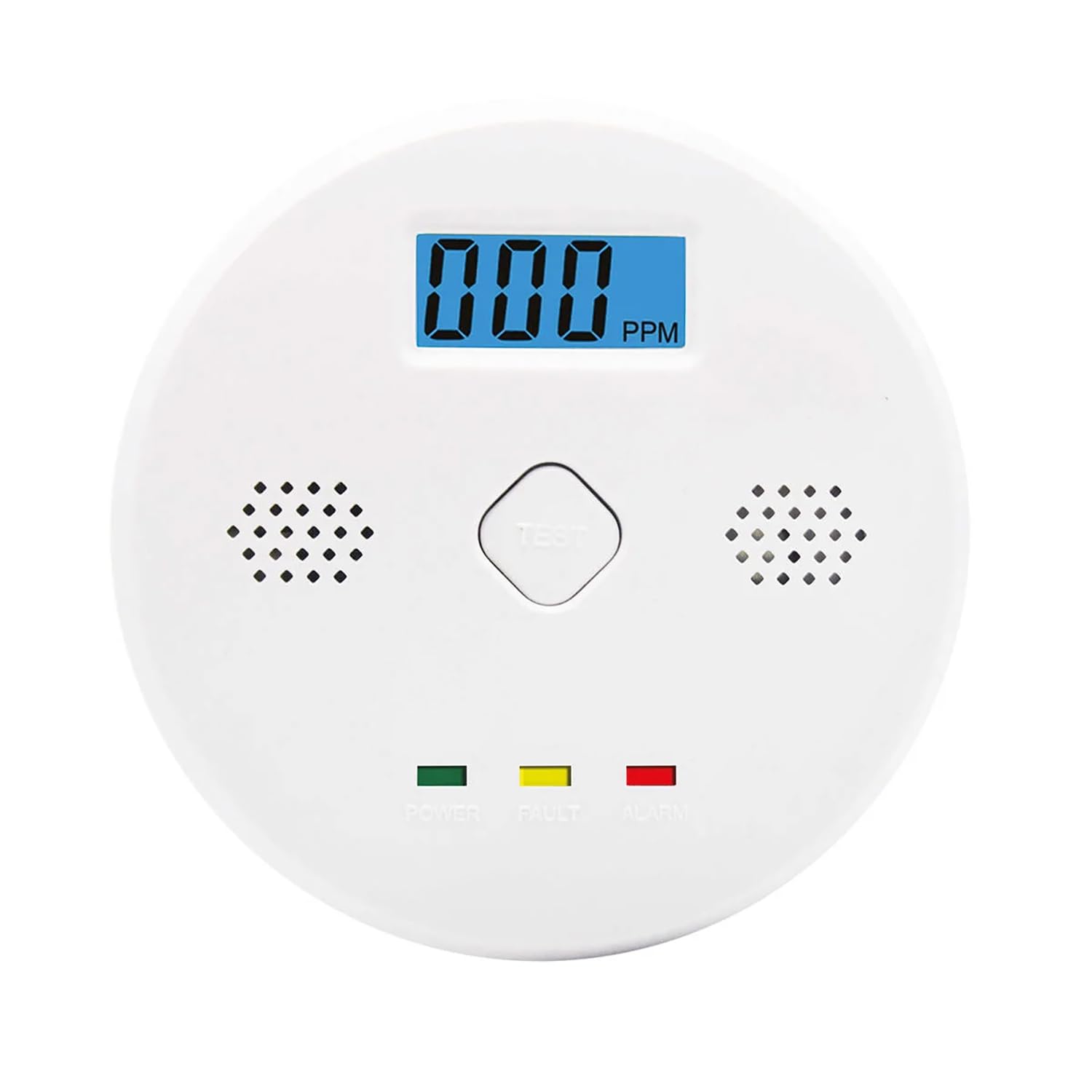
Figure 1: Front view of the GBC iSnatch Carbon Monoxide Detector. It features a central digital display showing PPM (parts per million) of CO, a 'TEST' button, and three indicator lights at the bottom: 'POWER' (green), 'FAULT' (yellow), and 'ALARM' (red). Speaker grilles are visible on both sides of the display.
- LCD Display: Shows real-time CO concentration in PPM (Parts Per Million).
- Test Button: Used to verify the sensor and alarm functionality.
- Power Indicator (Green LED): Illuminates when the device is powered on and functioning correctly.
- Fault Indicator (Yellow LED): Illuminates to indicate a fault or low battery condition.
- Alarm Indicator (Red LED): Flashes when a CO alarm condition is detected.
- 85 dB Siren: Emits a loud audible alarm during a CO event.
5. Setup and Installation
5.1 Battery Installation
The detector operates on 1 x 9V battery (not included). Ensure the battery is installed correctly before use.
- Locate the battery compartment cover on the back of the detector.
- Open the battery compartment.
- Insert one 9V battery, observing the correct polarity (+/-).
- Close the battery compartment cover securely.
- Upon successful battery installation, the detector will perform a self-test, and the green POWER LED should illuminate.
5.2 Choosing an Installation Location
For optimal performance and safety, consider the following when choosing a location:
- Install at least one CO detector on each level of your home, especially near sleeping areas.
- Place the detector at a height where it can be easily seen and heard, typically at eye level or higher.
- Avoid installing near fuel-burning appliances (furnaces, water heaters, stoves) to prevent nuisance alarms from normal operation.
- Do not install in direct sunlight, near windows or doors, or in areas with strong drafts, as this can affect sensor accuracy.
- Maintain a distance of at least 1.5 meters (5 feet) from any cooking or heating appliance.

Figure 2: Example installation of the CO detector on a wall in a kitchen area, demonstrating a suitable mounting height.
5.3 Mounting the Detector
Once you have selected an appropriate location:
- Mark the desired mounting position on the wall.
- Drill two holes at the marked positions.
- Insert wall plugs (if necessary) into the drilled holes.
- Screw the mounting screws into the wall, leaving a small gap for the detector to hang.
- Align the mounting slots on the back of the detector with the screws and slide the detector down to secure it.
- Ensure the detector is firmly attached to the wall.
6. Operating Instructions
6.1 Power On
After battery installation, the detector will automatically power on. The green POWER LED will light up, and the LCD display will show "0 PPM" or cycle through a brief startup sequence.
6.2 Normal Operation
During normal operation, the green POWER LED will remain steadily lit, and the LCD display will show "0 PPM" if no CO is detected, or the current CO concentration if present.
6.3 Test Function
It is recommended to test the detector weekly to ensure proper functionality.
- Press and hold the "TEST" button located on the front of the detector.
- The detector will emit a series of loud beeps (85 dB siren), and the red ALARM LED will flash. The LCD display may show a test value.
- Release the button. The detector should return to normal operation.
- If the detector does not respond as described, refer to the Troubleshooting section.
7. Alarm Conditions and Actions
The detector is designed to alarm at specific CO concentrations and durations as per EN50291-1:
- 50 PPM: Alarm within 60-90 minutes.
- 100 PPM: Alarm within 10-40 minutes.
- 300 PPM: Alarm within 3 minutes.
When a CO alarm occurs:
- The 85 dB siren will sound repeatedly.
- The red ALARM LED will flash rapidly.
- The LCD display will show the detected CO concentration in PPM.
What to do if the alarm sounds:
- Evacuate Immediately: Move everyone, including pets, to fresh air outdoors.
- Do Not Re-enter: Do not re-enter the premises until the CO source has been identified and corrected, and the area has been thoroughly ventilated.
- Call Emergency Services: Contact your local emergency services or fire department.
- Identify Source: After the area is safe, have a qualified technician inspect all fuel-burning appliances and chimneys for proper operation and ventilation.
8. Maintenance
8.1 Regular Testing
Test the detector weekly by pressing the "TEST" button as described in Section 6.3.
8.2 Battery Replacement
The detector will indicate a low battery condition by flashing the yellow FAULT LED and possibly emitting a chirp sound. Replace the 9V battery immediately when this occurs. Refer to Section 5.1 for battery installation instructions.
8.3 Cleaning
Clean the detector regularly to prevent dust buildup from affecting its performance.
- Use a soft, damp cloth to wipe the exterior of the detector.
- Do not use cleaning agents, solvents, or abrasive materials.
- Do not spray air fresheners, hairspray, or other aerosols near the detector.
- Gently vacuum around the sensor openings to remove dust.
9. Troubleshooting
| Problem | Possible Cause | Solution |
|---|---|---|
| Detector does not power on. | No battery or incorrect battery installation. | Install a fresh 9V battery, ensuring correct polarity. |
| Yellow FAULT LED flashes / Chirping sound. | Low battery. | Replace the 9V battery immediately. |
| Alarm sounds without visible CO source. | False alarm due to interference or sensor issue. | Ventilate the area. If alarm persists, evacuate and contact emergency services. Ensure detector is not near sources of fumes or high humidity. |
| Test button does not activate alarm. | Faulty sensor or internal malfunction. | Ensure battery is fresh. If problem persists, the unit may need replacement. |
10. Specifications
| Model Number | 64051105 |
| Brand | GBC |
| Sensor Type | Electrochemical Carbon Monoxide |
| Power Source | 1 x 9V Battery |
| Alarm Volume | 85 dB at 1 meter |
| Alarm Thresholds (PPM) | 50 PPM (60-90 min), 100 PPM (10-40 min), 300 PPM (within 3 min) |
| Display | LCD, real-time CO concentration |
| Product Dimensions | 9.6 x 9.6 x 3.5 cm (3.78 x 3.78 x 1.38 inches) |
| Weight | 200 g (0.44 lbs) |
| Compliance | EN50291-1 |
| Material | Plastic |
11. Warranty and Support
For warranty information or technical support, please refer to the contact details provided by your retailer or the manufacturer's official website. Keep your purchase receipt as proof of purchase.
This product is designed for a specific lifespan. It is recommended to replace the CO detector after 7-10 years from the manufacturing date, or as indicated by the device's end-of-life signal, to ensure continued accuracy and reliability.


