
Candy CNCQ2T518EW
Candy City Fresco 300 Refrigerator User Manual
Model: CNCQ2T518EW / 34005805
1. Introduction
Thank you for choosing the Candy City Fresco 300 Combi Refrigerator. This manual provides essential information for the safe and efficient operation, installation, and maintenance of your appliance. Please read it thoroughly before use and keep it for future reference.
The Candy City Fresco 300 is a modern and functional combi refrigerator designed to keep your food fresh for longer with its advanced features.
2. Safety Information
Always follow basic safety precautions when using electrical appliances to reduce the risk of fire, electric shock, and injury.
General Safety
- Ensure the appliance is properly grounded.
- Do not damage the refrigerant circuit.
- Do not use electrical appliances inside the food storage compartments.
- Keep ventilation openings clear of obstruction.
- Unplug the appliance before cleaning or maintenance.
3. Setup and Installation
Proper installation is crucial for the performance and longevity of your refrigerator.
Unpacking
Carefully remove all packaging materials. Inspect the appliance for any damage during transit. Report any damage to your retailer immediately.
Placement
Place the refrigerator on a firm, level surface away from direct sunlight, heat sources (e.g., ovens, radiators), and extreme cold. Ensure adequate ventilation around the appliance.

Figure 3.1: Product dimensions. Height: 1825 mm, Width: 545 mm, Depth: 602 mm.
Leveling
Adjust the front leveling feet to ensure the appliance is stable and level. This prevents vibrations and ensures proper door sealing.
Door Reversibility
The doors of this refrigerator are reversible, allowing them to open from either the left or right side. Refer to the detailed instructions in the separate installation guide for door reversal procedures. This feature provides flexibility for various kitchen layouts.

Figure 3.2: Front view of the Candy City Fresco 300 refrigerator, showcasing its sleek white design and integrated handles.
Electrical Connection
Connect the appliance to a dedicated, properly grounded power outlet. Do not use extension cords or multiple socket adapters.
4. Operating Instructions
Familiarize yourself with the controls and features of your new refrigerator.
Initial Start-up
After installation, wait at least 4 hours before plugging in the appliance to allow the refrigerant to settle. Once plugged in, set the temperature controls and allow the refrigerator to cool for several hours before loading food.
Temperature Control
The refrigerator features internal digital control for precise temperature management. Adjust the temperature settings according to your needs and the ambient conditions. Recommended temperatures are 4°C for the refrigerator compartment and -21°C for the freezer compartment.
Total No Frost (Circle+) Technology
This appliance is equipped with Total No Frost (Circle+) technology, which maintains a uniform temperature throughout the compartments and prevents the formation of frost. This eliminates the need for manual defrosting and helps preserve food freshness for longer.
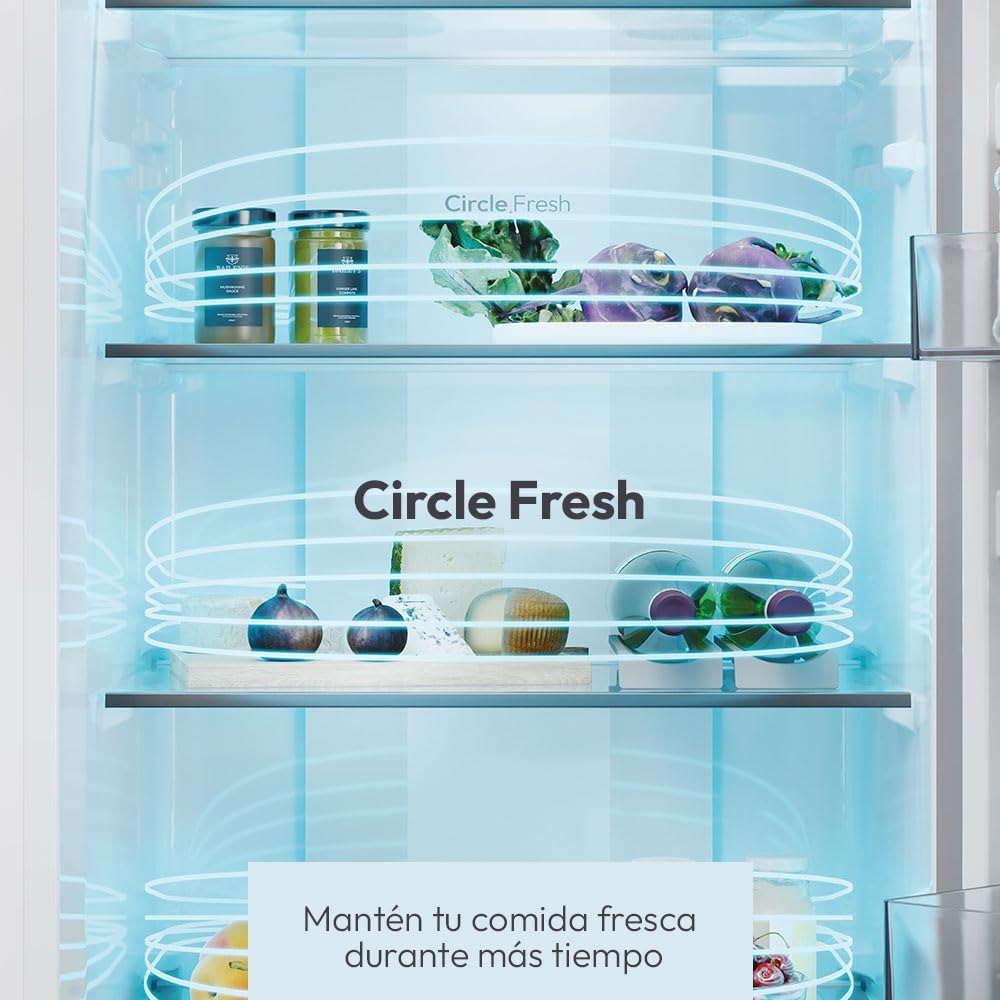
Figure 4.1: Illustration of Circle Fresh technology, showing air circulation for uniform temperature and freshness.
Fresh 0° Area (Vegetable Drawer)
The Fresh 0° Area is a dedicated drawer designed to maintain optimal conditions for delicate foods like fresh meat, fish, and certain vegetables, extending their shelf life. You can adjust the temperature of this drawer based on your specific storage needs.
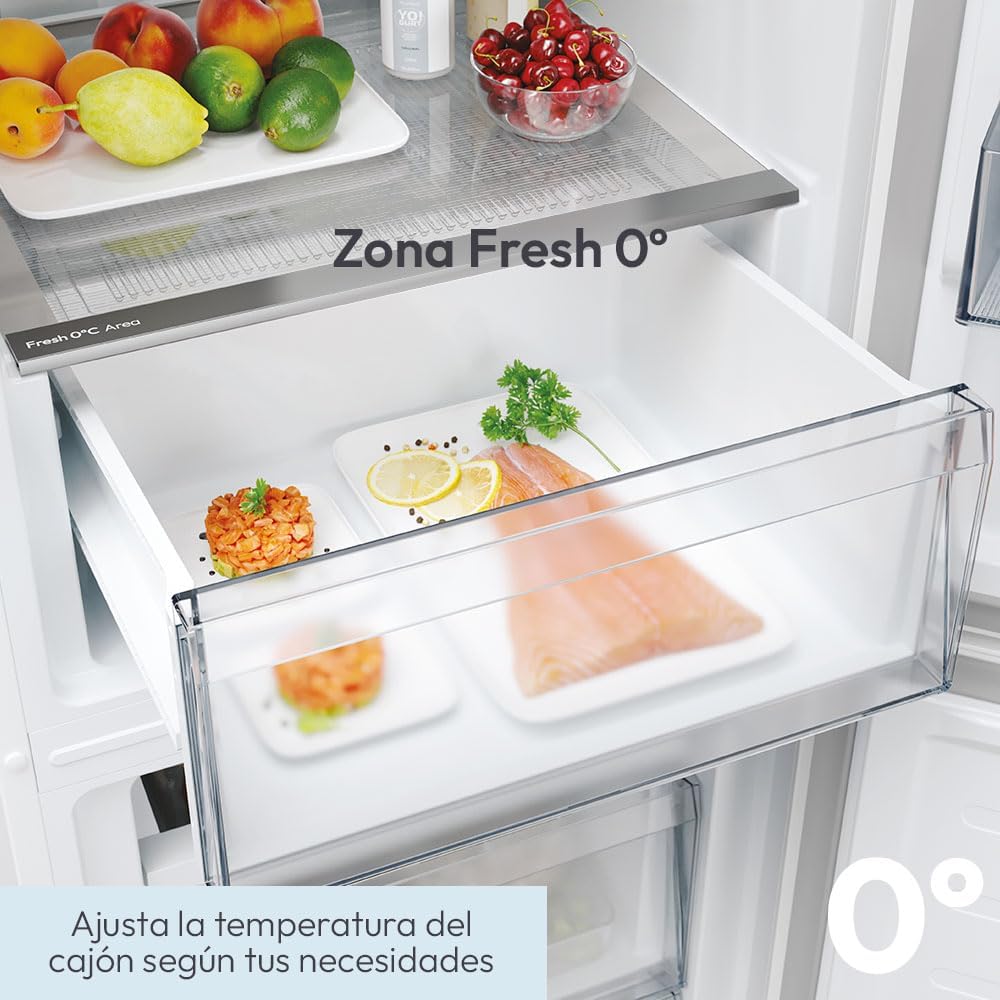
Figure 4.2: Close-up view of the Fresh 0° Area drawer, ideal for preserving sensitive food items.
Storage Capacity and Organization
The refrigerator offers a total capacity of 280 liters, with 197 liters for the refrigerator compartment and 82 liters for the freezer compartment. It includes 3+1 glass shelves with silver profiles, 2+2 door balconies, 1 Fresh 0°C Area drawer, and 2 drawers plus 1 band in the freezer for efficient organization.

Figure 4.3: Interior view highlighting the generous 280L total capacity for food storage.
hOn App Connectivity
This appliance supports smart connectivity via the hOn App. Download the hOn App on your smartphone to manage and optimize the refrigerator's performance, access smart features, and receive notifications.
5. Maintenance and Cleaning
Regular cleaning and maintenance will ensure optimal performance and extend the life of your appliance.
Cleaning the Interior
Before cleaning, unplug the refrigerator. Clean the interior with a soft cloth dampened with a solution of lukewarm water and a mild, non-abrasive detergent. Rinse and dry thoroughly. Do not use harsh chemicals or abrasive cleaners.
Cleaning the Exterior
Wipe the exterior surfaces with a soft, damp cloth. For stubborn stains, use a mild detergent. Avoid spraying water directly onto the appliance.
Condenser Coil Cleaning
Periodically clean the condenser coils at the back or bottom of the refrigerator to ensure efficient cooling. Use a vacuum cleaner or a soft brush to remove dust and debris.
No Defrosting Required
Thanks to the Total No Frost technology, manual defrosting of the freezer compartment is not required.
6. Troubleshooting
Before contacting customer service, refer to the following common issues and their solutions.
| Problem | Possible Cause | Solution |
|---|---|---|
| Refrigerator not cooling | Power outage; Plug not inserted correctly; Temperature setting too high; Door left open; Poor ventilation. | Check power supply; Ensure plug is secure; Adjust temperature setting; Close door properly; Ensure adequate space around appliance. |
| Unusual noises | Appliance not level; Objects touching the back wall; Compressor noise (normal). | Level the appliance; Move objects away from the back; Normal operation sounds are expected. |
| Water on floor/inside | Drain hole blocked; Door not sealed properly. | Clear the drain hole; Check door gasket for proper seal. |
| Excessive frost in freezer | Door left open frequently; Hot food placed inside. | Minimize door openings; Allow hot food to cool before placing in freezer. (Note: Total No Frost minimizes this issue). |
7. Technical Specifications
| Feature | Specification |
|---|---|
| Brand | Candy |
| Model Number | CNCQ2T518EW / 34005805 |
| Product Dimensions (H x W x D) | 182.5 cm x 54.5 cm x 60.2 cm |
| Weight | 55 kg |
| Total Capacity | 280 Liters |
| Refrigerator Capacity | 197 Liters |
| Freezer Capacity | 82 Liters |
| Configuration | Bottom Freezer |
| Color | White |
| Special Features | Electronic Temperature Control, LED Internal Lighting, Fresh 0°C Area, Total No Frost (Circle+), hOn App Connectivity |
| Installation Type | Freestanding |
| Number of Doors | 2 (Reversible) |
| Defrost System | No Frost |
| Energy Efficiency Class | E |
| Noise Level | 37 dB |
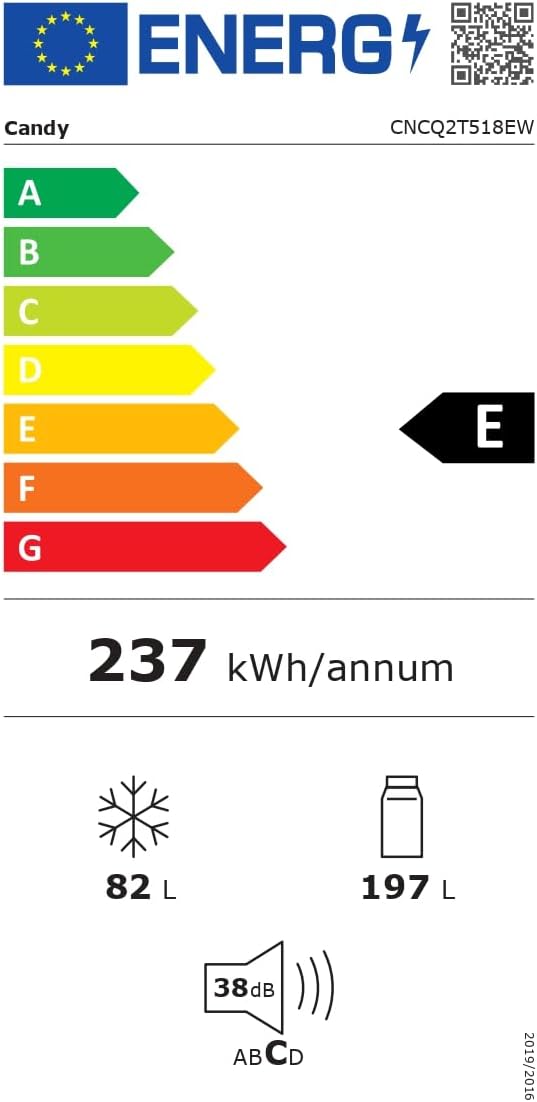
Figure 7.1: Energy efficiency label for the Candy City Fresco 300 refrigerator, showing Class E rating and 237 kWh/annum consumption.
For more detailed product information, please refer to the official EPREL database: https://eprel.ec.europa.eu/qr/2018094
8. Warranty and Support
Warranty Information
This Candy appliance comes with a manufacturer's warranty of 24 months from the date of purchase. Please retain your proof of purchase for warranty claims. The warranty covers manufacturing defects and malfunctions under normal use conditions.
Customer Support
For technical assistance, spare parts, or service requests, please contact Candy customer support. You can also find additional resources and FAQs on the official Candy website or through the hOn App.
Visit the official Candy store on Amazon: Candy Store
Related documentsCNCQ2T518EW


Ask a question about this manual
Ask about setup, troubleshooting, compatibility, parts, safety, or missing instructions. Manuals+ will review the question and use this page’s manual context to help answer it.