
IINE B0DMW9V95J
IINE Mini Retro Wireless Controller Instruction Manual
Model: B0DMW9V95J | Brand: IINE
Introduction
Thank you for choosing the IINE Mini Retro Wireless Controller. This ultra-portable controller is designed for classic and retro gaming experiences across multiple platforms, including Nintendo Switch, PC (Windows X-input), Android, and iOS devices. Its compact size and versatile features make it an ideal companion for gaming on the go or for various multi-function needs. Please read this manual carefully to ensure proper setup and optimal performance.
Package Contents
- 1 × IINE Mini Retro Wireless Controller
- 1 × USB Charging Cable
- 1 × Keychain / Portable Hand Strap
- 1 × Instruction Manual (this document)
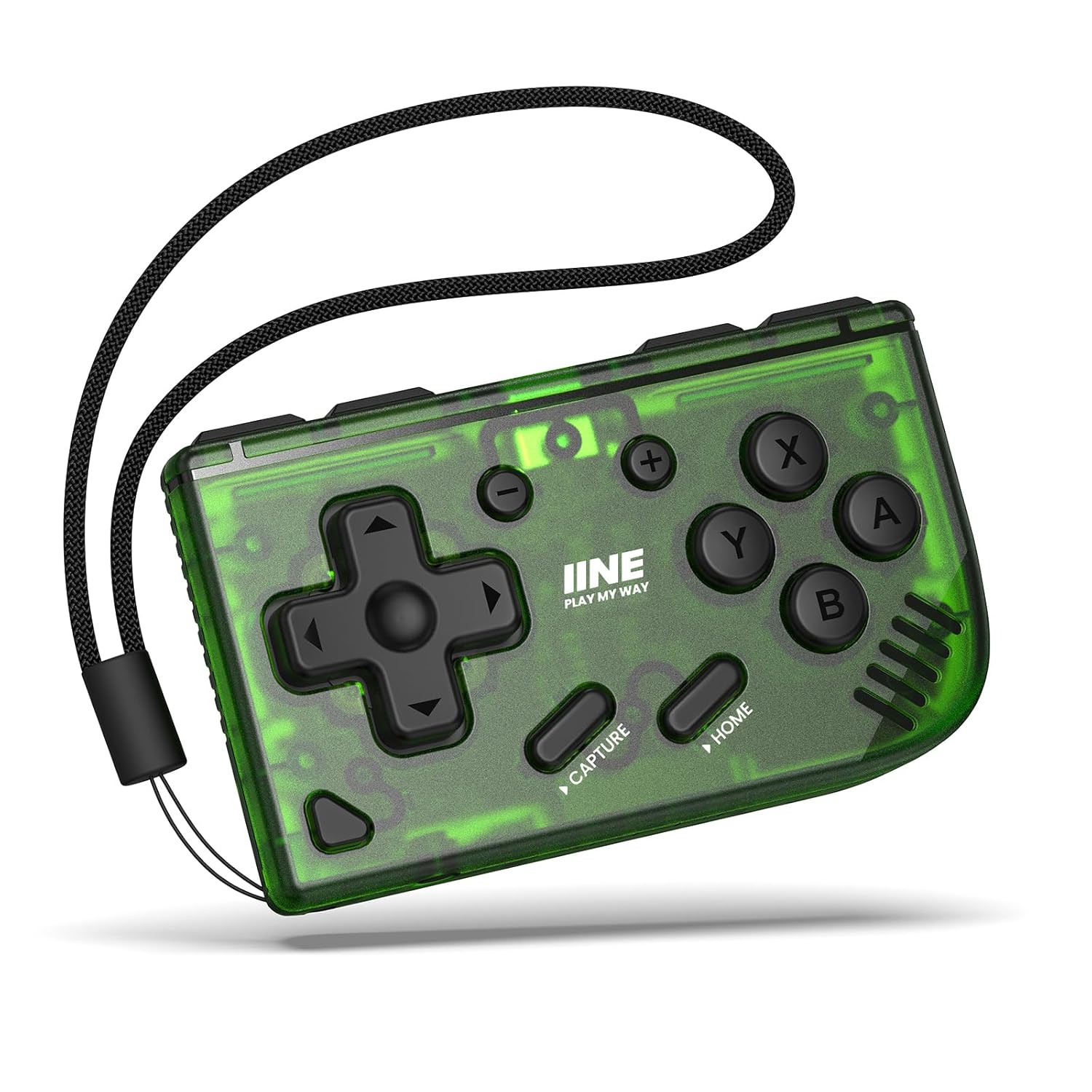
Image: The IINE Mini Retro Wireless Controller in its green translucent casing.
Product Overview
The IINE Mini Retro Wireless Controller features a classic design with modern functionality. It is lightweight and pocket-sized, making it highly portable.
Key Features:
- Multi-platform Compatibility: Supports Switch, PC (X-input), Android, and iOS (native gamepad games only).
- Ultra-Portable: Weighs only 35 grams and includes a portable hand strap.
- Long Battery Life: Up to 16 hours of gaming time on a single charge.
- Multi-functionality: Ideal for gaming, drawing, memorizing words, and turning pages in presentations.
- Turbo Function: Adjustable shooting speed for rapid input.
- D-pad/Joystick Swapping: Supports switching between D-pad and joystick input modes.

Image: Overview of the controller's key features and available colors.

Image: Detailed view of the durable buttons and ZL/ZR triggers.
Charging the Controller
The IINE Mini Retro Wireless Controller comes with a built-in rechargeable battery. To charge the controller:
- Connect the provided USB-C charging cable to the USB-C port on the top of the controller.
- Connect the other end of the USB-C cable to a compatible USB power source (e.g., computer USB port, USB wall adapter).
- The charging indicator light will illuminate during charging and turn off when fully charged.
A full charge provides up to 16 hours of gaming time.
Setup and Pairing
Follow these steps to connect your IINE Mini Retro Wireless Controller to your desired device:

Image: Visual guide for connecting the controller to various platforms.
For Nintendo Switch:
- On your Switch, go to HOME Menu > Controllers > Change Grip/Order.
- Press and hold the [Pairing] button on the controller until the indicator lights begin to flash.
- Once connected, the indicator light will remain solid.
For PC (Windows X-input):
- Ensure Bluetooth is enabled on your PC.
- Press and hold the [B + Home] buttons on the controller until the indicator lights begin to flash.
- On your PC, go to Bluetooth & other devices settings and add a new Bluetooth device. Select the controller when it appears.
For iOS Devices:
- Ensure Bluetooth is enabled on your iOS device.
- Press and hold the [B + Pairing] buttons on the controller until the indicator lights begin to flash.
- Go to Bluetooth settings on your iOS device and select the controller from the list of available devices.
- Note: This controller only supports native gamepad games available on the iOS App Store.
For Android Devices:
- Ensure Bluetooth is enabled on your Android device.
- Press and hold the [B + Pairing] buttons on the controller until the indicator lights begin to flash.
- Go to Bluetooth settings on your Android device and select the controller from the list of available devices.
Operating Instructions
Basic Controls:
- D-pad: For directional movement in games.
- A/B/X/Y Buttons: Standard action buttons.
- Capture Button: Takes screenshots or records video clips (functionality depends on the connected device).
- Home Button: Returns to the home screen or main menu of the connected device.
- ZL/ZR Buttons: Shoulder buttons for additional in-game actions.
Turbo Function:
The controller features a Turbo function, allowing for rapid, continuous input of a button press. To activate/deactivate or adjust the Turbo speed:
- Consult the detailed instructions in the included quick start guide for specific button combinations to enable/disable Turbo and adjust its speed.
- This feature is particularly useful for games requiring fast, repetitive button presses.
Multi-function Use:
Beyond gaming, this controller can serve as a convenient multi-function tool:
- Drawing: Use it for shortcuts in drawing applications on compatible tablets.
- Memorizing Words (Anki App): Easily navigate flashcards and notes.
- PPT Page Turning: Seamlessly advance or go back in presentations.

Image: Demonstrating the controller's versatility for multi-tasking, including educational apps and creative work.
Maintenance
To ensure the longevity and optimal performance of your controller:
- Keep the controller clean by wiping it with a soft, dry cloth. Avoid using harsh chemicals or abrasive materials.
- Store the controller in a cool, dry place away from direct sunlight and extreme temperatures.
- Avoid dropping the controller or subjecting it to strong impacts.
- Do not attempt to disassemble the controller, as this will void the warranty.
Troubleshooting
Controller Not Responding / Frozen:
If your controller becomes unresponsive or appears frozen, you can perform a reset:
- Locate the small reset hole on the back of the controller.
- Use a thin, pointed object (like a paperclip) to gently press the button inside the reset hole.
- This will force the controller to restart and may resolve connectivity or responsiveness issues.
Connectivity Issues:
- Ensure the controller is fully charged.
- Make sure Bluetooth is enabled on your device and that the controller is within range.
- Try unpairing and re-pairing the controller with your device.
- Restart both the controller and your device.
Specifications
| Product Name | IINE Mini Retro Ananke Controller |
| Model Number | B0DMW9V95J |
| Material | PC, Copper |
| Compatibility | Switch, PC, Android, iOS |
| Dimensions (L x W x H) | 2.75 x 1.69 x 0.62 inches (70 x 43 x 16 mm) |
| Weight | 35 grams |
| Battery Life | Up to 16 hours |
| Charging Port | USB-C |

Image: Visual representation of the controller's detailed parameters.
Official Product Video
Video: Official product video demonstrating the IINE Mini Retro Wireless Controller's features and usage across various platforms.
Warranty and Support
IINE products are manufactured with high-quality standards. For warranty information or technical support, please refer to the contact details provided on the product packaging or visit the official IINE website. If you have any questions about the product, please feel free to contact us via QA and Mail as mentioned in the product listing.
Related documentsB0DMW9V95J


Ask a question about this manual
Ask about setup, troubleshooting, compatibility, parts, safety, or missing instructions. Manuals+ will review the question and use this page’s manual context to help answer it.