
Hot Wheels JDW39
Hot Wheels Toy Car Track Set
Triple Loop Pack Instruction Manual
Brand: Hot Wheels | Model: JDW39
Product Overview
The Hot Wheels Track Creator Triple Loop Pack is designed for building epic track configurations with multiple loops. This set provides all the necessary components for various track builds, empowering users to design and construct their own courses for Hot Wheels cars. It allows for builds with two or three loops, integrating curved and straight track pieces for dynamic setups. The innovative Speed Snap Tracks facilitate easy connection, and included adapters ensure compatibility with older Hot Wheels track systems. One Hot Wheels 1:64 scale vehicle is included, with additional vehicles and track components sold separately. Product colors and decorations may vary from those shown.

Figure 1: Hot Wheels Triple Loop Pack in retail packaging, highlighting the track components and a sample car.
What's in the Box
The Hot Wheels Track Creator Triple Loop Pack includes the following components:
- 1 Hot Wheels Track Creator Classic Track Box
- 2 Loop sections
- 1 Loop section with a built-in kicker mechanism
- 1 Slam launcher
- 1 180-degree curved track piece
- 2 12-inch basic straight track pieces
- 2 6-inch straight track pieces
- 2 Track adapters for connecting to legacy Hot Wheels track systems
- 1 Hot Wheels 1:64 scale die-cast toy car
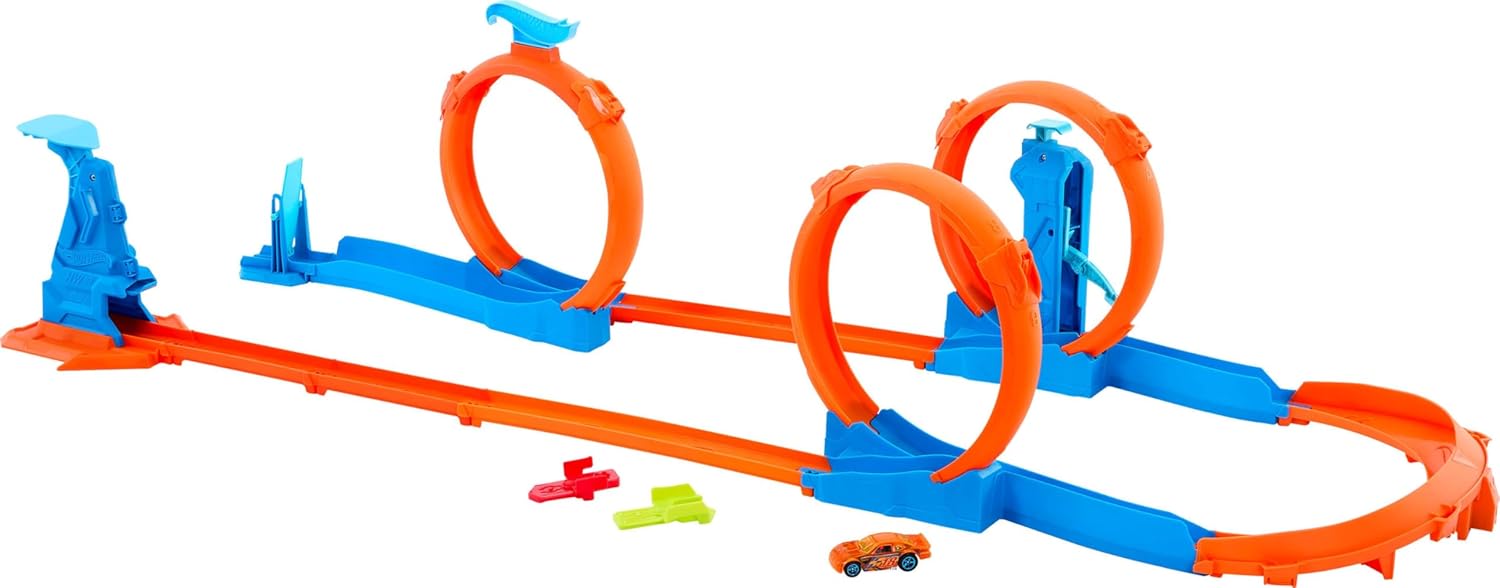
Figure 2: All included components of the Hot Wheels Triple Loop Pack.
Setup Instructions
Follow these steps to assemble your Hot Wheels Triple Loop Track Set:
- Unpack Components: Carefully remove all track pieces, loops, the slam launcher, and the included car from the packaging.
- Connect Straight Tracks: Begin by connecting the straight track pieces using the Speed Snap Track system. Align the arrow on one end of a track piece with the connector on the next piece and push firmly until it clicks into place.
- Assemble Loops: Attach the loop sections to the straight track pieces. Ensure the loop with the built-in kicker is positioned where desired for maximum stunt action.
- Attach Slam Launcher: Connect the slam launcher to the starting point of your track layout. This is where the Hot Wheels car will be placed for launch.
- Integrate Curved Tracks: Use the 180-degree curved track piece to create turns or connect different sections of your track.
- Use Adapters (Optional): If you wish to connect this set to older Hot Wheels track systems, use the included yellow and orange adapters. The yellow adapter connects the arrow end of the new track to old tracks, and the orange adapter connects the old track back into the connector end of the new Creator track.
- Finalize Layout: Arrange the assembled track pieces to create your desired two-loop or three-loop configuration. Ensure all connections are secure for smooth car movement.

Figure 3: An example of an assembled track layout with two loops.

Figure 4: Detail of the Speed Snap Track connection system.
Operating Instructions
Once your track is assembled, you can begin racing your Hot Wheels cars:
- Place Car: Position the included Hot Wheels 1:64 scale car onto the slam launcher at the start of the track.
- Launch Car: Firmly press down on the slam launcher to propel the car forward into the track system.
- Observe Loops: Watch as the car navigates through the loops. The loop with the built-in kicker will provide an additional boost to help the car complete multiple loops or maintain momentum.
- Experiment: Try different Hot Wheels cars (sold separately) to see which ones perform best on the track. Lighter cars may achieve higher speeds and better loop performance.

Figure 5: A Hot Wheels car in motion within a track loop.
Note: There are no official seller videos available for this product. Customer-submitted videos are not included in this manual.
Maintenance
To ensure the longevity and optimal performance of your Hot Wheels Track Set, follow these simple maintenance guidelines:
- Cleaning: Wipe down track pieces and components with a soft, dry cloth to remove dust and debris. Avoid using harsh chemicals or abrasive cleaners, as these can damage the plastic.
- Storage: When not in use, store the track set in a clean, dry place away from direct sunlight and extreme temperatures. While the Speed Snap Track system is designed for easy assembly, the bulkier loop components may require more space for storage compared to older, flatter track designs.
- Inspection: Periodically inspect all track connections and components for any signs of wear or damage. Replace any broken or severely worn parts to maintain safe and effective operation.
Troubleshooting
If you encounter issues while using your Hot Wheels Track Set, consider the following common problems and solutions:
| Problem | Possible Cause | Solution |
|---|---|---|
| Car does not complete loops. | Insufficient launch force; car too heavy; track not properly connected. | Ensure a firm and consistent press on the slam launcher. Try a lighter Hot Wheels car. Verify all track connections are secure and flat. |
| Track pieces disconnect during play. | Connections not fully engaged; excessive force applied to track. | Press track pieces together firmly until the Speed Snap mechanism clicks. Avoid lifting or moving the track while a car is in motion. |
| Car gets stuck on the track. | Debris on track; track misalignment; car wheels damaged. | Clean the track surface. Check for any misaligned track sections and adjust. Inspect the car's wheels for damage or obstructions. |
Specifications
| Feature | Detail |
|---|---|
| Product Dimensions | 17 x 48 x 11.67 inches |
| Item Weight | 2.31 pounds |
| ASIN | B0DMW8ZPK5 |
| Item Model Number | JDW39 |
| Manufacturer Recommended Age | 4 years and up |
| Release Date | April 19, 2025 |
| Manufacturer | Mattel |
Warranty and Support
For specific warranty information regarding your Hot Wheels Track Creator Triple Loop Pack, please refer to the documentation included with your purchase or visit the official Mattel website. Mattel is the manufacturer of this product.
If you require further assistance, have questions about assembly, operation, or need to report a defect, please contact Mattel customer support directly. Contact information can typically be found on the product packaging or on the manufacturer's official website.
Manufacturer: Mattel
Related documentsJDW39


Ask a question about this manual
Ask about setup, troubleshooting, compatibility, parts, safety, or missing instructions. Manuals+ will review the question and use this page’s manual context to help answer it.