
1. Product Overview
This manual provides instructions for the Showasaki LINKSWELL GEN 5 T-Style 12.1 Inch Car Stereo. This head unit is designed to upgrade the in-car entertainment and navigation system for compatible Jeep models, offering advanced features and an enhanced user experience.
1.1 Vehicle Compatibility
- Jeep Wrangler JL: 2018, 2019, 2020, 2021
- Jeep Gladiator: 2020, 2021
For further inquiries regarding compatibility, please contact customer support.
1.2 Key Features
- Android 9 Operating System
- 12.1-inch HD Touchscreen Display
- Wireless CarPlay and Wireless Android Auto
- 64GB Internal Memory, 4GB RAM
- Master Bluetooth Connection
- Upgraded DSP & EQ for enhanced audio
- On-screen ambient lighting control
- Physical A/C Controls, Volume, and Tuning Knobs
- Integration with factory massaging seats, heated/cooled seat controls
- Personalized radio settings tab

Figure 1: Front view of the Showasaki LINKSWELL GEN 5 Car Stereo unit.
2. Setup and Installation
The Showasaki LINKSWELL GEN 5 car stereo is designed for plug-and-play installation, simplifying the upgrade process. It includes specific wiring harnesses to ensure faster and easier setup.
2.1 Installation Process Overview
- Preparation: Ensure the vehicle's ignition is off and the battery is disconnected before beginning installation.
- Removal of Factory Unit: Carefully remove the existing factory radio and trim panels according to your vehicle's service manual.
- Wiring Connections: Connect the provided plug-and-play wiring harnesses to the vehicle's existing connectors and to the new head unit. Ensure all connections are secure.
- Component Integration: Connect any additional components such as the GPS antenna, USB cables, and microphone.
- Mounting the New Unit: Secure the LINKSWELL GEN 5 stereo into the dashboard opening using the provided installation kits and screws.
- Reassembly: Reinstall all trim panels and reconnect the vehicle battery.
- Initial Power-Up: Turn on the vehicle's ignition and test the new stereo's functionality.
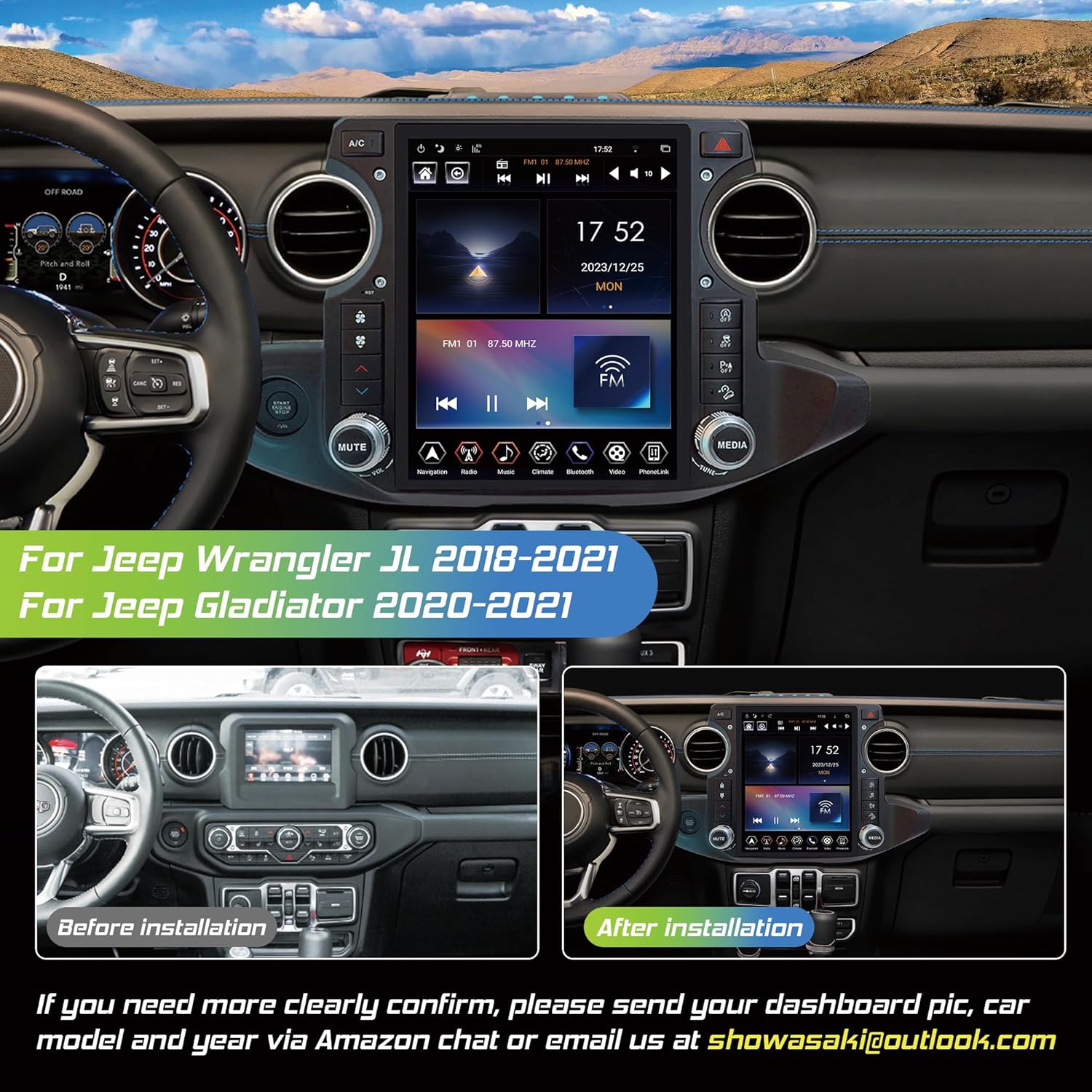
Figure 2: Comparison of the dashboard before and after installing the LINKSWELL GEN 5 Car Stereo.

Figure 3: Included components for the LINKSWELL GEN 5 Car Stereo, including the main unit, wiring harnesses, and accessories.
3. Operating Instructions
3.1 Wireless CarPlay / Android Auto
Activate and use CarPlay or Android Auto wirelessly for seamless integration of your smartphone. This feature allows access to navigation, music, calls, and messages directly from the stereo's display.
- For iPhone Users: Connect via Wireless CarPlay.
- For Android Users: Connect via Wireless Android Auto.
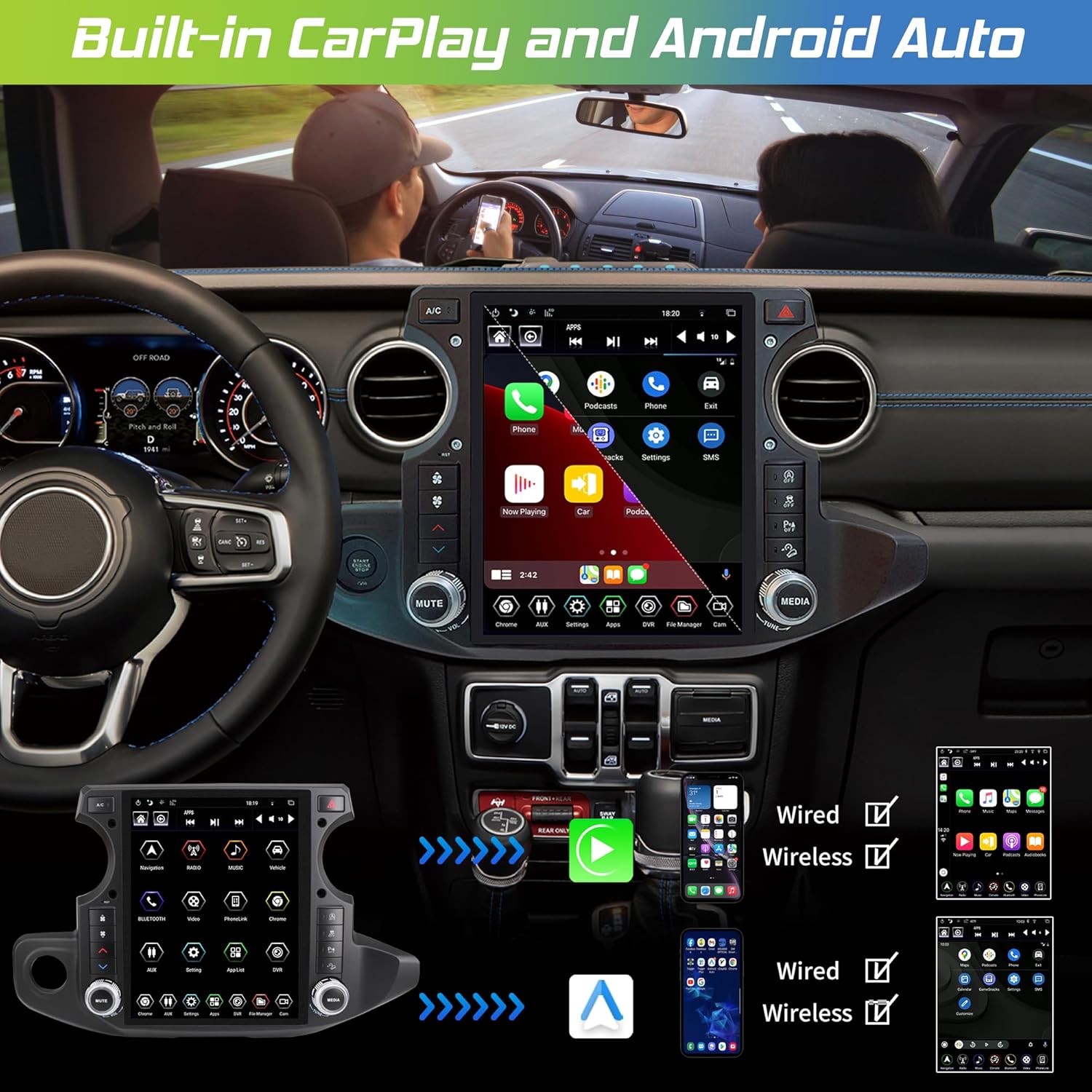
Figure 4: The car stereo display showing the CarPlay interface with various applications.
Figure 5: Visual representation of wireless connectivity for both CarPlay and Android Auto.
3.2 Bluetooth Connection
The unit features a master Bluetooth connection for hands-free calling and audio streaming. Pair your smartphone to the stereo for a stable and clear connection.
- Pairing: Navigate to the Bluetooth settings on the stereo and your phone. Select the stereo's name from the available devices on your phone to pair.
- Hands-Free Calling: Make and receive calls directly through the stereo.
- Audio Streaming: Play music and other audio from your phone through the car's speakers.

Figure 6: Illustration of a stable Bluetooth connection for phone calls and music playback.
3.3 GPS Navigation
Utilize the integrated GPS navigation system for accurate routing and real-time traffic updates. The large 12.1-inch display provides clear map visibility.
- Map Applications: Access pre-installed or downloaded navigation apps.
- Route Planning: Enter destinations and receive turn-by-turn directions.

Figure 7: The car stereo display showing a GPS navigation map with route information.
3.4 Steering Wheel Control
The unit supports integration with your vehicle's existing steering wheel controls, allowing you to manage audio, calls, and other functions without taking your hands off the wheel.
- Volume Control: Adjust audio volume up or down.
- Track/Station Change: Skip tracks or change radio stations.
- Call Management: Answer or end phone calls.

Figure 8: Depiction of the car stereo interface alongside steering wheel controls, highlighting their integration.
3.5 On-Screen Climate Control
Control your vehicle's climate settings directly from the stereo's touchscreen. This includes physical A/C controls, volume, and tuning knobs, as well as integration with factory massaging seats and heated/cooled seat controls.

Figure 9: The car stereo display showing the on-screen climate control interface.
3.6 Built-in WiFi Module
The integrated WiFi module allows the stereo to connect to the internet, enabling access to online services, app downloads, and software updates.

Figure 10: The car stereo display showing various applications accessible via the built-in WiFi module.
3.7 FM Radio
Access local FM radio stations with clear reception. The radio interface allows for easy station tuning and preset management.

Figure 11: The car stereo display showing the FM radio interface with station information.
4. Maintenance
To ensure the longevity and optimal performance of your Showasaki LINKSWELL GEN 5 Car Stereo, follow these maintenance guidelines:
- Screen Cleaning: Use a soft, lint-free cloth specifically designed for electronic screens. Gently wipe the display to remove dust and fingerprints. Avoid harsh chemicals or abrasive materials.
- Software Updates: Periodically check for and install available software updates to ensure the system runs efficiently and has the latest features and security patches. These can often be found through the system settings or the manufacturer's website.
- Environmental Conditions: Avoid exposing the unit to extreme temperatures, direct sunlight for prolonged periods, or excessive moisture.
- Cable Connections: Ensure all cables are securely connected and free from damage. Avoid pulling on cables forcefully.
5. Troubleshooting
This section addresses common issues you might encounter with your Showasaki LINKSWELL GEN 5 Car Stereo.
| Problem | Possible Cause | Solution |
|---|---|---|
| Unit does not power on | Loose power connection, blown fuse, vehicle battery issue | Check all power cables and connections. Inspect vehicle fuses. Ensure vehicle battery is charged. |
| No sound output | Volume muted, incorrect audio source, loose speaker wires | Check volume level and mute status. Verify correct audio source is selected. Inspect speaker wire connections. |
| Bluetooth device won't pair | Device not in pairing mode, interference, previous pairing issues | Ensure your device is in pairing mode. Delete previous pairings from both devices and try again. Move closer to the unit. |
| GPS signal lost or inaccurate | GPS antenna obstruction, poor satellite reception | Ensure the GPS antenna has a clear view of the sky. Check antenna connection. Move to an open area. |
| Touchscreen unresponsive | System freeze, temporary software glitch | Perform a soft reset (refer to system settings for reset option). If issue persists, contact support. |
If you encounter issues not listed here or if the suggested solutions do not resolve the problem, please contact Showasaki customer support for assistance.
6. Specifications
Detailed technical specifications for the Showasaki LINKSWELL GEN 5 Car Stereo:
- Item Weight: 11.4 pounds
- Package Dimensions: 21 x 15 x 9.5 inches
- Display Size: 12.1 Inches
- Voice Command: Touchscreen
- Model Name: LINKSWELL
- Vehicle Service Type: SUV
- Special Feature: Bluetooth, Touchscreen
- Connectivity Technology: Bluetooth, USB
- Map Type: Worldwide
- Audio Output Mode: Stereo
- Mounting Type: Dashboard Mount
- Included Components: Car radio for Jeep Wrangler JL Gladiator
7. Warranty and Support
7.1 Product Warranty
The Showasaki LINKSWELL GEN 5 Car Stereo comes with a 1-Year Warranty from the date of purchase. This warranty covers manufacturing defects and malfunctions under normal use. Please retain your proof of purchase for warranty claims.
7.2 Customer Support
Your satisfaction is important to us. If you have any questions during the installation process, require technical assistance, or need to make a warranty claim, please do not hesitate to contact our customer service team.
- Contact Method: Reach out via Amazon chat or email us directly.
- Response Time: We aim to provide a quick reply within 24 hours.
- Exchange & Return: 30-day exchange and return policy is available.

Figure 12: Overview of Showasaki's after-sale service support, including contact details and warranty information.