
1. Introduction
This manual provides essential information for the setup, operation, and maintenance of your SZBOX Mini PC N200 handheld computer. Please read it thoroughly before using the device to ensure optimal performance and longevity.
The SZBOX Mini PC N200 is a compact, high-performance handheld computer featuring a 7-inch touchscreen, powered by a 12th Gen Alder Lake-N200 processor. It comes with 16GB LPDDR5 RAM, a 1TB SSD, Wi-Fi 6, Bluetooth 5.2, and runs on Windows 11. Its portable design and versatile connectivity make it suitable for various applications, from office work to entertainment and data collection.
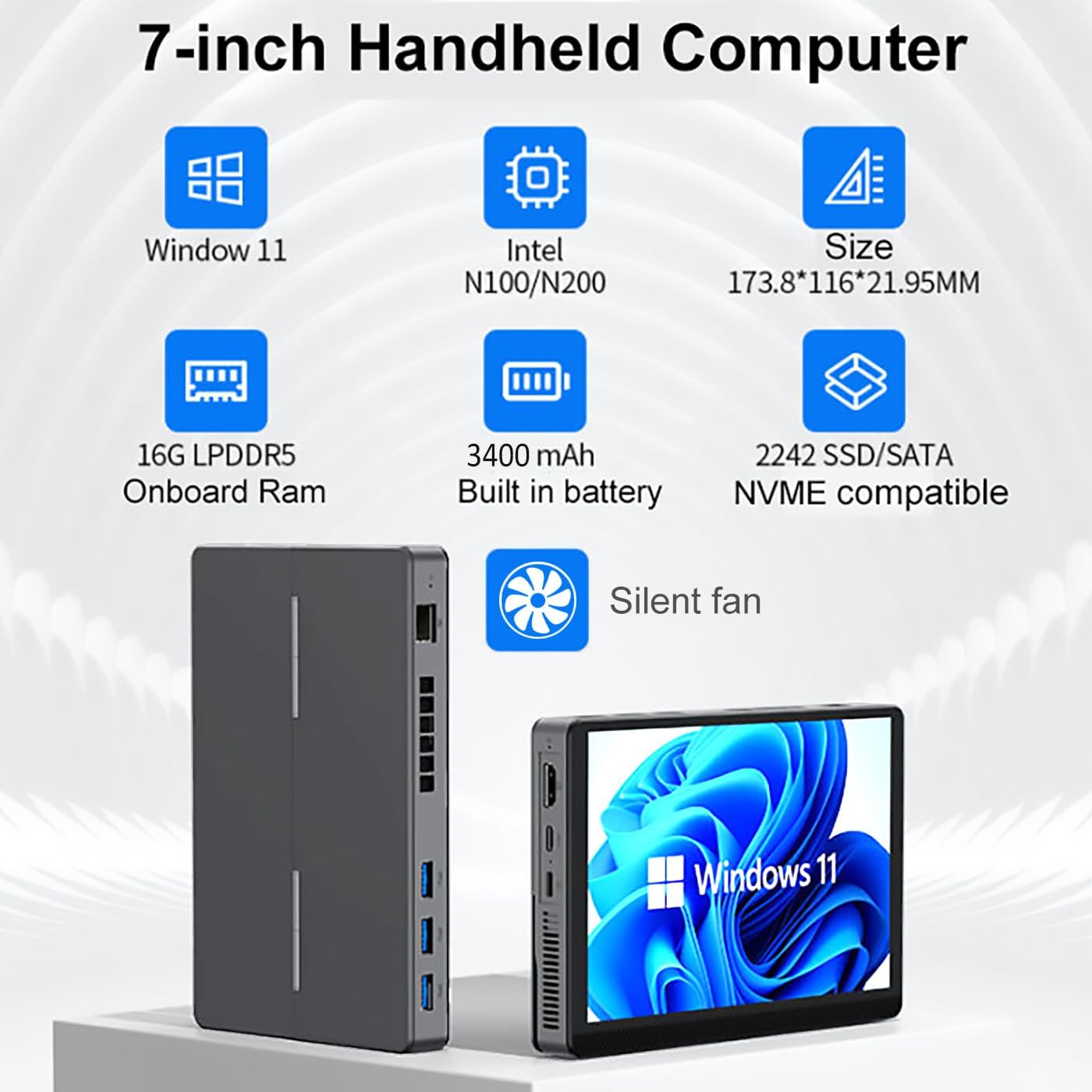
Image: The SZBOX Mini PC N200 handheld computer displaying the Windows 11 operating system.
2. Setup
2.1 Package Contents
Verify that all items are present in the package:
- SZBOX Mini PC N200 Handheld Computer
- Power Adapter (USB-C)
- User Manual (this document)
- DVD (for drivers or software, if applicable)
2.2 Device Overview and Ports
Familiarize yourself with the device's ports and features:

Image: Detailed diagram illustrating the various ports and interfaces of the SZBOX Mini PC N200, including USB, HDMI, Type-C, Ethernet, and audio jacks.
- MIC hole: Microphone input.
- HDMI: Video output for external displays.
- Type-C (full function): Supports power input (PD), video output (DP 3.0), and data transfer.
- Indicator light: Device status indicator.
- Type (DC): Dedicated DC power input (if applicable, Type-C also supports power).
- USB 3.2*3: High-speed USB ports for peripherals.
- Cooling hole: Ventilation for heat dissipation.
- Gigabit RJ45: Ethernet port for wired network connection.
- Reset hole: For system reset (use a pin).
- USB 2.0*1: Standard USB port.
- 3.5mm headphone jack: Audio output.
- Power switch: To turn the device on/off.
2.3 Initial Power On
- Connect the provided USB-C power adapter to the Type-C port on the device and plug it into a power outlet.
- Press and hold the Power switch (12) until the device powers on and the indicator light (4) illuminates.
- Follow the on-screen instructions to complete the initial Windows 11 setup.
2.4 Connecting Peripherals
- External Display: Connect an HDMI cable to the HDMI port (2) or a compatible USB-C to DisplayPort/HDMI adapter to the full-function Type-C port (3) to connect to an external monitor or TV.
- USB Devices: Plug in keyboards, mice, or other USB devices into the USB 3.2 ports (6) or USB 2.0 port (10).
- Wired Network: Connect an Ethernet cable to the Gigabit RJ45 port (8) for a stable internet connection.
- Audio: Connect headphones or external speakers to the 3.5mm headphone jack (11).
3. Operating Instructions
3.1 Basic Operation
Your SZBOX Mini PC N200 runs on Windows 11. Navigate the operating system using the integrated touchscreen or by connecting external input devices like a mouse and keyboard.
3.2 Touchscreen Functionality
The device features an Xpress multi-touch HD IPS display (800x1280 resolution) with high light transmittance and a fully fit touch screen for responsive interaction.

Image: The SZBOX Mini PC N200 touchscreen responding to multi-finger gestures, highlighting its Xpress multi-touch capability.
3.3 Network and Connectivity
The Mini PC supports advanced wireless and wired connectivity:
- Wi-Fi 6 (802.11ax): For high-speed wireless internet access.
- Bluetooth 5.2: For connecting wireless peripherals such as headphones, keyboards, and mice.
- Gigabit Ethernet (RJ45): For a stable and fast wired network connection.

Image: The SZBOX Mini PC N200 connected to two external monitors, demonstrating its capability for fast network connectivity via Wi-Fi 6 and Bluetooth 5.2.
3.4 Dual Display Support
Enhance your productivity by connecting up to two external 4K displays simultaneously using the HDMI port and the full-function Type-C port.

Image: The SZBOX Mini PC N200 connected to two external monitors, illustrating its dual display capabilities for enhanced workspace.
3.5 Battery Usage
The device is equipped with a 3400mAh battery, providing approximately 3 hours of usage on a single charge. For extended use, keep the device connected to the power adapter.
3.6 Applications
The SZBOX Mini PC N200 is versatile for various applications:
- Office & Productivity: Ideal for word processing, spreadsheets, presentations, and general office tasks.
- Entertainment: Enjoy videos, music, and light gaming.
- IoT & Education: Suitable for Internet of Things projects, educational purposes, and digital signage.
- Data Collection: Its portability makes it useful for mobile data entry and collection.

Image: Collage showing the SZBOX Mini PC N200 being used in various scenarios: office work, business meetings, watching videos, and data collection.
4. Maintenance
4.1 Cleaning
- Use a soft, dry cloth to clean the exterior of the device.
- For the screen, use a microfiber cloth specifically designed for electronics. Avoid harsh chemicals.
- Ensure cooling vents are free from dust and obstructions to maintain proper airflow.
4.2 Software Updates
Regularly update your Windows 11 operating system and drivers to ensure optimal performance, security, and compatibility. Access Windows Update through the system settings.
4.3 Storage Upgrade
The device supports M.2 2242 SSDs (SATA3/PCIe3). An accessible trap door on the back of the device allows for easy upgrade or replacement of the SSD. Refer to the manufacturer's guidelines or a qualified technician for assistance with hardware upgrades.
4.4 Battery Care
- Avoid fully discharging the battery frequently.
- Store the device in a cool, dry place when not in use for extended periods.
- Use only the provided or approved power adapter.
5. Troubleshooting
If you encounter issues with your SZBOX Mini PC N200, refer to the following common solutions:
| Problem | Possible Cause | Solution |
|---|---|---|
| Device does not power on | No power, discharged battery, faulty power adapter | Ensure power adapter is securely connected and plugged into a working outlet. Charge the device for at least 30 minutes before attempting to power on again. |
| No display on external monitor | Incorrect cable, wrong input source on monitor, display settings | Check HDMI/Type-C cable connections. Ensure the external monitor is set to the correct input source. Press Windows key + P to cycle through display modes. |
| Wi-Fi/Bluetooth not working | Drivers, disabled adapter, interference | Check Wi-Fi/Bluetooth settings in Windows. Ensure drivers are up to date. Restart the device. |
| Touchscreen unresponsive after OS reinstallation | Missing or incorrect touchscreen drivers | Note: OS reinstallation requires touchscreen driver reinstallation. Download and install the correct touchscreen drivers from the manufacturer's support website. The Goodix Touch HID Driver is often required. |
| Device runs hot or fan is loud | Heavy workload, obstructed vents, outdated firmware | Ensure proper ventilation and clear any obstructions from the cooling holes. Reduce background applications. Update system firmware if available. |
| Slow performance | Too many applications, low storage, malware | Close unnecessary applications. Free up disk space. Run a malware scan. Ensure Windows and drivers are updated. |
If the problem persists, please contact customer support.
6. Specifications
Detailed technical specifications for the SZBOX Mini PC N200:

Image: Visual summary of key specifications for the SZBOX Mini PC N200, including Windows 11, Intel N100/N200 CPU, 16GB LPDDR5 RAM, 3400mAh battery, and 2242 SSD/NVME compatibility.
| Feature | Specification |
|---|---|
| Processor | 12th Gen Intel Alder Lake-N200 (4C/4T, 6MB Cache, up to 3.7GHz, 6W TDP) |
| RAM | 16GB LPDDR5 Onboard |
| Storage | 1TB SSD (M.2 2242, SATA3/PCIe3 compatible) |
| Display | 7-inch HD IPS Touchscreen (1280x800 resolution) |
| Max External Resolution | 1920x1080 (via HDMI/Type-C) |
| Graphics | Integrated Intel UHD Graphics |
| Wireless Connectivity | Wi-Fi 6 (802.11ax), Bluetooth 5.2 |
| Wired Connectivity | Gigabit RJ45 Ethernet |
| Ports | 3x USB 3.2, 1x USB 2.0, 1x HDMI, 1x Full-function Type-C (PD/DP 3.0), 1x 3.5mm Headphone Jack, 1x MIC hole |
| Battery | 3400mAh Lithium Polymer (approx. 3 hours average battery life) |
| Operating System | Windows 11 (Pre-installed) |
| Dimensions (LxWxH) | 6.85 x 4.57 x 0.87 inches (17.4 x 11.6 x 2.2 cm) |
| Weight | 1.15 pounds (approx. 520g) |
7. Warranty and Support
7.1 Warranty Information
For detailed warranty terms and conditions, please refer to the warranty card included with your product or visit the official SZBOX website. Retain your proof of purchase for warranty claims.
7.2 Customer Support
If you require technical assistance, have questions about your device, or need to report an issue, please contact SZBOX customer support through their official website or the contact information provided with your purchase documentation.


