
BAFANG US JJ DPC18-UART Display
BAFANG C18 LCD Display User Manual
Model: US JJ DPC18-UART Display | Brand: BAFANG
1. Introduction
This manual provides detailed instructions for the installation, operation, maintenance, and troubleshooting of your BAFANG C18 LCD Display. The BAFANG C18 LCD Display is designed for BAFANG mid-motors using the UART communication protocol, offering clear and comprehensive riding data for an enhanced electric bike experience.
The display features a 3.5-inch TFT color screen and an external 5-key keyboard, housed in a durable PC shell with a hardened PMMA LCD display. It is waterproof and dustproof with an IP65 rating, ensuring reliability in various conditions.
2. Safety Information
- Always ensure the display is securely mounted before riding.
- Do not attempt to disassemble or modify the display. This may void the warranty and cause damage.
- Avoid exposing the display to extreme temperatures outside its operating range (-20℃ to 45℃).
- While the display is IP65 rated for water and dust resistance, avoid submerging it in water or using high-pressure water jets directly on it.
- Keep the screen clean and free from obstructions to ensure clear visibility of riding data.
- Always prioritize road safety. Do not operate the display or adjust settings while riding in traffic.
3. Package Contents
Please verify that all items are present in your package:
- BAFANG C18 LCD Display Unit
- External 5-key Keyboard
- Mounting Brackets (for screen and keyboard)
- Connecting Cables
4. Setup and Installation
4.1 Compatibility
The BAFANG C18 LCD Display is compatible only with BAFANG motors that utilize the UART communication protocol versions 5.0 to 5.8. It is designed for BAFANG BBS series mid-motors and BAFANG Hub Motors. Please ensure your motor uses a 5-pin female round UART protocol connector.
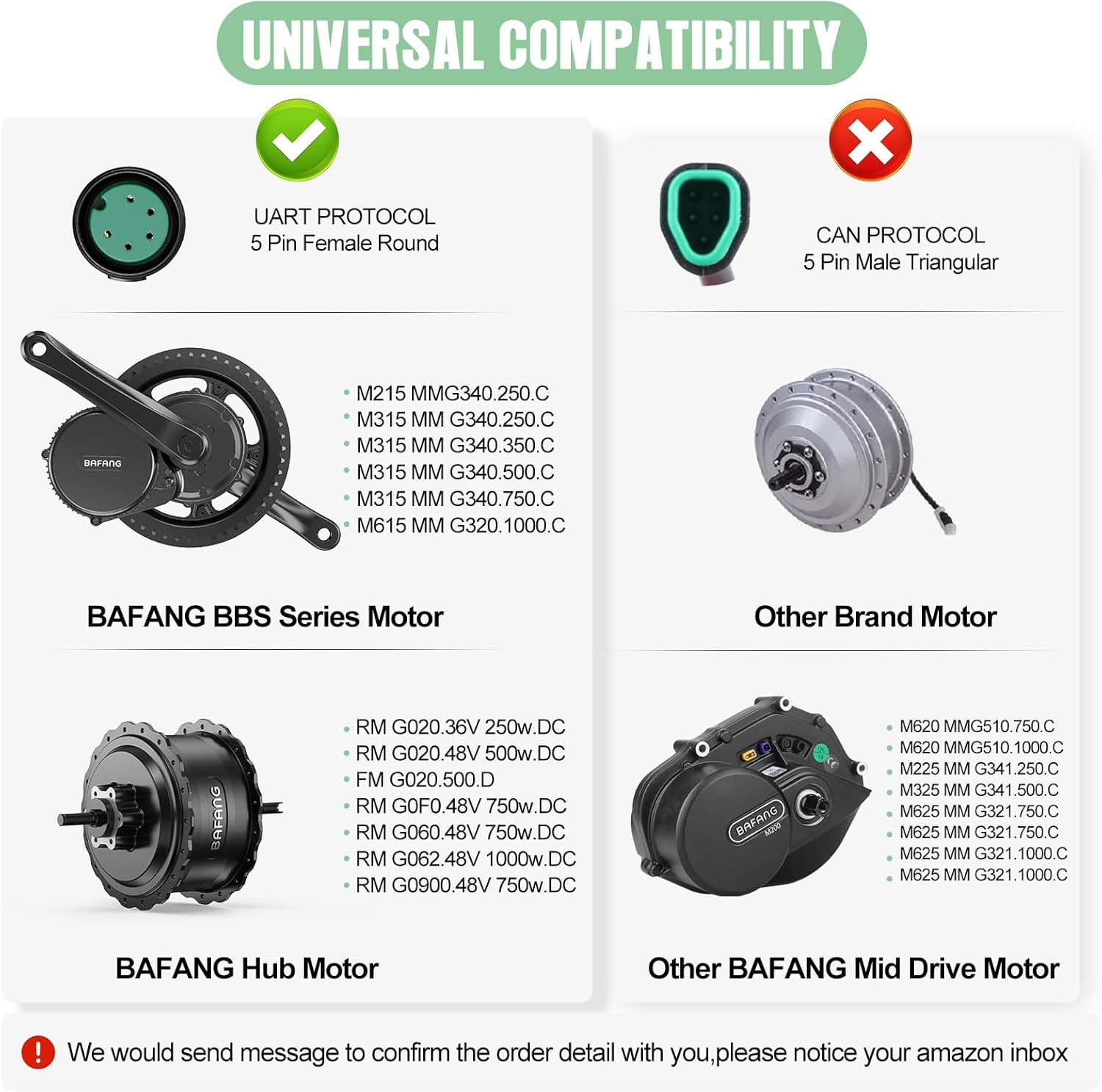
Figure 4.1: Compatibility Overview. This image illustrates the compatible UART protocol (5-pin female round) for BAFANG BBS Series and Hub Motors, and incompatible CAN protocol (5-pin male triangular) for other brands and certain BAFANG mid-drive motors.
4.2 Mounting the Display and Keyboard
The display screen bracket is suitable for handlebar diameters of Ø22.2 mm, Ø25.4 mm, and Ø31.8 mm. The keyboard bracket is designed for Ø22.2 mm handlebars.
- Select an appropriate position on your handlebar for the display unit, ensuring it does not obstruct your view or interfere with braking/shifting.
- Attach the display bracket to the handlebar and secure it firmly using the provided screws.
- Slide the display unit onto the bracket until it clicks into place.
- Mount the 5-key external keyboard near the display, in a position that allows for easy access with your thumb while riding.
4.3 Wiring Connections
Connect the display to your BAFANG motor system using the provided 5-pin female connector. Ensure the connection is secure and the wires are not pinched.
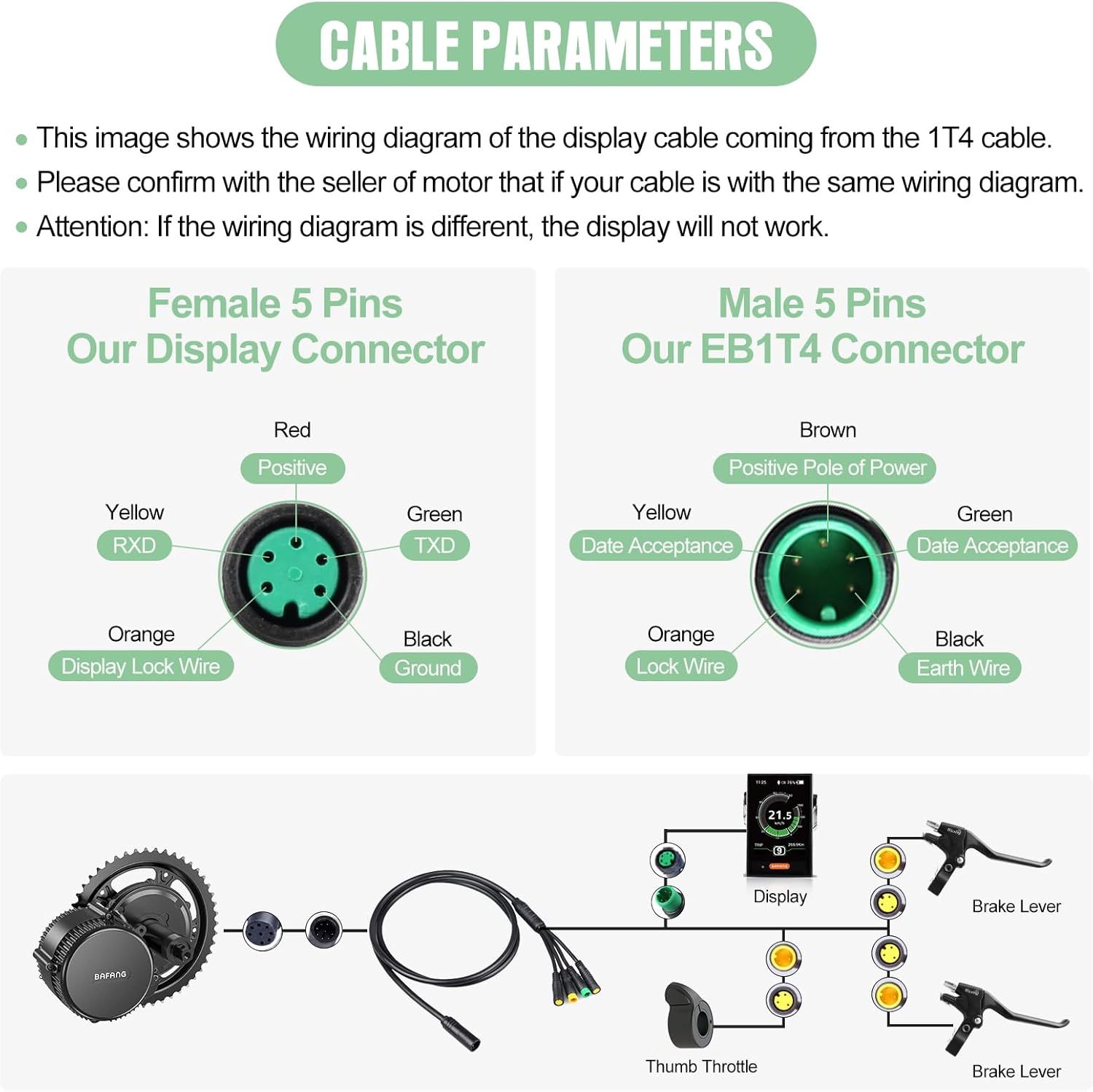
Figure 4.2: Cable Parameters and Wiring Diagram. This image details the pinout for the 5-pin female display connector (Red: Positive, Yellow: RXD, Green: TXD, Orange: Display Lock Wire, Black: Ground) and the corresponding male EB1T4 connector. It also provides a schematic of the display's connection to the motor, brake levers, and thumb throttle.
Important: Confirm that your motor's cable wiring diagram matches the one shown. If the wiring diagram is different, the display will not function correctly.
5. Operating the Display
5.1 Display Overview
The 3.5-inch TFT color screen provides a clear and comprehensive view of your riding data. The external 5-key keyboard allows for easy navigation and control.

Figure 5.1: Multifunction LCD Display. This image highlights the various data points displayed on the BAFANG C18 screen, including time, battery level, headlight status, current speed, power/current output, total mileage, PAS level, speed scale, and trip mileage. It also shows the USB charging capability.
5.2 Key Functions
- Power Button: Press and hold to turn the display ON/OFF.
- Up/Down Buttons (+/-): Adjust the Pedal Assist System (PAS) level (0-3, 0-5, or 0-9, depending on configuration). These buttons may also navigate menu options.
- Mode/Info Button (i): Cycle through different display modes (e.g., Trip Distance, Odometer, Max Speed, Average Speed, Energy Consumption, Calories).
- Light Button: Turn the bike's headlights ON/OFF (if connected and supported).
5.3 Features and Functions
- Automatic Light Sensing: The display can automatically adjust its backlight brightness based on ambient light conditions.
- 5-Level Backlight: Manually adjust the screen brightness for optimal visibility in various lighting environments.
- USB Charging Port: A convenient USB port is integrated for charging external devices like smartphones.
- PAS Level Selection: Supports various pedal assist level modes (0-3, 0-5, 0-9) without separate ECO and Sport modes.
- Real-time Data Display: Shows motor riding output power (W), output current (A), remaining mileage range, and estimated energy consumption (calories).

Figure 5.2: High-tech Display Features. This image highlights key features such as adjustable PAS levels (0-9), versatile holder sizes for different handlebar diameters, the 2.7-inch LCD screen, 1-5 brightness settings, and the integrated USB charging port.
6. Maintenance
- Cleaning: Use a soft, damp cloth to wipe the display screen and body. Do not use abrasive cleaners, solvents, or high-pressure water.
- Connections: Periodically check all cable connections to ensure they are secure and free from corrosion.
- Storage: When storing your e-bike for extended periods, especially in cold conditions, it is advisable to remove the display and store it in a dry, room-temperature environment.
- Impact Protection: While durable, avoid dropping the display or subjecting it to strong impacts.
7. Troubleshooting
| Problem | Possible Cause | Solution |
|---|---|---|
| Display does not power on. | Loose cable connection, low battery, incompatible motor. | Check all connections. Ensure the e-bike battery is charged. Verify motor compatibility (UART protocol). |
| No data displayed (speed, PAS level). | Sensor issue, communication error. | Check motor and speed sensor connections. Restart the system. |
| Screen is dim or unreadable. | Backlight setting, direct sunlight. | Adjust backlight brightness. Move to a shaded area if in direct sunlight. |
| USB charging not working. | Cable issue, device incompatibility. | Try a different USB cable and device. Ensure the display is powered on. |
If you encounter issues not listed here or if the problem persists, please contact BAFANG customer support for assistance.
8. Specifications
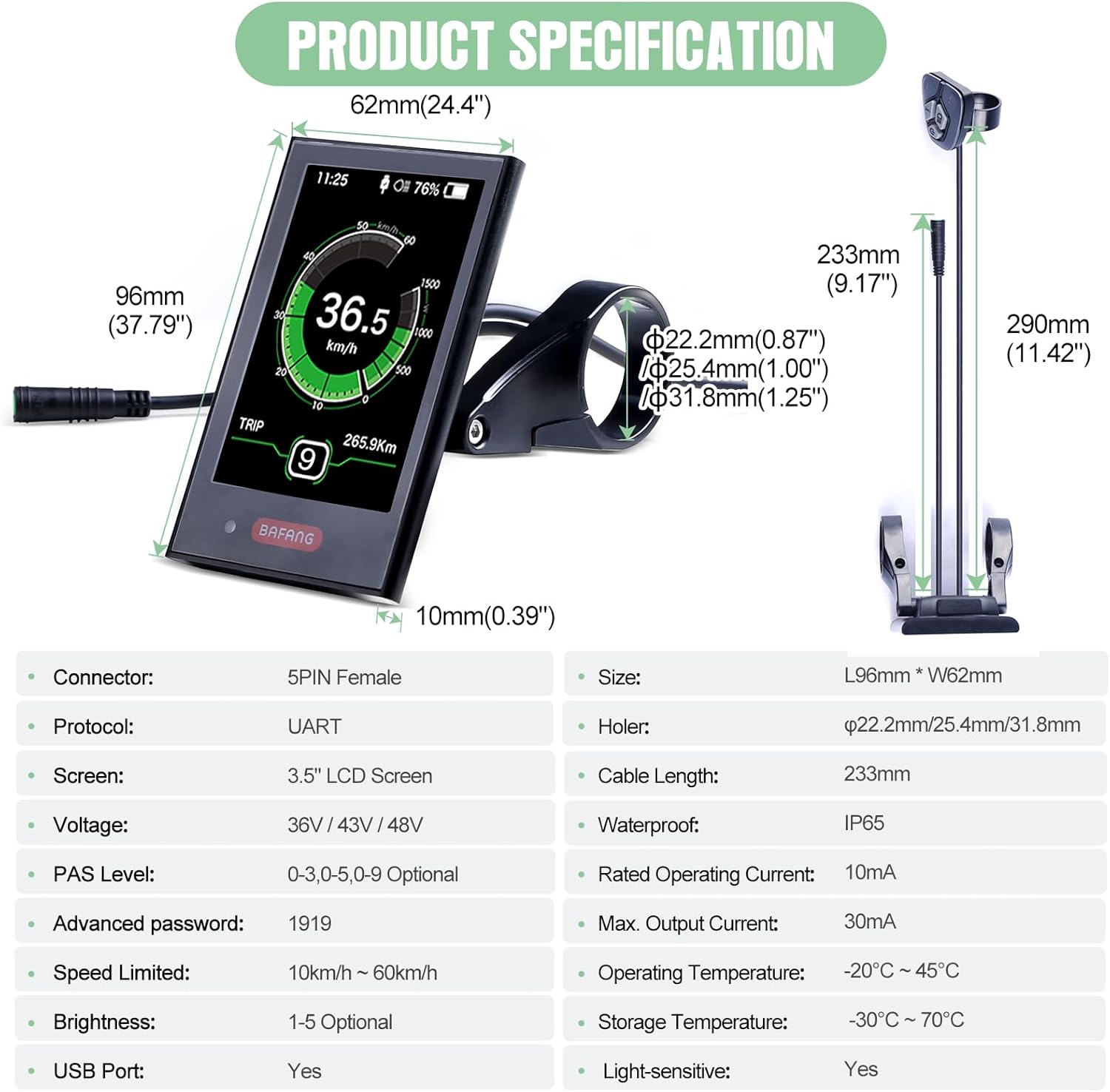
Figure 8.1: Product Specifications. This image provides a visual representation of the display's dimensions and a detailed table of its technical specifications.
| Parameter | Value |
|---|---|
| Rated Voltage | 36V/43V/48V DC |
| Rated Current | 10mA |
| Maximum Operating Current | 30mA |
| Leak Current (Power Off) | ≤1uA |
| Operating Current Supplied to Controller | 50mA |
| Operating Temperature | -20℃ ~ 45℃ |
| Storage Temperature | -30℃ ~ 70℃ |
| IP Level | IP65 |
| Storage Humidity | 30%-70% |
| Screen Type | 3.5-inch TFT Color Screen |
| Connector Type | 5 Pin Female Connector (UART Protocol) |
| Handlebar Clamp Diameter | Ø22.2/25.4/31.8 mm (Screen), Ø22.2 mm (Keyboard) |
| Cable Length | 233mm |
9. Warranty and Support
9.1 Warranty Information
The BAFANG C18 LCD Display comes with a warranty of 30 days for returns and 365 days for repair or replacement. Please retain your proof of purchase for warranty claims.
9.2 Customer Support
For technical assistance, troubleshooting, or warranty inquiries, please contact BAFANG customer support. Refer to the official BAFANG website or your purchase documentation for contact details.
You can also visit the official BAFANG Store on Amazon for more information and support resources: BAFANG Amazon Store.
Related documentsUS JJ DPC18-UART Display


Ask a question about this manual
Ask about setup, troubleshooting, compatibility, parts, safety, or missing instructions. Manuals+ will review the question and use this page’s manual context to help answer it.