
Introduction
Thank you for choosing the Dowinx Gaming Chair. This ergonomic computer chair is designed for comfort and support during extended periods of use, whether for gaming, office work, or relaxation. It features a vintage design with breathable perforated leather, 4D adjustable armrests, a retractable footrest, and a massage lumbar support. This manual provides essential information for assembly, operation, maintenance, and troubleshooting to ensure you get the most out of your chair.

Image: The Dowinx Gaming Chair in a home office environment, showcasing its design and features.
Important Safety Information
Please read and follow all safety instructions included with this product. Failure to do so may result in injury or damage to the product.
- Do not exceed the maximum weight capacity of 350 lbs.
- Be cautious when using adjustable features to avoid injury.
- Ensure all screws and bolts are securely tightened before use and periodically check for looseness.
- Keep hands and fingers clear of moving parts during adjustment.
- Do not stand on the chair or use it as a step stool.
- Use the chair on a level surface to prevent tipping.
Components List
Before assembly, ensure all components are present and undamaged. Refer to the detailed numbered instructions provided in the packaging for a complete list and visual guide.
- Chair Backrest
- Seat Base with Retractable Footrest
- 4D Adjustable Armrests (Left and Right)
- BIFMA-certified Base (5-star base)
- Industrial-strength Class 4 Gas Lift
- Casters (Wheels)
- Headrest Pillow
- Massage Lumbar Pillow
- Assembly Hardware (screws, washers, tools)

Image: A visual representation of various chair components, including the seat, backrest, and base parts.
Setup (Assembly)
Assembly of your Dowinx Gaming Chair is designed to be straightforward and typically takes under 20 minutes. Follow the detailed numbered instructions provided in your product packaging.
- Attach Casters to Base: Insert the casters into the holes on the 5-star base.
- Install Gas Lift: Place the gas lift into the center hole of the base.
- Assemble Seat Mechanism: Secure the seat mechanism to the underside of the seat base using the provided screws.
- Connect Seat to Gas Lift: Place the assembled seat onto the gas lift.
- Attach Backrest: Align the backrest with the seat and secure it using the appropriate screws.
- Install Armrests: Attach the 4D armrests to the sides of the seat and backrest.
- Attach Headrest and Lumbar Pillows: Secure the headrest and massage lumbar pillows using their straps.
- Final Checks: Ensure all connections are tight and the chair functions correctly.

Image: A close-up view of the chair's sturdy base and smooth-rolling casters, ready for assembly.
Operating Instructions
Your Dowinx Gaming Chair offers multiple adjustment options for personalized comfort.
Height Adjustment
To adjust the chair's height, pull the lever located under the seat upwards while applying or releasing body weight. The chair is liftable within 3 inches.
Backrest Recline
The backrest can recline smoothly from 90° to 165°. Pull the recline lever on the side of the chair and lean back to your desired angle. Release the lever to lock the position.
4D Armrest Adjustment
The 4D armrests offer extensive adjustability:
- Up/Down: Press the button on the side of the armrest to raise or lower.
- Front/Back: Slide the armrest pad forward or backward.
- Left/Right: Slide the armrest pad left or right.
- Angle Adjustable: Rotate the armrest pad to your preferred angle.
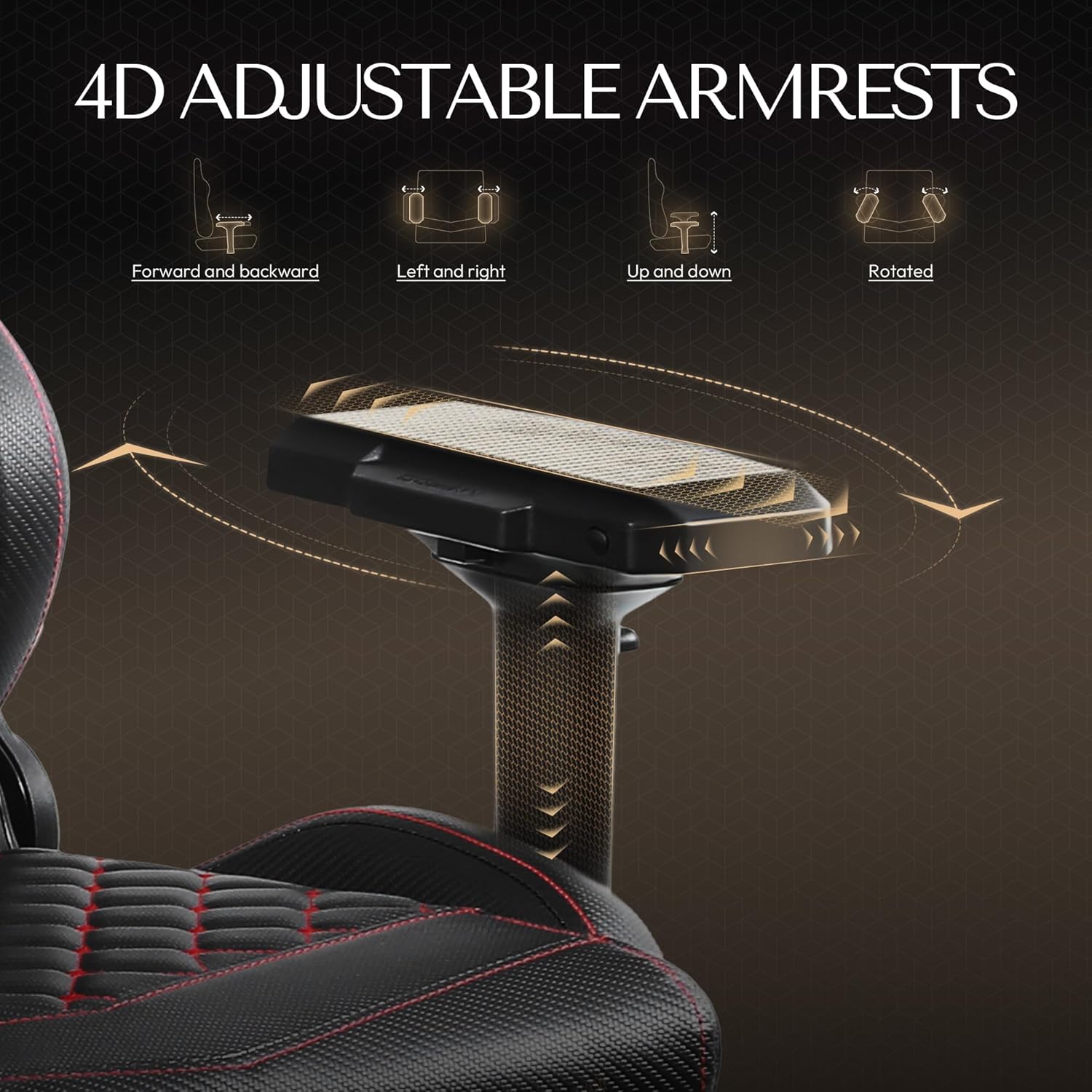
Image: A detailed diagram illustrating the four-dimensional adjustments available for the armrests: forward/backward, left/right, up/down, and rotation.
Retractable Footrest
For full-body support and relaxation, pull out the footrest located under the seat. It can be extended and retracted as needed.
Rocking Function
Engage the 20° rocking function by pulling out the tilt lock lever. Push the lever back in to lock the chair in an upright position.
Massage Lumbar Pillow
The built-in massage lumbar pillow helps relieve back tension. Connect the USB cable from the pillow to a power source (e.g., computer, USB adapter) to activate the massage function.

Image: A person demonstrating the chair's reclining and footrest features, highlighting its suitability for relaxation.
Maintenance
Proper maintenance will extend the life and appearance of your Dowinx Gaming Chair.
- Cleaning: The manufacturer recommends dry cleaning for the PU leather. For general cleaning, wipe the surface with a soft, damp cloth and mild soap. Avoid harsh chemicals or abrasive cleaners.
- Hardware Check: Periodically check all screws and bolts to ensure they are tight. Re-tighten as necessary.
- Caster Care: Keep the casters free of hair and debris to ensure smooth movement.
- Avoid Direct Sunlight: Prolonged exposure to direct sunlight can cause the PU leather to fade or crack.
Troubleshooting
If you encounter any issues with your chair, refer to the following common solutions:
- Chair Sinks or Won't Stay Up: Ensure the gas lift lever is fully engaged. If the issue persists, the gas lift may need replacement.
- Chair Wobbles: Check all assembly screws and bolts, especially those connecting the seat to the mechanism and the backrest. Tighten any loose hardware. Ensure the base is properly seated on the gas lift.
- Casters Not Rolling Smoothly: Inspect casters for trapped debris (hair, lint, etc.) and clean them thoroughly.
- Recline Mechanism Stuck: Ensure no obstructions are preventing the backrest from moving. Check the recline lever for proper function.
- Massage Lumbar Pillow Not Working: Verify the USB cable is securely connected to a working power source.
If these steps do not resolve the issue, please contact Dowinx customer support.
Specifications
| Brand | Dowinx |
| Model Number | f367cfca-0d57-439c-a449-a9ec604f3a1c |
| Color | Black |
| Material | PU Leather (Foam Fill) |
| Product Dimensions | 22.5"D x 16"W x 17"H |
| Seat Depth | 22.5 inches |
| Seat Height | 16 Inches |
| Backrest Width | 23.5 Inches |
| Seat Back Interior Height | 32.5 Inches |
| Maximum Weight Recommendation | 350 Pounds |
| Special Features | Adjustable Backrest, Adjustable Height, Ergonomic, Foot Rest, Reclining, Massage Lumbar Support |
| Reclining Position Count | 19 |
| Product Care Instructions | Dry Clean |
| Item Weight | 51 pounds |

Image: A diagram illustrating the key dimensions of the Dowinx Gaming Chair, including seat width, backrest height, and overall depth.
Warranty and Support
Dowinx provides a 1-year free parts replacement warranty for this gaming chair. This warranty covers manufacturing defects and component failures under normal use.
For warranty claims, technical support, or any questions regarding your product, please contact Dowinx customer support through their official channels. Have your model number (f367cfca-0d57-439c-a449-a9ec604f3a1c) and proof of purchase ready when contacting support.


