
1. Introduction
Thank you for choosing the GEARit Portable Bluetooth Wireless Speaker. This manual provides essential information for setting up, operating, and maintaining your speaker. Designed for versatility, this 40W speaker delivers crystal clear sound with deep bass, features IPX6 water resistance, and offers multiple connectivity options, making it ideal for both indoor and outdoor use.

Image: The GEARit Portable Bluetooth Speaker highlighting its powerful sound and IPX6 water resistance.
2. Package Contents
- GEARit Portable Bluetooth Wireless Speaker
- USB-C to USB-A Charging Cable
- 3.5mm AUX Cable
- User Manual

Image: The GEARit speaker shown with its USB-C charging cable and AUX cable, illustrating the complete package.
3. Product Overview
3.1 Controls and Ports
Familiarize yourself with the speaker's buttons and connection ports for optimal use.
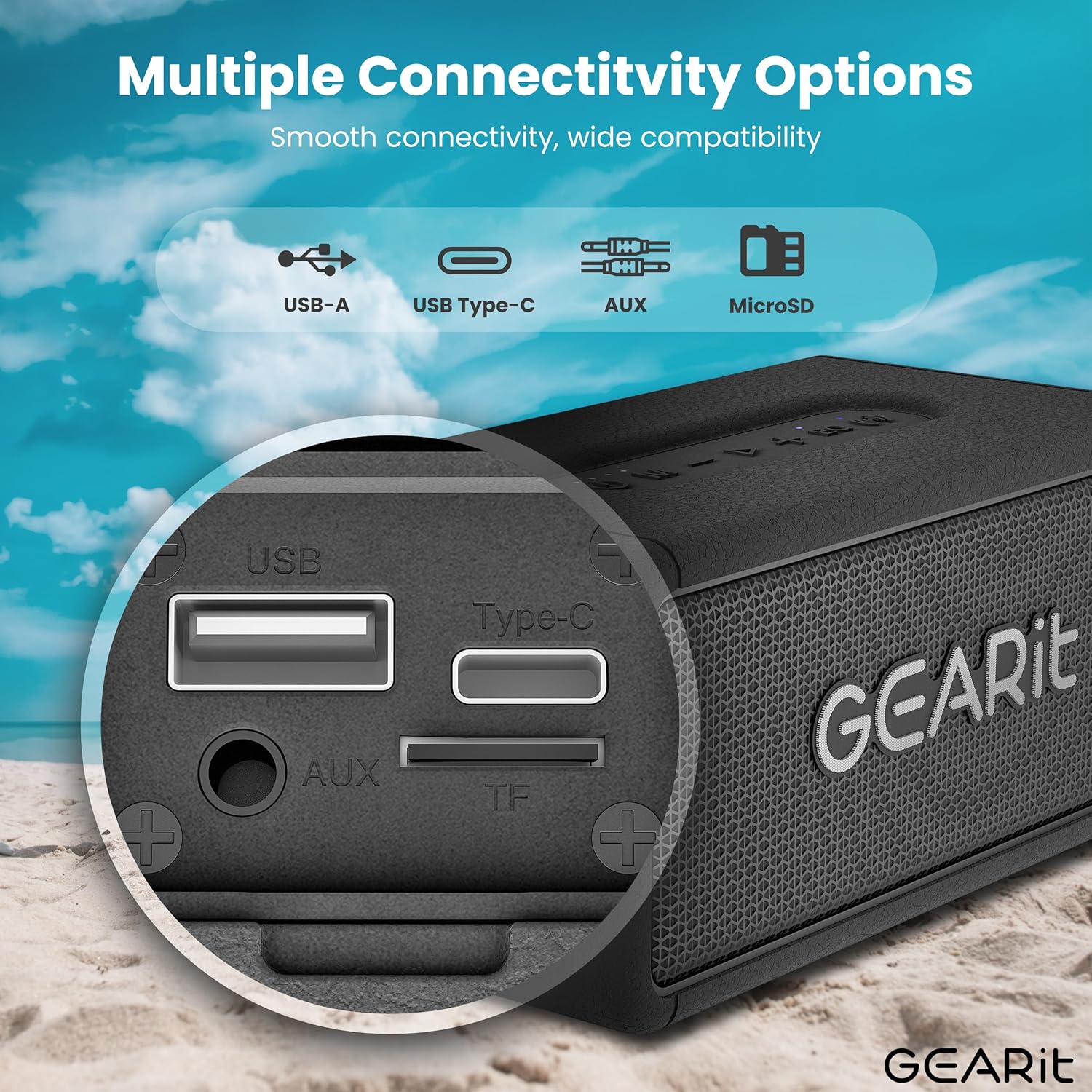
Image: A detailed view of the speaker's connectivity panel, showing the USB-A, USB Type-C, AUX, and MicroSD card slots.
- Power Button: Press and hold to power on/off. Short press to check battery status.
- Mode Button (M): Short press to switch between Bluetooth, AUX, and MicroSD modes.
- Volume Down (-): Short press to decrease volume. Long press for previous track.
- Play/Pause Button (>): Short press to play/pause music. Short press to answer/end calls. Long press to reject calls.
- Volume Up (+): Short press to increase volume. Long press for next track.
- EQ Button (EQ): Short press to cycle through EQ modes (Indoor/Outdoor).
- TWS Button (Wireless Icon): Short press to initiate TWS pairing.
- USB-C Port: For charging the speaker.
- AUX-in Port: For wired audio connection.
- MicroSD Card Slot (TF): For playing music directly from a MicroSD card.
- USB-A Port: For USB playback.
4. Setup
4.1 Charging the Speaker
- Connect the provided USB-C charging cable to the speaker's USB-C port.
- Connect the other end of the cable to a USB power adapter (not included) or a computer's USB port.
- The LED indicator will show charging status. A full charge typically takes approximately 3-4 hours.
4.2 Powering On/Off
- To power on, press and hold the Power button until you hear an audible prompt.
- To power off, press and hold the Power button again until the speaker shuts down.
4.3 Bluetooth Pairing
The speaker will automatically enter Bluetooth pairing mode when powered on for the first time or if no device is connected.
- Ensure the speaker is powered on and in Bluetooth mode (blue LED blinking).
- On your device (smartphone, tablet, etc.), enable Bluetooth and search for available devices.
- Select "GEARit Speaker" from the list.
- Once connected, the blue LED will remain solid, and you will hear a confirmation tone.

Image: An illustration of the Bluetooth 5.3 chip, emphasizing stable and fast connectivity.
4.4 True Wireless Stereo (TWS) Pairing
For an enhanced stereo experience, you can pair two GEARit Portable Bluetooth Wireless Speakers together.
- Ensure both speakers are powered on and not connected to any other Bluetooth device.
- On one speaker (this will be the primary speaker), short press the TWS button (wireless icon). It will emit a pairing tone.
- The primary speaker will automatically search for and connect to the secondary speaker.
- Once paired, both speakers will emit a confirmation tone, and the TWS indicator on both speakers will light up.
- Now, connect your device to the primary speaker via Bluetooth as described in section 4.3.

Image: Two GEARit speakers set up for True Wireless Stereo (TWS) pairing, providing an immersive audio experience for a group.
4.5 Other Connectivity Options
- AUX-in: Connect an audio device using the 3.5mm AUX cable to the AUX-in port. The speaker will automatically switch to AUX mode.
- MicroSD Card: Insert a MicroSD card with music files into the TF slot. The speaker will automatically switch to MicroSD mode and begin playback.
- USB Playback: Insert a USB drive with music files into the USB-A port. The speaker will automatically switch to USB mode and begin playback.

Image: The speaker's versatile input options, including USB-A, USB Type-C, MicroSD, and AUX, for broad compatibility.
5. Operating Instructions
5.1 Basic Playback
- Play/Pause: Short press the Play/Pause button.
- Volume Adjustment: Short press the Volume Up (+) or Volume Down (-) buttons.
- Next/Previous Track: Long press the Volume Up (+) for the next track or Volume Down (-) for the previous track.
5.2 EQ Modes
The speaker features two Equalizer (EQ) modes to optimize sound for different environments.
- Short press the EQ button to switch between Indoor and Outdoor modes.
- Indoor Mode: Provides a balanced sound profile suitable for enclosed spaces.
- Outdoor Mode: Enhances bass and volume for better projection in open environments.

Image: Visual representation of DSP Technology, highlighting 40W peak power and the two EQ modes (Indoor & Outdoor).
5.3 Hands-Free Calling
When connected via Bluetooth, you can manage phone calls directly from the speaker.
- Answer/End Call: Short press the Play/Pause button.
- Reject Call: Long press the Play/Pause button.
5.4 Water Resistance (IPX6)
The GEARit speaker is IPX6 water-resistant, meaning it can withstand powerful water jets. It is suitable for use outdoors, by the pool, or at the beach. Do not submerge the speaker in water. Ensure the port cover is securely closed before exposure to water.

Image: The GEARit speaker being splashed with water, showcasing its IPX6 water-resistant design.

Image: A graphic emphasizing the IPX6 water-resistant feature of the speaker, suitable for wet environments.
5.5 Battery Life
The speaker provides up to 20 hours of playtime on a single charge, depending on volume level and audio content.

Image: The GEARit speaker in a natural outdoor environment, symbolizing its long-lasting battery for extended use.
6. Maintenance
- Cleaning: Wipe the speaker with a soft, damp cloth. Do not use harsh chemicals or abrasive cleaners.
- Storage: Store the speaker in a cool, dry place away from direct sunlight and extreme temperatures.
- Battery Care: To prolong battery life, fully charge the speaker before long periods of inactivity. Avoid completely draining the battery frequently.
- Port Cover: Always ensure the port cover is securely closed to maintain water resistance.
7. Troubleshooting
- Speaker not turning on: Ensure the battery is charged. Connect the speaker to a power source using the USB-C cable.
- Cannot pair via Bluetooth:
- Ensure the speaker is in Bluetooth pairing mode (blue LED blinking).
- Make sure Bluetooth is enabled on your device and it is within range (up to 33 feet/10 meters).
- Forget "GEARit Speaker" from your device's Bluetooth list and try pairing again.
- If multiple Bluetooth devices are nearby, turn them off to avoid interference.
- No sound:
- Check the volume levels on both the speaker and your connected device.
- Ensure the correct input mode (Bluetooth, AUX, MicroSD, USB) is selected.
- If using AUX, ensure the cable is fully inserted and functional.
- TWS pairing failed:
- Ensure both speakers are not connected to any other Bluetooth device before initiating TWS pairing.
- Place speakers close to each other during pairing.
- Try resetting both speakers and repeating the TWS pairing process.
8. Specifications
| Feature | Specification |
|---|---|
| Model Name | Portable Bluetooth Speakers Wireless |
| Item Model Number | GI-SPKR-BT-IN-BK |
| Brand | GEARit |
| Speaker Type | Outdoor |
| Speaker Maximum Output Power | 40 Watts |
| Connectivity Technology | Auxiliary, Bluetooth |
| Wireless Communication Technology | Bluetooth |
| Audio Output Mode | Stereo |
| Control Method | App (referring to general Bluetooth control) |
| Waterproof Rating | IPX6 |
| Power Source | Battery Powered (1 Lithium Polymer battery required) |
| Item Weight | 1.61 Pounds |
| Product Dimensions | 2.95"D x 6.61"W x 3.39"H |
| Included Components | Power Cable (USB-C to USB-A), AUX Cable |

Image: The GEARit Portable Bluetooth Wireless Speaker, showcasing its compact and durable design.

Image: The GEARit speaker conveniently attached to a backpack, highlighting its portability for outdoor activities.
9. Official Product Video
Video: An official product video showcasing the GEARit Portable Bluetooth Speaker, highlighting its IPX6 water resistance and 40W loud audio output.
10. Warranty & Support
The GEARit Portable Bluetooth Wireless Speaker comes with a Limited Warranty. For detailed warranty information, please refer to the warranty card included in your package or visit the official GEARit website.
For technical support, troubleshooting assistance, or any product-related inquiries, please contact GEARit customer service through their official website or the contact information provided in your product documentation.
Online Support: Visit the GEARit Store on Amazon


