
Introduction
This user manual provides comprehensive instructions for the POOEKEN Automatic Pet Feeder (Model A90). This device is designed to provide convenient and reliable feeding for your cats and small dogs, featuring remote control via an app, customizable feeding schedules, and a large capacity. Please read this manual thoroughly before operating the device to ensure proper use and maintenance.
What's in the Box
- Automatic Cat Feeder Unit
- Food Bowl
- User Manual
- Desiccant Bag
- Power Adapter and Cable
Setup Guide
1. Unpacking and Assembly
Carefully remove all components from the packaging. The feeder consists of several detachable parts for easy assembly and cleaning.
- Remove the accessories and outer container from the box.
- Rotate the housing and insert the outer container into the base. Ensure the position is aligned.
- Place the desiccant bag into the designated slot on the lid to maintain food freshness.
- Wipe the container with a clean cloth before first use.
- Attach the food bowl to the base of the feeder.
- Connect the power supply.

Image: The POOEKEN Automatic Pet Feeder with its accompanying mobile application interface.

Image: Visual guide for assembling the pet feeder, showing components and connection points.
2. Power Supply
The feeder supports dual power supplies:
- Standard Power: Connect the provided 5V power adapter to a wall outlet.
- Backup Power: For uninterrupted operation during power outages, insert 3 x D batteries (not included) into the battery compartment at the base of the unit.

Image: Illustration of the dual power supply options, including AC adapter and battery backup.
3. App Installation and Wi-Fi Connection
The feeder requires a 2.4G Wi-Fi connection for app control. It does not support 5G Wi-Fi.
- Plug in the pet feeder and wait for the white light to flash quickly.
- Scan the QR code provided in the manual or on the product packaging to download the "POOEKEN" app from the App Store or Google Play.
- Open the POOEKEN app and click "Add Device".
- Connect to your 2.4G Wi-Fi network. Ensure your Wi-Fi password does not contain special characters (such as !, @, #, %, &).
- Once successfully added, click "Done".

Image: Detailed steps for app installation and Wi-Fi setup, including QR code for app download.
4. Filling the Food Container
The feeder has a 4L large capacity, suitable for dry pet food. It supports kibble with a maximum diameter of 12mm.
- Open the lid of the food container.
- Pour dry pet food into the container, ensuring it does not exceed the MAX fill line.
- Close the lid securely. The dual-locking mechanism helps prevent pets from accessing the food directly.

Image: The 4L food container being filled with dry pet food.

Image: The dual-locking mechanism of the feeder, designed to prevent pets from opening it.

Image: Guide to suitable kibble sizes and types for the feeder.
Operating Instructions
1. Remote Control via App
Once connected to Wi-Fi, you can control the feeder remotely using the POOEKEN app from anywhere with an internet connection.
- Customized Feeding Schedule: Use the "Feed Plan" feature in the app to set precise feeding times and portion sizes. You can schedule up to 10 meals per day with 1-12 portions per meal.
- Instant Feeding: Dispense food immediately by selecting the desired portion size and tapping the "Feed" button in the app.
- Feed Record: Review past feeding activities in the "Feed Record" section.
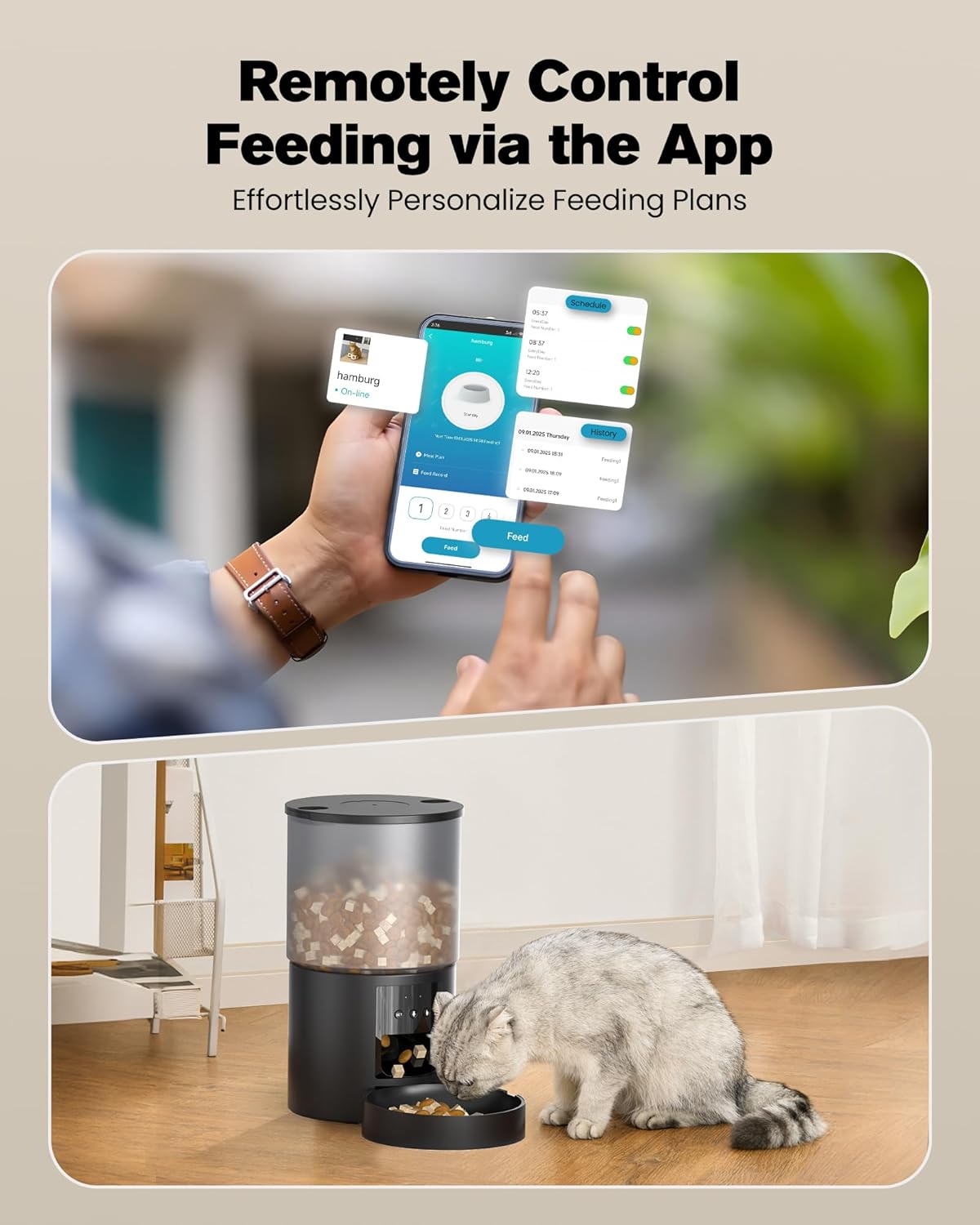
Image: The mobile app interface for remotely controlling feeding schedules and portions.

Image: The smart app control interface, highlighting customizable feeding times and amounts.

Image: Examples of feeding your pets anytime, anywhere using the smart feeder.
2. 10-Second Voice Recording
Record a 10-second voice message to call your pet for meals. This personalized message will play automatically at scheduled feeding times.

Image: A cat responding to the 10-second recorded meal call from the feeder.

Image: The 10-second recording feature prompting your pet to eat.
3. Anti-Clog Design
The feeder features a unique grain discharge structure and mechanical devices with a 45° steep slope design to ensure smooth food dispensing and prevent clogging.

Image: The anti-clog design of the feeder, featuring a 45° steep slope for smooth food flow.
4. Official Product Video
Video: An official product video demonstrating the features and operation of the POOEKEN Automatic Pet Feeder.
Maintenance
1. Cleaning Instructions
Regular cleaning ensures hygiene and extends the life of your pet feeder.
- The food container and bowl are detachable for easy cleaning.
- Wash the food container and bowl with mild soap and water. Rinse thoroughly and dry completely before reassembling.
- Important: The base of the unit cannot be soaked in water. Wipe it clean with a damp cloth only.
- Replace the desiccant bag periodically (e.g., every 1-2 months) to ensure food freshness.

Image: The detachable components of the feeder, indicating which parts can be cleaned.

Image: Illustration of the easy-to-clean detachable parts of the feeder.

Image: The desiccant bag compartment, designed to keep dry food fresh and crispy.
Troubleshooting
| Problem | Possible Cause | Solution |
|---|---|---|
| Feeder not dispensing food. |
|
|
| Cannot connect to Wi-Fi. |
|
|
| App control is unresponsive or delayed. |
|
|
| Voice recording not playing. |
|
|
Specifications
| Feature | Detail |
|---|---|
| Brand | POOEKEN |
| Model Number | A90 |
| Capacity | 4 Liters |
| Dimensions (L x W x H) | 10.16 x 10.16 x 25.4 cm |
| Item Weight | 500 g |
| Color | Black |
| Material | Acrylonitrile Butadiene Styrene |
| Power Supply | AC Adapter (included), 3 x D Batteries (not included) |
| Connectivity | 2.4G Wi-Fi (does not support 5G Wi-Fi) |
| Recommended Pet Type | Cat, Small Dog, Pet |
| Recommended Age | All life stages |
| Special Features | Feeding schedule, Smart App control, 10s voice recording, Anti-clog design, Dual power supply |
Warranty and Support
For warranty information and customer support, please refer to the documentation provided with your purchase or contact the manufacturer directly.

