
Introduction
Thank you for choosing the LANBON L8-HS Smart Touch Switch. This intelligent switch is designed to seamlessly integrate with your smart home ecosystem, offering convenient control over your lighting. It supports multiple smart home platforms including Apple HomeKit, Tuya, and Smart Living, and can be controlled via touch, app, or voice commands through Amazon Alexa and Google Assistant.
Important Safety Information
Please read all safety warnings and instructions carefully before installation and operation. Failure to follow these instructions may result in electric shock, fire, or serious injury.
- Neutral Wire Required: This device requires a neutral wire for proper operation. If your electrical box does not have a neutral wire, consult a qualified electrician.
- Voltage Compatibility: The switch is designed for 220V to 250V AC circuits. Do not connect to circuits outside this voltage range.
- 2.4 GHz Wi-Fi Only: For initial setup and operation, ensure your Wi-Fi network is 2.4 GHz. 5 GHz networks are not supported.
- Not Dimmable: This switch is designed for ON/OFF control of lights and is not compatible with dimmable fixtures.
- Professional Installation Recommended: If you are unsure about electrical wiring, please seek assistance from a qualified electrician.
- Indoor Use Only: This product is intended for indoor use in dry locations.

Key purchase notes and requirements for the LANBON L8-HS smart switch, including neutral wire necessity and 2.4GHz Wi-Fi compatibility.
Package Contents
Verify that all components are present in the package:
- LANBON L8-HS Smart Touch Switch
- Mounting Screws
- User Manual (this document)

Image showing the LANBON L8-HS Smart Touch Switch, mounting screws, and user manual included in the product package.
Specifications
| Feature | Detail |
|---|---|
| Model Number | L8-HS |
| Brand | LANBON |
| Operating Mode | ON-OFF |
| Current Rating | 10 A |
| Operating Voltage | 220 - 250 Volts |
| Contact Type | Normally Open |
| Switch Type | Wi-Fi Touch Switch |
| Material | Polycarbonate Glass |
| Item Dimensions (L x W x H) | 8.6 x 8.6 x 4.2 cm |
| Circuit Type | 1-way (Wireless 3-way setting via APP) |
| Connectivity | 2.4 GHz Wi-Fi |
| Integrated Systems | Apple HomeKit, Tuya, Smart Living |

Overview of different switch configurations (1-gang, 2-gang, 3-gang) and compatibility with Smart Living, Smart Life, and Apple HomeKit systems.
Installation Guide
Before beginning installation, ensure the main power supply to the circuit is turned OFF at the circuit breaker to prevent electric shock.
Wiring Diagram
The LANBON L8-HS switch requires a neutral wire. Please refer to the diagram below for correct wiring.

Detailed wiring diagram for the LANBON L8-HS smart switch, showing connections for Live (HOT), Neutral, and Load 1, 2, and 3.
Step-by-Step Installation
- Turn Off Power: Locate your circuit breaker and turn off the power to the light switch you are replacing. Verify power is off using a voltage tester.
- Remove Old Switch: Carefully remove the existing wall plate and unscrew the old switch from the wall box. Disconnect the wires.
- Identify Wires: Identify the Live (HOT), Neutral, and Load wires. The L8-HS supports 1, 2, or 3 load connections.
- Connect Wires: Connect the wires to the corresponding terminals on the LANBON L8-HS switch as shown in the wiring diagram:
- Connect the Live (HOT) wire to the 'L' terminal.
- Connect the Neutral wire to the 'N' terminal.
- Connect the Load wires (for your lights) to the 'L1', 'L2', 'L3' terminals as needed.
- Mount the Switch: Gently push the wired switch into the wall box and secure it with the provided screws.
- Attach Faceplate: Snap the faceplate onto the switch.
- Restore Power: Turn the power back on at the circuit breaker. The switch's screen should illuminate.
Setup and App Integration
The LANBON L8-HS smart switch supports Apple HomeKit, Tuya, and Smart Living systems. You will need to choose one system for integration.

The LANBON L8-HS smart switch is compatible with Apple HomeKit (iOS only), Smart Life (iOS/Android), and Smart Living (iOS/Android) applications.
Initial Setup via App
- Download the App: Download your preferred smart home app (Apple Home, Tuya Smart, or Smart Life) from the App Store or Google Play Store.
- Register/Log In: Open the app and register a new account or log in to your existing account.
- Add Device: Follow the in-app instructions to add a new device. Typically, this involves selecting "Add Device" or the "+" icon, then choosing "Switch" or "Lighting".
- Connect to Wi-Fi: The app will guide you to connect the switch to your 2.4 GHz Wi-Fi network. Ensure your phone is also connected to the same 2.4 GHz network during setup.
- Pairing Mode: The switch may need to be put into pairing mode. Refer to the on-screen instructions on the switch or in the app for specific steps (e.g., long-pressing a button).
- Device Naming: Once connected, you can name your switch and assign it to a room for easier management.
Customizing the LCD Touch Panel
The L8-HS features an LCD touch panel that allows for customization of icons and names for each switch gang. You can also adjust screen brightness and button colors via the app or directly on the switch.
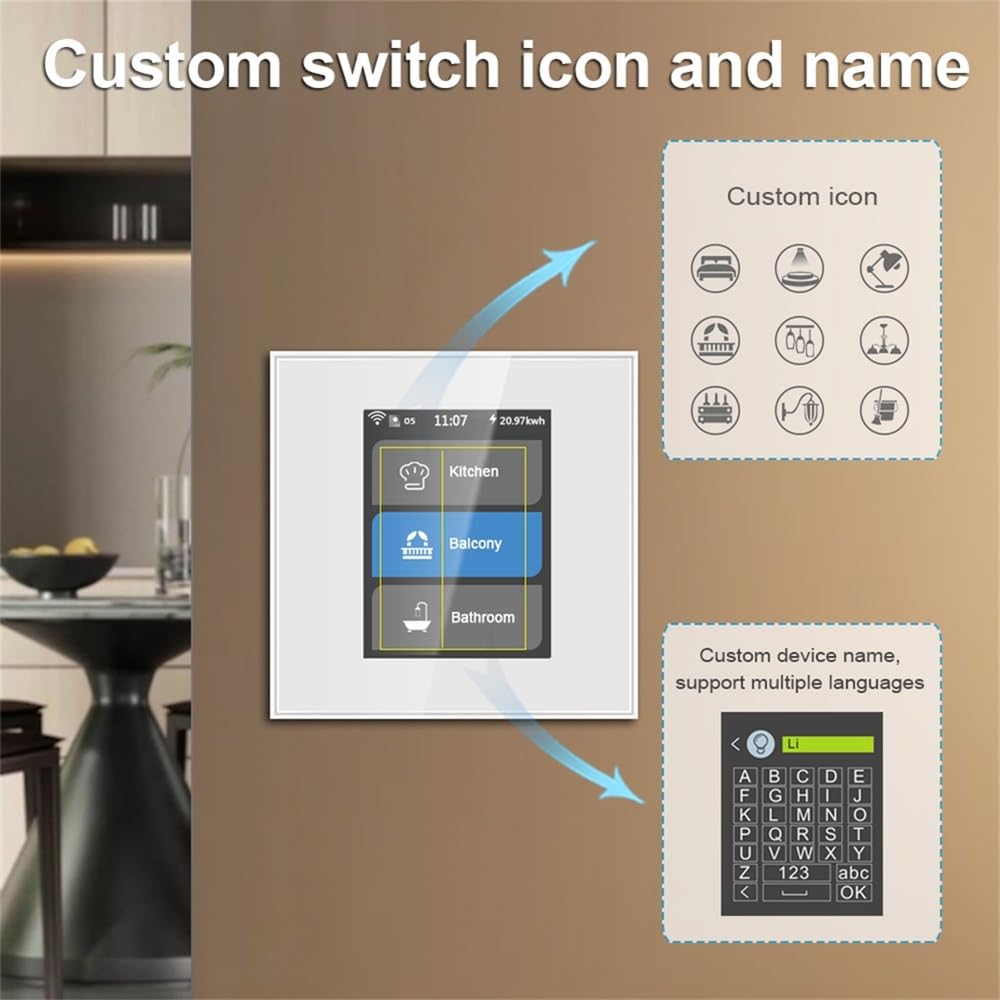
The LCD touch panel allows users to customize switch icons and names for personalized control.
Operating Instructions
The LANBON L8-HS smart switch offers multiple control methods:
1. Touch Control
Directly tap the corresponding icon on the LCD touch panel to turn the connected light ON or OFF.
2. App Control
Use the integrated smart home app (HomeKit, Tuya Smart, or Smart Life) on your smartphone or tablet to control the switch from anywhere with an internet connection.
- Remote ON/OFF: Toggle lights on or off remotely.
- Scheduling & Timers: Set schedules for lights to automatically turn on or off at specific times. Create countdown timers.
- Routines/Scenes: Create custom routines or scenes to control multiple devices simultaneously (e.g., "Good Morning" scene to turn on bedroom lights).
3. Voice Control (Amazon Alexa & Google Assistant)
Once integrated with your chosen smart home system (Tuya or Smart Life are recommended for Alexa/Google Assistant), you can link your account to Amazon Alexa or Google Assistant for voice control.
- Enable Skill/Service: In the Alexa or Google Home app, search for and enable the skill/service corresponding to your chosen smart home app (e.g., "Tuya Smart" or "Smart Life").
- Link Accounts: Log in with your smart home app credentials to link the accounts.
- Discover Devices: Ask Alexa or Google Assistant to "Discover devices" or manually add them in the app.
- Voice Commands: Use commands such as:
- "Alexa, turn on [Light Name]"
- "Hey Google, turn off [Light Name]"
- "Alexa, set [Light Name] to 50%" (Note: This switch is not dimmable, so percentage commands may not function as expected for brightness, but can be used for scenes if supported by the app).

The LANBON L8-HS smart switch supports multiple control methods including touch, app, voice, and scheduled timers.
Multi-way Control (Wireless)
The L8-HS supports wireless 3-way setting via the app, allowing for multi-location control of a single light fixture without complex wiring.

Diagram illustrating 2-way and multi-way wireless control configurations for the LANBON L8-HS smart switch.
Maintenance
- Cleaning: Wipe the touch panel with a soft, dry cloth. Do not use abrasive cleaners or solvents.
- Firmware Updates: Periodically check your smart home app for available firmware updates for the switch to ensure optimal performance and security.
- Network Stability: Ensure your 2.4 GHz Wi-Fi network is stable and strong in the area where the switch is installed for reliable operation.
Troubleshooting
| Problem | Possible Cause / Solution |
|---|---|
| Switch does not power on. |
|
| Cannot connect to Wi-Fi. |
|
| Voice control not working. |
|
| Lights flicker or do not turn off completely. |
|
Warranty and Support
For warranty information and technical support, please contact LANBON customer service or visit the official LANBON website. Details are typically provided on the product packaging or within the smart home application's help section.
Manufacturer: Shenzhen LANBON Hi-Tech Co., Ltd.
Date First Available: November 12, 2024


