
Introduction
Thank you for choosing the Genérico BY-16 Wireless Earbuds. These earbuds are designed to provide a high-quality audio experience with advanced features such as Active Noise Cancellation (ANC), Spatial Audio, and an intuitive LCD touch screen. This manual will guide you through the setup, operation, and maintenance of your new earbuds to ensure optimal performance.
Setup
1. Initial Charging
Before first use, fully charge the earbuds and the charging case. Connect the charging case to a power source using the provided cable. The LCD screen on the case will indicate the charging status. A full charge typically takes approximately 1.5 hours.
2. Pairing with Your Device
- Ensure the earbuds are in the charging case and the case has sufficient power.
- Open the charging case lid. The earbuds will automatically enter pairing mode.
- On your smartphone or other Bluetooth-enabled device, go to the Bluetooth settings.
- Search for available devices and select "BY-16" from the list.
- Once connected, the earbuds will indicate successful pairing, and the device will show "Connected."
Operating Instructions
1. Touch Controls
The BY-16 earbuds feature sensitive touch controls for various functions. The charging case also has a touch screen for advanced settings and control.

Figure 1: Earbud and Charging Case Touch Interaction. This image illustrates how to use the touch-sensitive areas on both the earbuds and the charging case for various controls, including answering or rejecting calls.
2. Music Playback Control
Control your music directly from the earbuds or the charging case screen.
- Play/Pause: Single tap on either earbud or use the touch screen.
- Next Track: Double tap the right earbud or swipe on the touch screen.
- Previous Track: Double tap the left earbud or swipe on the touch screen.
- Volume Control: Adjust volume via the touch screen interface.
- Lyrics Sync: The touch screen supports displaying synchronized lyrics for compatible content.
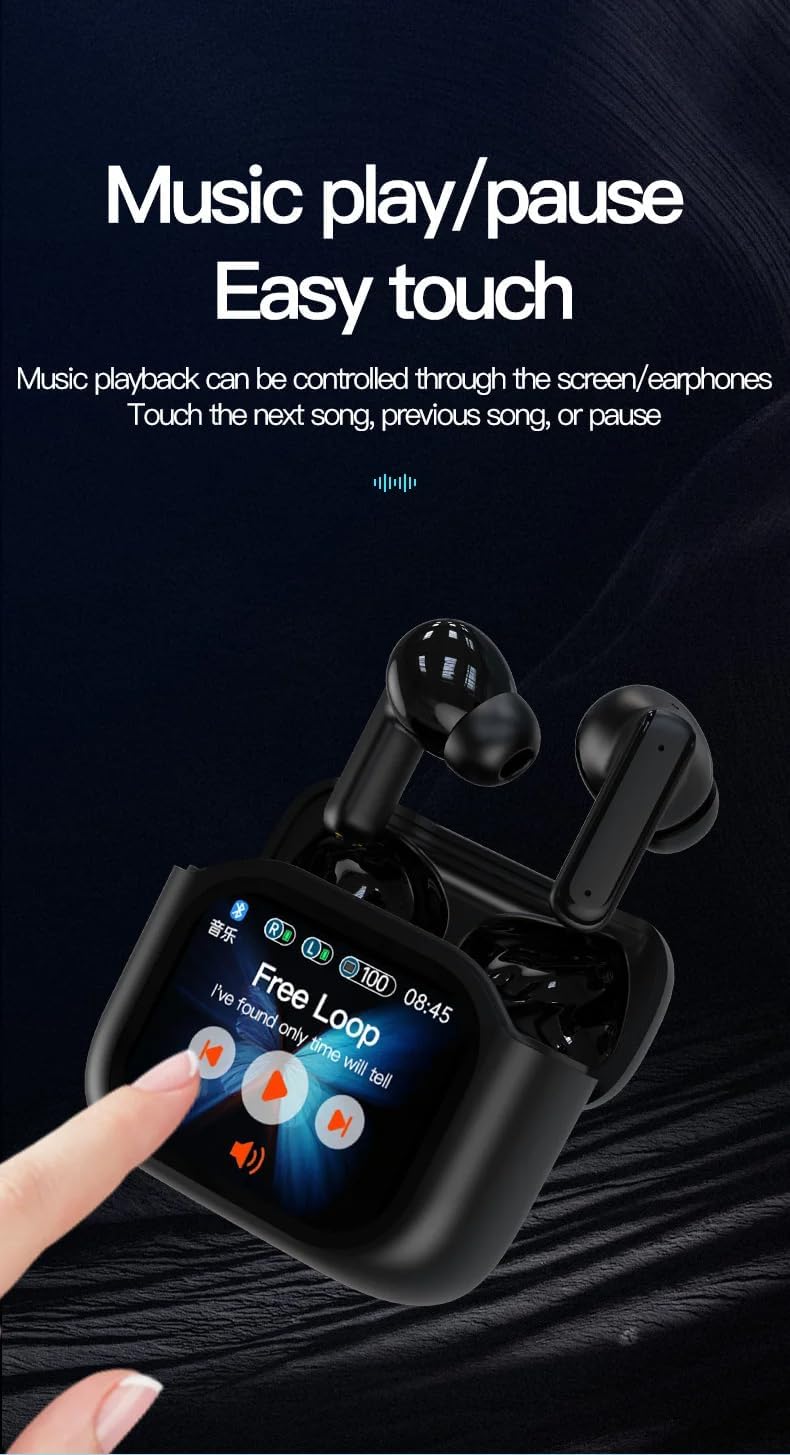
Figure 2: Music Playback Control on Touch Screen. This image demonstrates how to control music, including play/pause and track selection, directly from the charging case's LCD touch screen.
3. Active Noise Cancellation (ANC) & Environmental Noise Cancellation (ENC)
The BY-16 earbuds feature both ANC for reducing ambient noise and ENC for clear call quality.
- Activating/Deactivating ANC: Use the touch screen interface to toggle Active Noise Cancellation on or off.
- Transparency Mode: Select this mode via the touch screen to allow ambient sounds to pass through, enhancing awareness of your surroundings.
4. Spatial Audio Function
Experience immersive audio with Spatial Audio, offering different modes for various activities:
- Observation Mode: For general listening with enhanced environmental awareness.
- Music Mode: Optimized for a rich musical experience.
- Game Mode: Provides low-latency audio for an immersive gaming experience.
Select your preferred Spatial Audio mode through the charging case touch screen.
5. Adaptive Equalizer (EQ)
Customize your sound profile with the adaptive equalizer. You can activate or deactivate the EQ function and choose from 7 specific sound effects:
- POP
- ROCK
- CLASSIC
- JAZZ
- VOCAL
- DJ
- DISCO
These options are accessible via the display screen buttons.
6. Display Interface and Settings
The charging case features an upgraded touch UI for intelligent control.

Figure 3: Upgraded Touch User Interface. This image displays the various functions and settings available on the charging case's LCD touch screen, including camera control, power options, language selection, equalizer presets, and the 'Find My Earbuds' feature.
- Control Interface Styles: Choose from three control modes: Default (swipe left/right), Kaleidoscope, and Gear. Select and click to switch between them.
- Lock Screen: Configure the display lock screen settings.
- Language Options: Select your preferred language for the interface.
- Shutdown/Restart: Power off or restart the device directly from the settings.
- Factory Reset: Reset the earbuds to their original factory settings.
- Touch to Wake: Enable or disable the touch screen wake-up function.
7. Call Functions
Manage calls directly from your earbuds or the charging case screen.
- Answering/Ending Calls: Tap the earbud or use the touch screen interface.
- Rejecting Calls: Press and hold the earbud or use the touch screen interface.
- Call Interface: The touch screen displays an interface during incoming and active calls.
8. Find My Earbuds
If you misplace an earbud, use the "Find My Earbuds" function on the charging case screen to locate the left (L) or right (R) earbud.
9. Camera Control
Control your phone's camera remotely using the charging case screen.

Figure 4: Remote Camera Control. This image demonstrates how the charging case's touch screen can be used to remotely control a smartphone camera, displaying a camera interface on the case.
Access the camera interface on the touch screen to trigger your phone's camera, making it easier to take photos.
Maintenance
1. Cleaning
Regularly clean your earbuds and charging case with a soft, dry, lint-free cloth. Avoid using abrasive materials or harsh chemicals. Do not allow moisture into any openings.
2. Water Resistance
The BY-16 earbuds are rated IPX-6 waterproof, meaning they are resistant to high-pressure water jets. They are suitable for use during workouts or in light rain. However, they are not designed for swimming or submersion in water. Ensure the earbuds are dry before placing them back in the charging case.
3. Battery Care
To prolong battery life, avoid fully discharging the earbuds and charging case frequently. Store them in a cool, dry place when not in use. The earbuds offer approximately 6 hours of continuous playback, and the charging case provides additional charges, extending total usage time. Standby time is up to 120 hours.
Troubleshooting
1. Earbuds Not Pairing
- Ensure both earbuds are in the charging case and the lid is open.
- Check that Bluetooth is enabled on your device.
- Forget/delete "BY-16" from your device's Bluetooth list and try pairing again.
- Ensure the charging case and earbuds have sufficient battery.
2. No Sound or Intermittent Audio
- Check the volume level on both your device and the earbuds.
- Ensure the earbuds are properly connected to your device.
- Move closer to your device to avoid interference.
- Try restarting your device and the earbuds.
3. Charging Issues
- Verify that the charging cable is securely connected to both the case and the power source.
- Try using a different charging cable or power adapter.
- Ensure the charging contacts on the earbuds and inside the case are clean and free of debris.
Specifications

Figure 5: Product Parameters. This image provides a detailed overview of the technical specifications for the BY-16 Wireless Earbuds.
| Feature | Specification |
|---|---|
| Model Name | BY-16 |
| Connectivity Technology | Bluetooth 5.4, Wireless |
| Material | Acrylonitrile Butadiene Styrene (ABS) |
| Water Resistance Level | IPX-6 (Resistant to high-pressure water jets) |
| Charging Time | 1.5 Hours |
| Continuous Playtime | 6 Hours |
| Standby Time | 120 Hours (5 days) |
| Charging Case Battery Capacity | 320 mAh |
| Earbud Battery Capacity | 30 mAh (each earbud) |
| Transmission Distance | >10 Meters |
| Chip Version | V5.3 |
| Speaker Size | φ10mm |
| Frequency Response | 20Hz-20kHz |
| Control Method | Touch |
| Compatible Devices | iOS Devices, Android Devices, Computers |
Warranty Information
Please refer to the warranty card included in your product packaging for detailed warranty terms and conditions. Typically, products are covered against manufacturing defects for a specified period from the date of purchase. Keep your proof of purchase for any warranty claims.
Customer Support
If you encounter any issues not covered in this manual or require further assistance, please contact your retailer or the manufacturer's customer support. Contact information can usually be found on the product packaging or the official brand website.