
Introduction
The BoxWave miniSync Retractable Cable provides a convenient and tangle-free solution for charging and synchronizing your USB Type-C compatible devices. Featuring a retractable design, this cable offers multiple pre-set lengths for optimal use and portability. It supports high-speed USB 2.0 data transfers and efficient charging.
Setup
To set up your miniSync Retractable Cable, follow these steps:
- Unpacking: Carefully remove the miniSync cable from its packaging.
- Extending the Cable: To extend the cable, gently pull both ends simultaneously until you reach your desired length. The cable features 5 pre-set lengths. Do not pull only one end or from the middle, as this can damage the retraction mechanism.
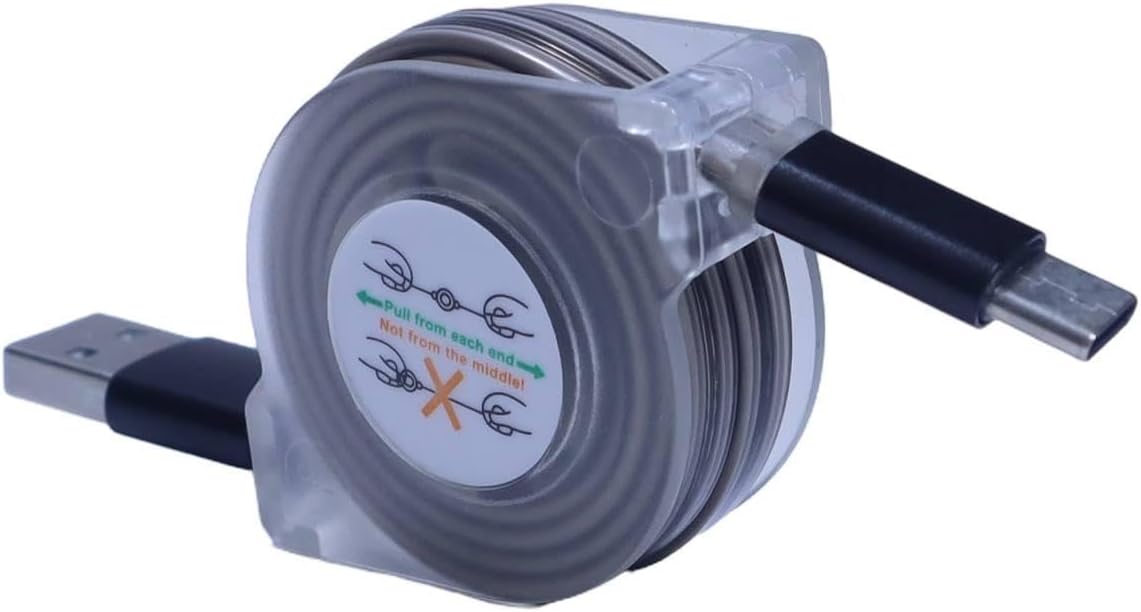
Image: The BoxWave miniSync Retractable Cable in its compact form, displaying the USB-A and USB Type-C connectors.

Image: A user demonstrating the correct method to extend the miniSync cable by pulling both ends evenly.
Operating Instructions
The miniSync cable is designed for both charging and data synchronization.
- Connecting for Charging: Plug the USB-A end of the miniSync cable into a standard USB power adapter, computer USB port, or power bank. Then, plug the USB Type-C end into your compatible device (e.g., PATPET U11 Anti-Bark Ultrasonic Repeller Box, smartphone, tablet). Ensure a secure connection for optimal charging.
- Connecting for Data Synchronization: Plug the USB-A end into a USB port on your computer. Plug the USB Type-C end into your compatible device. Your device should then be recognized by your computer, allowing for high-speed USB 2.0 data transfers.
- Adjusting Length: The cable can be adjusted to 5 pre-set lengths, up to 37 inches (93 cm), by gently pulling both ends. This allows for comfortable use in various scenarios.

Image: The miniSync cable connected to a smartphone for charging and a laptop for data transfer, demonstrating its versatility.

Image: A visual representation of the five adjustable lengths of the miniSync cable, ranging from 4 inches to 37 inches.
Maintenance
To ensure the longevity and proper function of your BoxWave miniSync cable, please observe the following maintenance guidelines:
- Proper Retraction: When retracting the cable, gently pull both ends slightly further out, then release them slowly. This allows the internal mechanism to retract the cable smoothly and prevents tangles or damage. Avoid letting the cable snap back quickly.
- Storage: Store the cable in its fully retracted state when not in use to protect the cable and its mechanism. Its compact size makes it ideal for storage in pockets or bags.
- Cleaning: Use a soft, dry cloth to wipe the cable and connectors if they become dirty. Avoid using harsh chemicals or abrasive materials.
- Avoid Stress: Do not bend the cable sharply at the connectors. The cable features reinforced strain relief designed to prevent kinks and splitting, but excessive force can still cause damage.

Image: A close-up view highlighting the reinforced strain relief at the connector of the miniSync cable, designed for durability.
Troubleshooting
If you encounter issues with your miniSync cable, consider the following:
- Device Not Charging:
- Ensure both ends of the cable are securely plugged into the power source and your device.
- Try using a different power adapter or USB port.
- Verify that your device's charging port is clean and free of debris.
- Data Transfer Failure:
- Confirm that the cable is firmly connected to both your computer and device.
- Try a different USB port on your computer.
- Ensure your device's settings allow for data transfer (e.g., 'File Transfer' mode on Android devices).
- Retraction Mechanism Issues:
- If the cable does not retract smoothly, gently pull both ends out to their maximum length, then slowly release them to allow the mechanism to reset.
- Avoid forcing the retraction, as this can cause permanent damage.
Specifications
| Model Name | miniSync |
| Connector Type | USB-A to USB Type-C |
| Cable Length (Retracted) | 4 inches (10 cm) |
| Cable Length (Extended) | Up to 37 inches (93 cm) |
| Adjustable Lengths | 5 pre-set lengths |
| Data Transfer Speed | High-speed USB 2.0 (up to 480 Mbps) |
| Charging Output | Up to 15W (Standard USB Charging) |
| Material | Durable high-quality polycarbonate, heavy-duty ribbon-style cable |
| Item Weight | 1.2 ounces |
| Manufacturer | BoxWave |

Image: A close-up of the USB Type-C connector, illustrating its fast charging capability up to 15W.
Warranty and Support
For warranty information or technical support regarding your BoxWave miniSync Retractable Cable, please contact BoxWave Corporation directly. Refer to the product packaging or the official BoxWave website for the most current contact details and warranty terms.