
PRISMXR Carina D1S Lite
PRISMXR Carina D1S Lite Magnetic Charging Dock User Manual
Model: Carina D1S Lite | Compatible with Meta Quest 3S
1. Introduction
Thank you for choosing the PRISMXR Carina D1S Lite Magnetic Charging Dock. This product is designed to provide a convenient and efficient charging solution for your Meta Quest 3S headset and controllers. Featuring magnetic wireless charging, it ensures your devices are always ready for use while keeping your space organized.

Image 1.1: The PRISMXR Carina D1S Lite Magnetic Charging Dock with Meta Quest 3S headset and controllers.
2. What's in the Box
Please verify that all the following components are included in your package:
- PRISMXR Carina D1S Lite Charging Dock
- 2 x Rechargeable Batteries (for controllers)
- 2 x Controller Battery Covers
- 1 x USB-C to USB-C Charging Cable
- 1 x USB-C Magnetic Charging Adapter (for headset)
- 1 x Headset Support Stand
- 1 x Quick Start Guide
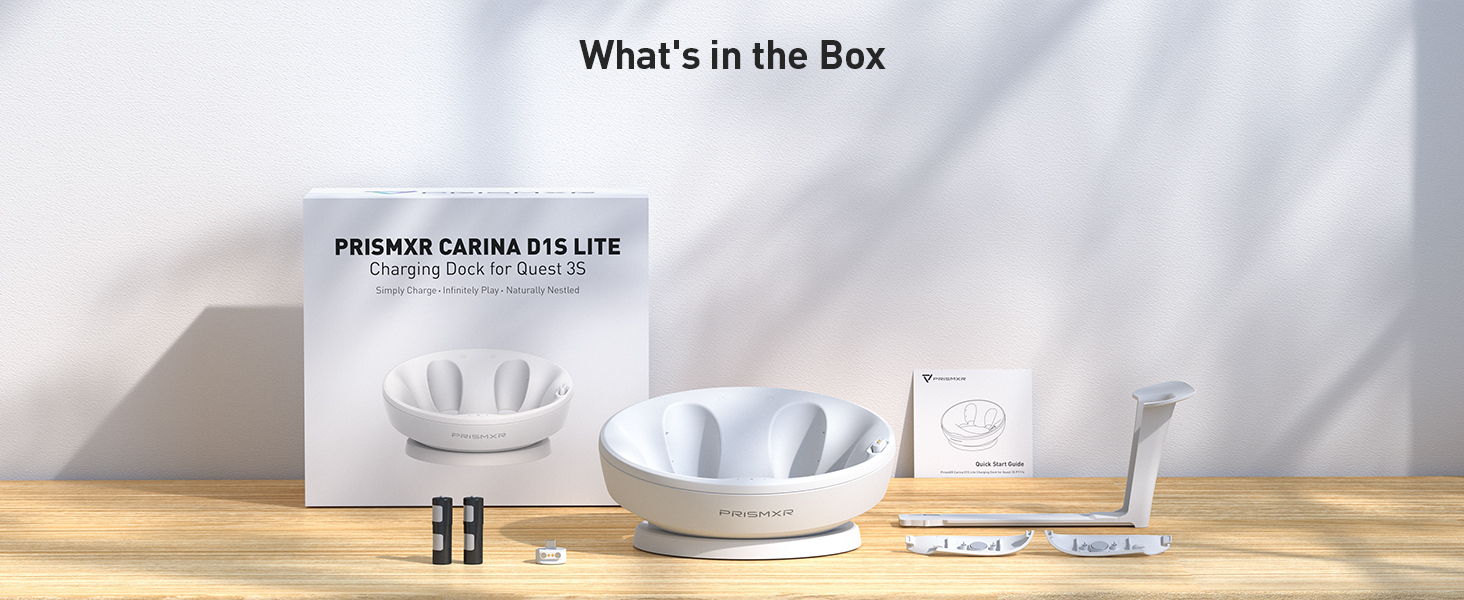
Image 2.1: All components included in the PRISMXR Carina D1S Lite package.
3. Setup Instructions
3.1 Headset Setup
- Insert the provided USB-C Magnetic Charging Adapter into the USB-C port of your Meta Quest 3S headset. Ensure it is fully seated.
- Place the headset onto the charging dock, aligning the magnetic adapter with the charging pins on the dock. The headset should snap into place, and a charging indicator light on the dock will illuminate.

Image 3.1: Magnetic connection for the Meta Quest 3S headset on the dock.
3.2 Controller Setup
- Remove the original battery covers from your Meta Quest 3S controllers.
- Insert the provided rechargeable batteries into each controller, ensuring correct polarity.
- Attach the new controller battery covers (included in the package) to your controllers. These covers are designed to enable magnetic charging.
- Place each controller into its designated slot on the charging dock. The magnetic connection will align the controllers, and charging indicator lights will illuminate.

Image 3.2: Installation of rechargeable batteries and specialized covers for controllers.

Image 3.3: Controllers placed on the dock for streamlined charging.
3.3 Power Connection
Connect the USB-C charging cable to the port on the back of the PRISMXR Carina D1S Lite Charging Dock. Connect the other end of the cable to a compatible USB power adapter (not included). It is recommended to use the original Meta Quest 3S charger for optimal performance.
4. Operating Instructions
4.1 Charging Your Devices
Once the dock is powered and your devices are correctly placed, the LED indicators on the dock will show the charging status:
- Red Light: Device is charging.
- Green Light: Device is fully charged.
The Meta Quest 3S headset typically charges from 0% to 100% in approximately 2 hours. The controllers typically charge from 0% to 100% in approximately 4.5 hours.

Image 4.1: Approximate charging times for the headset and controllers.
After completing a full charge, the PRISMXR dock will maintain the Quest 3S controllers below a 100% charge to maximize battery life and health.
4.2 Compatibility with Accessories
The Carina D1S Lite charging dock is designed to be broadly compatible with various Meta Quest 3S accessories, including most Elite Straps, Halo Straps, and Facial Covers. It also supports PrismXR Controller Grips and Shell Covers.

Image 4.2: Compatibility with different Meta Quest 3S accessories.
4.3 Product Overview Video
Video 4.1: An official overview of the PRISMXR Carina D1S Lite Charging Dock for Meta Quest 3S, demonstrating its features and use.
5. Maintenance
- Cleaning: Use a soft, dry cloth to wipe the surface of the charging dock. Avoid using abrasive cleaners or solvents that may damage the finish.
- Storage: When not in use, store the charging dock in a cool, dry place away from direct sunlight and extreme temperatures.
- Magnetic Contacts: Ensure the magnetic charging contacts on both the dock and the devices are clean and free from dust or debris to maintain optimal charging performance.
6. Troubleshooting
- Q: The headset or controllers are not charging.
-
- Ensure the USB-C cable is securely connected to both the charging dock and a working power adapter.
- Verify that the power adapter is plugged into a live electrical outlet.
- Check if the magnetic charging adapter is fully inserted into the Meta Quest 3S headset's USB-C port.
- For controllers, confirm that the rechargeable batteries are correctly inserted and the specialized battery covers are properly attached and aligned with the dock's charging pins.
- Clean the magnetic charging contacts on the dock and devices with a dry cloth to remove any obstructions.
- Q: One of the controller charging indicators does not illuminate.
-
- Try swapping the rechargeable batteries between controllers to determine if the issue is with the battery or the dock's contact.
- Ensure the controller is seated correctly and the battery cover's magnetic contacts are aligned with the dock's pins.
- If the controller still charges but the light does not work, it may indicate a minor LED issue. The controller should still charge correctly.
- Q: The dock feels warm during charging.
-
It is normal for charging devices to generate some heat. If the dock becomes excessively hot or emits unusual odors, disconnect it immediately and contact customer support.
7. Specifications
| Feature | Detail |
|---|---|
| Brand | PRISMXR |
| Model Number | Carina D1S Lite (P1114) |
| Compatible Devices | Meta Quest 3S, Quest 3S Controllers |
| Connector Type | USB Type C |
| Special Feature | Wireless Charging |
| Power Source | Corded Electric |
| Output Voltage | 5V DC |
| Output Current | 1.8 A |
| Amperage | 0.35 A |
| Material | Plastic |
| Item Weight | 1.14 kg |
| UPC | 783970544322 |
7.1 Carina D1S vs. Carina D1S Lite Comparison
The Carina D1S Lite model differs from the standard Carina D1S in a few key aspects:

Image 7.1: Feature comparison between Carina D1S and Carina D1S Lite.
- Battery Capacity: Carina D1S Lite includes 1200mAh rechargeable batteries, while Carina D1S includes 1800mAh batteries.
- Passthrough: The Carina D1S Lite does not feature a USB passthrough port, unlike the Carina D1S.
- Charger: The Carina D1S Lite does not include a dedicated power adapter; it is recommended to use the original Meta charger. The Carina D1S includes a charger.
8. Warranty Information
The PRISMXR Carina D1S Lite Magnetic Charging Dock comes with an 18-month warranty from the date of purchase. This warranty covers manufacturing defects and issues arising from normal use. Please retain your proof of purchase for warranty claims. The warranty does not cover damage caused by misuse, accidents, unauthorized modifications, or improper installation.
9. Customer Support
If you encounter any issues or have questions regarding your PRISMXR Carina D1S Lite Magnetic Charging Dock, please contact PRISMXR customer support through the retailer's platform or the official PRISMXR website. Our support team is available to assist you with troubleshooting, warranty claims, and general inquiries.
Related documentsCarina D1S Lite

Ask a question about this manual
Ask about setup, troubleshooting, compatibility, parts, safety, or missing instructions. Manuals+ will review the question and use this page’s manual context to help answer it.