
Introduction
The SPC Polaris is a 4G mobile phone designed for seniors, combining ease of use with advanced safety features. It features large, clearly separated keys, an intuitive menu, and a dual-screen display for important information. This device is compatible with the SPC Care App, allowing remote management and real-time monitoring. Key functionalities include an emergency call button, GPS tracking, and hearing aid compatibility.
This manual provides comprehensive instructions for setting up, operating, maintaining, and troubleshooting your SPC Polaris phone. Please read it carefully to ensure proper use and to maximize the benefits of its features.
Package Contents
- SPC Polaris Mobile Phone
- USB Cable
- Quick Start Guide
- Charging Station
- Battery (1 C-type, included)
Setup
1. Battery Installation
The SPC Polaris phone includes one C-type battery. To install, remove the back cover of the phone. Align the battery contacts with the phone's terminals and gently press the battery into place. Replace the back cover securely.
2. SIM Card Installation
The phone supports a single standard-sized SIM card. Locate the SIM card slot, usually beneath the battery or on the side. Insert your standard SIM card into the designated slot, ensuring it is correctly oriented as indicated by the diagram near the slot.
3. Initial Charging
Before first use, fully charge the phone. Connect the USB cable to the charging station and then to a power source. Place the phone in the charging station. The external screen will indicate charging status. A full charge typically takes several hours.
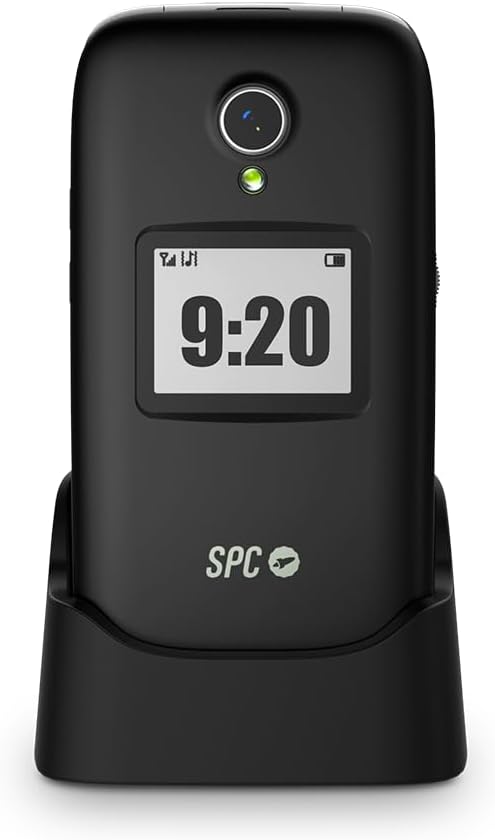
Image: The SPC Polaris phone placed in its dedicated charging station. The station ensures the phone is always visible and ready for use.
4. Powering On/Off
To power on, press and hold the power button (usually located on the side or top) until the screen illuminates. To power off, press and hold the power button, then select "Power Off" from the options on the screen.
Operating Instructions
Basic Navigation
The SPC Polaris features large, well-separated keys and an intuitive menu system with clear icons. Use the directional keys and the central "OK" button to navigate through menus and select options.

Image: The SPC Polaris phone opened, displaying its large, easy-to-read keypad and the main internal screen with time and menu options.

Image: An angled view of the SPC Polaris phone in its open position, showcasing the keypad and internal screen from a different perspective.
Making and Receiving Calls
- To Dial: Enter the phone number using the keypad and press the green call button.
- To Answer: Open the phone's flip or press the green call button when an incoming call is received.
- To End Call: Close the phone's flip or press the red end call button.
- Speed Dial: The M1, M2, M3 buttons can be configured for speed dialing frequently contacted numbers. Refer to the SPC Care App section for configuration details.
Dual Screen Display
The phone features a 2.8-inch internal screen and a 1.4-inch external screen. The external screen displays essential information such as time, date, battery level, and incoming call notifications without needing to open the phone.

Image: The SPC Polaris phone in its closed position, showing the external display which indicates the current time and battery status.
Hearing Aid Compatibility
The SPC Polaris is compatible with M3/T3 hearing aids, ensuring clear and interference-free calls for users with hearing assistance devices.
SPC Care App Features
The SPC Care App (available for iOS and Android) is a revolutionary tool that allows designated caregivers to remotely manage and monitor the SPC Polaris phone. This requires the phone to have a mini SIM card with mobile data enabled.
Remote Management
- Parameter Adjustment: Remotely adjust phone settings such as volume, screen brightness, and enable/disable functions like Bluetooth or mobile data.
- Contact Management: Add, edit, or delete contacts, including direct dial contacts for the M1, M2, M3 buttons.
- Spam Call Blocking: Configure the phone to block unwanted spam calls.
Real-time Monitoring and Alerts
- GPS Tracking: Monitor the phone's real-time location for enhanced safety.
- Battery Alerts: Receive automatic notifications when the phone's battery level drops below 15%.
- Missed Call Alerts: Get notified of missed calls.
- Inactivity Alerts: Receive alerts if the phone detects prolonged inactivity, which can indicate a potential issue.
- Emergency Alerts: Receive immediate notifications when the emergency button is activated.
Safety Features
Emergency Call Button (SOS)
The SPC Polaris is equipped with a dedicated SOS emergency button on the back of the phone. In an emergency:
- Press and hold the SOS button for several seconds.
- The phone will activate an acoustic alarm.
- It will automatically send an SMS message with the user's exact GPS location to pre-configured emergency contacts.
- The phone will then initiate up to 15 automatic calls to these pre-configured contacts until one is answered.
All emergency contacts and settings for the SOS button can be fully configured via the SPC Care App.

Image: The rear view of the SPC Polaris phone, highlighting the prominent SOS emergency button and speaker grille.
GPS Geopositioning
The phone integrates GPS functionality, allowing for accurate geopositioning. This feature is crucial for the emergency call function and for real-time tracking via the SPC Care App, providing peace of mind for caregivers.
Maintenance
- Charging: Always use the provided charging station and USB cable. Ensure the phone is properly seated in the station for efficient charging.
- Battery Care: Avoid fully discharging the battery frequently. The SPC Care App will alert you when the battery drops below 15%, prompting you to recharge.
- Cleaning: Wipe the phone with a soft, dry cloth. Do not use liquid cleaners or abrasive materials.
- Water Resistance: The SPC Polaris phone is NOT water-resistant. Avoid exposure to water, moisture, or high humidity to prevent damage.
- Storage: Store the phone in a cool, dry place away from direct sunlight and extreme temperatures.
Troubleshooting
| Problem | Possible Cause | Solution |
|---|---|---|
| Phone does not power on. | Low or no battery charge. | Connect the phone to the charging station and allow it to charge for at least 30 minutes before attempting to power on. |
| Cannot make or receive calls. | No SIM card, incorrect SIM installation, or no network signal. | Ensure the SIM card is correctly inserted and activated. Check for network signal strength. Contact your mobile operator if issues persist. |
| SPC Care App location tracking is inconsistent. | Temporary software glitch or network issue. | Restart the mobile phone. Ensure the phone has an active mobile data connection for the app to function optimally. |
| Emergency button not working. | Incorrect configuration or no emergency contacts set. | Verify emergency contacts and settings through the SPC Care App. Ensure the phone has network coverage. |
| Audio quality issues during calls. | Low signal, speaker/microphone obstruction, or hearing aid interference. | Move to an area with better signal. Ensure speakers and microphone are clear. Adjust hearing aid settings if applicable. |
Specifications
- Model Name: Polaris
- Model Number: 2334N
- Brand: SPC
- Operating System: Nucleus OS
- Cellular Technology: 4G (LTE)
- SIM Card Type: Standard SIM (Single slot)
- Internal Screen Size: 2.8 inches
- External Screen Size: 1.4 inches
- Resolution: 320 x 240 (QVGA)
- RAM: 48 MB
- Storage Capacity: 32 GB
- CPU Speed: 1 GHz
- Battery Capacity: 1400 mAh (1 C-type battery)
- Talk Time: Up to 24 hours
- Connectivity: 3.5 mm Jack, USB Type C
- Camera: Rear camera (No flash)
- GPS: Yes, supported
- Hearing Aid Compatibility: M3/T3
- Water Resistance: No
- Dimensions (packaged): 15.1 x 9.2 x 7.5 cm
- Weight (packaged): 260 grams
- Color: Black
- Year of Model: 2024
Warranty and Support
For warranty information, please refer to the documentation included with your purchase or visit the official SPC website. If you encounter any issues not covered in this manual or require further assistance, please contact SPC customer support. Contact details can typically be found on the manufacturer's website or in the quick start guide.
The product has a standard return policy of 30 days for refund/replacement, as per purchase terms.


