
Orion Motor Tech RFS-B100-AB
Orion Motor Tech Bluetooth Refrigerant Scale User Manual
Model: RFS-B100-AB
Introduction
The Orion Motor Tech Bluetooth Refrigerant Scale is a high-precision electronic digital scale designed for accurate refrigerant charging and recovery in HVAC systems. Featuring both Bluetooth and wired control options, it offers convenience and reliability for professional and DIY use. This manual provides detailed instructions for setup, operation, maintenance, and troubleshooting to ensure optimal performance and longevity of your device.
- Bluetooth & Wired Control: Offers flexible operation with a 100 ft Bluetooth range and a wired controller.
- Precision Weighing: Achieves 0.05% accuracy with a fine 0.2 oz resolution for precise measurements.
- Prolonged Lifespan: Operates for up to 60 hours on 5 AAA batteries and retains settings during power interruptions.
- Durable Construction: Built with aluminum alloy, IP68 waterproof rating, and a 9"x9" rubber-coated platform.
- Portable & Convenient: Lightweight, compact, and includes a durable carrying case for easy transport and storage.
Setup
1. Unboxing and Initial Inspection
Carefully remove all components from the carrying case. Verify that all items listed in the 'What's in the Box' section are present and undamaged. The package should include: 1x Refrigerant Scale, 5x AAA Batteries, 1x Carrying Case, 1x User Manual.
2. Battery Installation
Locate the battery compartment on the wired controller. Using a Phillips head screwdriver, open the compartment and insert the 5 AAA batteries, ensuring correct polarity. Close the compartment securely.
3. Connecting the Wired Controller
Connect the coiled cable from the scale platform to the port on the wired controller. Ensure the connection is firm.
4. Bluetooth Pairing (Optional)
For wireless control, download the 'TUYA' app from your device's app store (App Store or Google Play). Enable Wi-Fi and Bluetooth on your smartphone. Open the app and follow the on-screen instructions to add a new device. The app will automatically search for and connect to the refrigerant scale, simplifying operation.

The Orion Motor Tech Bluetooth Refrigerant Scale in its protective carrying case, alongside a smartphone demonstrating the intuitive app interface for remote control and monitoring.
Official product video demonstrating the unboxing, setup, and key features of the Orion Motor Tech Bluetooth Refrigerant Scale, including its Bluetooth connectivity and precision weighing.
Operating Instructions
1. Powering On and Off
Press the 'POWER' button on the wired controller or within the app to turn the scale on. The LCD display will illuminate. To turn off, press and hold the 'POWER' button until the display shuts off. The scale features an auto shut-off after 10 minutes of inactivity to conserve battery life.
2. Zeroing/Tare Function
Before placing any refrigerant tank, ensure the scale is on a stable, level surface. Press the 'ZERO' button on the controller or 'ZERO' within the app to tare the scale, setting the display to 0.000. This ensures accurate measurement of the refrigerant being added or removed.
3. Unit Switching
Press the 'UNIT' button on the controller or select the desired unit within the app to toggle between ounces (oz), kilograms (kg), and pounds (lb). The selected unit will be displayed on the LCD screen.
4. Weighing Procedure
Place the refrigerant tank securely on the 9"x9" rubber-coated platform. The scale will display the weight in real-time. Monitor the weight changes on the LCD or through the app during charging or recovery processes. The scale has a maximum capacity of 220 pounds (100 kg) and provides a high accuracy of 0.05% with a 0.2 oz resolution.
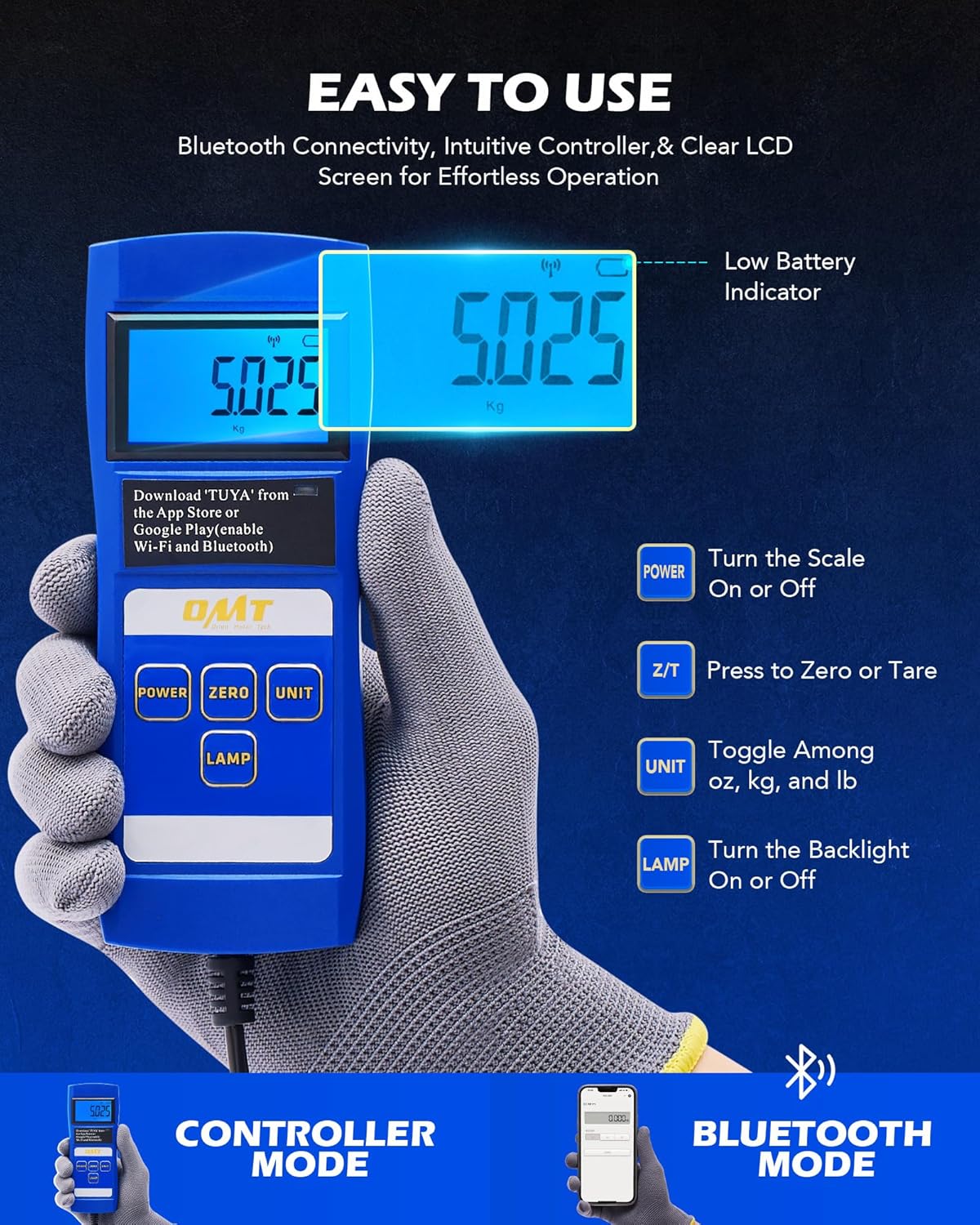
The wired controller and Bluetooth app provide easy access to power, zeroing, unit selection, and backlight functions for effortless operation.

Experience exact accuracy with real-time readings, ensuring precise refrigerant charging down to three decimal places.
5. Backlight Control
Press the 'LAMP' button on the wired controller to turn the LCD backlight on or off, improving visibility in low-light conditions.
Maintenance
1. Cleaning
Wipe the scale platform and controller with a soft, damp cloth. Avoid using abrasive cleaners or solvents that could damage the surfaces. Ensure the scale is dry before storage.
2. Storage
When not in use, store the scale in its durable carrying case to protect it from dust, moisture, and physical damage. Store in a cool, dry place away from direct sunlight and extreme temperatures.

The lightweight and compact design, along with the included carrying case, makes the scale easy to transport and store.
3. Battery Care
If the scale will not be used for an extended period, remove the AAA batteries to prevent leakage and potential damage to the controller. Replace batteries when the low battery indicator appears on the display.
4. Durability Features
The scale is constructed with a rugged aluminum base for sturdy and anti-collision performance. Its textured rubber surface is nonslip and scratch-proof, suitable for various cylinder sizes. With an IP68 waterproof rating, it is safe for use in humid conditions.

The scale features durable construction with a rugged aluminum base, nonslip and scratch-proof textured rubber surface, and IP68 waterproofing for reliable performance in various conditions.
Troubleshooting
1. Inaccurate Readings
- Ensure the scale is placed on a firm, level surface free from vibrations.
- Always tare (zero) the scale before placing the refrigerant tank.
- Check for any obstructions under the scale platform.
- Random fluctuations in readings may indicate a potential overload. Remove the tank immediately if this occurs to protect the scale.
2. Display Not Turning On
- Verify that the 5 AAA batteries are correctly installed and not depleted. Replace if necessary.
- Ensure the wired controller cable is securely connected to the scale platform.
3. Bluetooth Connectivity Issues
- Ensure Bluetooth is enabled on your smartphone and the scale is within the 100 ft range.
- Restart the 'TUYA' app and attempt to re-pair the device.
- Check if the scale's batteries are low, as this can affect Bluetooth performance.
Specifications
| Feature | Specification |
|---|---|
| Brand | Orion Motor Tech |
| Model | RFS-B100-AB |
| Weight Capacity | 220 pounds (100 kg) |
| Accuracy | 0.05% |
| Resolution | 0.2 oz (10g) |
| Measurement Units | oz, kg, lb |
| Power Source | 5 AAA batteries (included) |
| Battery Life | Up to 60 hours |
| Platform Dimensions | 9" x 9" |
| Item Weight | 7.76 pounds |
| Package Dimensions | 17.2 x 12.4 x 3.11 inches |
| Operating Temperature | 14°F to 122°F (-10°C to 50°C) |
| Special Features | Auto Shut Off, Bluetooth Connectivity, Wired Control, IP68 Waterproof |
Warranty and Support
For detailed warranty information and customer support, please refer to the official Orion Motor Tech website or contact their customer service directly. Keep your purchase receipt for warranty claims.
Ask a question about this manual
Ask about setup, troubleshooting, compatibility, parts, safety, or missing instructions. Manuals+ will review the question and use this page’s manual context to help answer it.