
RADIOMASTER DBR4
Radiomaster DBR4 2.4GHz Dual Band Gemini Xrossband ExpressLRS Receiver User Manual
Model: DBR4 | Brand: RADIOMASTER
1. Introduction
The Radiomaster DBR4 is a cutting-edge dual-band, dual-channel Gemini receiver designed for seamless compatibility with the Nomad module. It features two dual-band sections, enabling simultaneous reception of 2.4GHz and 900MHz signals. This innovative design ensures robust and reliable signal integrity by allowing two data streams to be received concurrently, significantly improving interference rejection and preventing packet loss. The DBR4 is engineered to provide unparalleled connectivity and performance for your RC applications.
- Dual-Band, Dual-Channel Gemini Receiver: Ensures seamless compatibility with the Nomad module.
- Simultaneous Signal Reception: Capable of receiving 2.4GHz and 900MHz signals concurrently.
- Enhanced Interference Rejection: Two data streams provide exceptional resistance to interference.
- Robust and Reliable Signal: Designed to maintain strong and consistent connectivity.
- High Performance: Elevates your RC experience with superior connectivity.


2. What's in the Box
Upon opening your Radiomaster DBR4 package, you will find the following components:
- 1 x DBR4 Gemini Xrossband ExpressLRS Receiver
- 2 x 2.4 GHz wire antennas
- 2 x 900 MHz wire antennas
- 1 x CRSF wire
- 4 x 4mm Red vibration dampeners
- 4 x 3mm Black vibration dampeners
- 1 x Manual card (quick start guide)
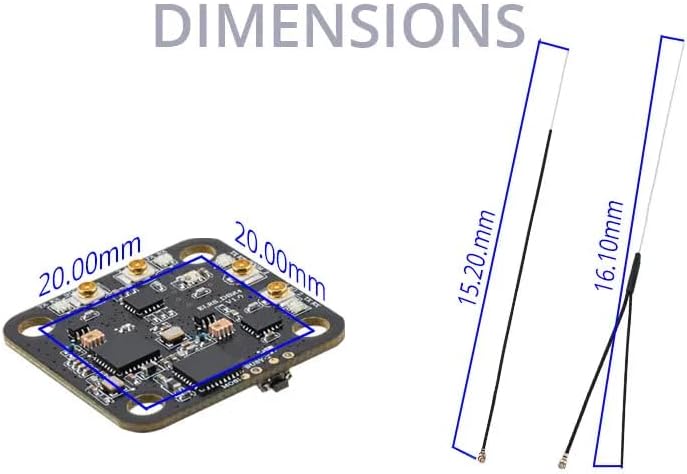
3. Specifications
Detailed technical specifications for the DBR4 Gemini Xrossband ExpressLRS Receiver are provided below:
| Feature | Description |
|---|---|
| Item | DBR4 Gemini Xrossband ExpressLRS Receiver |
| Type | ISM_2.4, FCC_915 |
| MCU | ESP32 |
| RF chip | Semtech LR1121 x 2 |
| Telemetry RF power | Max 100mW (each module) |
| Antenna | 2 x 2.4GHz wires & 2 x 900MHz wires |
| Frequency Range | 2.404 - 2.479 GHz / 903.5 - 926.9 MHz |
| Maximum receive refresh rate | 500Hz (1000Hz coming soon in ExpressLRS V3.4) |
| Minimum receiver refresh rate | 50Hz |
| Working voltage | DC 4.5 - 8.4V |
| Weight | Without antennas 2.70g / With antennas 5.30g |
| Dimension | 27.20 x 27.20mm |
| Firmware version | ExpressLRS V3.3.2 pre-installed |
| Bus interface | CRSF |


4. Setup
Proper setup of your DBR4 receiver is crucial for optimal performance and reliable operation. Follow these general guidelines:
4.1 Mounting
The DBR4 receiver features 20x20mm mounting holes, making it suitable for integration into existing stacks or direct mounting onto a frame. Ensure the mounting location provides adequate ventilation and is free from excessive vibration. Use the provided vibration dampeners (4mm Red and 3mm Black) to minimize stress on the board and components.

4.2 Wiring
Connect the DBR4 receiver to your flight controller or compatible device using the provided CRSF wire. The DBR4 utilizes a CRSF bus interface for communication. Ensure correct polarity and pin assignments as per your flight controller's documentation and the DBR4's pinout (refer to detailed diagrams if available in the manual card).
4.3 Antenna Installation
The DBR4 comes with two 2.4GHz wire antennas and two 900MHz wire antennas. Connect each antenna to its corresponding U.FL connector on the receiver board. For optimal signal diversity and range, position the antennas at a 90-degree angle to each other, ensuring they are clear of carbon fiber frames or other conductive materials that could block signals.
4.4 Binding
To establish communication between your DBR4 receiver and your ExpressLRS transmitter module, a binding process is required. Typically, this involves powering on the receiver while holding a bind button (if present) or cycling power a specific number of times. Refer to the ExpressLRS documentation or the manual card for the precise binding procedure for your specific ExpressLRS firmware version.
5. Operating
Once set up and bound, the DBR4 receiver operates as a high-performance link between your transmitter and your RC model. Its dual-band, dual-channel design provides robust communication.
5.1 ExpressLRS Functionality
The DBR4 is an ExpressLRS receiver, leveraging the capabilities of this open-source radio control link. It supports various modulation modes and refresh rates, with a maximum receive refresh rate of 500Hz (and 1000Hz planned for ExpressLRS V3.4). The minimum refresh rate is 50Hz.
5.2 Dual-Band Operation (Gemini Xrossband)
The DBR4's Gemini Xrossband technology allows it to simultaneously utilize both 2.4GHz and 900MHz frequency bands. This provides redundancy and improved signal penetration, especially in environments with high RF noise. The receiver intelligently manages the two bands to maintain the most reliable link.

5.3 Telemetry
The DBR4 supports telemetry, transmitting data back to your compatible transmitter. The telemetry RF power is rated at a maximum of 100mW per module, providing sufficient range for monitoring critical flight parameters.
6. Maintenance
The Radiomaster DBR4 receiver is designed for durability, but proper care can extend its lifespan and ensure consistent performance.
- Keep Clean: Regularly inspect the receiver for dirt, dust, or debris. Use a soft, dry brush or compressed air to gently clean the board. Avoid using liquids or solvents.
- Protect from Elements: While robust, the receiver is not waterproof. Protect it from moisture, extreme temperatures, and direct sunlight.
- Inspect Connections: Periodically check all wire connections (CRSF, antennas) for secure fit and signs of wear or damage.
- Antenna Care: Ensure antennas are not kinked or damaged. Damaged antennas can significantly reduce range and signal quality.
- Firmware Updates: Keep your ExpressLRS firmware updated. Check the official ExpressLRS project website for the latest stable releases and update procedures.
7. Troubleshooting
If you encounter issues with your DBR4 receiver, consider the following common problems and solutions:
7.1 No Signal / No Link
- Check Binding: Ensure the receiver is correctly bound to your transmitter module. Re-attempt the binding process if unsure.
- Power Supply: Verify the receiver is receiving adequate power (DC 4.5 - 8.4V). Check wiring for loose connections or shorts.
- Antenna Connections: Confirm all four antennas are securely connected to their respective U.FL ports.
- Firmware Mismatch: Ensure your receiver and transmitter module are running compatible ExpressLRS firmware versions.
- RF Environment: Test in a different location to rule out local RF interference.
7.2 Reduced Range
- Antenna Placement: Optimize antenna placement. Ensure they are not obstructed by carbon fiber or other conductive materials and are oriented correctly.
- Damaged Antennas: Inspect antennas for any physical damage. Replace if necessary.
- Transmitter Power: Verify your transmitter module is set to an appropriate power output.
- Environmental Factors: Dense foliage, buildings, or other obstacles can significantly reduce range.
7.3 Intermittent Connection / Failsafes
- Vibration: Ensure the receiver is properly mounted with vibration dampeners to prevent connection issues due to vibration.
- Power Fluctuations: Check for stable power delivery to the receiver.
- RF Interference: Identify and mitigate sources of electrical noise near the receiver (e.g., ESCs, motors, video transmitters).
- Firmware Issues: Consider updating or re-flashing firmware if the issue persists.
8. Warranty Information
Radiomaster products are typically covered by a limited warranty against manufacturing defects. The specific terms and duration of the warranty may vary depending on your region and the retailer from whom you purchased the product. Please retain your proof of purchase.
For detailed warranty information, it is recommended to:
- Consult the warranty card included in your product packaging.
- Visit the official Radiomaster website.
- Contact the authorized dealer or retailer from whom you purchased the DBR4 receiver.
Damage caused by misuse, improper installation, unauthorized modifications, or accidents is generally not covered under warranty.
9. Support
For further assistance, technical support, or inquiries regarding your Radiomaster DBR4 receiver, please utilize the following resources:
- Official Radiomaster Website: Visit the official Radiomaster website for product information, firmware downloads, and support resources.
- ExpressLRS Community: As an ExpressLRS product, the DBR4 benefits from a large and active community. Online forums and social media groups dedicated to ExpressLRS can be valuable resources for troubleshooting and advice.
- Authorized Dealers: Your authorized Radiomaster dealer or retailer can often provide direct support and assistance.
- Contact Support: If the above resources do not resolve your issue, contact Radiomaster customer support directly through their official channels.
Related documentsDBR4


Ask a question about this manual
Ask about setup, troubleshooting, compatibility, parts, safety, or missing instructions. Manuals+ will review the question and use this page’s manual context to help answer it.