
ELEGOO Saturn 4 Ultra, Mercury Plus V3.0
Contents
ELEGOO Saturn 4 Ultra 12K Resin 3D Printer and Mercury Plus V3.0 Wash and Cure Station User Manual
Your comprehensive guide to setup, operation, and maintenance.
1. Introduction
This manual provides detailed instructions for the safe and efficient use of your ELEGOO Saturn 4 Ultra 12K Resin 3D Printer and ELEGOO Mercury Plus V3.0 Wash and Cure Station. These devices are designed to work together to provide a complete solution for resin 3D printing, from model creation to post-processing.
The ELEGOO Saturn 4 Ultra is a high-resolution resin 3D printer featuring a 12K monochrome LCD for exceptional detail and precision. It incorporates smart automatic leveling and offers fast printing speeds. The ELEGOO Mercury Plus V3.0 is a versatile wash and cure station with a large 7.5L capacity, designed to efficiently clean and post-cure resin 3D prints, enhancing their mechanical properties and surface finish.

Image 1.1: ELEGOO Saturn 4 Ultra 12K Resin 3D Printer and Mercury Plus V3.0 Wash and Cure Station.
2. Safety Information
Please read and understand all safety warnings before operating the devices. Failure to do so may result in injury or damage to the equipment.
- Ventilation: Always operate the resin 3D printer and wash/cure station in a well-ventilated area. Resin fumes can be harmful.
- Personal Protective Equipment (PPE): Wear appropriate PPE, including nitrile gloves, safety glasses, and a respirator (if necessary), when handling liquid resin or isopropyl alcohol (IPA).
- Resin Handling: Avoid direct skin contact with liquid resin. If contact occurs, wash thoroughly with soap and water. Do not ingest resin. Keep resin away from children and pets.
- UV Light Exposure: The curing station emits strong UV light. Do not look directly at the UV light source. Ensure the cover is in place during curing operations.
- Flammable Liquids: IPA used for washing is flammable. Keep it away from open flames, sparks, and heat sources. Store in a cool, well-ventilated area.
- Electrical Safety: Ensure power cords are properly connected and not damaged. Do not operate with wet hands. Disconnect power before performing maintenance.
3. Product Overview
3.1 ELEGOO Saturn 4 Ultra 12K Resin 3D Printer
The Saturn 4 Ultra is engineered for high-precision resin 3D printing. Its core features include:
- 12K Monochrome LCD: Offers a resolution of 11520x5120 for exceptional detail and clarity.
- Smart Automatic Leveling: Simplifies setup and ensures consistent print quality.
- High Printing Speed: Capable of printing at speeds up to 150mm/h.
- Tilt Release Technology: Facilitates quick and clean detachment of models from the release film.
- Wi-Fi Cluster Printing: Enables efficient management and printing across multiple units.

Image 3.1.1: ELEGOO Saturn 4 Ultra 12K Resin 3D Printer.

Image 3.1.2: Detail achieved with 12K Mono LCD.

Image 3.1.3: Tilt Release Technology in action.

Image 3.1.4: Wi-Fi Cluster Printing capability.
3.2 ELEGOO Mercury Plus V3.0 Wash and Cure Station
The Mercury Plus V3.0 is an essential companion for resin 3D printing, providing efficient post-processing capabilities:
- 7.5L Large Capacity: Accommodates larger prints and multiple smaller prints.
- Washing Size-Upgrade: Enhanced dimensions for more effective cleaning.
- Powerful Curing Function: Utilizes 405nm UV lamp beads for 360° all-round curing.

Image 3.2.1: ELEGOO Mercury Plus V3.0 Wash and Cure Station.
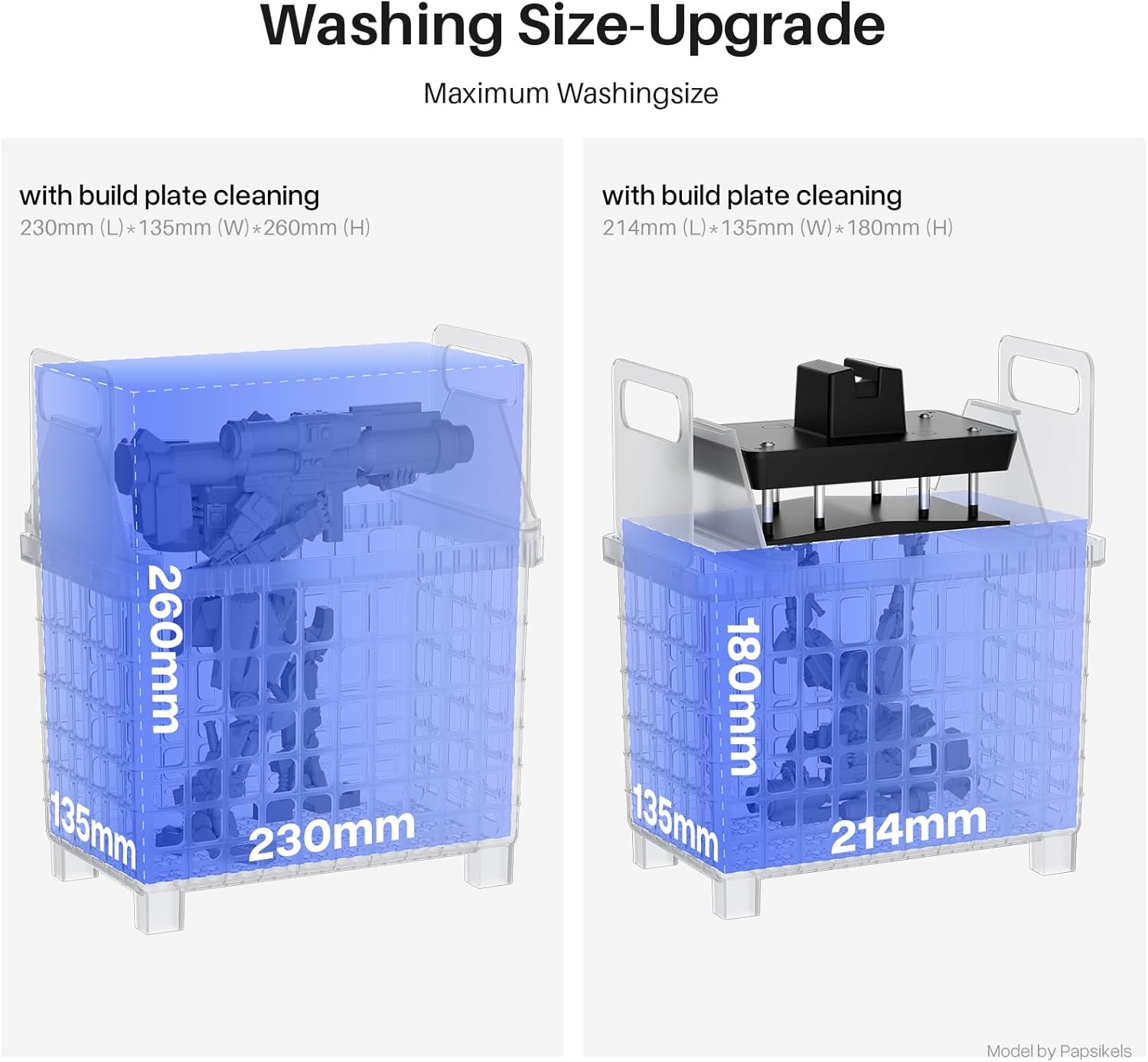
Image 3.2.2: Illustration of the Washing Size-Upgrade.

Image 3.2.3: Effect of Washing and Curing on a resin print.

Image 3.2.4: Powerful Curing Function with 360° UV exposure.
4. Setup
4.1 ELEGOO Saturn 4 Ultra 12K Resin 3D Printer Setup
- Unpacking: Carefully remove the printer and all accessories from the packaging. Inspect for any damage.
- Placement: Place the printer on a stable, level surface in a well-ventilated area, away from direct sunlight.
- Power Connection: Connect the power adapter to the printer and then to a power outlet.
- Resin Vat Installation: Ensure the FEP film is clean and properly tensioned. Place the resin vat onto the printer platform, securing it with the locking mechanisms.
- Build Plate Installation: Attach the build plate to the Z-axis arm and tighten the securing knob.
- Automatic Leveling: The Saturn 4 Ultra features smart automatic leveling. Follow the on-screen prompts to initiate the leveling process. No manual adjustment is typically required.
4.2 ELEGOO Mercury Plus V3.0 Wash and Cure Station Setup
- Unpacking: Remove the station and its components from the packaging.
- Placement: Place the station on a stable surface.
- Power Connection: Connect the power adapter to the station and then to a power outlet.
- Wash Bucket Setup: For washing, place the wash bucket onto the station. Fill it with an appropriate cleaning solution (e.g., 95%+ Isopropyl Alcohol).
- Curing Platform Setup: For curing, remove the wash bucket and place the curing platform onto the station.
5. Operating Instructions
5.1 ELEGOO Saturn 4 Ultra 12K Resin 3D Printer Operation
- Prepare 3D Model: Use a compatible slicing software (e.g., Chitubox) to prepare your 3D model. Add supports, hollow the model if necessary, and slice it into layers. Save the sliced file to a USB drive or prepare for Wi-Fi transfer.
- Add Resin: Pour liquid resin into the resin vat, ensuring it does not exceed the maximum fill line. Stir gently if the resin has settled.
- Start Printing: Insert the USB drive into the printer or connect via Wi-Fi. Select your sliced file from the printer's touchscreen interface. Confirm settings and start the print.
- Monitoring: Monitor the first few layers to ensure proper adhesion. The printer's touchscreen will display print progress.
- Print Completion: Once printing is complete, the build plate will rise. Wait for excess resin to drip off.
- Remove Print: Carefully remove the build plate from the Z-axis arm. Use a plastic scraper to gently detach the printed model from the build plate.
5.2 ELEGOO Mercury Plus V3.0 Wash and Cure Station Operation
After printing, models require washing and curing.
Washing Process:
- Prepare Wash Bucket: Ensure the wash bucket is filled with IPA or another suitable cleaning solution.
- Place Model: Place the printed model into the wash basket. For larger models, you can place them directly into the wash bucket. You can also wash the build plate with the model still attached.
- Select Wash Mode: Place the wash bucket onto the station. Select the desired wash time using the control panel.
- Start Washing: Press the start button. The magnetic stirrer will agitate the cleaning solution.
- Remove and Dry: Once washing is complete, remove the model and allow it to air dry or use compressed air. Ensure all excess resin and cleaning solution are removed.
Curing Process:
- Prepare for Curing: Remove the wash bucket and place the curing platform onto the station.
- Place Model: Place the dried model onto the curing platform.
- Select Cure Mode: Place the UV-blocking cover over the model and the station. Select the desired curing time using the control panel.
- Start Curing: Press the start button. The UV lights will activate, and the platform will rotate for even curing.
- Completion: Once curing is complete, the UV lights will turn off. Remove the fully cured model.
6. Maintenance
6.1 ELEGOO Saturn 4 Ultra 12K Resin 3D Printer Maintenance
- Resin Vat Cleaning: After each print, inspect the resin vat for cured resin bits. Use a plastic scraper to gently remove them. If changing resin colors or storing the printer, clean the vat thoroughly with IPA.
- Build Plate Cleaning: Clean the build plate with IPA after each print to remove any resin residue.
- FEP Film Inspection/Replacement: Regularly inspect the FEP film for damage, scratches, or cloudiness. Replace the FEP film if it shows signs of wear to prevent print failures.
- LCD Screen Cleaning: If resin spills onto the LCD screen, immediately clean it with a soft cloth and IPA. Be extremely careful not to scratch the screen.
- General Cleaning: Keep the printer exterior clean from dust and resin spills.
6.2 ELEGOO Mercury Plus V3.0 Wash and Cure Station Maintenance
- Cleaning Solution Replacement: Replace the cleaning solution (IPA) when it becomes cloudy or heavily contaminated with resin. Dispose of contaminated IPA responsibly according to local regulations.
- Wash Bucket Cleaning: Clean the wash bucket and magnetic stirrer regularly to prevent resin buildup.
- Curing Platform Cleaning: Wipe down the curing platform with a soft cloth if it gets dirty.
- UV Lamp Maintenance: Ensure the UV lamps are clean and free from obstructions for optimal curing performance.
7. Troubleshooting
7.1 Common 3D Printer Issues (Saturn 4 Ultra)
| Problem | Possible Cause | Solution |
|---|---|---|
| Print not sticking to build plate | Improper leveling, insufficient exposure time, cold resin/environment, dirty build plate. | Re-level build plate, increase bottom exposure time, warm resin/environment, clean build plate thoroughly. |
| Failed print (partial print, detached layers) | Insufficient supports, FEP film damage, resin contamination, incorrect exposure settings. | Add more/thicker supports, inspect/replace FEP film, filter resin, adjust exposure time. |
| Layer lines visible | Z-axis wobble, incorrect layer height, unstable printing environment. | Check Z-axis stability, use recommended layer height, ensure printer is on a stable surface. |
7.2 Common Wash and Cure Station Issues (Mercury Plus V3.0)
| Problem | Possible Cause | Solution |
|---|---|---|
| Model still sticky after washing | Insufficient wash time, contaminated IPA, model not fully dried before curing. | Increase wash time, replace IPA, ensure model is completely dry. |
| Model still soft/bendy after curing | Insufficient curing time, uneven UV exposure, low UV lamp intensity. | Increase curing time, ensure model rotates properly, check UV lamps for cleanliness. |
| Station not turning on | Power cable not connected, power outlet issue, internal fault. | Check power connections, try different outlet, contact support if issue persists. |
8. Specifications
8.1 ELEGOO Saturn 4 Ultra 12K Resin 3D Printer
- Printing Technology: MSLA (Masked Stereolithography)
- LCD Screen: 10-inch 12K Monochrome LCD
- Resolution: 11520 x 5120 pixels
- XY Resolution: Approximately 19 microns
- Build Volume: 219mm (L) x 123mm (W) x 220mm (H) / 8.62in (L) x 4.84in (W) x 8.66in (H)
- Printing Speed: Up to 150mm/h
- Leveling: Smart Automatic Leveling
- Connectivity: USB, Wi-Fi (Cluster Printing)
8.2 ELEGOO Mercury Plus V3.0 Wash and Cure Station
- Wash Volume: 7.5 Liters
- Maximum Washing Size (with build plate): 230mm (L) x 135mm (W) x 260mm (H)
- Maximum Washing Size (without build plate): 214mm (L) x 135mm (W) x 180mm (H)
- Maximum Curing Size: Ø250mm x 290mm (H)
- UV Wavelength: 405nm
- Curing Time Range: 0-30 minutes
- Curing Method: 360° rotating platform
9. Warranty and Support
ELEGOO products come with a standard manufacturer's warranty. For specific warranty terms and conditions, please refer to the warranty card included with your product or visit the official ELEGOO website.
If you encounter any issues or require technical assistance, please contact ELEGOO customer support through their official channels. You can often find support contact information on the ELEGOO website or through the retailer where you purchased the product.
For more information and resources, visit the ELEGOO Store on Amazon.
Documents and downloads
Ask a question about this manual
Ask about setup, troubleshooting, compatibility, parts, safety, or missing instructions. Manuals+ will review the question and use this page’s manual context to help answer it.