
1. Introduction
Thank you for choosing the Olywiz HTD-825 Long Range Two Way Radio. This manual provides essential information for the safe and efficient operation of your device. Please read it thoroughly before use and retain it for future reference.
2. Safety Information
To ensure safe operation and optimal performance, please observe the following safety precautions:
- Do not operate the radio in explosive atmospheres (e.g., flammable gases, dust particles, metallic powders).
- Do not modify the radio. Unauthorized modifications can void your warranty and violate regulatory compliance.
- Use only Olywiz approved batteries and chargers. Improper use may result in fire, explosion, or injury.
- Avoid exposing the radio to direct sunlight for extended periods or to extreme temperatures.
- Keep the radio away from medical devices to prevent interference.
- This device is FCC ID: 2AX3U-OL2WHTD compliant.
3. Package Contents
Upon unpacking, please verify that all items listed below are included:
- HTD-825 Walkie Talkie (x8)
- Rechargeable Battery (x8)
- Fixed Antenna (x8)
- Adapter (x8)
- USB-C Charging Cable (x8)
- Belt Clip (x8)
- Sling (x8)
- Earpiece (x8)
- User's Manual (x1)
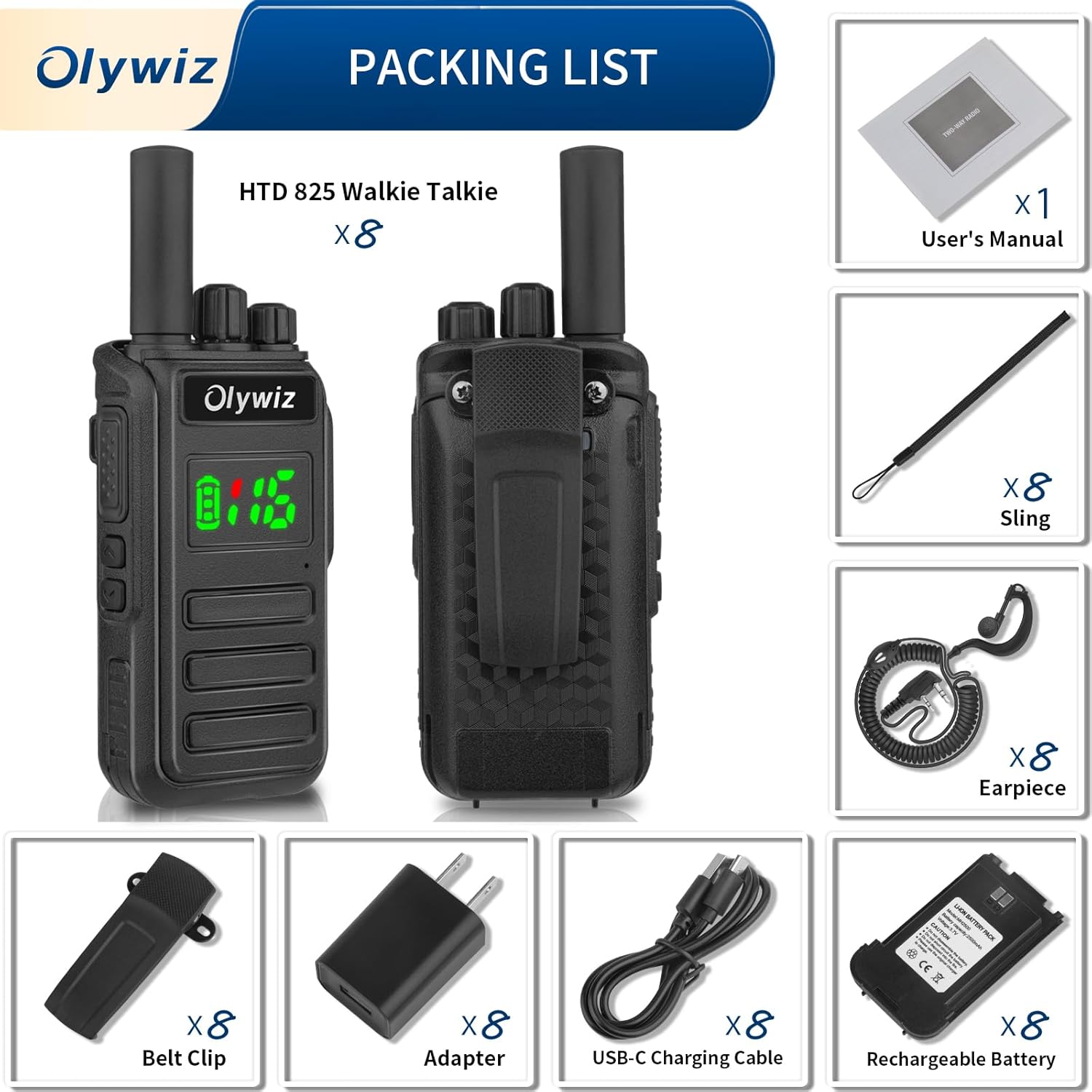
Figure 3.1: Visual representation of the Olywiz HTD-825 package contents, including eight walkie-talkies, batteries, antennas, adapters, USB-C cables, belt clips, slings, earpieces, and one user manual.
4. Product Overview
The Olywiz HTD-825 is a robust and versatile two-way radio designed for clear and reliable communication. It features a durable, waterproof, and dustproof design, making it suitable for various outdoor and professional environments.

Figure 4.1: Detailed diagram of the Olywiz HTD-825 radio, highlighting key components such as the antenna, channel knob, volume/power switch, Type-C charging port, PTT button, custom button, headphone jack, squelch button, battery, microphone, speaker, and belt clip.
4.1 Key Features
- Hidden LED Display: Provides clear channel and battery status.
- IP54 Waterproof & Dustproof: Ensures durability in challenging conditions.
- Frequency Copy & Auto Save: Simplifies channel programming.
- Wireless Radio Replication: Allows easy cloning of settings between radios.
- Red/Green Signal Lights: Red indicates transmitting, green indicates receiving.

Figure 4.2: Illustration of the Olywiz HTD-825's functional details, including dustproof and IP54 waterproof ratings, hidden LED display, red transmitting signal light, green receiving signal light, frequency copy and auto save, and wireless radio replication capabilities.
5. Setup
5.1 Battery Installation and Charging
- Ensure the radio is powered off before installing or removing the battery.
- Align the battery with the compartment on the back of the radio and slide it into place until it clicks securely.
- To charge, connect the provided USB-C charging cable to the radio's Type-C port and then to the adapter. Plug the adapter into a power outlet.
- The battery takes approximately 3-4 hours to fully charge. A full charge provides up to 48 hours of working time and 168 hours of standby time.
- The radio can also be charged via a power bank, car charger, or laptop using the USB-C cable.

Figure 5.1: Illustration demonstrating the 2500mAh battery life and various USB-C charging methods for the Olywiz HTD-825, including adapters, power banks, car chargers, and laptops.
5.2 Attaching Accessories
- Belt Clip: Attach the belt clip to the designated slot on the back of the radio for convenient carrying.
- Earpiece: Insert the earpiece plug into the headphone jack on the side of the radio.
- Sling: Secure the sling to the radio's attachment point for additional carrying options.
6. Operating Instructions
6.1 Power On/Off and Volume Adjustment
- Power On: Rotate the Volume/Power Switch knob clockwise until you hear a click. The LED display will illuminate.
- Power Off: Rotate the Volume/Power Switch knob counter-clockwise until you hear a click and the display turns off.
- Volume Adjustment: Rotate the Volume/Power Switch knob clockwise to increase volume and counter-clockwise to decrease volume.
6.2 Channel Selection
Rotate the Channel knob (located next to the antenna) to select one of the 16 available channels. Ensure all radios in your group are set to the same channel for communication.
6.3 Transmitting and Receiving
- To Transmit: Press and hold the Push-To-Talk (PTT) button on the side of the radio. Speak clearly into the microphone. The red indicator light will illuminate. Release the PTT button to stop transmitting.
- To Receive: Ensure the PTT button is not pressed. The green indicator light will illuminate when a signal is being received.
6.4 VOX Function (Voice Operated Exchange)
The VOX function allows hands-free transmission. When activated, the radio will automatically transmit when it detects your voice, without needing to press the PTT button. Refer to the full user manual for detailed activation and sensitivity settings.
6.5 CTCSS/DCS (Continuous Tone-Coded Squelch System / Digital Coded Squelch)
CTCSS and DCS codes help filter out unwanted conversations from other radios on the same channel. Your radio supports 50 groups of CTCSS and 105 groups of standard DCS. When a CTCSS/DCS code is set, you will only hear transmissions from radios using the same code on the same channel.
6.6 Scanning Function
The scanning function allows the radio to automatically scan through active channels. When an active channel is detected, the radio will stop on that channel until the transmission ends, then resume scanning.
6.7 One-Click Decoding and Copying
The HTD-825 features a convenient one-click decoding and copying function to easily replicate settings from one radio to another without computer programming.
- Step 1: On the source radio (Dev 1), set to Channel 1. Ensure other radios are powered off. Keep Dev 1 powered on.
- Step 2: On the target radio, hold the PTT button and a side button (Side 2, if available) simultaneously, then power on the radio. The green light should blink, indicating Pairing Mode. A beep confirms success. This radio is now ready to receive settings.
- Step 3: On the source radio (Dev 1), switch to Channel 2 and turn it off.
- Step 4: On the source radio (Dev 1), hold the PTT button and a side button (Side 2) simultaneously, then power on. The green light should blink, indicating it's ready to copy.
- Step 5: On the source radio (Dev 1), hold the PTT button. The indicator light will change from red to green. Reboot the radio. The copying process should now be successful.
Tips: Channel "1" typically means decode mode, and Channel "2" means copy mode during this process.

Figure 6.1: Step-by-step visual guide for using the one-click decoding and copying function to replicate settings between Olywiz HTD-825 radios.
7. Maintenance
- Cleaning: Use a soft, damp cloth to clean the radio's exterior. Do not use harsh chemicals or solvents.
- Battery Care: Store batteries in a cool, dry place. Avoid fully discharging the battery frequently to prolong its lifespan.
- Storage: If storing the radio for an extended period, remove the battery and store it separately.
- Antenna: Do not bend or twist the antenna excessively, as this can damage it and affect performance.
8. Troubleshooting
| Problem | Possible Cause | Solution |
|---|---|---|
| Radio does not power on. | Battery is depleted or not properly installed. | Charge the battery or ensure it is correctly installed. |
| Cannot transmit or receive. | Incorrect channel selected; low battery; out of range. | Verify channel settings; charge battery; move closer to other radios. |
| Poor audio quality or static. | Weak signal; interference; volume too low/high. | Adjust antenna position; move away from interference sources; adjust volume. |
| One-click copying fails. | Incorrect steps followed; radios too far apart. | Review "One-Click Decoding and Copying" section; ensure radios are close. |
9. Specifications
| Feature | Detail |
|---|---|
| Model Number | HTD-825 |
| Brand | Olywiz |
| Item Weight | 5.39 pounds (for 8-pack) |
| Product Dimensions | 1.5 x 2.16 x 5.71 inches (per radio) |
| Batteries | 1 Lithium Ion battery required (included) |
| Number of Channels | 16 |
| Talking Range Maximum | 5 Kilometers (approx. 3.1 miles) |
| Voltage | 3.7 Volts (DC) |
| Water Resistance Level | Water Resistant (IP54) |
| Battery Capacity | 2500mAh |
| Working Time | Up to 48 hours |
| Standby Time | Up to 168 hours |
| Charging Port | USB-C |
| Special Features | Hidden Display, Rechargeable, Long Range, VOX, Scanning, CTCSS/DCS |
10. Warranty & Support
The Olywiz HTD-825 Two Way Radio comes with a 1-Year Manufacturer Warranty from the date of purchase. This warranty covers defects in materials and workmanship under normal use.
For technical support, warranty claims, or any inquiries regarding your Olywiz product, please contact Olywiz customer service. Refer to the contact information provided with your purchase or visit the official Olywiz website.
Olywiz provides after-sales support and services to customers worldwide.
