
1. Introduction
This user manual provides detailed instructions for the ANFIER M3 Translator Earbuds and the ANFIER W09 Handheld Translator. Please read this manual thoroughly before using your devices to ensure proper operation and to maximize your translation experience. Keep this manual for future reference.

Image 1.1: The ANFIER M3 Translator Earbuds and W09 Handheld Translator devices.
2. ANFIER M3 Translator Earbuds
2.1 Package Contents
- M3 Translator Earbuds (Left and Right)
- Charging Case
- USB-C Charging Cable
- User Manual
2.2 Product Overview
The M3 Translator Earbuds are designed for seamless real-time translation during conversations. They feature a compact design and utilize Bluetooth 5.3 for stable connectivity.

Image 2.1: Illustration of Bluetooth 5.3 technology, indicating improved audio quality and efficiency for the M3 Earbuds.
2.3 Setup
- Charge the Earbuds: Place the M3 earbuds into the charging case. Connect the USB-C cable to the charging case and a power source. Ensure the earbuds and case are fully charged before first use.
- Power On: Open the charging case. The earbuds will automatically power on.
- Pair with Your Device:
- Enable Bluetooth on your smartphone or tablet.
- Search for 'ANFIER M3' in the list of available Bluetooth devices.
- Select 'ANFIER M3' to pair. A confirmation sound will indicate successful pairing.
- Install the Companion App: Download and install the dedicated ANFIER translator application from your device's app store. This app is essential for accessing full translation features and language options.
2.4 Operating the M3 Earbuds
The M3 earbuds offer both online and offline translation capabilities.
2.4.1 Online Translation
When connected to the companion app and an internet connection, the M3 earbuds support translation for 74 languages and 70 accents. This mode provides the highest accuracy and broadest language support.
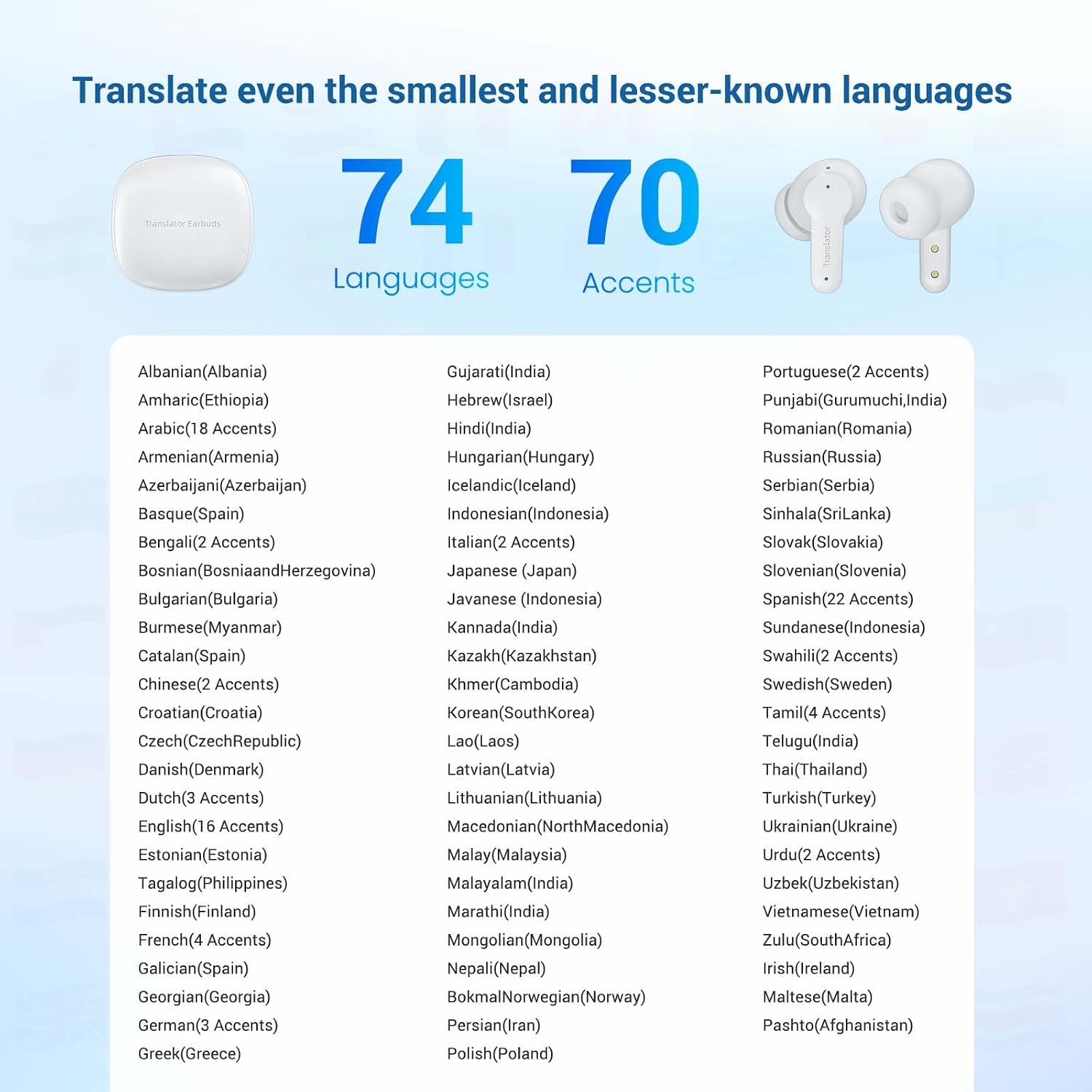
Image 2.2: Visual representation of the M3 Earbuds' capability to translate across 74 languages and 70 accents.
2.4.2 Offline Translation
The M3 earbuds support offline voice translation between 8 languages without an internet connection. Ensure these language packs are downloaded via the companion app beforehand.
- Supported Offline Languages: English, Spanish, Mandarin, Japanese, Russian, French, German, Korean.

Image 2.3: Depiction of the M3 Earbuds facilitating offline voice translation between 8 specified languages in a conversation setting.
2.4.3 Translation Accuracy and Speed
The M3 earbuds offer approximately 98% accuracy with a response time of 0.5 seconds for simultaneous translation, facilitating natural conversations.

Image 2.4: Graphic illustrating the M3 Earbuds' 98% translation accuracy and 0.5-second response time for simultaneous translation.
3. ANFIER W09 Handheld Translator
3.1 Package Contents
- W09 Handheld Translator Device
- USB-C Charging Cable
- User Manual
3.2 Product Overview
The W09 Handheld Translator is a standalone device featuring an HD touch screen and multiple translation modes, including voice, photo, and offline translation.
3.3 Setup
- Charge the Device: Connect the USB-C cable to the W09 device and a power source. Ensure the device is fully charged before first use.
- Power On: Press and hold the power button located on the side of the device until the screen illuminates.
- Initial Setup: Follow the on-screen prompts to select your preferred system language, time zone, and connect to a Wi-Fi network. A stable Wi-Fi connection is recommended for optimal online translation performance and language pack downloads.
- Download Offline Language Packs: Navigate to the 'Offline Download' section in the device settings to download necessary language packs for offline translation functionality.
3.4 Operating the W09 Handheld Translator
The W09 offers various translation modes accessible via its HD touch screen interface.

Image 3.1: The ANFIER W09 Handheld Translator's 480*854 2.4" HD touch screen, showing the main menu with Voice Translation, Photo Translation, Offline Translation, and Settings options.
3.4.1 Voice Translation
The W09 supports two-way instant voice translation for over 144 languages with approximately 97% accuracy and a 0.5-second rapid translation response. Select your source and target languages, then speak into the device.

Image 3.2: Illustration of the W09 Handheld Translator's two-way instant translation feature, demonstrating a conversation flow with translated text on screen.
3.4.2 Offline Translation
The W09 supports offline translation between 16 languages. Ensure the required language packs are downloaded to the device's internal storage via the 'Offline Download' setting.
- Supported Offline Languages: English, Spanish, Simplified Chinese, Traditional Chinese, Japanese, Arabic, Portuguese, Russian, French, German, Korean, Thai, Hindi, Vietnamese, Italian, Indonesian.

Image 3.3: Depiction of the W09 Handheld Translator's offline translation capability across 16 specified languages.
3.4.3 Photo Translation
The W09 can translate text from images using its built-in camera. It supports 42 languages and can recognize both printed and handwritten fonts. To use this feature, select 'Photo Translation' from the main menu, align the text within the camera frame, and capture the image.

Image 3.4: The W09 Handheld Translator's photo translation feature, showing a foreign text being translated on screen, with a list of 42 supported languages.
4. Maintenance
4.1 Cleaning
- Use a soft, dry, lint-free cloth to clean the earbuds, charging case, and handheld translator.
- Do not use abrasive cleaners, alcohol, or chemical solvents, as these may damage the devices.
- Avoid getting moisture into any openings.
4.2 Storage
- Store the devices in a cool, dry place away from direct sunlight and extreme temperatures.
- When not in use for extended periods, ensure the devices are partially charged (around 50%) to preserve battery health.
4.3 Battery Care
- Charge the devices regularly to prevent deep discharge, which can reduce battery lifespan.
- Use only the provided charging cable or a certified USB-C cable.
5. Troubleshooting
5.1 M3 Earbuds Issues
- Earbuds not pairing: Ensure earbuds are charged, Bluetooth is enabled on your device, and the earbuds are in pairing mode. Try restarting both the earbuds and your device.
- No sound: Check volume levels on both your device and the earbuds. Ensure earbuds are properly seated in your ears.
- Translation not working: Verify internet connection for online translation. For offline translation, ensure language packs are downloaded and selected correctly in the app.
5.2 W09 Handheld Translator Issues
- Device not powering on: Ensure the device is charged. Connect to a power source and try again.
- Wi-Fi connection issues: Check your Wi-Fi password and network stability. Try restarting the device and your router.
- Translation errors: Ensure clear pronunciation for voice translation. For photo translation, ensure good lighting and clear text. Verify correct source and target languages are selected.
- Offline translation unavailable: Confirm that the necessary offline language packs have been downloaded via the device settings.
6. Specifications
6.1 ANFIER M3 Translator Earbuds
- Connectivity: Bluetooth 5.3
- Online Translation: 74 Languages, 70 Accents
- Offline Translation: 8 Languages (English, Spanish, Mandarin, Japanese, Russian, French, German, Korean)
- Accuracy: Approximately 98%
- Response Time: 0.5 seconds
6.2 ANFIER W09 Handheld Translator
- Display: 2.4-inch HD Touch Screen (480*854 resolution)
- Online Voice Translation: 144+ Languages
- Offline Voice Translation: 16 Languages (English, Spanish, Simplified Chinese, Traditional Chinese, Japanese, Arabic, Portuguese, Russian, French, German, Korean, Thai, Hindi, Vietnamese, Italian, Indonesian)
- Photo Translation: 42 Languages (supports print/handwritten fonts)
- Accuracy: Approximately 97%
- Response Time: 0.5 seconds
- Connectivity: Wi-Fi
7. Warranty and Support
ANFIER products are designed for reliability and performance. For warranty information, technical support, or any inquiries regarding your M3 Translator Earbuds or W09 Handheld Translator, please refer to the warranty card included in your product packaging or visit the official ANFIER website. You may also contact ANFIER customer service directly through the contact information provided on their website.