
Introduction
This manual provides comprehensive instructions for the installation, operation, and maintenance of your LLPParts 1001TH A Fireplace Remote. This remote control system is designed to provide convenient and reliable operation of your fireplace, offering precise control over its functions. Please read this manual thoroughly before use to ensure safe and efficient operation.
Safety Information
- Always ensure the fireplace is off and cool before performing any maintenance or installation.
- Keep the remote control away from water and extreme temperatures.
- Do not attempt to disassemble or repair the remote control yourself. Refer to qualified service personnel.
- Replace batteries with the correct type and ensure proper polarity.
- Keep batteries out of reach of children.
Package Contents
Verify that all items are present in your package:
- 1 x LLPParts 1001TH A Fireplace Remote Control
- 1 x Wall Mount Bracket
- Mounting Screws and Anchors
- 2 x AAA Batteries

Setup
1. Battery Installation
- Locate the battery compartment on the back of the remote control.
- Slide the battery cover open.
- Insert two AAA batteries, ensuring correct polarity (+ and -).
- Close the battery cover securely.
2. Wall Mount Installation (Optional)
- Choose a suitable location for the wall mount, away from heat sources and direct sunlight.
- Use the provided screws and anchors to secure the wall mount bracket to the wall.
- The remote control can then be placed into the bracket for storage.
3. Pairing with Fireplace Receiver
This remote is designed as a replacement for Skytech OEM models. Refer to your fireplace's original receiver manual for specific pairing instructions. Generally, the process involves:
- Ensure the fireplace receiver has power.
- Locate the "LEARN" or "PROGRAM" button on your fireplace receiver.
- Press and hold the "LEARN" button on the receiver until an audible beep or LED indicator activates.
- Within a few seconds, press the "ON" button on your new 1001TH A remote control.
- The receiver should emit another beep or the LED will change, indicating successful pairing.
- Test the remote's functionality.
Operating Instructions
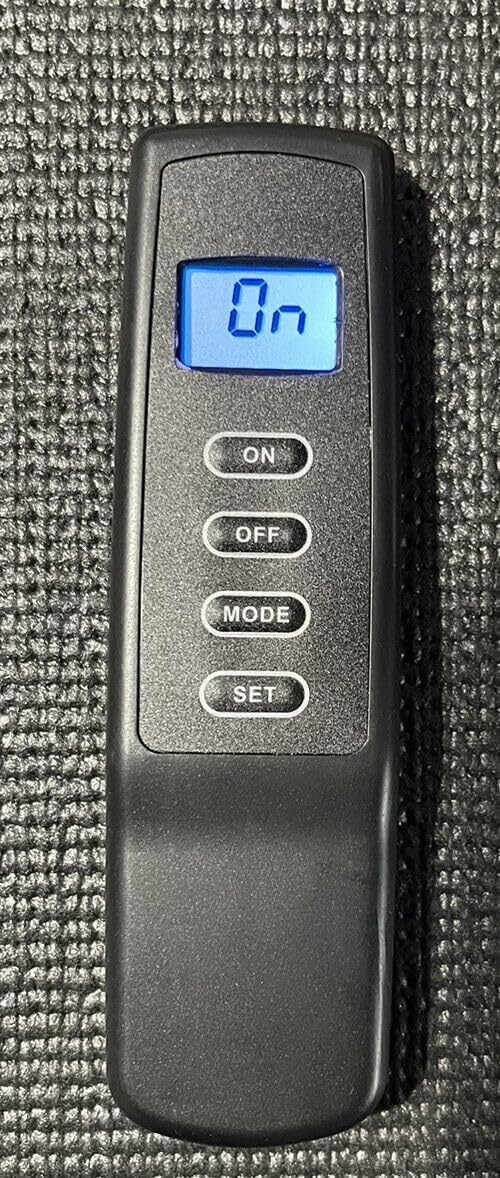
The 1001TH A remote control features a clear LCD display and four primary buttons:
- ON: Activates the fireplace.
- OFF: Deactivates the fireplace.
- MODE: Cycles through operating modes (e.g., Manual, Thermostatic).
- SET: Confirms settings or enters setting mode.
1. Turning the Fireplace On/Off
- To turn the fireplace ON, press the ON button. The display will show "On".
- To turn the fireplace OFF, press the OFF button.
2. Setting Temperature (Thermostatic Mode)
If your fireplace receiver supports thermostatic control, you can set a desired temperature:
- Press the MODE button until the display shows the current room temperature and a target temperature icon (if applicable).
- Press the SET button to enter temperature adjustment mode.
- Use the ON and OFF buttons to increase or decrease the desired temperature.
- Press SET again to confirm the new temperature. The fireplace will now cycle on and off to maintain this temperature.

Maintenance
Battery Replacement
When the display becomes dim or the remote's range decreases, it's time to replace the batteries. Follow the battery installation steps outlined in the "Setup" section.
Cleaning
Wipe the remote control with a soft, dry cloth. Do not use abrasive cleaners or immerse the remote in water.
Troubleshooting
| Problem | Possible Cause | Solution |
|---|---|---|
| Remote not responding / Fireplace not turning on. |
|
|
| Display is dim or blank. | Low batteries. | Replace batteries. |
| Fireplace turns on/off unexpectedly in thermostatic mode. | Temperature setting is too close to ambient temperature. | Adjust the desired temperature setting. |
Specifications
- Model: 1001TH A
- Brand: LLPParts
- Compatible Devices: Fireplace, Fireplace Insert, Fireplace Stove
- Connectivity Technology: Infrared
- Power Source: 2 x AAA Batteries
- Dimensions: Approximately 1 x 1 x 1 inches (as per product data, may vary slightly)
- Weight: Approximately 1 pound (as per product data, may vary slightly)

Warranty
The LLPParts 1001TH A Fireplace Remote comes with a one-year product warranty from the date of purchase. This warranty covers defects in materials and workmanship under normal use. It does not cover damage caused by misuse, accident, unauthorized modification, or improper installation. Please retain your proof of purchase for warranty claims.
Support
For technical assistance, troubleshooting not covered in this manual, or warranty inquiries, please contact LLPParts customer support. Refer to the product packaging or the retailer's website for the most current contact information.
Note: As this product is a replacement for Skytech OEM, specific operational details related to your fireplace unit's receiver may be found in your fireplace's original instruction manual.