
1. Introduction
The PHYSEN WiFi Smoke Detector is an intelligent fire alarm designed to enhance home safety. Equipped with a photoelectric sensor, it efficiently detects slow-burning and smoldering fires. This device features a 10-year battery and sensor life, providing long-term, reliable protection. It connects to your home's 2.4GHz Wi-Fi network, enabling real-time notifications via the Tuya or Smart Life mobile application.
2. Safety Information
- This smoke detector complies with EN 14604 standards, ensuring high quality and reliability.
- The device performs an automatic self-test every 56 seconds to check circuits, electronics, and battery level.
- The alarm emits an 85dB sound to alert occupants.
- Important: Do not install smoke detectors in the kitchen or areas with high humidity and cooking fumes, as this may lead to false alarms.

The PHYSEN WiFi Smoke Detector is certified according to EN 14604 and TÜV Rheinland standards, ensuring reliable safety performance.

This smoke detector offers a 10-year product lifespan, including a 10-year battery and sensor, providing continuous 24/7 protection for your home.
3. Product Features
- 10-Year Battery & Sensor: Equipped with a long-life battery and photoelectric sensor for extended service.
- Wi-Fi Connectivity: Connects to 2.4GHz Wi-Fi for smart features.
- Real-Time Push Notifications: Receive immediate alerts on your smartphone via the Tuya/Smart Life app.
- Device Sharing Function: Share access with up to 12 different app accounts for family safety.
- Self-Test Function: Automatic and manual testing capabilities to ensure proper operation.
- 85dB Alarm: Loud audible alarm to alert occupants in case of smoke detection.
- Coverage: One device covers approximately 40 square meters.
4. Product Overview

Key components include ventilation slots for smoke entry, an LED indicator for status, a test/hush button for manual testing and silencing, and a loud buzzer for alarms.
- Ventilation Slots: Allows smoke to enter the detection chamber.
- LED Indicator: Provides visual status of the detector (e.g., normal operation, alarm, fault).
- Test/Hush Button: Press to manually test the alarm or silence a false alarm.
- Buzzer: Emits the audible alarm sound.
5. Setup and Installation
The PHYSEN WiFi Smoke Detector offers flexible installation options.

The smoke detector offers flexible installation options: use the provided adhesive pad for quick mounting or secure it with screws for a more permanent fixture. Rotate to activate after installation.
Installation Methods:
- Adhesive Mounting:
- Ensure the mounting surface is clean, dry, and smooth.
- Peel off the protective film from the adhesive pad.
- Attach the adhesive pad to the back of the detector.
- Press the detector firmly onto the desired ceiling location.
- Screw Mounting:
- Use the provided mounting bracket as a template to mark screw holes on the ceiling.
- Drill pilot holes and insert wall anchors if necessary.
- Secure the mounting bracket to the ceiling with screws.
- Attach the smoke detector to the mounting bracket by twisting it clockwise until it clicks into place.
Activation:
After installation, rotate the detector clockwise onto its base or mounting bracket to activate the internal battery. The LED indicator will flash to confirm activation.
Recommended Placement:
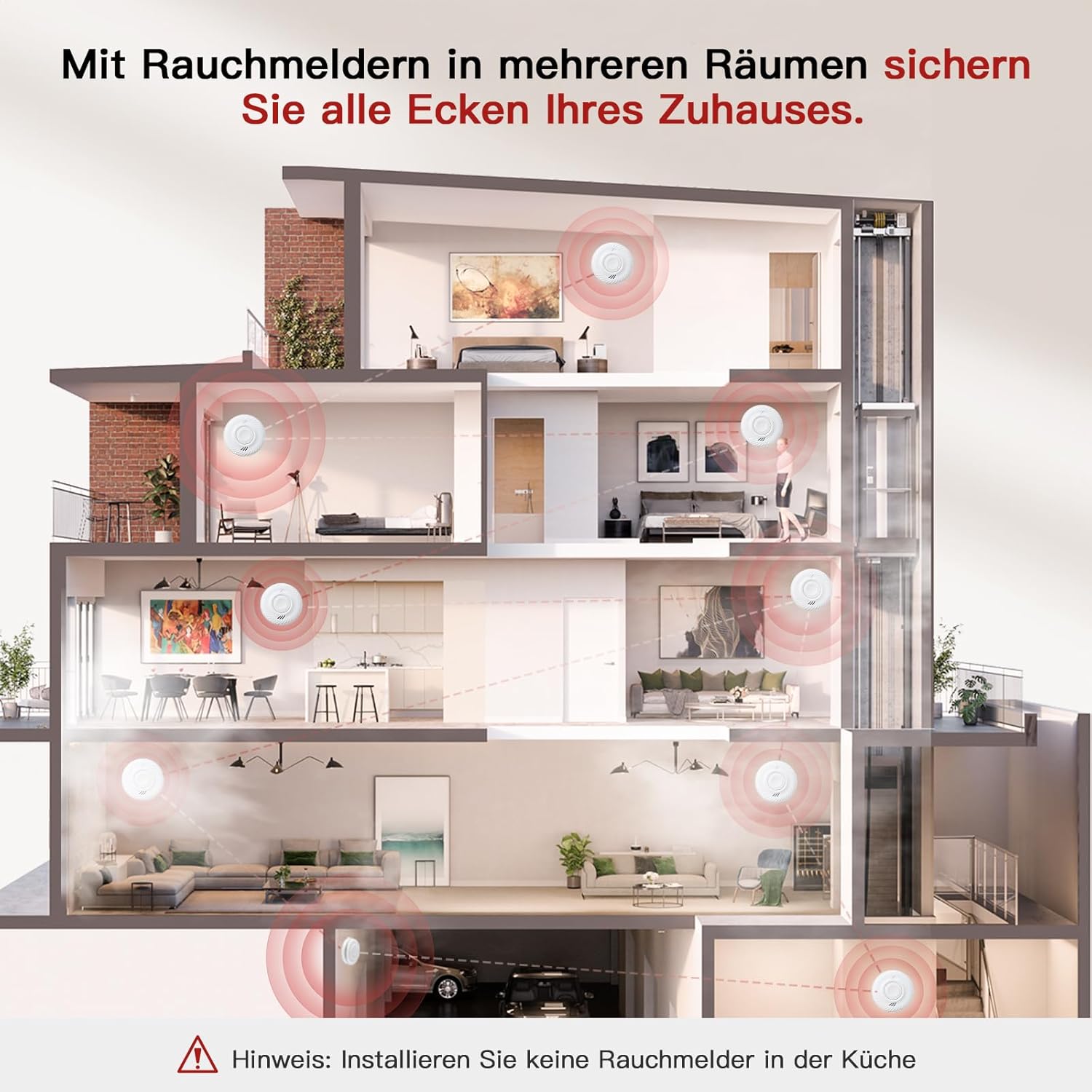
Install smoke detectors in multiple rooms to secure all areas of your home. Important: Do not install smoke detectors in the kitchen due to potential false alarms from cooking fumes.
- Install at least one smoke detector on every level of your home, including basements and attics.
- Place detectors inside and outside sleeping areas.
- Avoid placing detectors near windows, doors, or air vents where drafts might interfere with smoke detection.
- Maintain a distance of at least 1 meter (3 feet) from cooking appliances.
6. Operating Instructions
Normal Operation:
Once activated, the detector will perform a self-test and enter normal monitoring mode. The LED indicator will flash periodically (e.g., every 56 seconds) to indicate proper functioning.
Testing the Detector:
It is recommended to test your smoke detector weekly to ensure it is working correctly.
- Press and hold the Test/Hush button on the detector for a few seconds.
- The alarm will sound loudly, and the LED indicator will flash rapidly.
- Release the button. The alarm will stop.

Perform convenient self-tests of the smoke detector directly from your smartphone using the app, eliminating the need to physically reach the device. The alarm sounds at 85dB during a test or actual event.
Hush/Silence Function:
In case of a nuisance alarm (e.g., from cooking fumes), you can temporarily silence the alarm:
- Press the Test/Hush button on the detector.
- The alarm will silence for a short period (e.g., 10 minutes) before automatically resetting.
- If the smoke is still present after the hush period, the alarm will sound again.
7. App Connection (Tuya/Smart Life)
Connect your PHYSEN WiFi Smoke Detector to the Tuya or Smart Life app for remote monitoring and notifications.

Connect the detector to the Tuya/Smart Life app via 2.4GHz Wi-Fi to receive real-time notifications on your smartphone when smoke is detected or in case of malfunction. Ensure your phone has cellular or Wi-Fi network access.
- Download the App: Download and install the "Tuya Smart" or "Smart Life" app from your smartphone's app store (iOS or Android).
- Register/Log In: Create an account or log in to your existing account.
- Add Device:
- Ensure your smartphone is connected to a 2.4GHz Wi-Fi network. The smoke detector only supports 2.4GHz Wi-Fi.
- Open the app and tap "+" or "Add Device."
- Select "Security & Video Surveillance" > "Smoke Detector (Wi-Fi)" or similar category.
- On the smoke detector, press and hold the Test/Hush button until the LED indicator starts blinking rapidly (usually blue). This puts the device into pairing mode.
- Follow the on-screen instructions in the app to connect the detector to your Wi-Fi network. You may need to enter your Wi-Fi password.
- Once connected, the LED indicator on the detector will stop blinking rapidly and remain off or flash slowly, indicating a successful connection.
- Device Sharing:

The device can be shared with up to 12 different app accounts, allowing all shared users to receive real-time push notifications for enhanced family safety.
- In the app, navigate to the device settings for your smoke detector.
- Look for a "Share Device" or "Device Sharing" option.
- Enter the email or phone number associated with the Tuya/Smart Life account of the person you wish to share access with.
- Shared users will receive real-time push notifications.
8. Maintenance
Regular Cleaning:
Clean your smoke detector at least once a month to prevent dust and debris buildup, which can affect performance.
- Gently vacuum the ventilation slots using a soft brush attachment.
- Wipe the exterior with a clean, damp cloth. Do not use cleaning solvents or sprays.
Battery:
The detector is equipped with a sealed 10-year battery. It is not user-replaceable. When the battery is low, the detector will emit a low battery warning (a chirp and/or app notification). Replace the entire unit when the low battery warning persists or after 10 years of operation.
9. Troubleshooting
- Alarm sounds intermittently or chirps: This usually indicates a low battery. Since the battery is sealed, the unit needs to be replaced.
- False alarms:
- Check for sources of smoke or steam (e.g., cooking, hot showers, fireplaces).
- Clean the detector to remove dust or insects.
- Relocate the detector if it is too close to kitchens or bathrooms.
- Detector does not connect to Wi-Fi:
- Ensure your Wi-Fi network is 2.4GHz. The detector does not support 5GHz Wi-Fi.
- Check your Wi-Fi password for accuracy.
- Move the detector closer to your Wi-Fi router.
- Restart your router and try pairing again.
- Ensure the detector is in pairing mode (rapidly blinking LED).
- No app notifications:
- Ensure your phone has a stable internet connection (cellular or Wi-Fi).
- Check app notification settings on your phone and within the Tuya/Smart Life app.
- Verify that the detector is still connected to Wi-Fi (check its status in the app).
- Test button does not work: Ensure the detector is properly activated and the battery is not depleted. If issues persist, the unit may be faulty and require replacement.
10. Specifications
| Brand | PHYSEN |
| Model Number | SDWIFI-1006 |
| Power Source | Battery Powered (10-year sealed battery) |
| Sensor Type | Photoelectric |
| Connectivity | 2.4GHz Wi-Fi |
| Alarm Loudness | 85dB |
| Material | Flame Retardant ABS |
| Product Dimensions | 3D x 9W x 9.5H Centimeters |
| Item Weight | 0.96 Kilograms (for 6 units) |
| Certifications | EN 14604, TÜV Rheinland |
11. Warranty and Support
For warranty information and technical support, please refer to the documentation included with your purchase or contact PHYSEN customer service through their official website or the retailer where the product was purchased. Keep your proof of purchase for warranty claims.