
INSMART WDF-881
INSMART Water Flosser Instruction Manual
Model: WDF-881 (Item Model Number: 881-Black-US)
Brand: INSMART
Product Overview
The INSMART Water Flosser is designed for comprehensive oral hygiene, offering deep cleaning for teeth and gums. It features adjustable pressure levels and a variety of specialized nozzles to cater to individual needs and ensure thorough removal of food debris and plaque.
- 360° Deep Cleaning: This professional water flosser provides powerful pulsation (1400-1800 pulses per minute) to effectively remove food debris hidden deep within the mouth, addressing gum issues, teeth stains, and bad breath. Its large 600ml water tank supports extended use for individuals and multiple family members.
- 10 Adjustable Water Pressure Settings: Customize your cleaning experience with 10 pressure levels (10-130 PSI). Levels 1-3 are suitable for children, sensitive teeth, and beginners. Medium pressure (5-7) is ideal for most users, while high pressure (10) is designed for adults and experienced users, ensuring thorough cleaning.
- Large 600ml Capacity & Leak-Proof Design: The water tank offers ample capacity for up to 500 seconds of continuous water dispensing. A 1-meter flexible inlet hose allows for convenient long-distance use. The leak-proof design prevents spills, and the 360° rotating nozzle ensures all areas of the mouth are accessible for cleaning.
- 8 Specialized Nozzles: The flosser includes 3 regular high-pressure nozzles and 5 special-purpose nozzles: 1 orthodontic nozzle, 1 tongue cleaning nozzle, 1 periodontal nozzle, 1 stain nozzle, and 1 toothbrush nozzle. These diverse tips enable deep cleaning of interdental spaces and gum lines, areas often missed by traditional brushing and flossing.

Image: The INSMART Water Flosser unit shown with its eight included water jet tips, illustrating the variety of cleaning options available.
Setup
- Unpack Components: Carefully remove all components from the packaging, including the main unit, water tank, handle, charging cable, and various nozzles.
- Charge the Device: Ensure the device is fully charged before first use. The unit is rechargeable and includes a 9V battery.
- Attach Water Tank: Remove the water tank from the main unit. Fill the 600ml tank with lukewarm water. Ensure it is securely reattached to prevent leaks.
- Select and Attach Nozzle: Choose the desired nozzle (e.g., standard, orthodontic, tongue cleaner) and firmly insert it into the handle until it clicks into place. The nozzles are color-coded for easy identification if shared among family members.

Image: A detailed view of the INSMART Water Flosser highlighting its key components: the 10-water pressure adjustment knob, mode switch button, jet tip, 360-degree nozzle rotation, and handle switch.
Operating Instructions
- Initial Pressure Setting: When using the oral irrigator for the first time, begin with a low water pressure setting (Pressure 1-3) to allow your gums to adjust. Gradually increase the pressure to a comfortable level (Medium Pressure 5-7 for most, High Pressure 10 for experienced users).
- Power On: Turn the main unit's knob to the desired pressure setting.
- Position Nozzle: Place the nozzle tip into your mouth, aiming it at the gumline at a 90-degree angle.
- Activate Water Flow: Turn on the handle switch to start the water flow. Keep your lips slightly closed to prevent splashing while allowing water to drain into the sink.
- Flossing Technique: Guide the water jet along your gumline, pausing briefly between teeth. Ensure you clean both the front and back surfaces of your teeth. The 360° rotating nozzle allows for easy access to all areas.
- Changing Modes: The device features three pressure modes: Normal, Pulse, and Point. Use the mode switch button on the top of the unit to cycle through these options. The mode memory function will automatically shut down the device after 2 minutes of continuous use.
- To Stop Use: First, turn off the handle switch. Then, turn the gear knob on the main unit to the "OFF" position. Finally, turn off the main switch in the center of the irrigator.
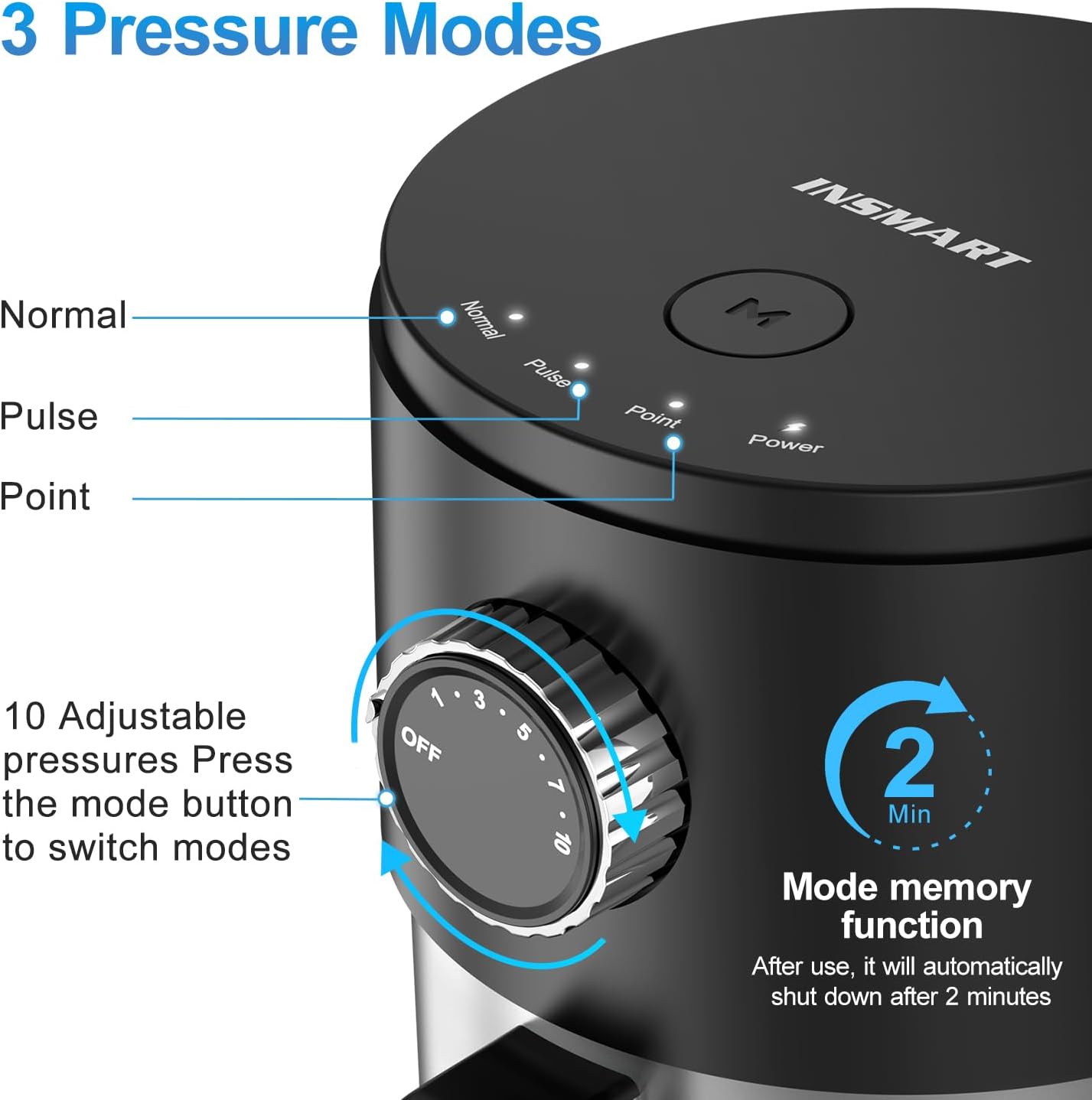
Image: Close-up of the INSMART Water Flosser's control panel, showing the "Normal," "Pulse," and "Point" modes, along with the 10 adjustable pressure settings and the 2-minute mode memory function.

Image: A visual representation of the 10 adjustable pressure levels on the INSMART Water Flosser, indicating recommended ranges for sensitive teeth, daily cleaning, and deep cleaning.
Video: An official demonstration of the INSMART Water Flosser, showcasing its features, setup, and operation for family use.
Maintenance
- Empty and Dry Water Tank: After each use, empty any remaining water from the tank. The removable 600ml water tank can be easily detached for cleaning and drying to prevent mold and bacterial growth.
- Clean Nozzles: Rinse the nozzles thoroughly under running water after each use. For deeper cleaning, periodically soak them in a solution of 2 parts water to 1 part white vinegar.
- Wipe Down Unit: Wipe the exterior of the main unit with a soft, damp cloth. Do not submerge the main unit in water.
- Storage: Store the water flosser in a clean, dry place. Ensure the handle and hose are properly coiled and stored to prevent kinks.

Image: The INSMART Water Flosser demonstrating its large 600ml removable water tank being filled, emphasizing ease of cleaning and longer usage time.
Troubleshooting
If you encounter any issues with your INSMART Water Flosser, please refer to the following common solutions:
| Problem | Possible Cause | Solution |
|---|---|---|
| No water flow or weak pressure | Low water level in tank, clogged nozzle, or incorrect pressure setting. | Ensure water tank is filled. Check if the nozzle is clear of debris. Adjust pressure setting to a higher level. |
| Device not turning on | Battery is low or unit is not properly connected to power. | Charge the device fully. Ensure all connections are secure. |
| Water leakage from unit | Water tank not properly seated or damaged seal. | Ensure the water tank is securely attached. Inspect seals for any damage. |
If the issue persists after attempting these solutions, please contact INSMART customer support for further assistance.
Specifications
| Feature | Detail |
|---|---|
| Model Number | 881-Black-US (WDF-881) |
| Brand | INSMART |
| Package Dimensions | 7.05 x 6.57 x 6.18 inches |
| Item Weight | 1.85 Pounds |
| Batteries | 1 9V batteries required (included) |
| Power Source | Corded Electric |
| Special Features | Multiple Operation Modes, Multiple Pressure Settings, Multiple Tips, Rechargeable, Rotatable Tip |
| Product Benefits | Gum Health, Prevents Bad Breath, Prevents Cavities, Removes Plaque |
| Unit Count | 24.7 Count |
| Water Pulse Frequency | 1400-1800 pulses per minute |
| Water Pressure Range | 10-130 PSI |
| Water Tank Capacity | 600ml |

Image: Graphic illustrating the water pressure range (10-130 PSI) and pulse frequency (1400-1800 times per minute) of the INSMART Water Flosser, highlighting its quick and comfortable plaque cleaning capabilities.
Warranty and Support
For warranty information and customer support, please refer to the documentation included with your product or contact the manufacturer directly. The manufacturer, INSMART, can be reached through their official channels for any product-related inquiries or assistance.
Safety Information: Do not use with electrical devices. Do not submerge in water. Keep away from children. Use with caution if you have a medical condition or are pregnant.
Legal Disclaimer: Statements regarding dietary supplements have not been evaluated by the FDA and are not intended to diagnose, treat, cure, or prevent any disease or health condition.
Related documentsWDF-881

Ask a question about this manual
Ask about setup, troubleshooting, compatibility, parts, safety, or missing instructions. Manuals+ will review the question and use this page’s manual context to help answer it.