1. Introduction
Thank you for choosing the CITYSPORTS Treadmill with Incline. This manual provides essential information for the safe and efficient operation, maintenance, and troubleshooting of your new walking pad. Please read this manual thoroughly before initial use and retain it for future reference.
This treadmill is designed for home use, offering a convenient way to incorporate walking and light jogging into your daily routine, whether at home or under a standing desk.

Image: The CITYSPORTS treadmill being used in various settings, including watching TV, outdoors, with family, and as an under-desk walking pad.
2. Safety Instructions
To ensure safe operation, please observe the following precautions:
- Always place the treadmill on a flat, stable surface.
- Ensure adequate clear space around the treadmill (at least 0.6 meters on all sides).
- Keep children and pets away from the treadmill during operation.
- Do not use the treadmill if you weigh more than 120 kg (265 lbs).
- Wear appropriate athletic footwear.
- If you experience dizziness, nausea, chest pain, or any other abnormal symptoms, stop your workout immediately and consult a physician.
- Unplug the treadmill from the power outlet when not in use or before cleaning/maintenance.
- Do not operate the treadmill if the power cord is damaged.
3. Product Overview
The CITYSPORTS Treadmill is a compact and versatile walking pad designed for various fitness needs. Key features include:
- Adjustable Incline: Manual 3-level incline adjustment (11%, 13%, 14%) plus a flat 0% option.
- Speed Range: 1 to 6 km/h.
- Integrated Bluetooth Speaker: Connect your smartphone for audio playback.
- LED Display: Shows time, speed, distance, and calories burned.
- Portable Design: Compact dimensions (110 x 50.9 x 10.8 cm) and lightweight (15.7 kg) with built-in transport wheels for easy storage.
- Shock Absorption: 5-layer anti-slip diamond running belt combined with six silicone shock absorbers for knee protection.
- Quiet Motor: 440W motor ensures stable and quiet operation.
- Remote Control: Convenient control of speed and power.
- Tri-color LED Lights: Visual speed tracking (Green: 1-2 km/h, Orange: 2.5-4 km/h, Red: 4.5-6 km/h).

Image: The CITYSPORTS treadmill showcasing its design and incline capabilities, with a user walking on it.

Image: Diagram illustrating the non-slip and shock-absorbing system of the treadmill, highlighting the silicone absorbers.
4. Setup
The CITYSPORTS Treadmill requires minimal assembly. Follow these steps for initial setup:
- Unpack: Carefully remove the treadmill from its packaging.
- Placement: Place the treadmill on a firm, level surface. Ensure there is sufficient space around the unit for safe operation and movement.
- Power Connection: Plug the power cord into a grounded electrical outlet.
- Incline Adjustment: If desired, manually adjust the incline to one of the three levels (11%, 13%, 14%) or keep it flat (0%). Refer to the 'Operating Instructions' section for details on incline adjustment.

Image: The treadmill being easily moved and stored, highlighting its compact dimensions and transport wheels.
5. Operating Instructions
Familiarize yourself with the controls and functions before starting your workout.
5.1 Powering On/Off
- Power On: Plug in the treadmill and press the power button on the remote control or the quick access button on the treadmill.
- Power Off: Press the power button on the remote control or the quick access button. Unplug the unit from the wall when not in use.
5.2 Using the Remote Control
The remote control allows you to start/stop the treadmill and adjust the speed. Ensure the remote has working batteries.

Image: The remote control and LED display of the treadmill, showing various metrics and Bluetooth connectivity.
5.3 Speed Adjustment
The treadmill offers speeds from 1 km/h to 6 km/h.
- Use the '+' and '-' buttons on the remote control or the quick access buttons on the treadmill to increase or decrease speed.
- The LED display will show the current speed.
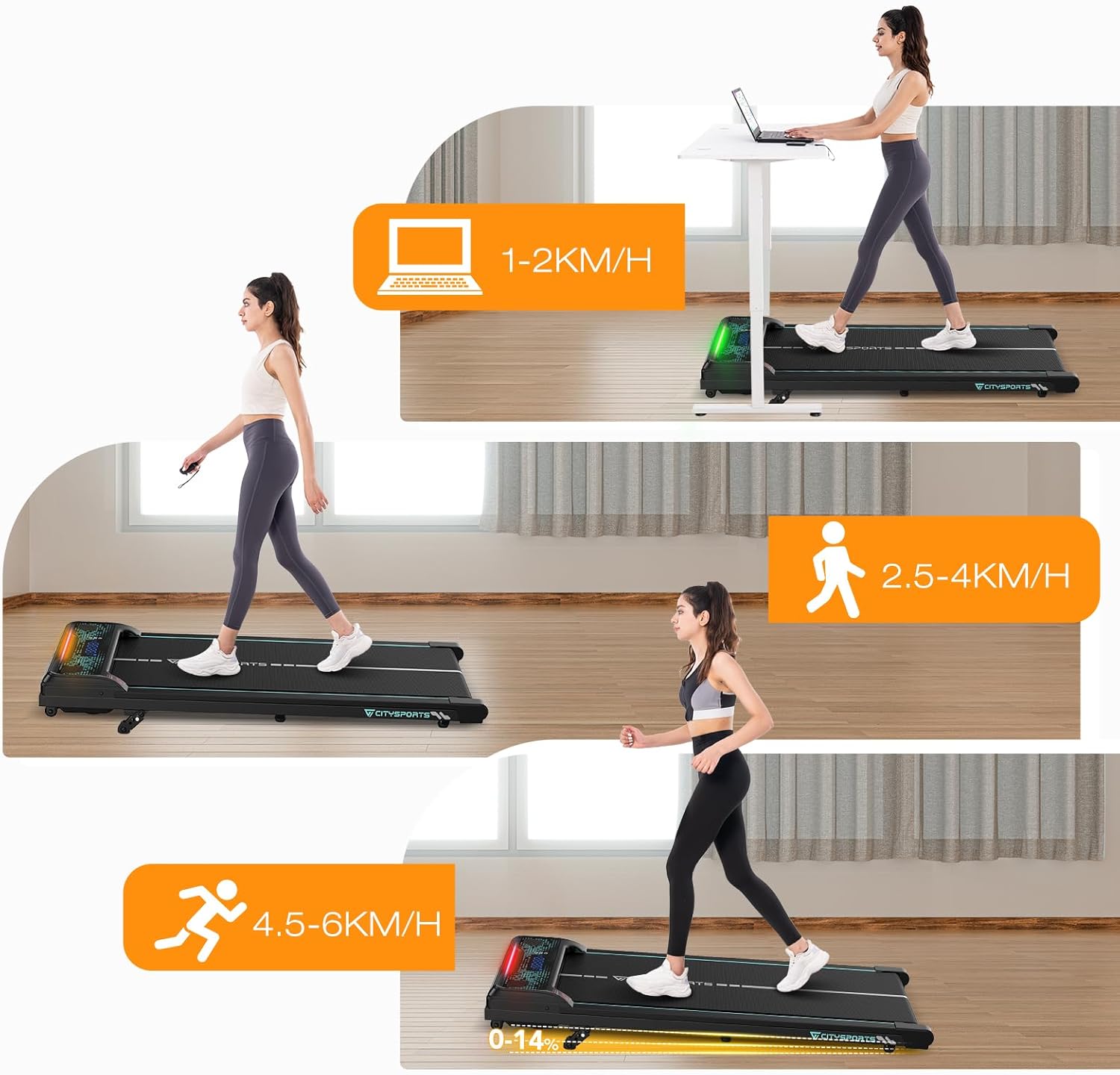
Image: Visual representation of speed tracking with tri-color LED lights: green for 1-2 km/h, orange for 2.5-4 km/h, and red for 4.5-6 km/h.
5.4 Incline Adjustment
The treadmill features a manual 3-level incline adjustment. To change the incline:
- Ensure the treadmill is powered off and unplugged.
- Carefully lift the rear of the treadmill to access the incline adjustment mechanism.
- Adjust the support legs to the desired incline level (0%, 11%, 13%, or 14%). Ensure both sides are set equally.
- Gently lower the treadmill back down, ensuring it is stable before use.

Image: The manual 3-level incline adjustment mechanism, showing the different settings for 11%, 13%, and 14% incline.
5.5 LED Display
The LED display provides real-time workout data:
- TIME: Duration of your workout.
- SPEED: Current walking/running speed in km/h.
- DIST: Distance covered during the workout.
- CAL: Estimated calories burned.
5.6 Bluetooth Speaker
To connect your smartphone to the integrated Bluetooth speaker:
- Ensure the treadmill is powered on.
- Activate Bluetooth on your smartphone.
- Search for available devices and select 'CITYSPORTS' (or similar name).
- Once connected, you can play music through the treadmill's speakers.
6. Maintenance
Regular maintenance ensures the longevity and optimal performance of your treadmill.
6.1 Cleaning
- Always unplug the treadmill before cleaning.
- Wipe down the display and frame with a soft, damp cloth. Avoid abrasive cleaners.
- Clean the running belt regularly to remove dust and debris.
6.2 Lubrication
The running belt requires periodic lubrication to reduce friction and extend its lifespan. Refer to the specific instructions provided with your treadmill for the correct type of lubricant and application frequency. Generally, apply silicone lubricant under the belt every few months, depending on usage.
6.3 Belt Adjustment
If the running belt feels loose or shifts to one side, it may need adjustment. Consult the specific instructions for your model, typically involving adjusting tension bolts at the rear of the treadmill with an Allen wrench.
7. Troubleshooting
If you encounter issues with your treadmill, refer to the following common problems and solutions:
| Problem | Possible Cause | Solution |
|---|---|---|
| Treadmill does not power on. | Power cord not plugged in; power switch off; circuit breaker tripped. | Ensure power cord is securely plugged in. Check the power switch. Reset the circuit breaker if necessary. |
| Running belt slips or stops. | Belt too loose; belt needs lubrication; motor overload. | Adjust belt tension. Lubricate the belt. Reduce user weight or speed. |
| Unusual noise during operation. | Loose parts; belt misalignment; motor issue. | Check for and tighten any loose components. Adjust belt alignment. If noise persists, contact customer support. |
| Remote control not working. | Dead batteries; remote out of range; interference. | Replace batteries. Ensure remote is pointed at the treadmill's receiver. Reduce interference. |
If the problem persists after attempting these solutions, please contact CITYSPORTS customer support.
8. Specifications
| Feature | Specification |
|---|---|
| Brand | CITYSPORTS |
| Model | B0DMK5LKVB |
| Color | Black/Green |
| Material | Acrylonitrile Butadiene Styrene (ABS) |
| Product Dimensions (L x W x H) | 110 x 50.9 x 10.8 cm (43.3 x 20.0 x 4.3 inches) |
| Item Weight | 15.7 kg (34.6 lbs) |
| Maximum Speed | 6 km/h (3.7 mph) |
| Motor Power | 440 Watt |
| Maximum User Weight | 120 kg (265 lbs) |
| Incline Levels | 0%, 11%, 13%, 14% (Manual Adjustment) |
| Components Included | Remote Control |
| Assembly Required | No |
9. Warranty and Support
For warranty information and customer support, please refer to the documentation included with your purchase or visit the official CITYSPORTS website. Keep your purchase receipt as proof of purchase for any warranty claims.
If you have any questions or require assistance, please contact CITYSPORTS customer service.


