
Nikon Z 50II w/16-50 Kit
Nikon Z50 II User Manual
Model: Z 50II w/16-50 Kit | Brand: Nikon
Introduction
This manual provides essential information for operating your Nikon Z50 II mirrorless camera with the NIKKOR Z DX 16-50mm f/3.5-6.3 VR lens. The Z50 II is a compact and versatile camera designed for capturing stunning stills and high-quality video. It combines excellent image quality with user-friendly features, making it ideal for everyday photography, video creation, and live streaming.
Setup
1. Unboxing and Initial Inspection
Carefully unpack all components from the box. Ensure the following items are present:
- Nikon Z50 II Camera Body
- NIKKOR Z DX 16-50mm f/3.5-6.3 VR Lens
- EN-EL25a Rechargeable Lithium-ion Battery
- Nikon Camera Strap
- USB Type-C Charging and Transfer Cable

Figure 1: Included components of the Nikon Z50 II w/16-50 Kit.
2. Battery Installation and Charging
Insert the EN-EL25a battery into the battery compartment located at the bottom of the camera. Ensure it clicks into place. Charge the battery fully before first use using the supplied USB Type-C cable connected to a compatible USB power adapter (not included) or a computer.
3. Attaching the Lens
Align the white mounting mark on the NIKKOR Z DX 16-50mm f/3.5-6.3 VR lens with the white mounting mark on the camera body. Rotate the lens counter-clockwise until it clicks securely into place. To remove, press the lens release button on the camera body and rotate the lens clockwise.
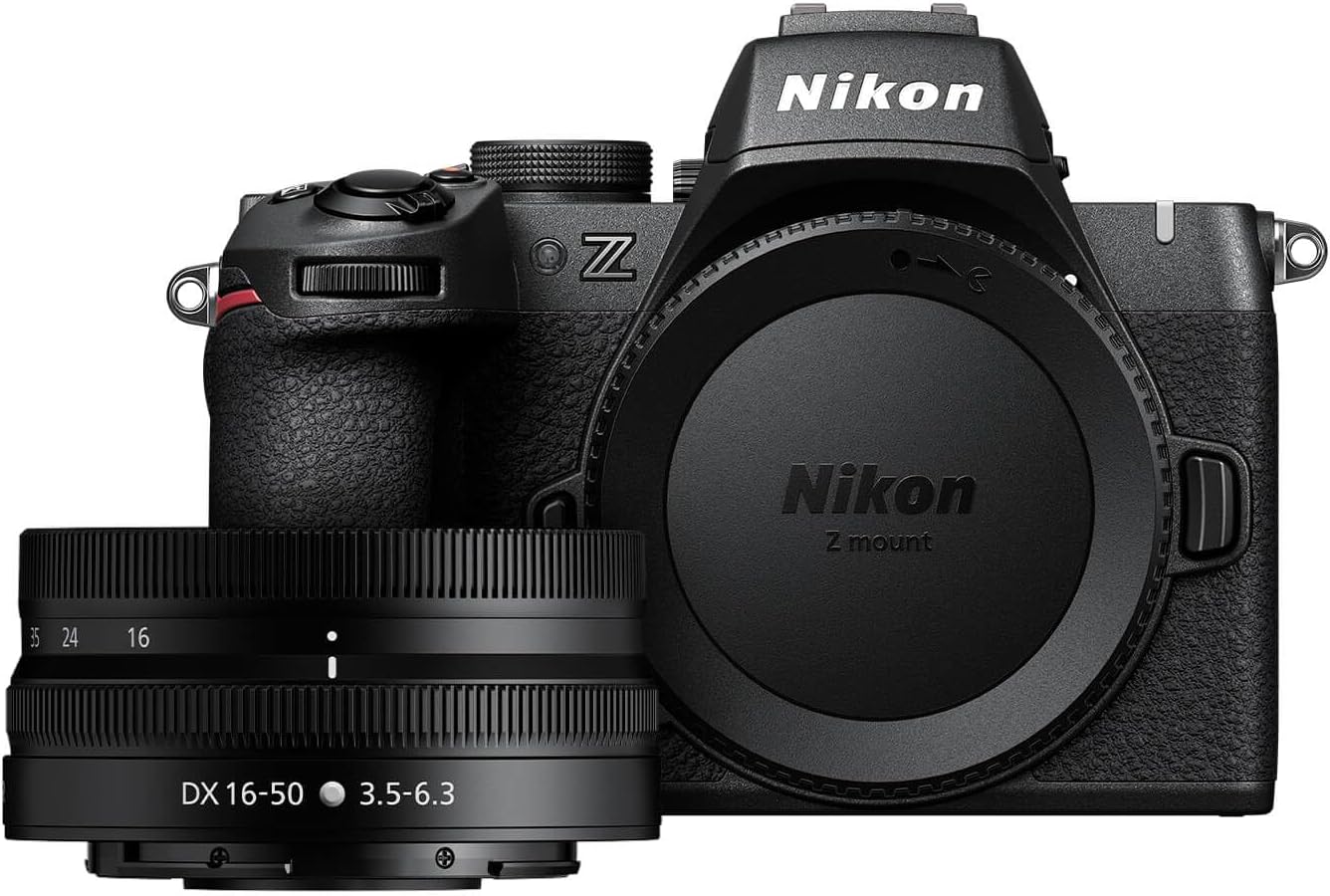
Figure 2: Nikon Z50 II camera body and NIKKOR Z DX 16-50mm lens.
Operating the Camera
1. Power On and Basic Controls
Turn the camera on using the power switch located around the shutter button. The Z50 II features intuitive buttons and dials for easy operation. The rear LCD screen is a flip-out touchscreen, perfect for various shooting angles, including selfies and vlogging.

Figure 3: Rear controls and flip-out touchscreen of the Nikon Z50 II.

Figure 4: Easy, immersive operation with intuitive buttons and dials, and a flip-out touchscreen.
2. Autofocus System
The Z50 II features an intelligent autofocus system capable of detecting and tracking various subjects, including people, dogs, cats, birds, and vehicles. Dedicated bird and airplane modes enhance autofocus accuracy for specific scenarios. This ensures fast and accurate focus, even with moving subjects.

Figure 5: Intelligent autofocus with subject detection options.
3. Picture Control Presets
Explore your creative vision with 31 built-in Picture Control presets. These presets are designed to give your photos and videos distinct looks. You can also create and save your own custom presets or download bespoke Cloud Picture Controls directly to your Z50 II from Nikon Imaging Cloud. Experiment with different looks in real-time as you shoot.

Figure 6: Explore creative color styles using the Picture Control button.

Figure 7: Download creative color presets to your camera from Nikon Imaging Cloud.
4. Video Recording
Capture stunning video with the Z50 II. It supports 4K UHD/60p recording and in-camera 120p slow-motion in Full HD. Built-in electronic VR (Vibration Reduction) helps stabilize footage, and a product review mode is available for specific video needs. The camera also offers flexible color grading with N-Log for advanced video workflows.

Figure 8: Powerful video features of the Nikon Z50 II.
5. Wireless Connectivity and Sharing
The Z50 II allows for easy sharing of photos and videos to your smart device in seconds using the free Nikon SnapBridge app. This built-in wireless photo sharing capability simplifies your workflow.

Figure 9: Send photos to your phone or the cloud, right from the camera.
Maintenance
1. Cleaning the Camera and Lens
- Use a soft, lint-free cloth to clean the camera body.
- For the lens, use a lens brush or blower to remove dust, then gently wipe with a micro-fiber lens cloth and lens cleaning solution if necessary.
- Avoid touching the sensor directly. If sensor cleaning is required, consult a professional service center.
2. Battery Care
- Store batteries in a cool, dry place when not in use.
- Avoid fully discharging the battery regularly to prolong its lifespan.
- Use only genuine Nikon batteries and chargers.
3. Storage
When storing the camera for extended periods, remove the battery and store the camera in a dry, well-ventilated area, preferably in a camera bag with desiccant to prevent mold and mildew.
Troubleshooting
If you encounter issues with your Nikon Z50 II, consider the following common troubleshooting steps:
- Camera not powering on: Ensure the battery is fully charged and correctly inserted.
- Images are blurry: Check focus settings, ensure the lens is clean, and verify sufficient lighting.
- Memory card error: Ensure the memory card is inserted correctly and is not full or corrupted. Try reformatting the card (this will erase all data).
- Wireless connection issues: Restart both the camera and your smart device. Ensure the SnapBridge app is up to date.
For more detailed troubleshooting or complex issues, please refer to the comprehensive online manual available on the official Nikon support website or contact Nikon customer service.
Specifications
| Feature | Detail |
|---|---|
| Product Dimensions | 1.26 x 2.76 x 2.76 inches |
| Item Weight | 1.51 pounds |
| Item Model Number | 1786 |
| Batteries | 1 Lithium Ion batteries required (included) |
| Manufacturer | Nikon |
| Special Feature | Pop-Up Flash |
| Included Components | Camera Body & Lens |
| Model Name | Z50II 16-50mm Lens Kit |
| Compatible Devices | Smartphones, Nikon Z series cameras and accessories |
| Exposure Control Type | Automatic, Manual |
| Min Shutter Speed | 30 Seconds |
| Viewfinder Magnification | 1.02x |
| Sensor | 20.9-megapixel DX format (APS-C size) |
| Video Resolution | 4K UHD/60p, Full HD 120p (slow-motion) |
Warranty and Support
Your Nikon Z50 II camera is covered by Nikon's standard limited warranty. Please refer to the warranty card included with your product for specific terms and conditions. For technical support, software updates, or to download the full user manual, please visit the official Nikon support website:
Related documentsZ 50II w/16-50 Kit


Ask a question about this manual
Ask about setup, troubleshooting, compatibility, parts, safety, or missing instructions. Manuals+ will review the question and use this page’s manual context to help answer it.