
1. Introduction
This manual provides comprehensive instructions for the setup, operation, and maintenance of your Smartby BN59-01330H / RMCSPR1AP1 Remote Control. This remote is designed as a replacement for various Samsung Smart TV models, offering voice control and essential functions.
2. Product Overview
The Smartby BN59-01330H / RMCSPR1AP1 is a universal remote control compatible with a wide range of Samsung Smart TVs, including LED, QLED, UHD, SUHD, HDR, LCD, Frame, Curved, Solar, HDTV, 4K, 8K, and 3D models. It features built-in voice recognition technology for enhanced control.
This remote replaces numerous Samsung remote models, including BN59-01312, BN59-01329A, BN59-01329C, BN59-01329F, BN59-01330A, BN59-01330C, BN59-01330H, BN59-01330N, BN59-01330Q, BN59-01330N, BN59-01330M, BN59-01330H, BN59-01312Q, BN59-01259E, BN59-01312B/H/G, BN59-01312F, BN59-01312M, BN59-01312A, BN59-01199F, BN59-01259B, BN59-01260A, BN59-01301A, BN59-01315A, AA59-00666A, AA59-00741A, AA59-00786A, AA59-00602, AA59-00581A, AA59-00582A, AA59-00594A, BN59-01178W, and AA59-00638A.

Front view of the Smartby BN59-01330H remote control, displaying all buttons and their layout.

The Smartby BN59-01330H remote control positioned in front of a Samsung Smart TV, illustrating its intended use.
3. Setup
- Battery Installation: Insert two AAA batteries into the remote control, ensuring correct polarity.
- Pairing Process: To pair the remote with your Samsung Smart TV, press and hold the Back/Exit button and the Play/Pause button simultaneously for approximately 5 seconds. A 'Pairing complete' message will appear on your TV screen once successful.
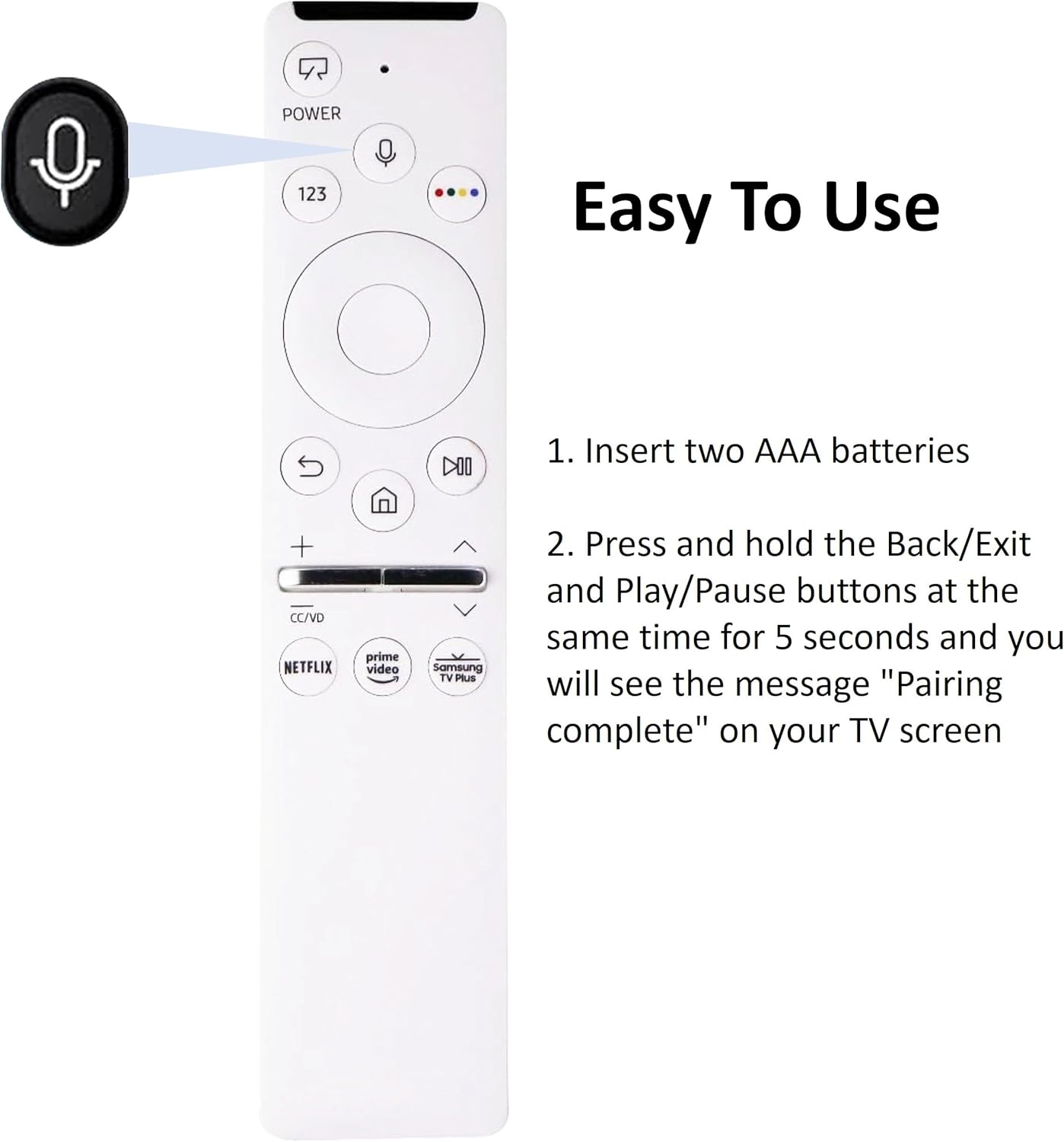
Diagram illustrating the pairing process for the Smartby BN59-01330H remote control, highlighting the Back/Exit and Play/Pause buttons.
4. Operating Instructions
The remote control features a standard layout for easy navigation and control of your Samsung Smart TV. Refer to the image below for button identification.
Front view of the Smartby BN59-01330H remote control, displaying all buttons and their layout.
- Power Button: Turns the TV on or off.
- 123 Button: Accesses the virtual numeric keypad.
- Microphone Button: Activates voice control for commands and searches.
- Directional Pad (Circular): Navigates menus and selects items.
- Back/Exit Button: Returns to the previous screen or exits a menu.
- Home Button: Accesses the TV's Smart Hub or home screen.
- Play/Pause Button: Controls media playback.
- Volume Up/Down: Adjusts the TV volume.
- Channel Up/Down (CC/VD): Changes TV channels or accesses Closed Captions/Video Description.
- Netflix, Prime Video, Samsung TV Plus Buttons: Direct access to these streaming services.

The Smartby BN59-01330H remote control with the microphone button highlighted, indicating its voice control functionality.
5. Troubleshooting
- Remote Not Responding: Ensure batteries are correctly installed and have sufficient charge. Replace batteries if necessary.
- Pairing Issues: If the 'Pairing complete' message does not appear, ensure the remote is within close proximity to the TV and repeat the pairing process (hold Back/Exit and Play/Pause buttons for 5 seconds). Some users have reported needing multiple attempts for successful Bluetooth connection.
- Voice Control Not Working: Verify that the remote is properly paired and that your TV supports voice control. Ensure there are no obstructions between the remote and the TV.
- Specific App Buttons Not Activating: If direct streaming buttons (Netflix, Prime Video, Samsung TV Plus) do not launch the apps, check your TV's internet connection and app installation. In some cases, this may indicate a compatibility issue or require a TV software update.
- Intermittent Functionality: If the remote stops working intermittently, try re-pairing it with the TV. If issues persist, consider replacing the batteries or contacting support.
6. Specifications
| Product Dimensions | 7.5 x 1.2 x 1 inches |
| Item Weight | 1.44 ounces |
| Batteries | 2 AAA batteries (required) |
| Connectivity Technology | Bluetooth |
| Compatible Devices | Television |
| Special Feature | Voice Search |
| Max Number of Supported Devices | 1 |
| Model Number | BN59-01330H |
7. Warranty and Support
For product support or warranty inquiries, please contact Smartby customer service. Refer to your purchase documentation for specific warranty terms and conditions.