1. Introduction
Thank you for choosing the Dolphin SP-3210RBT High-Power Portable Party Bluetooth Speaker. This manual provides detailed instructions for the safe and efficient operation of your speaker. Please read this manual thoroughly before use and retain it for future reference.
2. Safety Information
- Power Source: Use only the provided power cable and ensure the voltage matches the speaker's requirements.
- Battery Care: To prolong battery life, fully charge the speaker before first use. Avoid completely draining the battery. Recharge regularly, even if not in use.
- Water and Moisture: Do not expose the speaker to water, rain, or excessive moisture. This product is not waterproof.
- Ventilation: Ensure adequate ventilation around the speaker. Do not block any ventilation openings.
- Heat: Keep the speaker away from heat sources such as radiators, heat registers, stoves, or other apparatus (including amplifiers) that produce heat.
- Cleaning: Disconnect from power before cleaning. Use a soft, dry cloth. Do not use liquid cleaners or aerosol cleaners.
- Servicing: Do not attempt to service this product yourself. Refer all servicing to qualified service personnel.
- Volume Levels: Prolonged exposure to high volume levels may cause permanent hearing damage. Adjust volume to a safe level.
3. Package Contents
Please check that all items listed below are included in your package:
- Dolphin SP-3210RBT Portable Party Bluetooth Speaker
- Wireless Microphone
- Remote Control
- 12V Battery Extender Cable
- Power Cable
4. Product Overview
The Dolphin SP-3210RBT is a high-power portable speaker designed for various events. It features dual 10-inch woofers, interactive LED lights, and a robust wooden cabinet for enhanced sound quality. The speaker is equipped with a control panel for managing audio settings and connectivity options, along with a handle and wheels for easy transport.

Image 4.1: Front view of the Dolphin SP-3210RBT speaker with its wireless microphone.

Image 4.2: Close-up of the speaker's control panel, highlighting the X-BASS knob and various input options.
5. Setup
5.1 Initial Charging
Before first use, fully charge the speaker. Connect the provided power cable to the speaker's power input and plug it into a standard electrical outlet. The charging indicator light will show the charging status. Once fully charged, the indicator will change or turn off.
5.2 Powering On/Off
Locate the power switch on the control panel. Flip the switch to the 'ON' position to power on the speaker. To power off, flip the switch to the 'OFF' position.
5.3 Wireless Microphone Setup
- Open the battery compartment of the wireless microphone and insert the required batteries (not specified in input, typically AA or AAA).
- Turn on the microphone using its power switch.
- Adjust the microphone volume (MIC.VOL) and echo effect (ECHO) on the speaker's control panel as desired.
6. Operation
6.1 Bluetooth Connectivity
- Power on the speaker. The display will indicate the current mode.
- Press the 'MODE' button on the control panel until 'Bluetooth' or 'BT' is displayed. The speaker will enter pairing mode, indicated by a flashing Bluetooth icon or sound.
- On your mobile device (smartphone, tablet, etc.), enable Bluetooth and search for available devices.
- Select 'Dolphin SP-3210RBT' from the list of devices. Once connected, the speaker will emit a confirmation sound, and the Bluetooth indicator will stop flashing.
6.2 WaveSync Pairing (for two SP-3210RBT speakers)
WaveSync allows you to wirelessly connect two SP-3210RBT speakers for a synchronized stereo sound experience.
- Ensure both SP-3210RBT speakers are powered on and in Bluetooth mode.
- On one speaker (this will be the primary speaker), press and hold the 'WaveSync' button. The speaker will emit a pairing sound.
- On the second speaker (secondary speaker), press the 'WaveSync' button. The speakers will attempt to connect.
- Once successfully paired, both speakers will emit a confirmation sound, and audio will play in stereo across both units.

Image 6.1: Illustration of two Dolphin SP-3210RBT speakers connected via WaveSync for double power and synchronized sound.
6.3 USB/TF/SD Card Playback
Insert a USB drive or TF/SD card (with compatible audio files) into the corresponding port on the control panel. The speaker will automatically switch to USB/Card mode and begin playing music. Use the 'PREV' and 'NEXT' buttons to navigate tracks and the 'PLAY/PAUSE' button for playback control.
6.4 AUX Input
Connect an external audio device (e.g., MP3 player, laptop) to the speaker's 'AUX' input using a 3.5mm audio cable. Press the 'MODE' button until 'AUX' is displayed. Audio will be played through the speaker from your connected device.
6.5 FM Radio
Press the 'MODE' button until 'FM' is displayed. Press the 'PLAY/PAUSE' button to automatically scan and save available FM radio stations. Use the 'PREV' and 'NEXT' buttons to switch between saved stations.
6.6 Audio Adjustment (X-BASS & Equalizer)
- Volume: Use the large 'VOLUME' knob to adjust the overall sound output level.
- X-BASS: Turn the dedicated 'X-BASS' knob to enhance the low-frequency response for deeper bass.
- Equalizer: Use the 6-band equalizer sliders to fine-tune specific frequency ranges (e.g., 60Hz, 250Hz, 1KHz, 3KHz, 6KHz, 12KHz) to match your audio preference.

Image 6.2: A hand adjusting the 6-band equalizer sliders on the speaker's control panel.
6.7 LED Light Modes
Press the 'LED LIGHT' button on the control panel to cycle through different interactive LED light modes. Press the button repeatedly to select your desired light pattern or to turn the lights off.

Image 6.3: The Dolphin SP-3210RBT speaker showcasing its interactive LED lights in action.
7. Maintenance
7.1 Cleaning
Always disconnect the speaker from the power source before cleaning. Use a soft, dry, lint-free cloth to wipe the exterior surfaces. Do not use abrasive cleaners, waxes, or solvents as they may damage the finish.
7.2 Battery Care and Storage
To maximize the lifespan of the internal rechargeable battery:
- Avoid fully discharging the battery frequently.
- Recharge the battery regularly, even if the speaker is not in active use, to maintain its charge level.
- Store the speaker in a cool, dry place when not in use for extended periods.
- If the battery level becomes too low, the speaker may shut off even when plugged in. Ensure sufficient charge for continuous operation.
8. Troubleshooting
If you encounter any issues with your Dolphin SP-3210RBT speaker, please refer to the following common problems and solutions:
| Problem | Possible Cause | Solution |
|---|---|---|
| Speaker does not power on. | Battery is discharged; Power cable not connected; Power switch is OFF. | Connect the power cable and charge the battery; Ensure power cable is securely connected; Flip power switch to ON. |
| No sound output. | Volume is too low; Incorrect input mode selected; Audio cable not connected properly (AUX); Bluetooth not paired. | Increase volume; Press MODE button to select correct input; Reconnect audio cable; Re-pair Bluetooth device. |
| Bluetooth device cannot connect. | Speaker not in pairing mode; Bluetooth disabled on device; Device too far from speaker; Another device is already connected. | Ensure speaker is in Bluetooth pairing mode; Enable Bluetooth on your device; Move device closer to speaker; Disconnect other Bluetooth devices. |
| Wireless microphone not working. | Microphone batteries are dead or inserted incorrectly; Microphone power switch is OFF; MIC.VOL is too low. | Replace microphone batteries; Turn on microphone; Increase MIC.VOL on speaker. |
| Low volume output despite high speaker volume. | Input signal from source device is too weak. | Increase the volume on your connected source device (phone, tablet, etc.). A stronger input signal will result in louder output from the speaker. |
| Speaker shuts off unexpectedly. | Battery is critically low. | Recharge the speaker's battery. Even when plugged in, a critically low battery may cause shutdown. |
9. Specifications
Technical specifications for the Dolphin SP-3210RBT speaker:
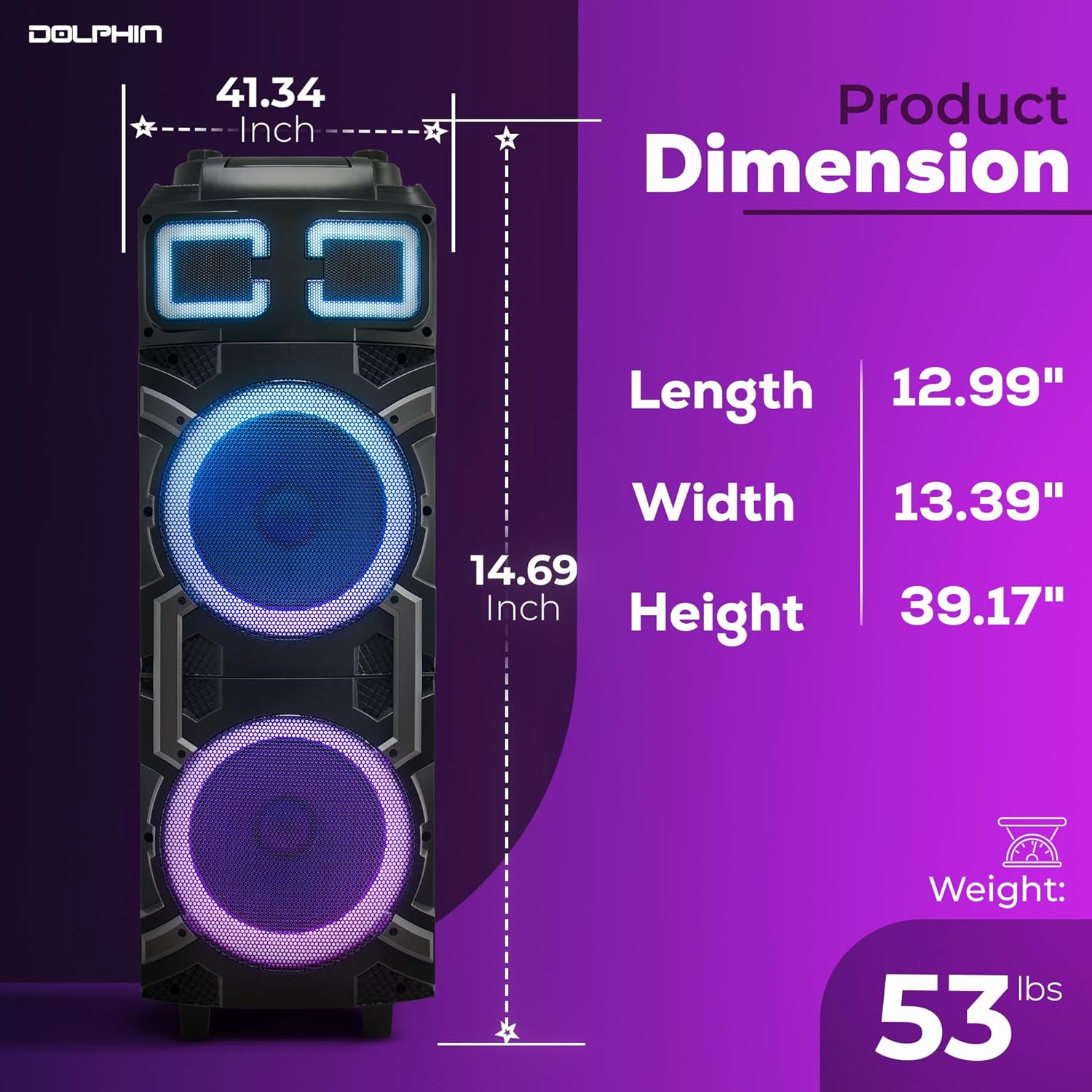
Image 9.1: Diagram illustrating the dimensions of the Dolphin SP-3210RBT speaker.
| Feature | Detail |
|---|---|
| Model Number | SP-3210RBT |
| Power Output | 100W RMS |
| Woofers | Dual 10-inch |
| Tweeter | Magnet Tweeter |
| Connectivity | Bluetooth 5.3, USB, TF, SD, AUX, FM Radio, WaveSync |
| Audio Input | Wireless UHF Microphone, AUX |
| Power Source | Battery Powered (1 x 12V battery included) |
| Material | Wood (Cabinet) |
| Product Dimensions (L x W x H) | 13.39 x 12.99 x 39.17 inches |
| Item Weight | 50 pounds |
| UPC | 810059432642 |
10. Warranty and Support
This product comes with a standard manufacturer's warranty. For specific warranty terms, claims, or technical support, please refer to the contact information provided with your original purchase documentation or visit the official Dolphin brand website for assistance.


