
Introduction
This manual provides comprehensive instructions for the setup, operation, maintenance, and troubleshooting of your Tek Styz Portable Bluetooth Speaker G2 Pro TWS. This device is designed for portable audio playback and hands-free communication, offering a blend of functionality and compact design.
Key features include Bluetooth 4.2 connectivity, multiple playback modes (Bluetooth, USB, TF card, FM radio, line input), built-in microphone for calls, and the ability to pair two speakers for a stereo sound experience.

Figure 1: The Tek Styz Portable Bluetooth Speaker G2 Pro TWS, showcasing its compact design and fabric grille.
Package Contents
Please verify that all items listed below are present in your package:
- 1 x Tek Styz Portable Bluetooth Speaker G2 Pro TWS
- 1 x MicroUSB Charging Cable
Note: A USB power adapter for charging is not included and must be supplied by the user.
Setup
1. Charging the Speaker
Before initial use, fully charge the speaker. Connect the supplied MicroUSB charging cable to the speaker's MicroUSB port and the other end to a compatible USB power adapter (not included) or a computer's USB port. The speaker features an 800mAh battery, providing up to 6+ hours of runtime on a full charge.
2. Powering On/Off
Locate the On/Off switch on the speaker. Slide the switch to the 'On' position to power on the device. To power off, slide the switch back to the 'Off' position.
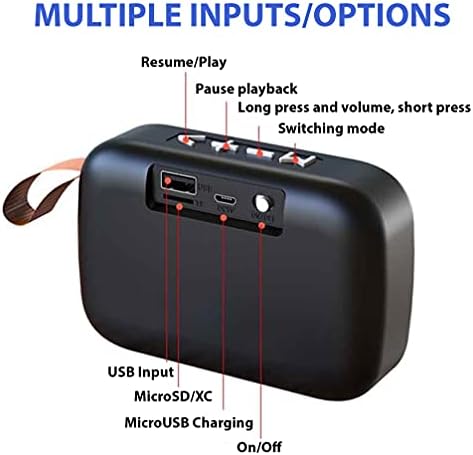
Figure 2: Rear panel of the speaker, illustrating the USB input, MicroSD/TF card slot, MicroUSB charging port, and On/Off switch.
Operating Instructions
1. Bluetooth Pairing
The speaker utilizes Bluetooth 4.2 for fast and stable connections.
- Ensure the speaker is powered on and in Bluetooth pairing mode (indicated by a flashing LED, if present).
- On your device (e.g., smartphone, tablet), enable Bluetooth and search for available devices.
- Select "Tek Styz Speaker" or a similar name from the list of found devices to connect.
- Once paired, the speaker will indicate a successful connection (e.g., a solid LED light or an audible prompt).
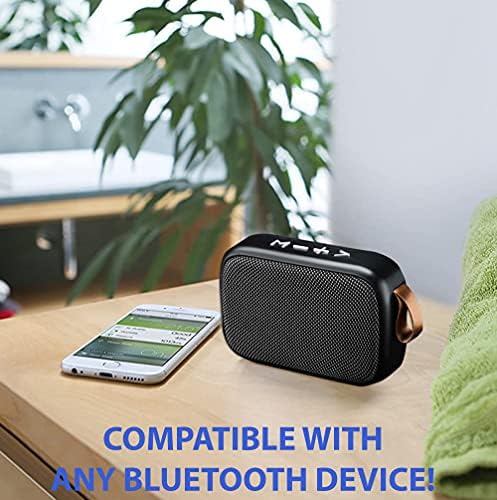
Figure 3: The speaker is compatible with any Bluetooth-enabled device, including smartphones and tablets.
2. Dual Stereo Mode (TWS Pairing)
To achieve a stereo surround sound experience, you can pair two Tek Styz G2 Pro TWS speakers together:
- Ensure both speakers are powered on and not connected to any other Bluetooth device.
- On one speaker, long press the "Mode" button (or a dedicated TWS button if available) until you hear a pairing prompt.
- The two speakers will automatically search for and connect to each other. Once connected, you will hear a confirmation sound.
- Now, connect your device to one of the paired speakers via Bluetooth as described in the "Bluetooth Pairing" section. Audio will play through both speakers in stereo.
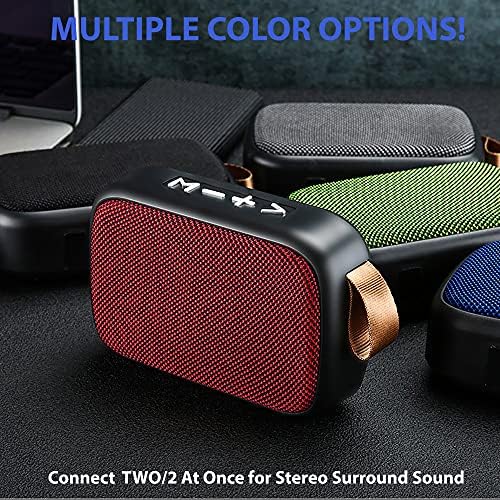
Figure 4: Multiple color options are available, and two speakers can be connected for a stereo sound experience.
3. Controls and Playback Modes
The speaker features easy-access buttons on the top panel for controlling playback and switching modes:
- Volume Adjustment: Use the '+' and '-' buttons for volume control.
- Play/Pause: Press the Play/Pause button to resume or pause playback.
- Mode Key: Use the 'M' (Mode) button to switch between different playback modes: Bluetooth, USB, TF card, FM radio, and line input.
- Hands-Free Calling: The built-in microphone allows you to answer or end calls directly through the speaker.
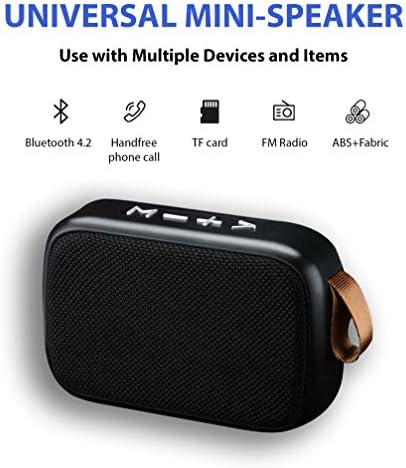
Figure 5: The universal mini-speaker supports various functions including Bluetooth 4.2, hands-free phone calls, TF card playback, FM radio, and is constructed from ABS+Fabric.

Figure 6: The speaker's stylish and portable design makes it suitable for use in various outdoor and indoor environments.
Maintenance
To ensure the longevity and optimal performance of your speaker, follow these maintenance guidelines:
- Cleaning: Use a soft, dry cloth to wipe the speaker's surface. Avoid using abrasive cleaners, solvents, or strong chemicals, as these may damage the fabric and plastic components.
- Storage: Store the speaker in a cool, dry place away from direct sunlight and extreme temperatures.
- Water Exposure: The speaker is not waterproof. Avoid exposing it to water, rain, or excessive moisture.
- Handling: Handle the speaker with care to prevent drops or impacts that could damage internal components.
Troubleshooting
If you encounter issues with your speaker, refer to the following common troubleshooting steps:
- Speaker does not power on: Ensure the speaker is fully charged. Connect it to a power source and allow it to charge for at least 30 minutes before attempting to power it on again.
- Cannot pair with Bluetooth device:
- Ensure the speaker is in pairing mode (e.g., flashing LED).
- Make sure Bluetooth is enabled on your device and it is within range (typically 10 meters).
- Forget or remove previous pairings of the speaker from your device's Bluetooth settings and try pairing again.
- Restart both the speaker and your Bluetooth device.
- No sound or low volume:
- Increase the volume on both the speaker and your connected device.
- Ensure the speaker is properly paired and connected.
- Check if the audio source is playing correctly.
- Poor sound quality:
- Move the speaker closer to your Bluetooth device to reduce interference.
- Ensure there are no obstructions between the speaker and the device.
- Check the audio quality of the source file or streaming service.
Specifications
| Feature | Detail |
|---|---|
| Brand | Tek Styz |
| Model | G2 Pro TWS Speaker |
| ASIN | B0DMGTDC2C |
| Speaker Type | Bluetooth |
| Wireless Communication Technology | Bluetooth 4.2 |
| Speaker Maximum Output Power | 3 Watts |
| Frequency Response | 48000 KHz |
| Impedance | 4 Ohm |
| Battery Capacity | 800 mAh (up to 6+ hours runtime) |
| Compatible Devices | Android, iOS, Mac, Samsung Galaxy S10/S10e/S10+/S10 Plus/10 5G/Lite, Windows |
| Material | ABS Plastic with Fabric Cover |
| Color | Gray (other colors may be available) |
| Item Weight | 4 Ounces |
| Product Dimensions (L x W x H) | 4.5 x 1.6 x 3 inches |
| Mounting Type | Tabletop Mount |
| Special Feature | Rapid Quick Fast Charger Cable (refers to MicroUSB cable) |
| Connectivity Technology | PowerLine (likely refers to wired charging/input) |
Warranty and Support
For warranty information or technical support, please contact the seller or manufacturer, Tek Styz. Refer to your purchase documentation for specific warranty terms and contact details.
You can also visit the official Tek Styz store on Amazon for more information: Tek Styz Store