
1. Safety Information
Please read this manual carefully before installation and operation. Keep this manual for future reference. Improper installation or operation due to ignoring instructions may cause serious injury or damage.
- Professional Installation Recommended: This mini split AC system is not a DIY mini split AC. Professional installation is strongly recommended to ensure proper function and safety.
- Electrical Safety: Ensure the power supply is disconnected before any maintenance or cleaning. Do not flush the air conditioner with water.
- Refrigerant Handling: The unit comes pre-filled with refrigerant. Any work involving refrigerant should only be performed by qualified personnel.
- Cleaning Precautions: When cleaning, you must shut down the machine and cut off the power supply for more than 5 minutes. Volatile liquids will damage the air conditioner; use only a soft dry cloth or a wet cloth dipped with neutral detergent.
- Indoor Unit Fins: After removing the filter screen, do not touch the fins of the indoor unit to avoid scratching.
2. Product Overview
The Acekool 9000 BTUs Mini Split Air Conditioning & Heating system is a highly efficient, ductless inverter split system designed for optimal climate control. It combines cooling and heating capabilities with advanced inverter technology for energy savings.
Key Features:
- Efficient Cooling and Heating: 9,000 BTUs capacity with a 19 SEER2 rating, operating on 230V. Features a pre-filled heat pump and DC inverter technology, saving up to 30% energy.
- Smart Control: Compatible with Alexa and controllable via a companion app for remote temperature adjustments and airflow management.
- Multiple Operation Modes: Includes Cool, Fan, Dehumidify, Heat, and Auto modes, along with 4 fan speeds, Sleep Mode, ECO Mode, and IFEEL.
- User-Friendly Remote Control: Allows easy management of functions and features a 0.5-24 hour timer. The display automatically turns off when not in use for undisturbed sleep.
- Ultra-Quiet Operation: Designed to operate at a low noise level of 41 dB, ensuring a peaceful environment.
Components Included:
- 1x Indoor Unit
- 1x Outdoor Condenser
- 1x Copper & Aluminum Connection Pipe (16.4 ft)
- 1x Wall Mounting Bracket
- 1x Drain Hose
- 1x Communication Wires
- 1x User Guide
- Additional gadgets for installation

Figure 2.1: Complete Acekool Mini Split AC System and Included Components.
3. Setup and Installation
Installation of the Acekool Mini Split AC system requires careful attention to detail and adherence to safety guidelines. Due to the complexity and handling of refrigerant, professional installation is highly recommended.
Installation Considerations:
- Area Coverage: This 9000 BTUs unit is designed to cool and heat areas up to 450 sq. ft. Ensure the chosen location is appropriate for the unit's capacity.
- Power Supply: The unit operates on 230V. Ensure a dedicated and appropriate electrical circuit is available.
- Component Placement: Plan the placement of both the indoor and outdoor units, considering optimal airflow, drainage, and accessibility for maintenance.
- Line Set and Wiring: The package includes a 16.4-ft copper wire set and communication cables for connecting the indoor and outdoor units.
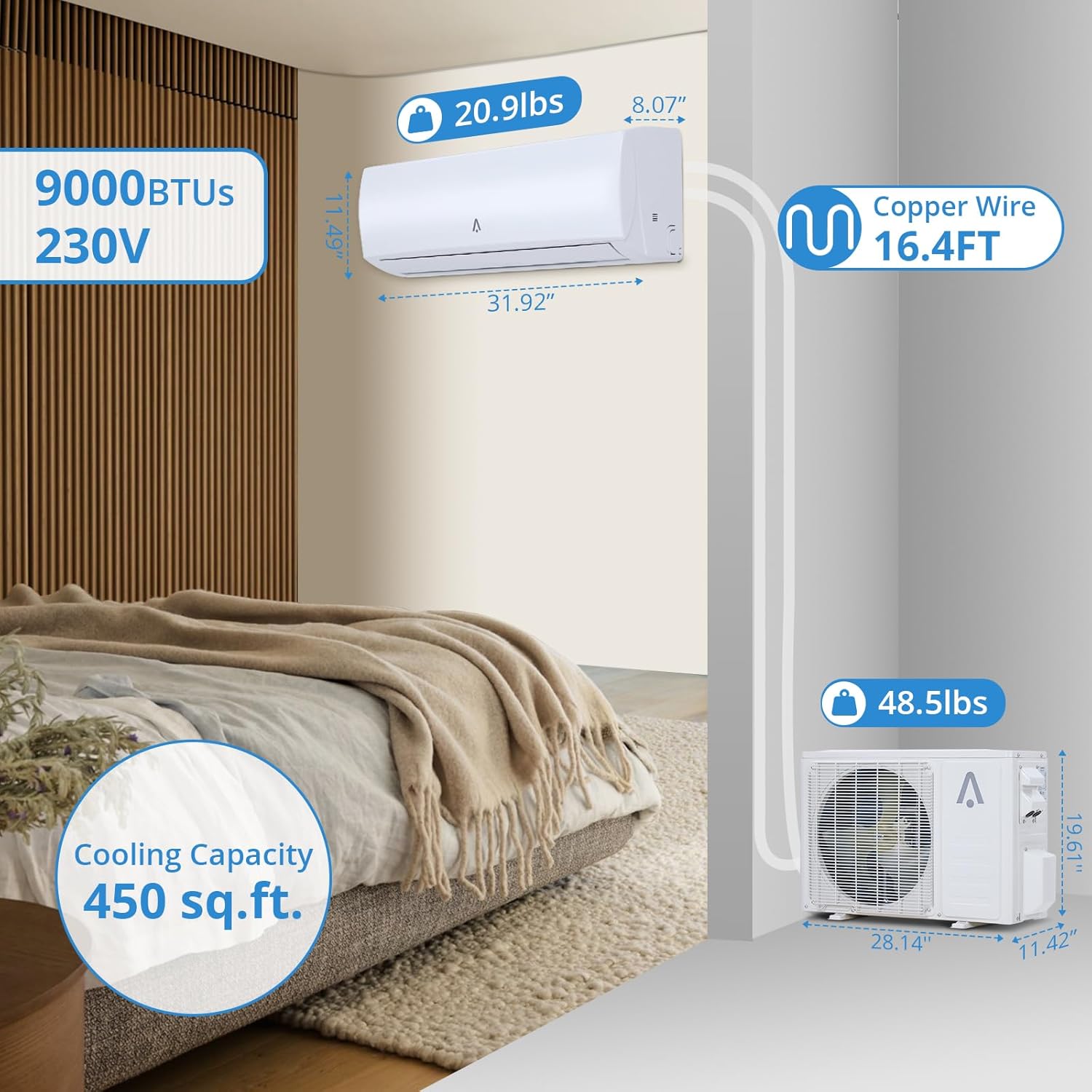
Figure 3.1: Unit Dimensions and Connection Pipe Length.
Delivery Information:
The Acekool Mini Split AC system is typically delivered in two separate boxes, which may arrive on different days. Please ensure you have received both packages before scheduling installation.

Figure 3.2: Product Delivery in Two Separate Boxes.
4. Operating Instructions
Your Acekool Mini Split AC system offers various modes and features to optimize your comfort. All functions can be controlled via the included remote control or the companion mobile application.
Operation Modes:
- Cool Mode: Provides efficient cooling, adjustable within a temperature range.
- Heat Mode: Utilizes the built-in heat pump for effective heating.
- Fan Mode: Circulates air without cooling or heating. Offers 4 fan speeds.
- Dehumidify Mode (DRY): Reduces humidity in the air, removing up to 46 pints per day.
- Auto Mode: Automatically selects the appropriate mode (Cool, Heat, or Fan) based on the set temperature and ambient conditions.

Figure 4.1: Overview of Operation Modes.
Smart Functions and Features:
- Temperature Range: The system can be set to provide cooling, heating, and dehumidification functions from 61°F to 88°F.
- Timer Function: Set the unit to turn on or off automatically with the 0.5-24 hour timer.
- Sleep Mode: Adjusts temperature and fan speed for comfortable sleep while conserving energy. The remote control display automatically turns off in this mode.
- ECO Mode: Optimizes energy consumption for greater efficiency.
- IFEEL Function: The remote control has a built-in temperature sensor that allows the unit to adjust the temperature based on the remote's location, providing more precise comfort.
- Smart Voice Control: Seamlessly integrate with various voice control assistants (e.g., Alexa) for hands-free operation.
- Mobile App Control: Adjust your unit from anywhere using the dedicated companion app.

Figure 4.2: Smart Control via App and Voice Assistant.
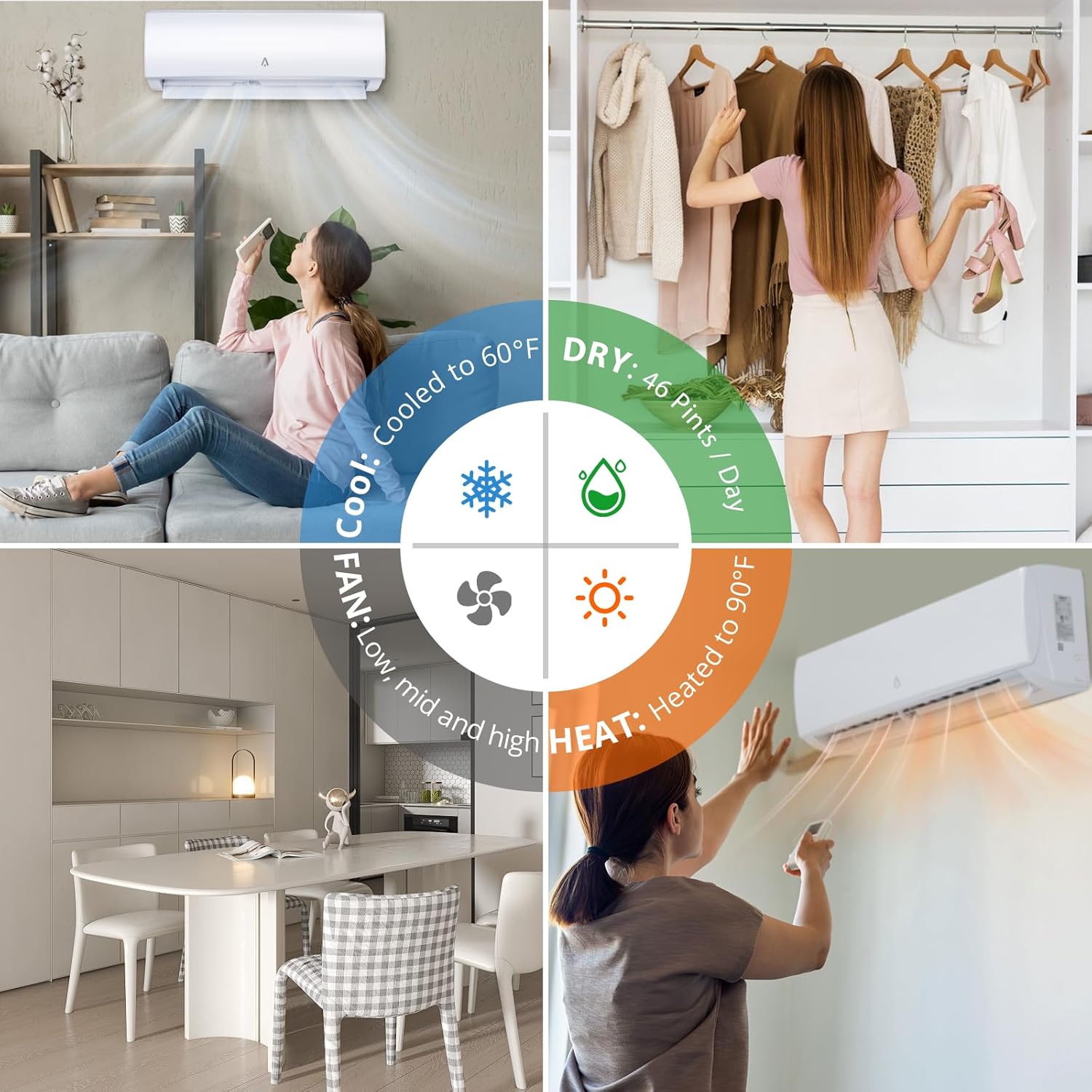
Figure 4.3: Ultra-Quiet Operation (41 dB).

Figure 4.4: Cooling and Heating Capacity.
5. Maintenance
Regular maintenance ensures the longevity and efficient operation of your Acekool Mini Split AC system. Always disconnect power before performing any maintenance.
Cleaning the Unit:
- Power Off: Before cleaning, shut down the machine and cut off the power supply for more than 5 minutes.
- Exterior Cleaning: Use only a soft dry cloth or a wet cloth dipped with neutral detergent to clean the air conditioner's exterior. Do not use volatile liquids as they will damage the unit.
- Avoid Water Flushing: Under no circumstances should the air conditioner be flushed with water.
Filter Screen Maintenance:
Pay attention to cleaning the filter screen regularly to avoid dust accumulation, which can affect the filter's effectiveness and airflow. If the operating environment is dusty, increase the cleaning frequency appropriately.
- Removal: Carefully remove the filter screen according to the instructions in the full user manual.
- Cleaning: Clean the filter screen with water and a mild detergent, then allow it to dry completely before reinstallation.
- Caution: After removing the filter screen, do not touch the fins of the indoor unit to avoid scratching.

Figure 5.1: Detachable and Easy-to-Clean Filter.
Defrost Cycle:
In heating operation, the appliance can automatically activate a defrost cycle. This is essential to clean frost on the condenser and recover its heat exchange function.
- Automatic Defrost: This procedure usually lasts for 2-10 minutes. During defrosting, the indoor unit fan will stop operation. After defrosting, it resumes to HEATING mode automatically.
- Forced Defrosting: If necessary, you can initiate a forced defrosting cycle by pressing the ECO button 10 times within 8 seconds under heating mode. This will defrost the outdoor ice much faster.

Figure 5.2: Automatic Defrost Cycle.
6. Troubleshooting
If you encounter issues with your Acekool Mini Split AC system, refer to the following common troubleshooting steps. For more complex problems, contact customer support.
| Problem | Possible Cause | Solution |
|---|---|---|
| Unit does not turn on. | No power supply; circuit breaker tripped; remote control batteries dead. | Check power connection; reset circuit breaker; replace remote control batteries. |
| Insufficient cooling/heating. | Dirty air filter; windows/doors open; incorrect mode selected; room size exceeds capacity. | Clean air filter; ensure all openings are closed; select appropriate mode (Cool/Heat); verify unit capacity matches room size. |
| Unusual noise from unit. | Loose parts; obstruction in fan; unit not level. | Inspect for loose components; check for obstructions; ensure unit is installed on a level surface. |
| Water leakage from indoor unit. | Clogged drain hose; improper installation angle. | Check and clear drain hose; ensure proper slope for drainage (professional assistance may be required). |
7. Specifications
| Specification | Detail |
|---|---|
| Brand Name | Acekool |
| Model Info | ACE19S9K230VsaV |
| Item Weight | 60.1 pounds |
| Product Dimensions | 34.85 x 24.02 x 14.57 inches |
| Efficiency | High (19 SEER2) |
| Capacity | 9000 BTUs (Cooling Power) / 46 Pints (Dehumidification) |
| Annual Energy Consumption | 3.52 Kilowatts |
| Noise Level | 41 dB |
| Installation Type | Split System |
| Special Features | Heating & Cooling Function, Smart Control, ECO Mode, Sleep Mode, IFEEL |
| Color | White |
| Voltage | 230V |
| Wattage | 830 watts |
| Included Components | Indoor Unit, Outdoor Condenser, Copper & Aluminum Connection Pipe, Wall Mounting Bracket, Drain Hose, Communication Wires, User Guide |
8. Warranty and Support
Acekool is committed to providing excellent customer service and support for your product.
- Warranty: The product includes 12 Months Free Maintenance and Technology Supports.
- Returns: Enjoy 30-day easy returns.
- Customer Support: For any inquiries or assistance, email support is available with a response time within 12 hours.

Figure 8.1: Acekool Customer Support Commitments.
