
Introduction
Thank you for purchasing the Fenton Core160 Bluetooth Party Speaker. This powerful and versatile speaker is designed to deliver high-quality audio with deep bass and clear highs, perfect for any occasion. Featuring Bluetooth 5.3 for stable wireless streaming, a long-lasting battery, and a vibrant LED light show, the Core160 offers an immersive audio experience. This manual provides essential information for safe operation, setup, and maintenance of your device. Please read it thoroughly before use.
Safety Instructions
- Power Source: Only use the provided power adapter. Ensure the voltage matches the requirements of your region.
- Water and Moisture: Do not expose the speaker to rain, moisture, or liquids. Keep it away from water sources.
- Ventilation: Ensure proper ventilation. Do not block any ventilation openings.
- Heat: Keep the speaker away from heat sources such as radiators, heat registers, stoves, or other apparatus (including amplifiers) that produce heat.
- Cleaning: Clean only with a dry cloth. Do not use liquid cleaners or aerosol cleaners.
- Servicing: Do not attempt to service this product yourself. Refer all servicing to qualified service personnel.
- Battery: The built-in battery should not be exposed to excessive heat such as sunshine, fire or the like. Do not attempt to replace the battery yourself.
Package Contents
Please check the box for the following items:
- Fenton Core160 Party Speaker
- Microphone
- Remote Control
- Power Adapter

Image: The Fenton Core160 Party Speaker shown with its accessories: a wired microphone, a remote control, and a power adapter. This image illustrates all items included in the package.
Product Overview: Controls and Connections
Familiarize yourself with the various controls and connection ports on your Core160 speaker.

Image: A detailed view of the top control panel of the Fenton Core160 speaker. It features knobs for ECHO, GUITAR, MIC, BASS, TREBLE, and MASTER volume, along with buttons for LED lighting, equalizer presets, and media playback controls. Input ports for GUITAR, MIC, AUX, USB, MicroSD, and DC IN are also visible.
Control Panel Functions:
- ECHO Knob: Adjusts the echo effect for the microphone.
- GUITAR Knob: Adjusts the volume for the guitar input.
- MIC Knob: Adjusts the volume for the microphone input.
- BASS Knob: Adjusts the bass level of the audio output.
- TREBLE Knob: Adjusts the treble level of the audio output.
- MASTER Knob: Controls the overall master volume of the speaker.
- LED Button: Toggles the LED light show on/off and cycles through modes.
- EQ Button: Selects different equalizer presets.
- Playback Controls: Play/Pause, Previous Track, Next Track, Mode selection.
Input Ports:
- GUITAR (6.3mm Jack): For connecting a guitar.
- MIC (6.3mm Jack): For connecting a microphone.
- AUX (3.5mm Jack): For connecting external audio devices via an AUX cable.
- USB Port: For playing audio from a USB flash drive.
- MicroSD Card Slot: For playing audio from a MicroSD card.
- DC IN (15V/2A): Power input for charging and operating the speaker.
Setup
1. Charging the Battery
Before first use, fully charge the speaker's built-in battery. Connect the provided power adapter to the DC IN port on the speaker and plug it into a wall outlet. The charging indicator will show the charging status. A full charge provides up to 12 hours of continuous playback.

Image: The Fenton Core160 speaker positioned outdoors, with a battery icon overlaid, emphasizing its long battery life for non-stop music playback.
2. Powering On/Off
Locate the power switch on the control panel. Toggle it to the "ON" position to power on the speaker. Toggle it to "OFF" to power off the speaker.
3. Connecting Microphone/Guitar
Plug your microphone into the MIC (6.3mm) input and your guitar into the GUITAR (6.3mm) input. Adjust their respective volume knobs on the control panel to achieve the desired sound level. Use the ECHO knob for microphone effects.
Operating Instructions
1. Bluetooth Pairing
- Power on the Core160 speaker. It will automatically enter Bluetooth pairing mode, indicated by a flashing Bluetooth icon on the display.
- On your smartphone or other Bluetooth device, enable Bluetooth and search for "Fenton Core160" in the list of available devices.
- Select "Fenton Core160" to pair. Once connected, you will hear a confirmation sound, and the Bluetooth icon will stop flashing.
- You can now stream audio wirelessly from your device to the speaker.
2. Stereo-Pairing (TWS Function)
For an enhanced stereo experience, you can pair two Core160 speakers together.
- Ensure both Core160 speakers are powered on and not connected to any Bluetooth device.
- On one speaker (this will be the primary speaker), press and hold the TWS button (if available, otherwise refer to the manual for specific TWS pairing instructions, typically a dedicated button or a long press on the Mode button).
- The speakers will attempt to connect to each other. Once successfully paired, you will hear a confirmation sound.
- Now, connect your Bluetooth device to the primary speaker as described in the "Bluetooth Pairing" section. Audio will play in stereo through both speakers.

Image: Two Fenton Core160 speakers are shown side-by-side, with arrows indicating their ability to connect for stereo sound. This illustrates the True Wireless Stereo (TWS) pairing feature.
3. USB/MicroSD Playback
Insert a USB flash drive or MicroSD card (with supported audio files) into the respective port. The speaker will automatically switch to USB/MicroSD mode and begin playback. Use the playback controls (Play/Pause, Previous/Next) on the speaker or remote control.
4. AUX Input
Connect an external audio device (e.g., MP3 player, laptop) to the AUX (3.5mm) input using an audio cable. Press the "Mode" button on the speaker or remote control to switch to AUX mode. Audio will play from the connected device.
5. Karaoke Function
With a microphone connected to the MIC input, you can sing along to your music. Adjust the MIC volume and ECHO effect to your preference. The speaker's powerful output makes it ideal for karaoke sessions.
6. LED Light Show
The Core160 features a dynamic multi-color LED light show. Press the "LED" button on the control panel or remote control to turn the lights on/off or cycle through different light modes and patterns.

Image: A close-up view of the Fenton Core160 speaker's front panel, showcasing its vibrant, multi-colored LED light rings. This highlights the speaker's party atmosphere feature.
7. Remote Control Usage
The included remote control allows you to conveniently manage playback, volume, mode selection, and LED lights from a distance. Ensure the remote control has working batteries and is pointed towards the speaker's IR receiver.
Maintenance
- Cleaning: Use a soft, dry cloth to clean the exterior of the speaker. Do not use abrasive cleaners, waxes, or solvents.
- Battery Care: To prolong battery life, avoid fully discharging the battery frequently. If storing the speaker for a long period, charge it to about 50% every few months.
- Storage: Store the speaker in a cool, dry place away from direct sunlight and extreme temperatures.
- Transportation: When transporting the speaker, ensure it is securely packed to prevent damage.
Troubleshooting
| Problem | Possible Cause | Solution |
|---|---|---|
| No power | Battery is depleted; Power adapter not connected or faulty. | Charge the speaker; Check power adapter connection and wall outlet. |
| No sound | Volume too low; Incorrect input mode; Device not paired (Bluetooth). | Increase master volume; Select correct input mode (Bluetooth, AUX, USB/MicroSD); Re-pair Bluetooth device. |
| Bluetooth not connecting | Speaker not in pairing mode; Device too far; Interference. | Ensure speaker is in pairing mode; Move device closer; Turn off other Bluetooth devices. |
| Microphone not working | Microphone not plugged in correctly; MIC volume too low. | Ensure microphone is fully inserted; Increase MIC volume knob. |
| LED lights not working | LED function turned off. | Press the LED button to turn on or cycle modes. |
Specifications
| Feature | Detail |
|---|---|
| Brand | Fenton |
| Model Name | Core160 |
| Product Dimensions | 38 x 41 x 84.5 cm |
| Weight | 13.35 Kilograms |
| Connectivity Technology | Bluetooth 5.3 |
| Audio Output Mode | Stereo |
| Speaker Type | Woofer (2x 8") |
| Power Output | 240 Watt |
| Battery Life | Up to 12 hours |
| Special Features | LED Light Show, Stereo Pairing (TWS), Karaoke Function |
| Input Ports | USB, MicroSD, AUX (3.5mm), Microphone (6.3mm), Guitar (6.3mm) |
| Manufacturer | Tronios B.V. |
| Country of Origin | China |
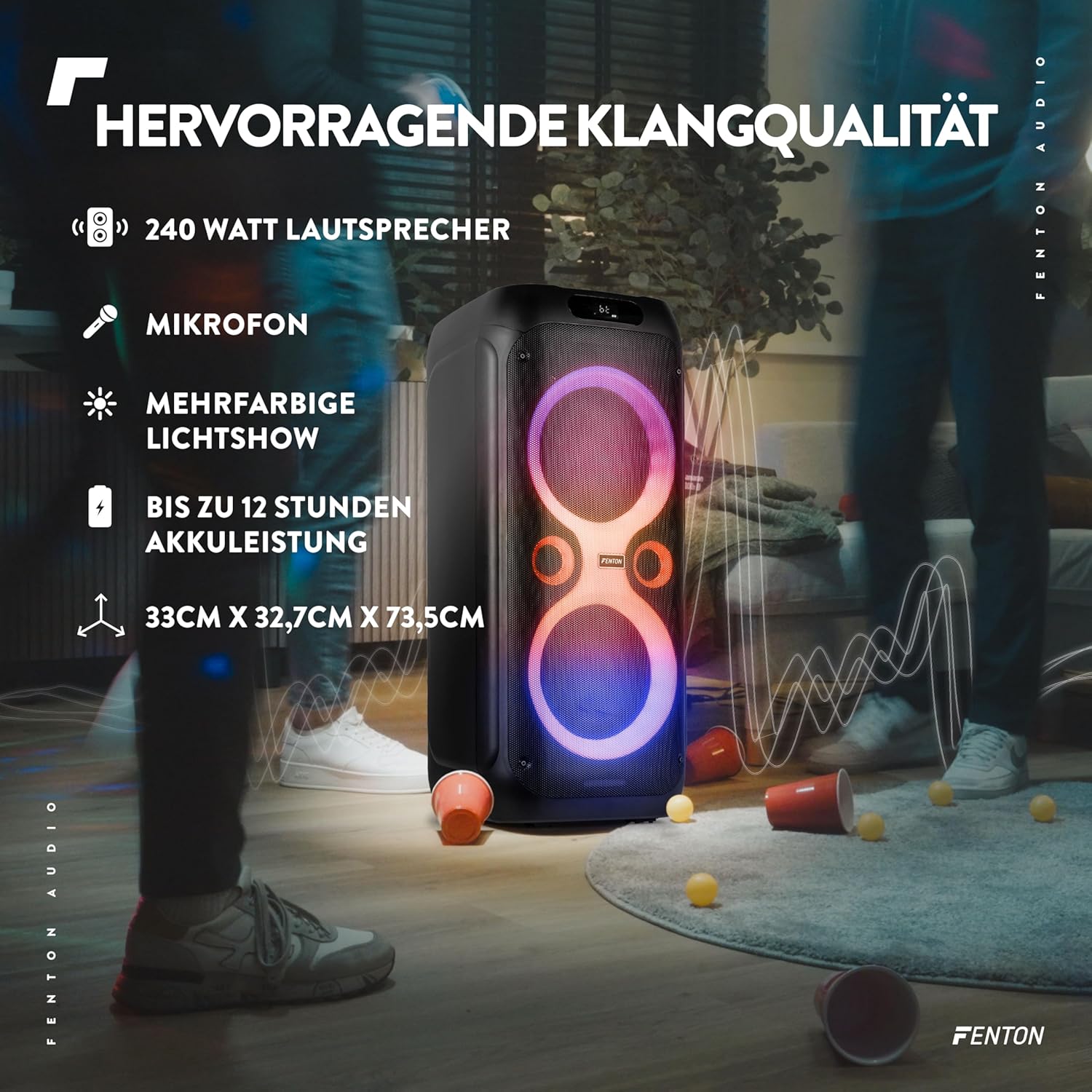
Image: The Fenton Core160 speaker with text overlays highlighting its 240 Watt output, microphone inclusion, multi-color light show, up to 12 hours of battery life, and dimensions (33cm x 32.7cm x 73.5cm).
Warranty and Support
For warranty information and technical support, please refer to the warranty card included with your product or visit the official Fenton website. Keep your purchase receipt as proof of purchase for any warranty claims.

