
Introduction
This manual provides detailed instructions for the installation, operation, and maintenance of your Yoolax Motorized Blackout Roller Shades. Please read this guide thoroughly before installation and use to ensure proper function and longevity of your product.
Safety Information
Always follow basic safety precautions when installing and operating electrical devices. Keep packaging materials away from children. Ensure all components are securely fastened during installation. Do not attempt to repair the motor or electrical components yourself; contact customer support for assistance.
What's in the Box
Verify that all components are present before beginning installation.

Image: Contents of the package including the blind, accessories, manual, remote, and charging cable.
- Blackout Smart Blind
- Motor (integrated)
- Yoolax Lightwirl Remote
- Installation Accessories (brackets, screws, anchors)
- Standard USB Charging Cable
- Instruction Book
Setup and Installation
Measuring Your Window
Accurate measurements are crucial for proper fit and function. Choose between Inside Mount or Outside Mount based on your preference and window frame characteristics.
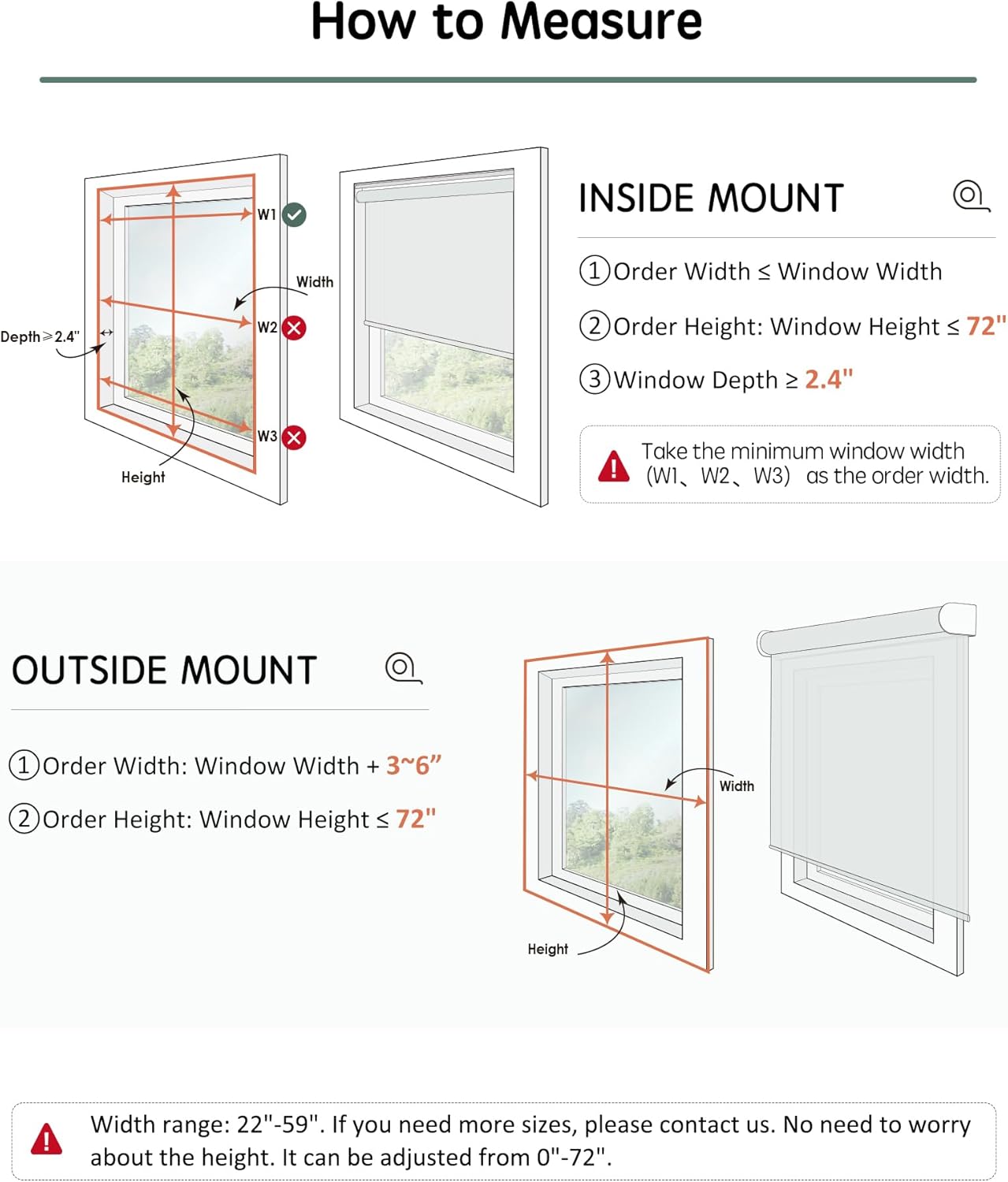
Image: Visual guide for measuring window dimensions for both inside and outside mount installations.
Inside Mount Measurement

Image: Instructions for inside mount, showing to measure width at three points (W1, W2, W3) and take the minimum, and ensuring window depth is at least 2.4 inches.
- Order Width: Should be 0" to 0.1" narrower than the window width. Take the minimum of W1, W2, W3.
- Order Height: Window Height should be less than or equal to 72".
- Window frame must be at least 2.4" deep.
Note: Motorized shades will have small light gaps on both sides with an inside mount. For full blackout, an outside mount is recommended.
Outside Mount Measurement

Image: Instructions for outside mount, showing to add 3 to 6 inches to the window width for better coverage.
- Order Width: Should be 3" to 54" wider than the window frame for better coverage.
- Order Height: Window Height should be less than or equal to 72".
Installation Steps
Refer to the following diagrams and video for detailed installation instructions.
Video: Official Yoolax guide on how to install Smart Roller Shades.
Inside Mount Installation

Image: Visual steps for drilling holes, installing brackets, and attaching the blind for an inside mount.
Outside Mount Installation

Image: Visual steps for drilling holes, installing brackets, and attaching the blind for an outside mount, including options for standard or reverse roll.
Operating Instructions
Yoolax Lightwirl Remote Control
The included Yoolax Lightwirl Remote offers convenient control over your shades. It can control up to 57 blinds and features group control and adjustable opening percentages.

Image: Close-up of the Yoolax Lightwirl Remote, highlighting its intuitive knob and buttons for shade operation.
Smart Motor and Charging
Your Yoolax shades are equipped with a Zigbee motor for smart functionality. The built-in rechargeable battery provides 4-54 months of use on a full charge (approximately 6 hours of charging for 600 operations).

Image: Details of the Smart Zigbee Motor, its low noise level (<48dB), battery life, and various charging methods including USB, power bank, and optional solar panel.
Charging can be done via the standard USB charging cable, a power bank, or an optional solar panel (available separately from the Yoolax Store).

Image: An optional solar panel that can be used to charge the motorized shades, promoting energy efficiency.
Smart Control Integration
These motorized blinds can be integrated with smart home systems for enhanced control.
Voice Control with Alexa
The Zigbee Motor allows direct compatibility with specific Alexa models without needing an additional smart hub. Compatible models include: Echo Plus 2nd Gen, Echo Show 2nd Gen, Echo Studio, Echo Show 10, Echo 4th Gen, Echo Show 8 3rd Gen, Echo Hub.
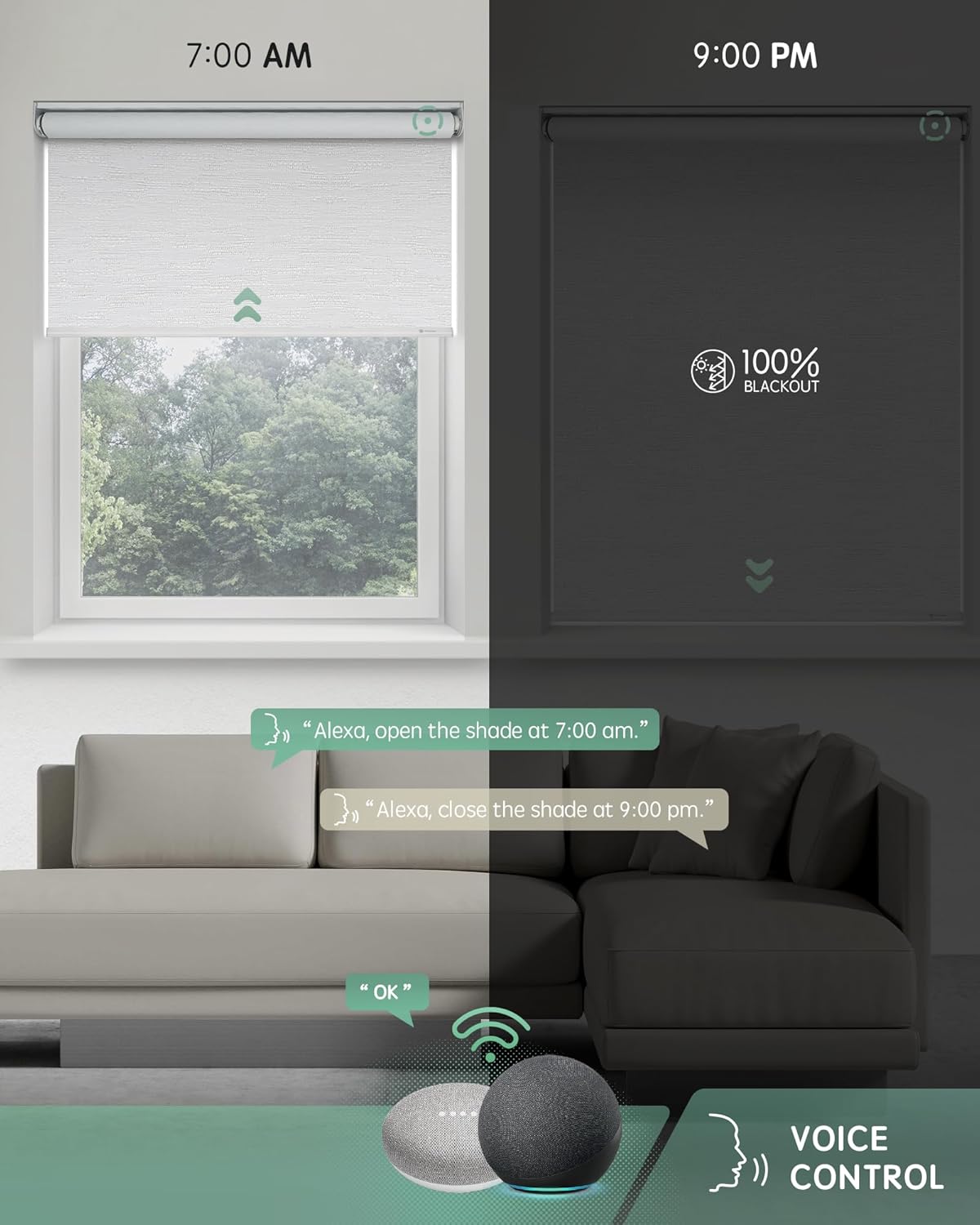
Image: A living room scene demonstrating voice commands with Alexa to open and close the shades at specific times.

Image: List of Alexa devices directly compatible with Yoolax Zigbee motors, eliminating the need for a separate smart hub.
Video: Demonstration of Yoolax Smart Blackout Roller Shades in action, highlighting their blackout capabilities and smart features.
Video: Overview of Yoolax Motorized Roller Shades, showcasing their smooth operation and design.
App Control (Yoolax Home APP)
For other Alexa versions or advanced smart home integration, a Smart Hub (Zigbee Matter Hub) is optional and available at the Yoolax Store. This allows control via the Yoolax Home APP, enabling scheduling and custom routines.

Image: Screenshots of the Yoolax Home APP demonstrating daily scheduling for shades, such as opening at sunrise or closing at sunset.
Maintenance
Cleaning and Care
To maintain the appearance and function of your Yoolax Motorized Blackout Roller Shades, follow these guidelines:
- Spot Clean Only: Use a soft, damp cloth with mild soap to gently clean any spots on the fabric. Do not immerse the fabric in water or use harsh chemicals.
- Dusting: Regularly dust the shades with a soft brush or vacuum cleaner with a brush attachment to prevent dust buildup.
- Motor Care: Keep the motor area clean and free from obstructions. Do not lubricate the motor.
The fabric is designed with 100% blackout, thermal insulation, and UV protection properties.

Image: Close-up view of the shade fabric, illustrating its blackout, thermal insulation, and UV protection features.
Troubleshooting
If you encounter issues with your Yoolax Motorized Blackout Roller Shades, refer to the following common problems and solutions:
| Problem | Possible Cause | Solution |
|---|---|---|
| Shade does not respond to remote. | Low battery in remote or motor, remote not paired, obstruction. | Check remote battery. Recharge motor if needed. Re-pair remote according to pairing instructions in the full manual. Ensure no obstructions block the shade's path. |
| Shade does not respond to Alexa commands. | Incompatible Alexa model, no smart hub (if required), poor Wi-Fi connection. | Verify your Alexa model is directly compatible or if a Zigbee Matter Hub is needed. Ensure stable Wi-Fi connection. Check Alexa app for device status. |
| Shade stops midway or does not reach full up/down position. | Limit settings incorrect, low motor battery. | Recharge motor. Refer to the full manual for instructions on resetting and setting upper and lower limits. |
| Shade makes unusual noise during operation. | Obstruction, motor issue. | Check for any physical obstructions. If noise persists, contact customer support. |
Specifications
| Feature | Detail |
|---|---|
| Brand | Yoolax |
| Model Number | US-QZDZ |
| Material | Polyester |
| Color | Jacquard White Classic |
| Product Dimensions | 46"W x 72"H |
| Opacity | Blackout |
| Operation Mode | Automatic |
| Control Type | Remote, Voice (Alexa), App (Yoolax Home APP with optional hub) |
| Mounting Type | Inside Mount, Outside Mount |
| Compatible Devices | Echo Plus 2nd Gen, Echo Show 2nd Gen, Echo Studio, Echo Show 10, Echo 4th Gen, Echo Show 8 3rd Gen, Echo Hub |
| Battery Life | 4-54 months on full charge (approx. 600 operations) |
| Noise Level | <48dB |
| Product Care | Spot Clean Only |
Warranty and Support
Yoolax provides a warranty for damaged components. If you receive damaged parts, please take photos and contact Yoolax customer service within 78 days of receipt for a free replacement.
For further assistance, technical support, or inquiries regarding custom series and advanced features, please refer to the contact information provided in your product packaging or visit the official Yoolax website.
