
1. Introduction
The OWON CMS101 is a versatile 3-in-1 measurement device, combining the functionalities of a 1000A AC/DC clamp meter, a 1MHz oscilloscope, and a data recording function with Bluetooth connectivity. Designed for electrical troubleshooting, motor maintenance, and general electrical component analysis, this device offers comprehensive testing capabilities with a user-friendly 2.8-inch IPS LCD display.

Figure 1.1: Front view of the OWON CMS101 Clamp Meter, showing its display and controls.

Figure 1.2: The OWON CMS101 integrates a clamp meter, recorder, and oscilloscope into one device.
2. Setup
2.1 Powering On the Device
The OWON CMS101 comes with a pre-installed Lithium Ion battery. To power on the device, press and hold the POWER button located at the bottom left of the control panel. The 2.8-inch IPS LCD display will illuminate.
2.2 Charging the Battery
To charge the device, connect the provided USB cable to the charging port on the side of the meter and to a suitable USB power source. The charging indicator on the display will show the charging status.

Figure 2.1: The CMS101 features a USB-C port for convenient charging.
3. Operating Instructions
3.1 General Operation and Display Modes
The CMS101 features a 2.8-inch IPS LCD display that offers wide viewing angles and supports dual theme display (light and dark modes) for optimal visibility in various lighting conditions. Use the DMM/OSC button to switch between Digital Multimeter (DMM) mode and Oscilloscope (OSC) mode.
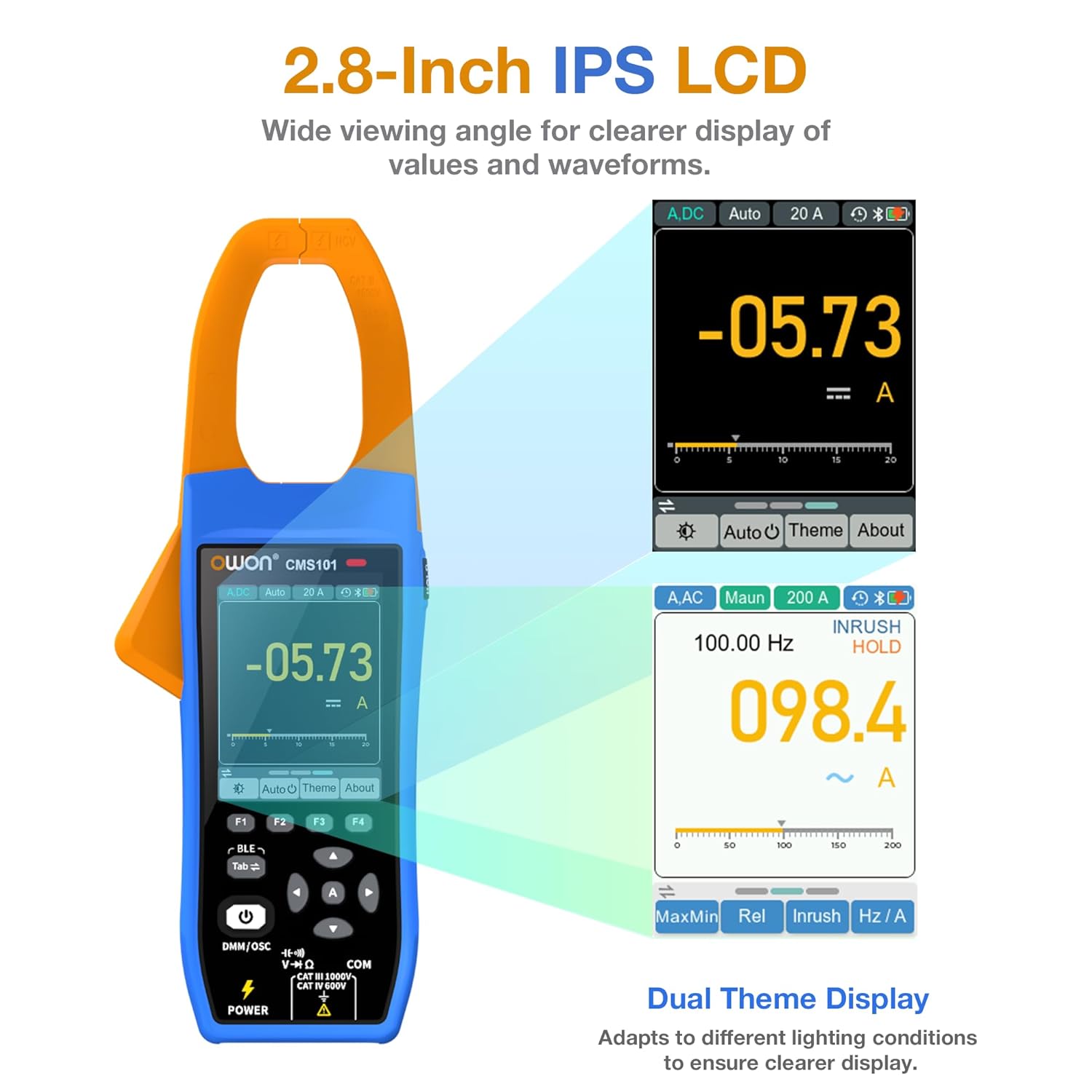
Figure 3.1: The 2.8-inch IPS LCD provides clear display of values and waveforms, with dual theme options.
3.2 Clamp Meter Functions
In DMM mode, the CMS101 functions as a high-performance clamp meter, capable of measuring a wide range of electrical parameters without direct contact with the conductor. The 38mm narrow-edge elongated opening design allows for measurements in confined spaces and on large wire diameters.
- Voltage Measurement: 1000V DC/AC Voltage.
- Current Measurement: 1000A AC/DC Current.
- Inrush Current: 1000A Inrush Current measurement.
- Resistance: Up to 100.00MΩ Resistance.
- Capacitance: Up to 20.00mF Capacitance.
- Frequency: Up to 20.000MHz Frequency.
- Duty Cycle: 0.1%-99.99% Duty Cycle.
- Diode Test: 3.0000V Diode test.
- Continuity: 0~200.0 Ω On-Off (Continuity) test.
- NCV (Non-Contact Voltage): Support for non-contact voltage detection.

Figure 3.2: The CMS101 offers a wide range of measurement functions accessible via dedicated buttons.
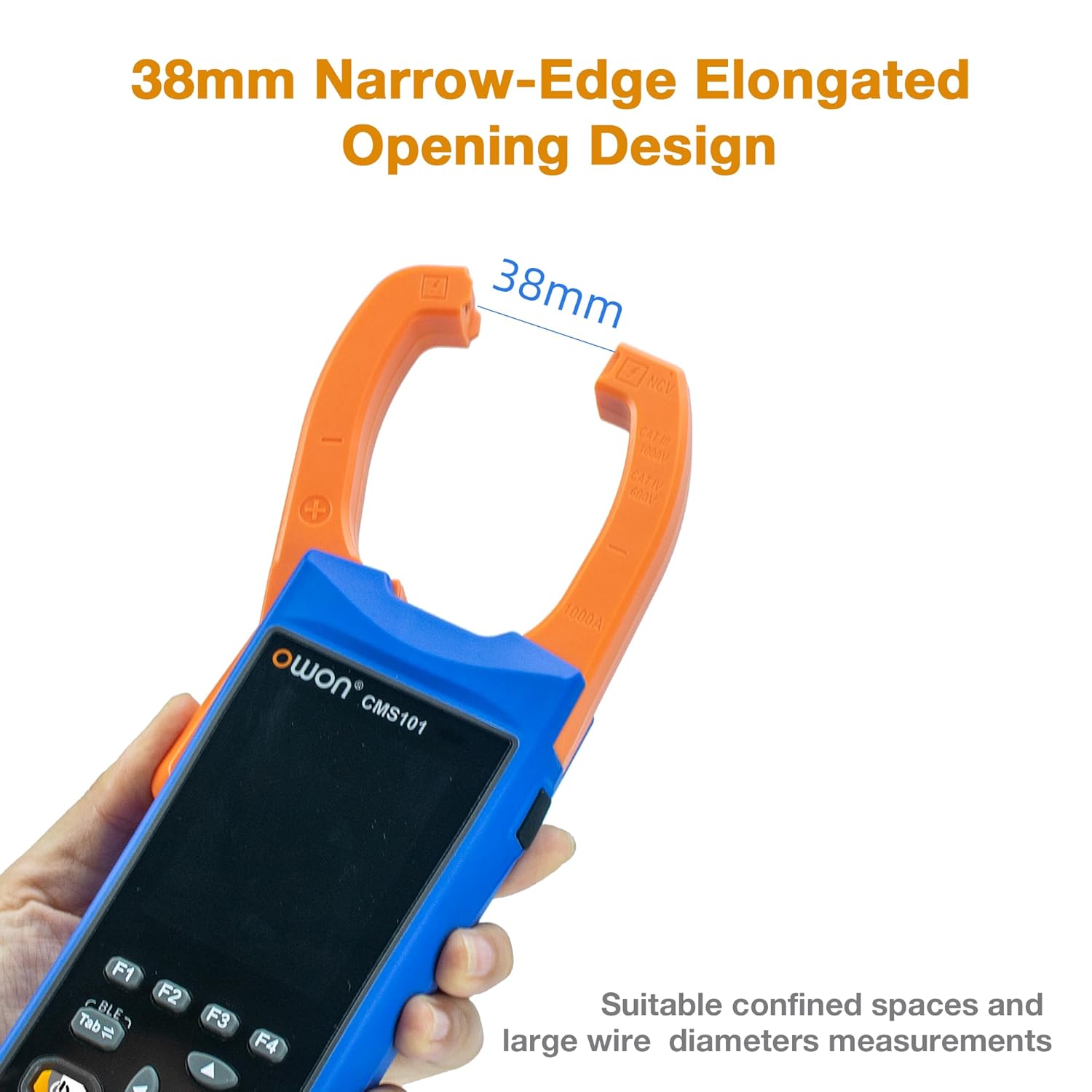
Figure 3.3: The 38mm jaw opening facilitates measurements in tight spaces and on larger conductors.
3.3 Oscilloscope Functions
In OSC mode, the CMS101 transforms into a compact oscilloscope, allowing for the visualization and analysis of voltage and current waveforms. This function provides a more comprehensive understanding of electrical signals.
- Analog Bandwidth: 1MHz (Voltage), 1KHz (Current).
- Channels: 1CH.
- Sample Rate: 5.0MSa/S.
- Input Impedance: ≥10MΩ.
- Max Input Voltage: 1000V.
- Max Sample Current: 1000A.
- Measurement Values: Displays Rms, Period, Freq, Max, Min, PK-PK, Avg.
- Trigger Mode: Auto trigger mode.
- Trigger Type: Rise, Fall.

Figure 3.4: Oscilloscope display showing waveform analysis with key measurement parameters.
3.4 Record Function and Bluetooth Connectivity
The CMS101 supports Bluetooth connectivity, allowing you to connect the device to your smartphone. This feature enables remote control, display of data charts, and storage of measurement data in CSV format for trend visualization and analysis.

Figure 3.5: The mobile application allows for remote monitoring and data logging of measurements.
4. Maintenance
To ensure the longevity and accuracy of your OWON CMS101 Clamp Meter, follow these maintenance guidelines:
- Cleaning: Regularly wipe the device with a soft, dry cloth. For stubborn dirt, use a slightly damp cloth with mild detergent, then dry thoroughly. Do not use abrasive cleaners or solvents.
- Storage: Store the meter in a cool, dry place, away from direct sunlight and extreme temperatures. If storing for extended periods, ensure the battery is partially charged (around 50%) to preserve battery health.
- Battery Care: Avoid fully discharging the battery frequently. Recharge the battery as needed.
- Probe and Lead Inspection: Periodically inspect the multimeter leads and probes for any signs of damage, such as frayed wires or cracked insulation. Replace damaged accessories immediately to ensure safety and accurate readings.
5. Troubleshooting
This section addresses common issues you might encounter with the OWON CMS101.
| Problem | Possible Cause | Solution |
|---|---|---|
| NCV (Non-Contact Voltage) function is inconsistent or not working. | Environmental interference, low battery, or specific circuit conditions. | Ensure the battery is adequately charged. Test in different environments to rule out external interference. For critical measurements, use direct contact methods. |
| Oscilloscope mode displays incorrect or unstable values (e.g., voltage readings). | Software glitch, processor lag, or incorrect settings. | Try restarting the device. Ensure correct input settings (e.g., voltage range, time base). Check for firmware updates from OWON's official support channels. |
| Device does not power on. | Battery fully discharged or faulty. | Connect the device to a charger and allow it to charge for at least 30 minutes before attempting to power on again. If the issue persists, contact customer support. |
6. Specifications
Detailed technical specifications for the OWON CMS101 Clamp Meter.
| Feature | Specification |
|---|---|
| Product Dimensions | 2.24 x 7.17 x 1.26 inches; 1.8 Pounds |
| Item Model Number | CMS101 |
| Batteries | 1 Lithium Ion battery (included) |
| Manufacturer | OWON |
| Power Source | Battery Powered |
| Color | Blue |
| Display | 2.8-inch IPS LCD |
| AC/DC Voltage | 0 ~ 1000V |
| AC/DC Current | 0 ~ 1000A |
| Inrush Current | 0 ~ 1000A |
| Resistance | 0 ~ 100.00MΩ |
| Capacitance | 0 ~ 20.00mF |
| Frequency | 0 ~ 20.000MHz |
| Duty Cycle | 0.1% ~ 99.9% |
| Diode Test | 3.0000V |
| Continuity | 0 ~ 200.0 Ω |
| Oscilloscope Analog Bandwidth (Voltage) | 1MHz |
| Oscilloscope Analog Bandwidth (Current) | 1KHz |
| Oscilloscope Sample Rate | 5.0MSa/S |
| Connectivity | Bluetooth |
7. What's in the Box
The OWON CMS101 package includes the following items:
- OWON CMS101 Clamp Meter (Host)
- Multimeter Leads
- USB Cable
- Soft Bag
- User Manual (this document)

Figure 7.1: Included accessories with the OWON CMS101 Clamp Meter.
8. Warranty and Support
For warranty information, technical support, or service inquiries, please refer to the warranty card included with your product or visit the official OWON website. You can also contact OWON customer service directly for assistance with product operation or troubleshooting.
OWON Official Website: www.owon.com


