
ZWP NS-RCFNA-21 (Rev G)
Instruction Manual
ZWP NS-RCFNA-21 (Rev G) Replacement Voice Remote Control
For Insignia F50 Series Smart TVs
Introduction
This manual provides comprehensive instructions for the setup, operation, and maintenance of your ZWP NS-RCFNA-21 (Rev G) Replacement Voice Remote Control. This remote is designed to be compatible with various Insignia F50 Series Smart TV models, including NS-43F501NA26, NS-50F501NA26, NS-55F501NA26, NS-65F501NA26, NS-70F501NA25, NS-75F501NA25, NS-85F501NA25, and NS-70F501NA26. Please read this manual carefully to ensure proper use and to maximize the functionality of your new remote control.

Image: The ZWP NS-RCFNA-21 (Rev G) Replacement Voice Remote Control, showing its sleek black design and button layout.
Setup
1. Battery Installation
The remote control requires two AAA batteries (not included). Follow these steps to install them:
- Locate the battery compartment on the back of the remote control.
- Slide open the battery compartment cover.
- Insert two AAA batteries, ensuring the positive (+) and negative (-) terminals align correctly with the markings inside the compartment.
- Close the battery compartment cover securely.

Image: Illustration showing the battery compartment of the remote control and the correct orientation for inserting two AAA batteries.
2. Pairing Instructions
For optimal functionality, especially voice control, the remote control needs to be paired with your Fire TV device. Follow these steps carefully:
- Place the remote control approximately 10 feet (about 3 meters) from your Fire TV device.
- Press and hold the Left button, the Menu button (three horizontal lines), and the Back button (curved arrow) simultaneously for more than 10 seconds. Release the buttons and wait for 60 seconds.
- Remove the batteries from the remote control.
- Unplug the power cable from your Fire TV device. Wait for 60 seconds.
- Reconnect the power cable to your Fire TV device and wait for the main screen to display.
- Reinsert the batteries into the remote control.
- Press and hold the Home button (house icon) on the remote control for 40 seconds.
- Release the button and wait for 60 seconds for the pairing process to complete.
Note: Some users report the remote working immediately after battery insertion without explicit pairing. However, performing these steps ensures full functionality, including voice commands.
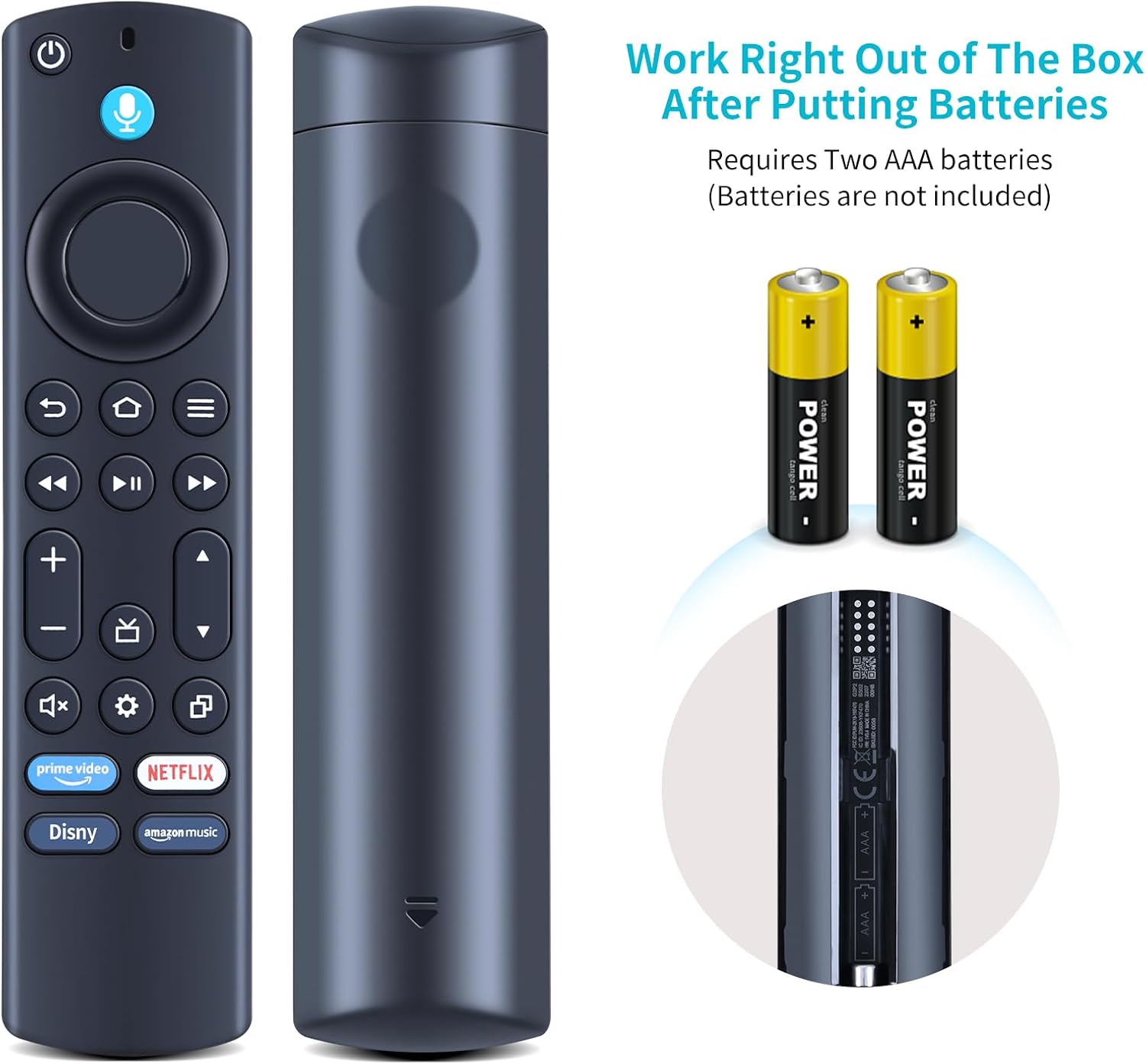
Image: Visual guide illustrating the buttons to press for pairing the remote control with a Fire TV device.
Operating Your Remote Control
Basic Functions
The remote control features standard buttons for navigating your Insignia F50 Series Smart TV:
- Power Button (⏻): Turns the TV on or off.
- Navigation Ring (Circular Pad): Use the directional buttons (Up, Down, Left, Right) to navigate menus and select items. The center button acts as Select/OK.
- Back Button (↩): Returns to the previous screen or menu.
- Home Button (⌂): Returns to the Fire TV home screen.
- Menu Button (Three Horizontal Lines ☰): Accesses context-sensitive menus or options.
- Playback Controls: Includes Play/Pause (▶‖), Fast Forward (≫), and Rewind (≪) for media playback.
- Volume Buttons (+/-): Adjusts the TV volume.
- Mute Button (🔇): Mutes or unmutes the TV audio.
- App Shortcut Buttons: Dedicated buttons for popular streaming services like Prime Video, Netflix, Disney+, and Amazon Music for quick access.
Voice Control
The NS-RCFNA-21 (Rev G) remote features voice control for convenient navigation and content search. To use voice control:
- Press and hold the Voice Button (microphone icon) located at the top of the remote.
- Speak clearly into the microphone on the remote.
- Release the voice button when you are finished speaking.
You can use voice commands to:
- Search for movies, TV shows, or actors (e.g., "Find action movies," "Play The Office").
- Launch applications (e.g., "Open Netflix," "Launch YouTube").
- Control playback (e.g., "Pause," "Fast forward 30 seconds").
- Ask questions (e.g., "What's the weather?").

Image: A visual representation of how to use the voice control feature, showing the microphone button and example voice commands.
Maintenance
To ensure the longevity and optimal performance of your remote control, follow these maintenance guidelines:
- Cleaning: Use a soft, dry cloth to wipe the remote control. For stubborn dirt, slightly dampen the cloth with water or a mild, non-abrasive cleaner. Do not use harsh chemicals or abrasive materials.
- Storage: Store the remote control in a cool, dry place away from direct sunlight and extreme temperatures.
- Battery Replacement: Replace batteries when the remote's responsiveness decreases or if it stops functioning. Always replace both batteries at the same time with new ones.
- Avoid Liquids: Do not expose the remote control to water or other liquids.
- Avoid Drops: Protect the remote from physical shocks and drops, which can damage internal components.
Troubleshooting
If you encounter issues with your remote control, refer to the following table for common problems and their solutions:
| Problem | Possible Cause | Solution |
|---|---|---|
| Remote not responding. | Dead or incorrectly inserted batteries. Remote not paired. Obstruction between remote and TV. | Replace batteries with new ones, ensuring correct polarity. Re-attempt pairing as per "Pairing Instructions" section. Ensure no objects block the signal path. |
| Voice control not working. | Remote not properly paired for voice functionality. Microphone obstructed. | Perform the full pairing procedure again. Ensure your hand or other objects are not covering the microphone hole on the remote. |
| Remote frequently disconnects or is unresponsive. | Low batteries. Interference from other devices. | Replace batteries. Try moving other wireless devices away from the TV or remote. |
| Buttons are sticky or unresponsive. | Dirt or debris under buttons. | Clean the remote control as described in the "Maintenance" section. Avoid spilling liquids on the remote. |
Specifications
| Feature | Detail |
|---|---|
| Model Number | NS-RCFNA-21 (Rev G) |
| Brand | ZWP |
| Compatible Devices | Insignia F50 Series Smart TVs (NS-43F501NA26, NS-50F501NA26, NS-55F501NA26, NS-65F501NA26, NS-70F501NA25, NS-75F501NA25, NS-85F501NA25, NS-70F501NA26) |
| Special Feature | Voice Search |
| Color | Black |
| Power Source | 2 x AAA Batteries (not included) |
| Item Weight | 2.08 ounces (approx. 59 grams) |
| Package Dimensions | 6.5 x 1.65 x 0.75 inches (approx. 16.5 x 4.2 x 1.9 cm) |
Warranty and Support
For any questions, technical assistance, or warranty inquiries regarding your ZWP NS-RCFNA-21 (Rev G) Replacement Voice Remote Control, please contact the seller or manufacturer directly through the platform where the product was purchased. They will be able to provide the most accurate and up-to-date support information.
Please retain your proof of purchase for any warranty claims.
Ask a question about this manual
Ask about setup, troubleshooting, compatibility, parts, safety, or missing instructions. Manuals+ will review the question and use this page’s manual context to help answer it.