
1. Important Safety Instructions
Before operating this treadmill, please read all instructions carefully. Keep this manual for future reference.
- Place the treadmill on a flat, stable surface. Ensure there is at least 2 meters of clear space behind the treadmill and 0.6 meters on each side.
- Keep children and pets away from the treadmill during operation.
- Always attach the safety key clip to your clothing before starting the treadmill. In case of an emergency, the safety key will detach, stopping the machine.
- Wear appropriate athletic footwear and clothing. Avoid loose clothing that could get caught in moving parts.
- Do not operate the treadmill if it has a damaged cord or plug, or if it is not working properly.
- Consult a physician before starting any exercise program. Stop exercising immediately if you feel faint, dizzy, or experience pain.
- Do not attempt to service the treadmill yourself. Contact customer support for assistance.
- Ensure the power cord is not pinched or damaged.
2. Product Overview
The CITYSPORTS Folding Treadmill is designed for home use, offering a compact and efficient way to exercise. It features a powerful 1400W motor, adjustable speed up to 12 km/h, and two manual incline settings (0% and 8%). The treadmill includes a multifunctional LED display and can connect to a running app via Bluetooth for enhanced control and tracking.
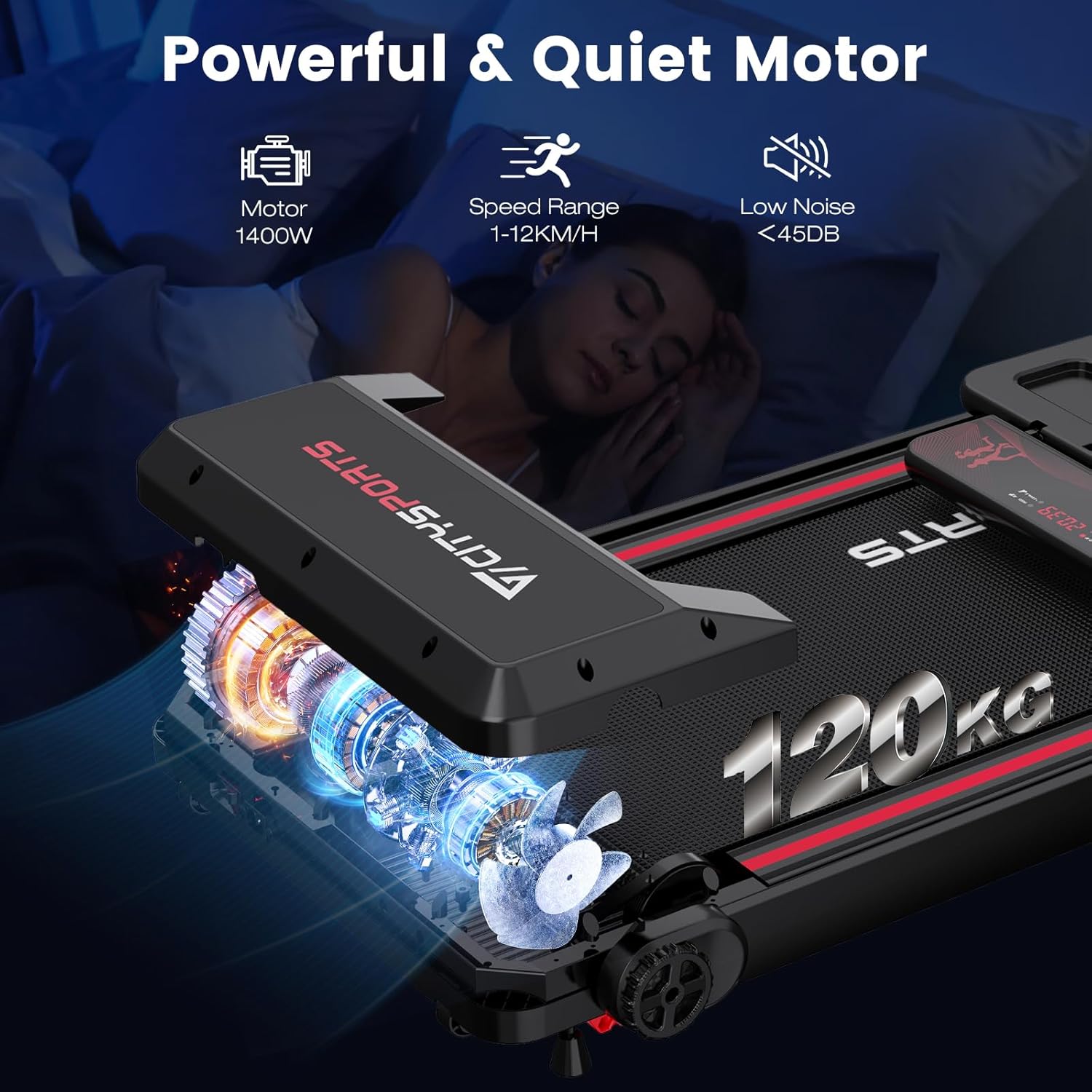
Figure 2.1: The 1400W motor provides a speed range of 1-12 KM/H with low noise operation (below 45dB).

Figure 2.2: The running belt system incorporates multiple layers and shock absorbers for reduced joint impact.
3. Setup Instructions
3.1 Unpacking
- Carefully remove the treadmill from its packaging.
- Remove all packing materials, including polystyrene and plastic bags.
- Inspect the treadmill for any signs of damage. If damaged, do not proceed with assembly or use, and contact customer support.
3.2 Assembly
The CITYSPORTS Folding Treadmill comes largely pre-assembled. Minor assembly is required to raise the control section.
- Locate the circular retaining bolts on the sides of the treadmill base.
- Loosen these bolts by turning them approximately two turns counter-clockwise.
- Carefully raise the control section (handle part with the display) into its upright position.
- Once in position, tighten the circular retaining bolts clockwise until secure.
- Ensure the handle part with controls clicks into its final position.
3.3 Placement and Power
- Place the treadmill on a firm, level surface. Avoid placing it on thick carpets, which may obstruct ventilation.
- Plug the power cord into a grounded electrical outlet.
3.4 Incline Adjustment
This treadmill offers two manual incline settings: 0% and 8%. To adjust the incline:
- Ensure the treadmill is powered off and unplugged.
- Lift the rear of the treadmill to access the incline adjustment mechanism.
- Adjust the support legs to the desired incline level (0% or 8%).
- Ensure both sides are set to the same incline level and are securely locked in place before use.

Figure 3.1: Manual incline adjustment between 0% and 8% for varied workout intensity.
4. Operating Instructions
4.1 Safety Key
The treadmill will not operate without the safety key properly placed on the console. Attach the clip of the safety key to your clothing before starting your workout.

Figure 4.1: The digital LED display console showing the safety key and workout metrics.
4.2 Control Panel and Display
The LED display console provides real-time feedback on your workout:
- Speed: Current speed in KM/H.
- Distance: Total distance covered.
- Time: Duration of your workout.
- Calories: Estimated calories burned.
Use the buttons on the control panel to start, stop, and adjust speed.
4.3 Starting and Adjusting Speed
- Ensure the safety key is correctly placed.
- Press the 'START' button on the console. The treadmill will begin at a low speed.
- Use the '+' and '-' buttons to increase or decrease the speed. The speed range is 1.0 to 12 KM/H.
- To stop, press the 'STOP' button or pull the safety key.

Figure 4.2: The treadmill supports walking, jogging, and running speeds.
4.4 APP Connectivity
The treadmill is compatible with a running application for convenient control and tracking.
- Download the designated running app from your device's app store.
- Enable Bluetooth on your mobile device.
- Open the app and follow the on-screen instructions to pair with your CITYSPORTS treadmill.
- Once connected, you can control the treadmill's speed and monitor your workout data through the app.
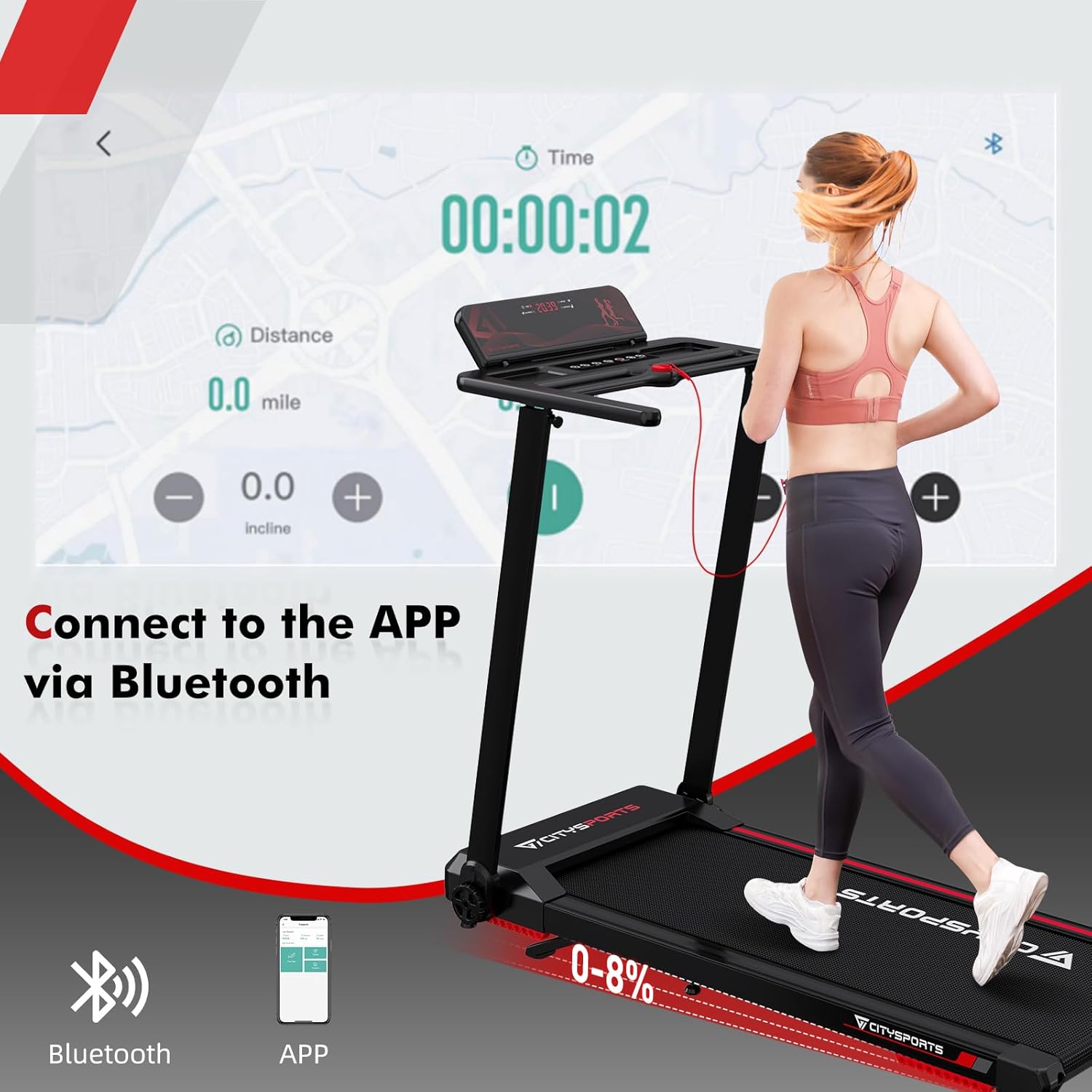
Figure 4.3: Connect to the running app via Bluetooth for enhanced control.
5. Maintenance
Regular maintenance ensures the longevity and optimal performance of your treadmill.
5.1 Cleaning
- After each use, wipe down the console and other surfaces with a damp cloth. Avoid abrasive cleaners or solvents.
- Periodically vacuum underneath the treadmill to prevent dust and debris buildup.
5.2 Lubrication
The running belt requires periodic lubrication to reduce friction and extend its lifespan. Use silicone lubricant specifically designed for treadmills.
- Turn off and unplug the treadmill.
- Lift each side of the running belt.
- Apply approximately 5ml of silicone lubricant to the center of the running deck, under the belt, on both sides.
- Plug in the treadmill and run it at the lowest speed (1 KM/H) for about 20 minutes. Walk on the belt occasionally to help spread the lubricant evenly.
5.3 Belt Tension and Alignment
If the running belt feels loose, slips, or drifts to one side, it may need adjustment.
- Turn off and unplug the treadmill.
- Locate the adjustment screws at the rear of the treadmill (usually on either side of the roller).
- For tension: Turn both screws clockwise in half-turn increments until the belt feels appropriately taut and does not slip under weight.
- For alignment: If the belt drifts left, turn the left screw clockwise a quarter turn. If it drifts right, turn the right screw clockwise a quarter turn. Run the treadmill at a low speed to check alignment and repeat if necessary.
- Always make small adjustments and check the belt's behavior before making further changes.
5.4 Storage
The CITYSPORTS treadmill is designed for easy folding and storage.
- Ensure the treadmill is turned off and unplugged.
- Follow the reverse steps of assembly to fold the control section down.
- The treadmill can then be stored upright or flat, for example, under a sofa.
- Use the built-in wheels to move the folded treadmill.
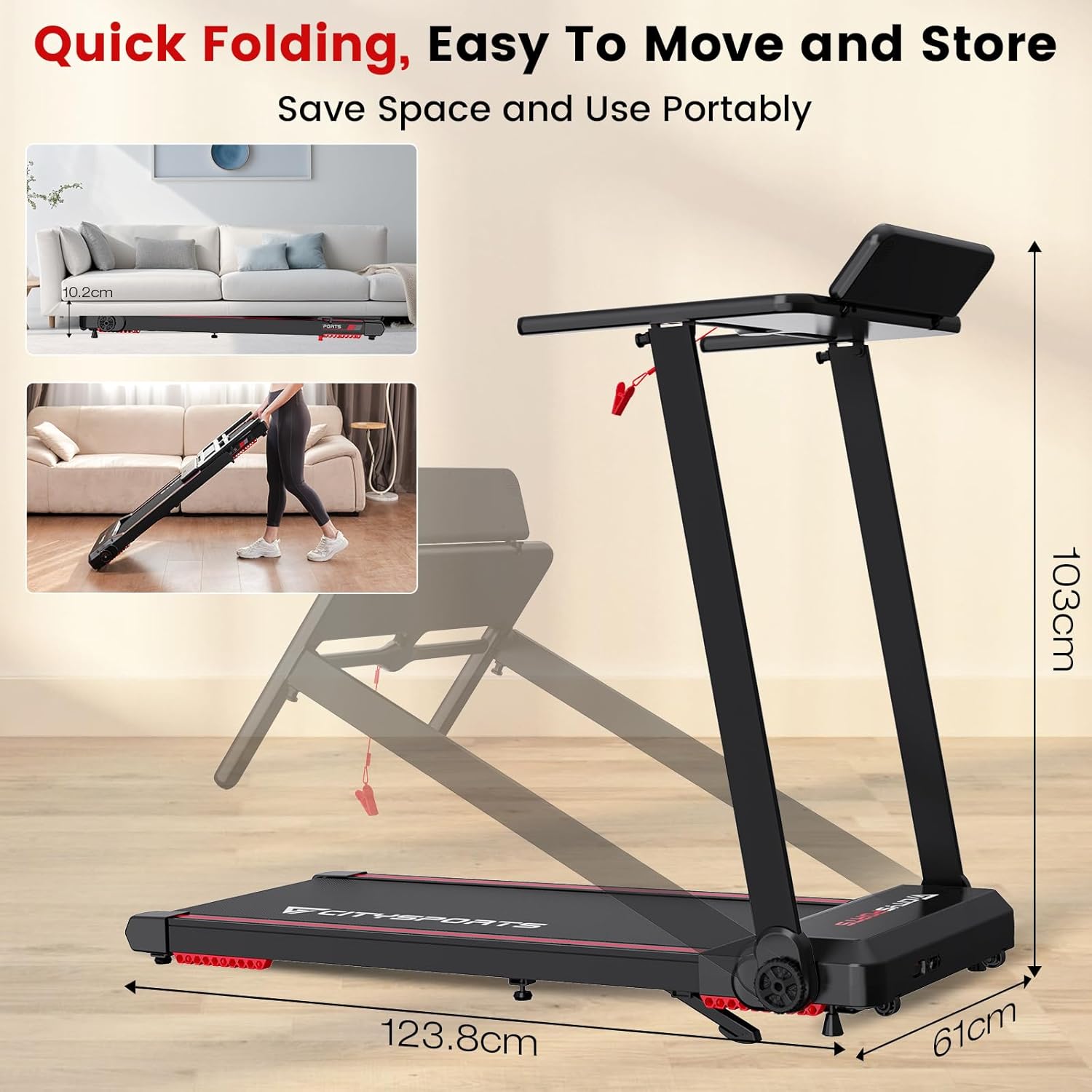
Figure 5.1: The treadmill features a quick folding design for easy storage and portability.
6. Troubleshooting
If you encounter issues with your treadmill, refer to the following common problems and solutions.
| Problem | Possible Cause | Solution |
|---|---|---|
| Treadmill does not start | Power cord not plugged in; Safety key not in place; Power switch off. | Ensure power cord is securely plugged in; Place safety key correctly; Turn on the power switch. |
| Running belt slips | Belt tension too loose; Belt needs lubrication. | Adjust belt tension (refer to Section 5.3); Lubricate the running belt (refer to Section 5.2). |
| Running belt drifts to one side | Belt alignment issue. | Adjust belt alignment (refer to Section 5.3). |
| Unusual noise during operation | Loose components; Lack of lubrication; Foreign object. | Check all bolts and screws for tightness; Lubricate the belt; Inspect for any foreign objects under the belt or motor cover. |
| APP not connecting via Bluetooth | Bluetooth off on device; App not updated; Treadmill not powered on. | Ensure Bluetooth is enabled; Update the app to the latest version; Power on the treadmill. |
7. Specifications
Technical specifications for the CITYSPORTS Folding Treadmill.
| Feature | Specification |
|---|---|
| Brand | CITYSPORTS |
| Model Number (ASIN) | B0DMDT48LJ |
| Motor Horsepower | 1400 Watts |
| Speed Range | 1.0 - 12 KM/H |
| Incline Levels | 2 Manual (0%, 8%) |
| Maximum User Weight | 120 KG |
| Running Area (approx.) | 40 x 102 cm |
| Product Dimensions (L x W x H) | 123.2 x 61 x 10.2 cm (folded) |
| Item Weight | 26.5 Kilograms |
| Material | Acrylonitrile Butadiene Styrene (ABS) |
| Display | Multifunctional LED |
| Connectivity | Bluetooth (for APP control) |
| Included Components | Remote Control |
8. Warranty and Support
CITYSPORTS is committed to providing satisfactory after-sales service. If you have any questions regarding your treadmill, its operation, maintenance, or require technical assistance, please do not hesitate to contact our customer support team.
Please refer to your purchase documentation or the retailer's website for specific warranty terms and contact information.


