Introduction
Thank you for choosing the Coleshome SYXM-002 Desk. This desk is designed to provide a versatile and organized workspace with features such as ample storage, integrated LED lighting, a monitor stand, and convenient power outlets. This manual provides detailed instructions for assembly, operation, maintenance, and troubleshooting to ensure optimal use and longevity of your product.
Safety Information
Please read all safety instructions carefully before assembly and use. Failure to follow these instructions may result in injury or damage to the product.
- Ensure to follow assembly instructions carefully to avoid any risk of accident.
- This desk can be heavy and stable; it is important to place it on a flat and stable surface.
- Do not place excessive weight on the desk to prevent tipping or damage.
- Keep all small parts and packaging materials away from children to prevent choking hazards.
- Do not use abrasive cleaners or harsh chemicals on the desk surface.
Package Contents
Before beginning assembly, please verify that all components are present and undamaged. If any parts are missing or damaged, please contact customer service.
- Desk Panels (Main desktop, monitor stand, side panels)
- Metal Frame Components
- Drawer Units (Fabric drawers, file drawer)
- LED Light Strip with Controller
- Integrated Power Outlet Unit (2 AC outlets, 2 USB ports)
- Assembly Hardware (Screws, bolts, tools if provided)
- Instruction Manual
Setup and Assembly
Follow the detailed assembly instructions provided in your package. It is recommended to assemble the desk with two people for ease and safety. Ensure all connections are secure before use.
Reversible Design
The Coleshome SYXM-002 desk features a reversible design, allowing you to configure the storage unit on either the left or right side to best suit your space and preferences. Refer to the assembly diagram for specific steps on how to achieve your desired orientation.

Figure 1: Desk Dimensions and Reversible Configuration. This diagram illustrates the overall dimensions of the desk (162cm length, 90.2cm height, 42cm depth for the monitor stand) and how the storage unit can be positioned on either side.
Component Identification
Familiarize yourself with the main components of the desk before starting assembly. The manual includes numbered diagrams to guide you through each step.
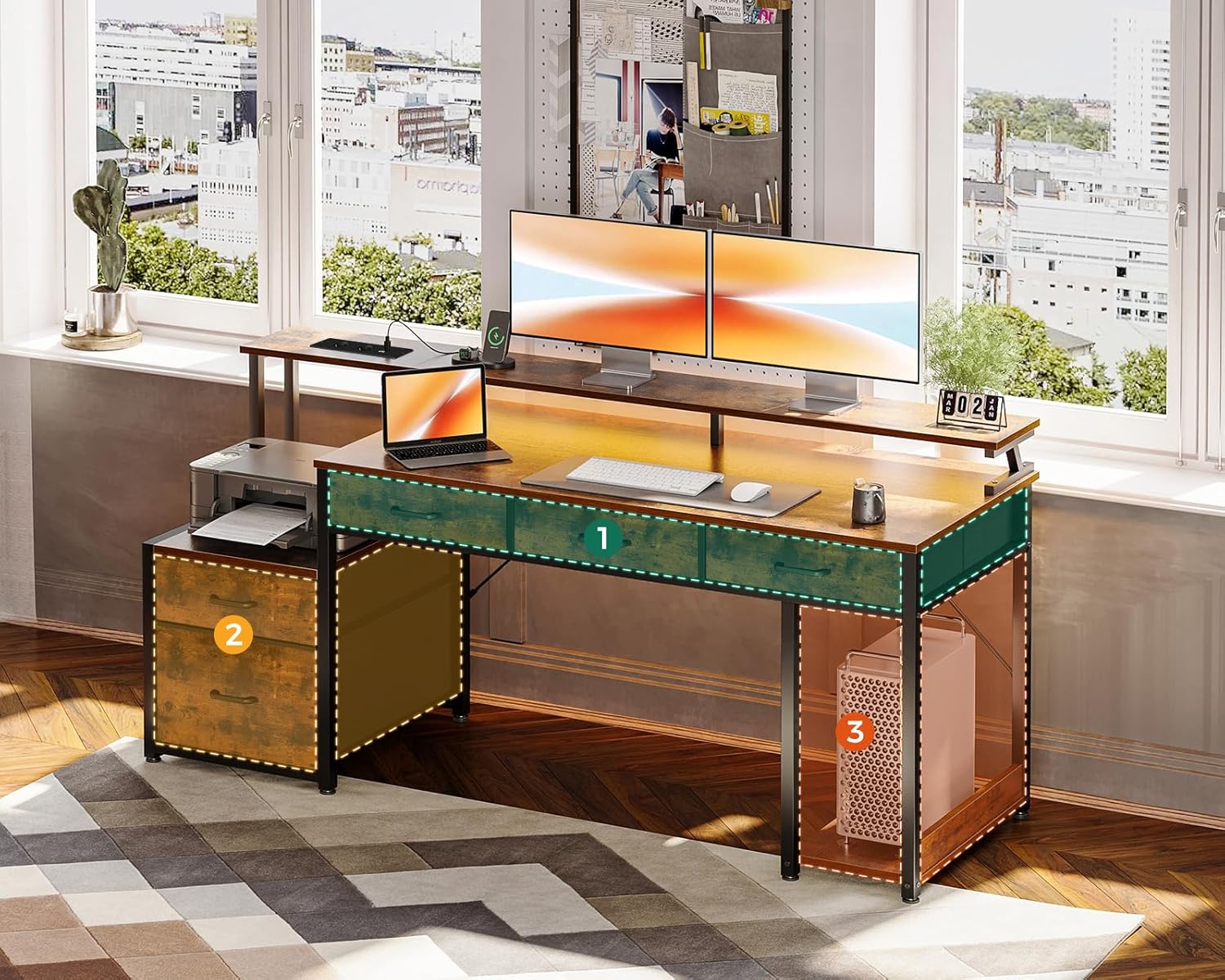
Figure 2: Key Desk Components. This image highlights the main functional areas: (1) the fabric drawers, (2) the printer cabinet with a file drawer, and (3) the dedicated CPU tower bay.
Operating Instructions
Storage Features
The desk offers extensive storage solutions to keep your workspace organized.
- Fabric Drawers: Four fabric drawers are integrated into the desk, providing convenient storage for office supplies, documents, and personal items.
- File Drawer: A dedicated file drawer accommodates letter and A4 size documents, ensuring important papers are neatly stored.
- Printer Cabinet: A designated space is available for your printer, keeping it off the main desktop.
- PC Tower Bay: A specific bay is designed to house your PC tower, optimizing space and airflow.

Figure 3: Organized Drawers. This image demonstrates the practical storage capacity of the desk's drawers, suitable for various office and personal items.

Figure 4: File Storage. This image illustrates the file drawer, designed to hold letter and A4 sized hanging folders for efficient document organization.

Figure 5: Fabric Drawer Assembly. This diagram shows the straightforward three-step process for assembling the fabric drawers.

Figure 6: CPU Support Bay. This image displays a computer tower positioned within its designated bay, designed for optimal organization and accessibility.
Customizable LED Lighting
The integrated LED light strips enhance your workspace ambiance. Use the included controller to adjust brightness and color temperature to suit your preference, whether for late-night work or creating a specific mood.

Figure 7: LED Lighting in Use. This image demonstrates the customizable RGB LED lighting, illuminating the desk and enhancing the overall atmosphere of a gaming or work setup.
Integrated Power and Charging
The desk includes a built-in power strip with 2 standard outlets and 2 USB ports, ideal for charging laptops, smartphones, and other electronic devices directly from your workspace.

Figure 8: Power Outlets and USB Ports. This image provides a close-up view of the integrated power strip, featuring two standard electrical outlets and two USB charging ports, with devices actively charging.
Monitor Stand
The elevated monitor stand promotes correct posture and helps protect your neck health by raising your screen to an ergonomic viewing height. It also frees up valuable desktop space.
Maintenance
To maintain the appearance and functionality of your Coleshome SYXM-002 desk, follow these simple maintenance guidelines:
- Cleaning: Wipe surfaces with a soft, damp cloth. Avoid using harsh chemicals, abrasive cleaners, or polishes that may damage the finish.
- Spills: Clean up spills immediately to prevent staining or damage to the wood finish.
- Hardware: Periodically check and tighten all assembly hardware to ensure stability.
- LED Lights: If the LED lights malfunction, check the connections to the power source and controller.
Troubleshooting
If you encounter any issues with your desk, refer to the following common troubleshooting tips:
- Desk Wobbles: Ensure all screws and bolts are securely tightened. Verify the desk is placed on a flat, even surface. Adjust leveling feet if present.
- LED Lights Not Working: Check that the LED strip is properly connected to the power adapter and the power outlet. Ensure the power outlet is functional. Try pressing the power button on the LED controller.
- Power Outlets/USB Ports Not Functioning: Confirm the desk's power cord is securely plugged into a working wall outlet. Check for any tripped circuit breakers.
- Drawers Stick: Ensure the drawer slides are correctly installed and free of obstructions. Check that the fabric drawers are assembled correctly and not overloaded.
For issues not resolved by these steps, please contact customer support.
Specifications
| Feature | Detail |
|---|---|
| Brand | Coleshome |
| Model Number | SYXM-002 |
| Color | Brown |
| Dimensions (L x W x H) | 160 x 48 x 91 cm (63 x 18.9 x 35.8 inches) |
| Item Weight | 20.9 Kilograms (46.1 lbs) |
| Material (Base) | Wood (MDF) |
| Material (Top Surface) | Wood (MDF) with oil-rubbed finish |
| Special Features | Integrated USB outlets, Reversible design, Monitor stand, LED lights |
| Power Outlets | 2 Standard AC outlets (110-240V) |
| USB Ports | 2 USB ports (5V/2A) |
| Power Cord Length | 200 cm |
Warranty and Support
Coleshome is committed to providing quality products and attentive customer service. While specific warranty details are not provided in this manual, we encourage you to retain your proof of purchase for any potential claims.
If you experience any issues such as product damage, missing parts, or require assistance with assembly or operation, please contact Coleshome customer service. Our professional team is available to assist you.
Information regarding the availability of spare parts is currently not provided. Please contact customer service for inquiries about replacement parts.


