
Wildgame Innovations FC-CR1_K325
Wildgame Innovations TERRA CELL 20MP Trail Camera (Verizon) User Manual
Model: FC-CR1_K325
Introduction
This manual provides detailed instructions for the setup, operation, and maintenance of your Wildgame Innovations TERRA CELL 20MP Cellular Trail Camera. Designed for reliable outdoor surveillance, this camera captures high-resolution images and offers cellular connectivity via Verizon for remote monitoring. Please read this manual thoroughly before using your device to ensure optimal performance and longevity.
What's in the Box
Verify that all items listed below are included in your package. If any components are missing or damaged, please contact customer support.
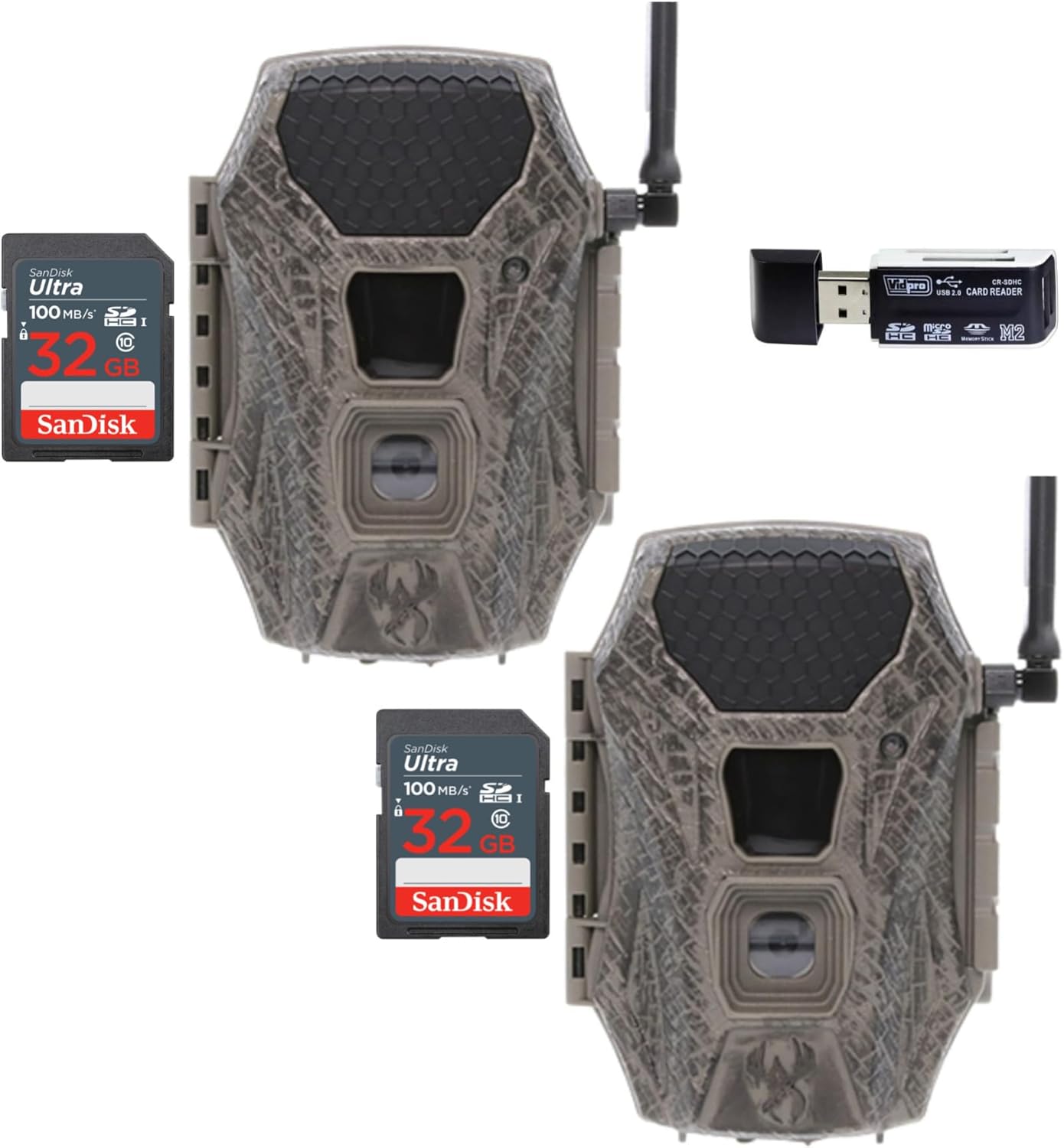
Image: Contents of the package, including two trail cameras, two 32GB SD cards, and a card reader.
- 2 x Wildgame Innovations Terra Cell 16MP Cellular Trail Camera (Verizon)
- 2 x SanDisk 32GB Ultra SDHC UHS-I Memory Card (100MB/s)
- 1 x All-In-One High-Speed Card Reader
- Adjustable Tree Strap (included with each camera)
Note: 8 AA batteries are required for each camera and are not included in the package.
Setup
- Install Batteries: Open the camera housing. Insert 8 new AA batteries into the battery compartment, ensuring correct polarity.

Image: Interior view of the camera, highlighting the battery compartment and QR code for app setup.
- Insert SD Card: Insert the provided 32GB SanDisk SD card into the SD card slot until it clicks into place. Ensure the card is correctly oriented.
- Activate Cellular Service (Verizon):
- Download the HuntSmart App on your smartphone.
- Create an account or log in.
- Use the QR code on the camera (visible when the housing is open) to add your device to the app.
- Follow the in-app instructions to activate your Verizon cellular plan for the camera.
- Mount the Camera:
- Use the adjustable tree strap to secure the camera to a tree or post. Position the camera at a height that provides a clear view of the desired area.
- Ensure the camera is stable and not prone to movement from wind.

Image: Demonstrates the process of attaching the trail camera to a tree using the provided strap.
- Power On: Turn the camera's power switch to the "ON" position. The camera will perform a self-check and connect to the cellular network.
Operating Instructions
Camera Modes and Settings
All camera settings, including photo resolution, video length, detection delay, and cellular upload frequency, are managed through the HuntSmart App. Refer to the app's interface for detailed options.

Image: Key features of the camera, including 16MP resolution, fast trigger speed, and 80ft flash range.
- Resolution: Captures 16-megapixel images.
- Trigger Speed: Rapid 0.7-second trigger speed to capture fast-moving subjects.
- Detection & Flash Range: 80-feet detection and flash range with 21 850nm LEDs for clear night vision.
- AIM System Integration: Utilizes the AIM System within the HuntSmart App for automatic photo uploads, organization, and analysis.
- On-Demand Photos: The app allows for on-demand photo capture, providing real-time updates from your camera's location.

Image: Example of an image captured by the Wildgame Innovations Terra Cell camera, showing a deer in its natural habitat.
Using the HuntSmart App
The HuntSmart App is your primary interface for managing your TERRA CELL camera. It allows you to:
- View captured photos and videos.
- Change camera settings remotely.
- Monitor battery life and signal strength.
- Receive notifications for new activity.
- Organize and analyze your captured media using AI-based features.
Maintenance
- Battery Replacement: Replace all 8 AA batteries when the battery indicator in the app shows low power. Always use fresh, high-quality alkaline or lithium batteries.
- SD Card Management: Periodically check the SD card capacity via the app. Format the SD card regularly (through the app or a computer) to maintain optimal performance and prevent data corruption.
- Lens Cleaning: Gently clean the camera lens and PIR sensor window with a soft, lint-free cloth. Avoid abrasive materials that could scratch the surfaces.
- Housing Inspection: Regularly inspect the camera housing for any signs of damage, cracks, or loose seals that could compromise its weather resistance.
- Firmware Updates: Check the HuntSmart App for available firmware updates for your camera. Keeping the firmware updated ensures access to the latest features and bug fixes.
Troubleshooting
- Camera Not Powering On:
- Ensure batteries are inserted correctly with proper polarity.
- Replace with fresh batteries.
- Check if the power switch is fully in the "ON" position.
- No Images Captured:
- Verify the SD card is properly inserted and not full. Format the SD card if necessary.
- Check camera settings in the HuntSmart App to ensure it's configured to capture images/videos.
- Ensure the PIR sensor is not obstructed and the detection range is appropriate for the placement.
- Check battery level.
- No Cellular Connection/Images Not Uploading:
- Confirm your Verizon cellular plan is active and has data available.
- Check the signal strength indicator in the HuntSmart App. If signal is weak, try repositioning the camera.
- Ensure the camera's antenna is securely attached and oriented correctly.
- Restart the camera by turning it off and then on again.
- Poor Image Quality:
- Clean the camera lens.
- Ensure the camera is stable and not vibrating.
- Check for obstructions in front of the lens or flash.
Specifications
| Model Number | FC-CR1_K325 |
| Brand | Wildgame Innovations |
| Resolution | 16 Megapixels |
| Trigger Speed | 0.7 seconds |
| Detection & Flash Range | 80 feet (21 850nm LEDs) |
| Power Source | 8 AA Batteries (not included) or 12V DC jack compatible with solar panels |
| Memory Card Support | SD, SDHC (up to 32GB included) |
| Cellular Carrier | Verizon |
| Dimensions (L x W x H) | 9.1 x 9.1 x 9.1 inches |
| Item Weight | 3.35 pounds |
| UPC | 196271875420 |
Warranty and Support
For warranty information, technical support, or service inquiries, please visit the official Wildgame Innovations website or contact their customer service department. Keep your purchase receipt as proof of purchase for warranty claims.
Wildgame Innovations Website: Visit Wildgame Innovations Store
Related documentsFC-CR1_K325


Ask a question about this manual
Ask about setup, troubleshooting, compatibility, parts, safety, or missing instructions. Manuals+ will review the question and use this page’s manual context to help answer it.