
1. Product Overview
The Candy Smart Pro Inverter Washer Dryer is a versatile appliance designed for efficient washing and drying of laundry. Featuring a slim design and advanced inverter motor technology, it offers quick cycles and smart connectivity for enhanced user experience. This manual provides essential information for safe and effective use of your appliance.

Figure 1.1: Front view of the Candy Smart Pro Inverter Washer Dryer, highlighting its energy efficiency class A and slim design.
2. Setup and Installation
Proper installation is crucial for the optimal performance and longevity of your washer dryer. Please follow these steps carefully.
2.1 Unpacking
- Remove all packaging materials, including the polystyrene base and any protective film.
- Remove the transport screws located at the rear of the appliance. Keep these screws for future transport.

Figure 2.1: Rear view of the appliance, showing the location of transport screws and connections.
2.2 Placement
Place the appliance on a firm, level floor. Ensure there is adequate space around the unit for ventilation and access.
- The slim design allows for space-saving installation.
- Ensure the appliance is stable and does not wobble.

Figure 2.2: The compact dimensions of the washer dryer, highlighting its space-saving capabilities (40 cm depth).
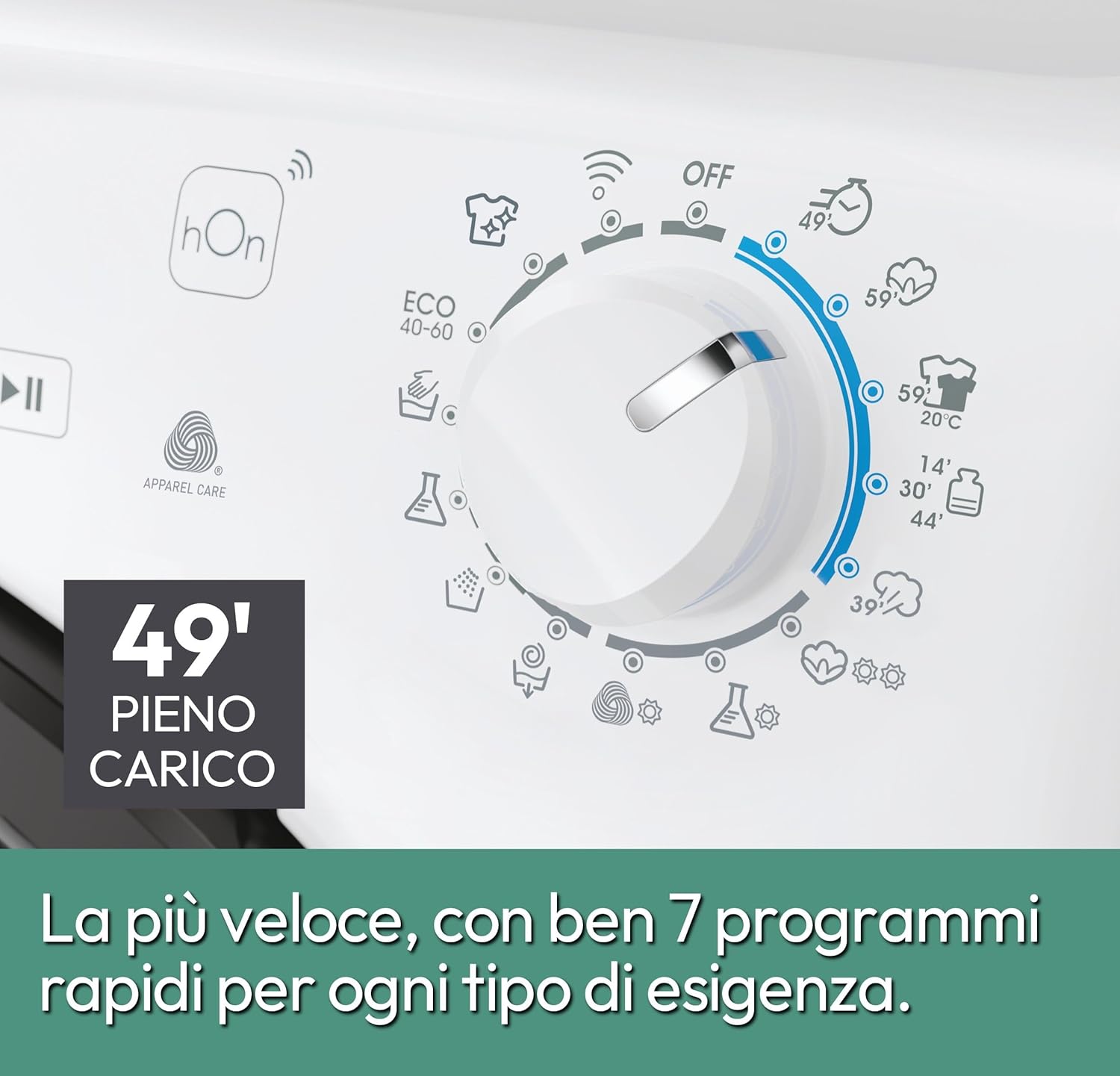
Figure 2.3: Side view of the appliance, illustrating its slim profile.
2.3 Water and Electrical Connections
- Connect the water inlet hose to a cold water tap.
- Ensure the drain hose is properly positioned in a drain or sink.
- Plug the appliance into a grounded electrical outlet. Refer to the specifications for voltage requirements.
3. Operating Instructions
This section guides you through the daily operation of your Candy Smart Pro Inverter Washer Dryer.
3.1 Control Panel Overview
The control panel features a program selector dial, touch controls, and a digital display for easy program selection and monitoring.

Figure 3.1: Close-up of the control panel, showing the program dial with various quick cycle options like 14, 30, and 44 minutes.

Figure 3.2: Front view of the appliance with the door open, ready for loading laundry.
3.2 Program Selection
Turn the program selector dial to choose the desired washing or drying program. The appliance offers a range of cycles, including:
- Rapid Cycles: Ideal for quick washes (e.g., 14, 30, 44 minutes).
- Eco 40-60: Energy-efficient program for cottons and mixed fabrics.
- Steam Program: Reduces wrinkles and removes odors.
- Specific programs for different fabric types (e.g., Cotton, Synthetics).

Figure 3.3: Illustration of the 39-minute steam treatment, designed to reduce wrinkles and refresh garments.
3.3 Detergent Dispenser
Add detergent and fabric softener to the appropriate compartments in the dispenser drawer before starting a cycle.
3.4 hOn App Connectivity
Connect your appliance to the hOn app for additional features, program customization, and remote control.
- Snap&Wash Function: Take a photo of your laundry to get the most suitable program.
- Access to additional programs and statistics.

Figure 3.4: A user interacting with the hOn app on a smartphone, demonstrating smart connectivity features.
4. Maintenance and Care
Regular maintenance ensures the efficiency and extends the lifespan of your appliance.
4.1 Cleaning the Detergent Dispenser
Periodically remove and clean the detergent dispenser drawer to prevent residue buildup.
4.2 Cleaning the Filter
The filter should be cleaned regularly to ensure proper drainage and prevent blockages.
4.3 Drum Cleaning
Run a maintenance wash cycle with a suitable cleaning agent to keep the drum fresh and hygienic.
5. Troubleshooting
If you encounter issues with your appliance, refer to the following common problems and their solutions before contacting service.
| Problem | Possible Cause | Solution |
|---|---|---|
| Appliance does not start | Power cord not plugged in; door not closed properly; program not selected. | Check power connection; ensure door is securely latched; select a program and press start. |
| Excessive noise during operation | Transport screws not removed; appliance not level; unbalanced load. | Remove transport screws; adjust leveling feet; redistribute laundry inside the drum. |
| Poor drying results | Overloaded drum; incorrect drying program; filter clogged. | Reduce load size; select appropriate drying program; clean the filter. |
6. Specifications
Detailed technical specifications for the Candy Smart Pro Inverter Washer Dryer.
- Model: CSOW 4746TWMB5-S
- Manufacturer Model Number: 31020017
- Brand: Candy
- Washing Capacity: 7 Kg
- Drying Capacity: 4 Kg
- Dimensions (DxWxH): 45 x 60 x 89 cm (Slim Design)
- Weight: 61 kg
- Energy Class (Washing Cycle): A (New Energy Label)
- Spin Speed: Up to 1400 RPM
- Motor Type: Speed Drive Inverter Motor
- Drum Material: Stainless Steel
- Control Type: Touch
- Special Features: Quick&Clean Technology, Snap&Wash Function, Steam Program, hOn App Connectivity.

Figure 6.1: Illustration of the innovative Inverter Motor, highlighting its reliability and efficiency.
7. Warranty and Support
Your Candy Smart Pro Inverter Washer Dryer is covered by a manufacturer's warranty. For specific details regarding warranty terms and conditions, please refer to the documentation provided with your appliance or visit the official Candy website.
- Returns: Products can typically be returned within 14 days of receipt if you change your mind.
- Defective/Damaged Products: Consult the return policy for defective or damaged products.
- For technical assistance or service requests, please contact Candy customer support.


