
1. Product Overview
The PMI SmokeNINJA PRO HAZER KIT is a portable fog machine designed for cinematic, photography, and event use. It features a 3rd generation haze nozzle with Bluetooth connectivity, advanced overheating protection, and USB-C controls for precise effects.
- High-Quality Cinematic Haze: Produces harmless, odorless haze covering up to 1,000 sqft (100 sqm) in a single burst.
- Advanced Overheating Protection: Ensures extended burst times (up to 3 minutes continuous) with quick recovery.
- New Haze Nozzle with Bluetooth: Efficient, quiet, and far-reaching haze control.
- USB-C Control for Customization: Compatible with DMX and wired button modules (sold separately).
- Portable & Complete Kit: Compact, lightweight design with all necessary accessories for immediate use.
2. What's in the Box
Your PMI SmokeNINJA PRO HAZER KIT includes the following components:
- PMI SmokeNINJA-PRO Machine x1
- Remote Control x1
- Atomizing Smoke Chamber x1
- 100ml Smoke Formula Refill x1
- New Haze Nozzle x1
- Smoke-Shaping Nozzle Set x1
- Oil Blocker x1
- Magnetic Mount x1
- 1/4" Mount x1
- USB-C Charging Cable x1
- Protective Carrying Case x1
- Warranty Card x1
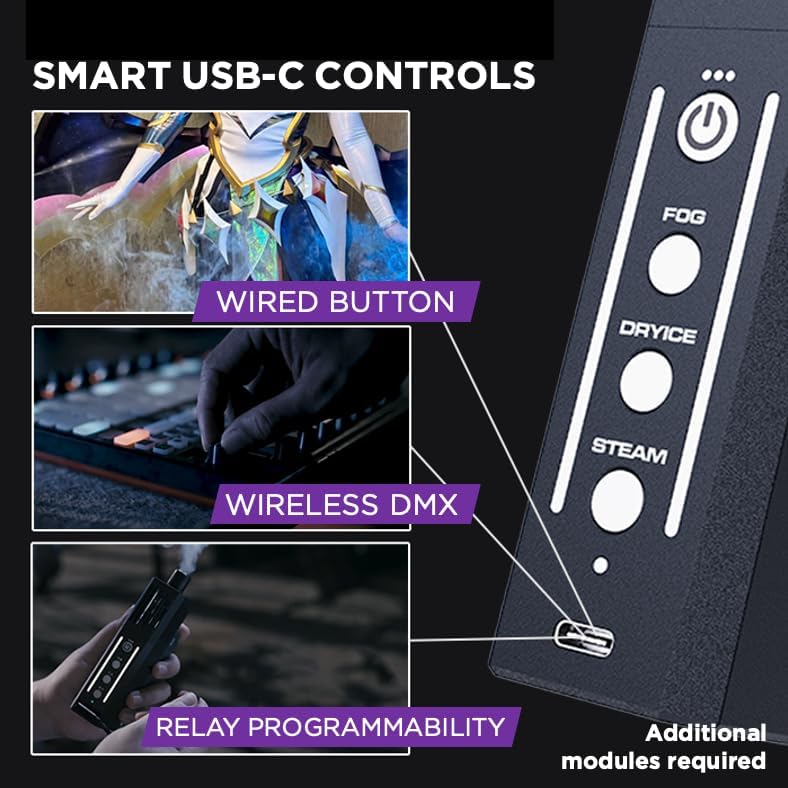
Image: All components of the PMI SmokeNINJA PRO HAZER KIT, including the main unit, various nozzles, remote, liquid, and carrying case.
3. Setup
3.1 Charging the Device
Before first use, ensure the SmokeNINJA PRO is fully charged. Connect the provided USB-C charging cable to the device's USB-C port and to a compatible power source. The LCD screen will indicate charging status.
3.2 Filling the Fog Liquid Chamber
- Unscrew the atomizing smoke chamber from the main unit.
- Carefully fill the chamber with the provided 100ml smoke formula refill. Do not overfill.
- Screw the chamber back onto the main unit securely.
- For first-time use, or after refilling, allow the liquid to sit for at least 5 minutes to ensure the coil is fully saturated and prevent dry burning.
3.3 Attaching Nozzles and Accessories
The SmokeNINJA PRO features magnetic attachments for quick and easy swapping of nozzles and accessories.
- Haze Nozzle: Align the haze nozzle with the magnetic connector on the main unit until it snaps into place. The device will automatically detect the haze nozzle.
- Smoke-Shaping Nozzles: These can be attached to the output of the haze nozzle or directly to the main unit for various smoke effects.
- Magnetic Mount/1/4" Mount: Attach these to the bottom of the device for flexible mounting options on metal surfaces or tripods.

Image: The PMI SmokeNINJA PRO HAZER KIT showcasing its main unit and various accessories like the haze nozzle, smoke-shaping nozzles, and mounting options.
4. Operating Instructions
4.1 Power On/Off
Press and hold the power button (usually the top button with a circle icon) for approximately 3 seconds to turn the device on or off. The LCD screen will illuminate upon activation.
4.2 Mode Selection
The SmokeNINJA PRO offers multiple modes for different effects:
- Normal Mode (Fog/Dry Ice/Steam): When no haze nozzle is attached, the device operates in normal mode. Use the dedicated buttons (Fog, Dry Ice, Steam) to select the desired effect.
- Haze Mode: When the haze nozzle is magnetically attached, the device automatically switches to Haze Mode. The buttons on the main unit will then control the fan speed (Low, Medium, High) for haze output.
- Bubble Mode: Requires an additional bubble formula and nozzle (sold separately). When attached, the device enters Bubble Mode, allowing adjustment of bubble size by varying fan speed.

Image: The intuitive control interface of the SmokeNINJA PRO, showing buttons for Fog, Dry Ice, and Steam modes, with LED indicators.
4.3 Adjusting Output and Fan Speed
Use the '+' and '-' buttons on the device to adjust the intensity of fog/steam output or the fan speed in Haze Mode. The LCD screen provides real-time feedback on current settings.
4.4 Remote Control Usage
The included wireless remote control allows for convenient operation from a distance. It typically features buttons for power, mode selection, and output/speed adjustment. Ensure the remote's battery is active (remove any plastic tabs before first use).
4.5 Bluetooth Pairing (Haze Nozzle)
The 3rd Gen Haze Nozzle connects via Bluetooth. When attached, the device automatically pairs. The unit's lights may change to indicate successful pairing (e.g., purple).
Video: An official product video from PMI showcasing the SmokeNINJA PRO, its features, and various applications, including the haze mode and remote control.
5. Features & Accessories
The SmokeNINJA PRO HAZER KIT is designed with versatility and safety in mind, offering a range of features and compatible accessories:
- GEN3 Clean Fog Technology: Produces harmless, odorless, and non-irritating smoke/haze. Lab-tested and approved by industry standards.
- Upgraded Overheat Protection System: Ensures safe and reliable operation with extended burst times and quick cooldowns.
- VortechMIX™ Technology: Integrated into the Bluetooth Haze Nozzle for optimized distance, spread, and efficiency of haze.
- Expansive Accessory Ecosystem: Includes various nozzles (precision fog, jet tip steam, liquid nozzle dry-ice), magnetic mounts, 1/4 inch mounts, and compatibility with optional accessories like the Bubble Nozzle, NINJA TRIDENT (for triple output), Wired Button, and Wireless DMX Module.

Image: Illustration highlighting the safety features of the SmokeNINJA PRO, including no eye/smell irritation, no carcinogens, and no fabric damage, approved by SGS.
Video: A seller-provided video demonstrating the PMI SmokeNINJA PRO HAZER KIT, showcasing its various modes (fog, dry ice, steam, haze) and accessories in action.
6. Maintenance
6.1 Cleaning
Regular cleaning ensures optimal performance and longevity of your device. After each use, especially if switching between different liquid types, it is recommended to run the device with a small amount of distilled water to flush out any residue. Ensure the device is completely dry before storage.
6.2 Storage
Store the SmokeNINJA PRO HAZER KIT in its protective carrying case in a cool, dry place away from direct sunlight. Ensure the fog liquid chamber is securely closed to prevent leaks. If storing for extended periods, it is advisable to empty the chamber and clean the device.
7. Troubleshooting
- No Fog Output: Check if the chamber is filled with liquid and if the coil is saturated (allow 5 minutes after filling). Ensure the device is fully charged.
- Overheating: The device has advanced overheating protection. If it stops producing fog, allow it to cool down. Extended continuous use may trigger this safety feature.
- Remote Not Responding: Check the remote's battery. Ensure there are no obstructions between the remote and the device.
- Haze Nozzle Not Pairing: Ensure the haze nozzle is correctly attached magnetically. If issues persist, try detaching and reattaching.
8. Specifications
- Item Weight: 2.2 pounds
- Product Dimensions: 11.81 x 7.87 x 7.87 inches
- Item Model Number: SmokeNINJA - PRO HAZER KIT
- First Available: November 7, 2024
9. Warranty & Support
Your PMI SmokeNINJA PRO HAZER KIT comes with a warranty. Please refer to the included Warranty Card for detailed terms and conditions. For technical support or inquiries, please visit the official PMI website or contact their customer service.