
TopMade MFK03
TopMade Smart Pet Tracker User Manual
Model: MFK03
1. Introduction
Thank you for choosing the TopMade Smart Pet Tracker. This device is designed to help you keep track of your beloved pets and valuable belongings using Apple's Find My network. This manual provides comprehensive instructions for setting up, operating, and maintaining your tracker to ensure optimal performance and longevity.
2. Product Overview
The TopMade Smart Pet Tracker is a compact, durable, and rechargeable device that leverages the vast Apple Find My network to help you locate items. It is not a GPS tracker but uses Bluetooth technology to communicate with nearby Apple devices, relaying its location to your Find My app.

Image: Two TopMade Smart Pet Trackers, black, with water droplets on their surface, highlighting their water-resistant design.
Key Features:
- Apple Find My Compatibility: Seamlessly integrates with your iPhone, iPad, Mac, or Apple Watch.
- Real-Time Tracking: View the tracker's last known location on a map within the Find My app.
- Sound Playback: Trigger a sound from the tracker to locate items nearby.
- Rechargeable Battery: Long-lasting battery, rechargeable via USB Type-C.
- Durable Design: Constructed with high-quality PC material for 360° protection and drop resistance.
- Versatile Use: Ideal for pets, luggage, backpacks, keys, and other personal items.

Image: Visual representation of the tracker's features including eco-friendliness, lightweight design, durability, fur-friendliness, real-time tracking, and long-lasting battery.
3. Setup Instructions
3.1 Charging the Device
Before first use, fully charge your TopMade Smart Pet Tracker. Connect the included USB Type-C cable to the charging port on the tracker and plug the other end into a compatible USB power source. The indicator light will show charging status.

Image: The tracker connected to its USB-C charging cable, demonstrating its rechargeable capability.
3.2 Powering On/Off
- To Power On: Long press the power button located on the bottom of the device until you hear a chime or see an indicator light.
- To Power Off: Press the power button twice quickly, then long press it until the device powers down. This prevents accidental power-offs.
3.3 Pairing with Apple Find My
Ensure your iOS device's location services and Find My app are enabled.
- Open the Find My app on your iPhone or iPad.
- Tap the Items tab at the bottom of the screen.
- Tap + Add New Item, then select Other Supported Item.
- Follow the on-screen instructions to connect your TopMade tracker. Your device should detect the tracker automatically.
- Once detected, confirm the pairing. You can name your tracker and assign an emoji for easy identification.

Image: Step-by-step visual guide for connecting the tracker to the Apple Find My app on an iPhone.
3.4 Attaching the Tracker
The tracker is designed to slide onto pet collars or straps. Ensure the collar or strap is compatible with the tracker's loops. For pet collars, ensure a secure fit that does not cause discomfort to your pet.

Image: Examples of the tracker seamlessly attached to various items like backpacks, pet collars, and luggage.
4. Operating Instructions
4.1 Locating Your Item Nearby
When your item is within Bluetooth range, you can use the Find My app to play a sound on the tracker to help you locate it.
- Open the Find My app.
- Select the Items tab.
- Tap on your TopMade tracker from the list.
- Tap Play Sound. The tracker will emit a sound, guiding you to its location.

Image: Using the 'Play Sound' feature in the Find My app to locate a pet wearing the tracker indoors.
4.2 Locating Your Item Far Away
If your item is out of Bluetooth range, the Find My network can still help. The location of your tracker is updated by any Apple device that passes within its Bluetooth range, securely and anonymously. You can view its last known location on the map.
- Open the Find My app.
- Select the Items tab.
- Tap on your TopMade tracker.
- The map will display its last reported location. You can tap Directions to get navigation to that location.
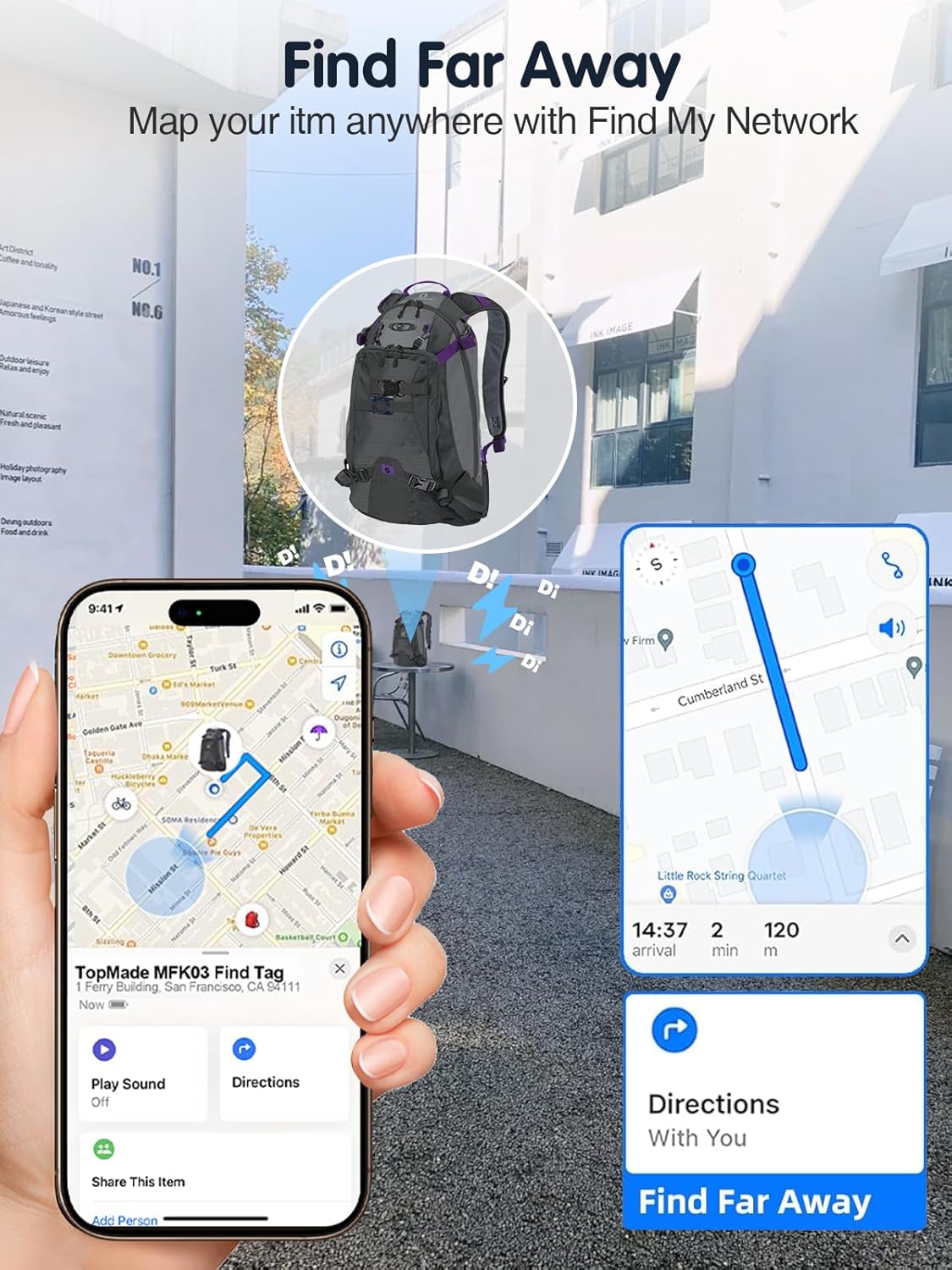
Image: The Find My app displaying the location of a tracked backpack on a map, with options for directions.
4.3 Left Behind Notifications
You can set up notifications to alert you if you leave your tracker behind at a specific location or if it separates from your device.
- In the Find My app, select your tracker.
- Scroll down to Notifications.
- Toggle on Notify When Left Behind.
- You can customize locations where you don't want to be notified (e.g., your home).

Image: An example of a 'Time Sensitive' notification on an iPhone, alerting the user that an item has been left behind.
5. Maintenance
5.1 Battery Life and Charging
The TopMade Smart Pet Tracker features a long-lasting rechargeable battery that can last up to 4 months on a single charge, depending on usage. Recharge the device when the battery level is low, as indicated in the Find My app.
5.2 Cleaning
Wipe the tracker with a soft, damp cloth to clean. Avoid using harsh chemicals or abrasive materials that could damage the device.
5.3 Durability
The tracker is designed with 360° high-quality PC protection, offering resistance against impacts from up to 15 feet. It is also waterproof, suitable for various environments.

Image: The tracker demonstrating its mil-grade drop protection, capable of withstanding drops from 15 feet.

Image: A dog playing in water with the tracker, illustrating its superior waterproof design.
6. Troubleshooting
6.1 Difficulty Connecting/Pairing
- Ensure your iOS device's Bluetooth and Location Services are enabled.
- Make sure the tracker is powered on and fully charged.
- Bring the tracker close to your iOS device during the pairing process.
- If issues persist, try restarting both your iOS device and the tracker.
6.2 Tracker Not Playing Sound
- Ensure the tracker is within Bluetooth range of your iOS device.
- Check the battery level of the tracker in the Find My app. A very low battery might prevent sound playback.
- Verify that your iOS device's volume is turned up.
6.3 Inaccurate Location
- The tracker relies on nearby Apple devices to update its location. In areas with fewer Apple devices, updates may be less frequent.
- Ensure the tracker is not obstructed by thick materials that could interfere with Bluetooth signals.
- Remember, this is not a GPS tracker; location accuracy depends on the density of the Find My network.
7. Specifications
| Feature | Specification |
|---|---|
| Model | MFK03 |
| Connectivity | Bluetooth |
| Compatible Devices | iOS devices (iPhone, iPad, Mac, Apple Watch) |
| Battery Type | 1 Lithium Ion battery (included) |
| Battery Life | Up to 4 months on a single charge |
| Charging Port | USB Type-C |
| Material | Plastic (PC) |
| Color | Black |
| Dimensions (approx.) | 1.96 inches (H) x 1.29 inches (W) x 1.03 inches (D) |

Image: Visual representation of the tracker's dimensions and its Type-C charging capability.
8. Warranty & Support
8.1 Warranty Information
TopMade products are covered by a limited warranty against defects in materials and workmanship. Please refer to the product packaging or the official TopMade website for specific warranty terms and conditions.
8.2 Customer Support
For technical assistance, troubleshooting, or warranty claims, please contact TopMade customer support. You can find contact information on the official TopMade website or through your purchase platform.
Visit the TopMade Store on Amazon for more information and products.
Ask a question about this manual
Ask about setup, troubleshooting, compatibility, parts, safety, or missing instructions. Manuals+ will review the question and use this page’s manual context to help answer it.