
1. Safety Information
Please read and understand all safety instructions before using the Alonefire SV119 UV LED Flashlight. Failure to follow these instructions may result in injury or damage to the product.
- UV Radiation Exposure: This flashlight emits powerful 365nm UV light. Avoid direct exposure of UV light to eyes and skin. Prolonged exposure can be harmful.
- Wear Protective Eyewear: Always wear the provided UV protection glasses when operating the flashlight to shield your eyes from UV radiation.
- Hot Surface: The flashlight head may become hot during extended use. Avoid touching the hot surface directly.
- Battery Safety: Use only the specified Lithium-ion battery. Do not attempt to disassemble, puncture, or expose the battery to extreme temperatures or fire.
- Children: Keep the flashlight out of reach of children.
2. Package Contents
Verify that all items are present in the package:
- Alonefire SV119 UV LED Flashlight
- USB-C Charging Cable
- UV Protection Glasses
- Rechargeable Lithium-ion Battery (pre-installed or separate)

Image: Contents of the Alonefire SV119 package, including the flashlight, USB-C cable, and yellow UV protection glasses.
3. Product Overview
The Alonefire SV119 is a powerful 90W UV LED flashlight designed for various detection and curing applications. Its key features include:
- High-Quality UV LED: Equipped with 9 pieces of 4-core 365nm UV LEDs, providing up to 90W power consumption and 10000mW light output.
- Black Filter Lens: Features a hardened black optical filter lens to filter out ambient visible light, ensuring a purer and more powerful UV output.
- Durable Construction: Made from high-quality aluminum alloy for enhanced heat dissipation and durability.
- USB-C Rechargeable: Convenient USB-C charging port for easy and versatile recharging.
- Digital LCD Display: An innovative LCD screen displays the battery power level numerically.
- Reverse Charging: Can function as a power bank to charge other devices via its USB-A output port.

Image: The Alonefire SV119 UV LED flashlight highlighting its 9-core 365nm UV LEDs and various detection and curing applications.

Image: A visual comparison demonstrating the effectiveness of 365nm UV light compared to 395nm UV light for mineral fluorescence.
4. Setup
4.1 Battery Installation
- Unscrew the tail cap of the flashlight.
- If the battery is not pre-installed, insert the provided Lithium-ion battery with the positive (+) terminal facing towards the flashlight head.
- Important: If there is a plastic insulating disc on the battery's positive or negative terminal, remove it before installation.
- Screw the tail cap back on securely.
4.2 Initial Charging
Before first use, fully charge the flashlight battery.
- Locate the USB-C charging port on the flashlight body.
- Connect the provided USB-C cable to the flashlight and plug the other end into a compatible USB power adapter (not included) or a computer USB port.
- The LCD display will show the charging progress. A full charge is indicated by '100%' on the display.
- Charging time is approximately 7 hours for a full charge.

Image: The Alonefire SV119 flashlight being charged via its USB-C port, with the LCD screen displaying the battery charge level.
5. Operating Instructions
5.1 Power On/Off and Mode Selection
- Power On: Press the power button located on the side of the flashlight.
- Mode Selection: The flashlight typically has two brightness modes (strong and medium). Press the power button repeatedly to cycle through these modes.
- Power Off: Press and hold the power button for a few seconds until the light turns off.
5.2 Understanding the LCD Display
The integrated LCD display provides real-time information about the battery status.
- When the flashlight is in use, the display shows the remaining battery percentage.
- During charging, it indicates the charging progress.
5.3 Reverse Charging Function
The SV119 can act as a portable power bank to charge other USB-powered devices.
- Locate the USB-A output port on the flashlight.
- Connect your device's charging cable to the USB-A port on the flashlight.
- The flashlight will begin charging your device.
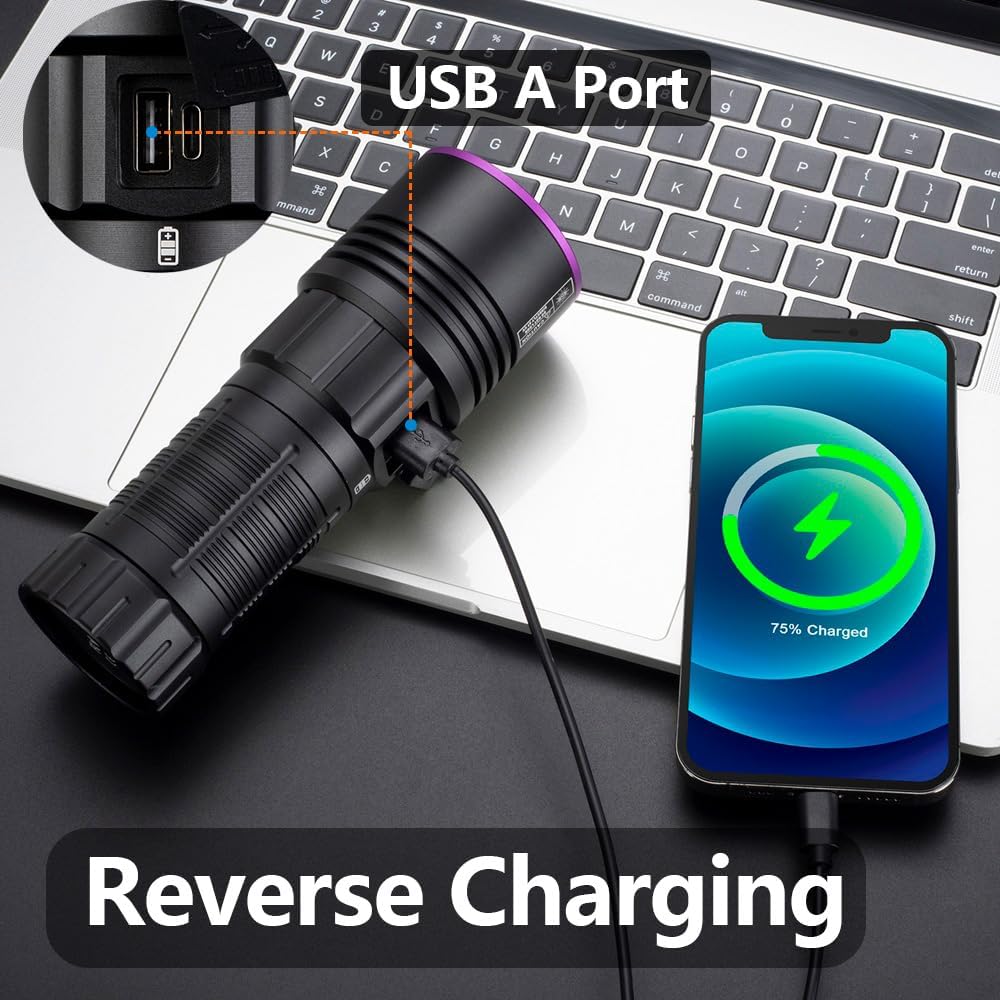
Image: The Alonefire SV119 flashlight demonstrating its reverse charging capability by powering a smartphone.
5.4 Applications
The 365nm UV light is suitable for various applications:
- Pet Stain Detection: Identify hidden pet urine, ringworm, and other biological stains on carpets, furniture, and floors.
- Scorpion Detection: Scorpions fluoresce under 365nm UV light, making them easier to spot in dark environments.
- Mineral and Amber Identification: Many minerals and amber exhibit fluorescence under UV light, aiding in identification.
- Currency and Document Authentication: Verify security features on banknotes, passports, and other official documents.
- Resin Curing: Accelerate the curing process of UV-sensitive resins.
- Leak Detection: Detect leaks in HVAC systems or automotive fluids when used with UV-sensitive dyes.

Image: A demonstration of the UV flashlight's ability to reveal hidden pet urine stains on a carpet, showing a 'before' view under normal light and an 'after' view under UV light.
6. Maintenance
6.1 Cleaning
- Wipe the flashlight body with a soft, damp cloth.
- For the lens, use a lens cleaning cloth and solution to avoid scratches.
- Do not use abrasive cleaners or solvents.
6.2 Battery Care and Storage
- Recharge the battery regularly, even if not frequently used, to maintain its lifespan.
- Store the flashlight in a cool, dry place away from direct sunlight and extreme temperatures.
- If storing for an extended period, charge the battery to approximately 50% capacity.
7. Troubleshooting
- Flashlight not turning on:
- Ensure the battery is correctly installed and fully charged.
- Check if the plastic insulating disc has been removed from the battery terminals.
- Tighten the tail cap securely.
- Battery not charging:
- Verify the USB-C cable is properly connected to both the flashlight and the power source.
- Try a different USB-C cable or power adapter.
- Ensure the power source is functional.
- Weak light output:
- The battery may be low; recharge it.
- Ensure the lens is clean and free of obstructions.
- LCD display not working or inaccurate:
- Recharge the battery fully.
- If the issue persists, contact customer support.
8. Specifications
| Feature | Specification |
|---|---|
| Brand | Alonefire |
| Model Number | SV119 |
| Light Source | 9x 4-core 365nm UV LED |
| Power | 90 Watts |
| Luminous Flux | 10000 milliwatt |
| Material | Aluminum Alloy |
| Battery Type | 1x Lithium-ion (included) |
| Charging Port | USB-C |
| Special Features | Rechargeable, Digital Display, Reverse Charging |
| Weight | 580 g |
| Dimensions (Package) | 19.9 x 13.2 x 6.3 cm |
| Water Resistance Level | Not waterproof |
9. Warranty and Support
9.1 Warranty Information
Specific warranty details for the Alonefire SV119 are not provided in this manual. Please refer to the retailer or manufacturer's official website for the most current warranty policy.
9.2 Customer Support
For technical assistance, troubleshooting beyond this manual, or inquiries regarding your product, please contact Alonefire customer support through their official channels or the retailer where the product was purchased.


