
1. Introduction
The FULAIM X6 Wireless Lavalier Microphone System is designed for high-quality audio recording across various devices. Featuring four transmitters and one receiver, it offers 48kHz/24bit audio format, intelligent noise cancellation, and a wide wireless transmission range, making it ideal for video recording, vlogging, interviews, and live streaming. This manual provides comprehensive instructions for setting up, operating, and maintaining your FULAIM X6 system.
2. What's in the Box
Carefully unpack your FULAIM X6 system and ensure all components are present:
- 4 x Transmitters (TX)
- 1 x Receiver (RX)
- 4 x Windscreens
- 1 x 4-in-1 Charging Cable
- 1 x 3.5mm Camera Cable
- 1 x Type-C Adapter
- 1 x Lightning Adapter
- 4 x Magnets
- 1 x Portable Case
- 1 x User Manual

Figure 2.1: All components included in the FULAIM X6 package.
3. Product Overview
The FULAIM X6 system consists of compact and lightweight transmitters and a receiver, designed for ease of use and portability.
3.1 Transmitters (TX)
Each transmitter features a built-in microphone, a power/mute button, and a SET button for noise cancellation. They are equipped with a convenient back clip and magnetic design for easy attachment to clothing.
3.2 Receiver (RX)
The receiver features a TFT display screen that shows volume level, pairing status, signal strength, battery power, and audio mode (Mono/Secure Audio Track). It includes a 3.5mm real-time monitoring port and a USB-C port for charging and connection.

Figure 3.1: Overview of the FULAIM X6 Wireless Lavalier Microphone System.
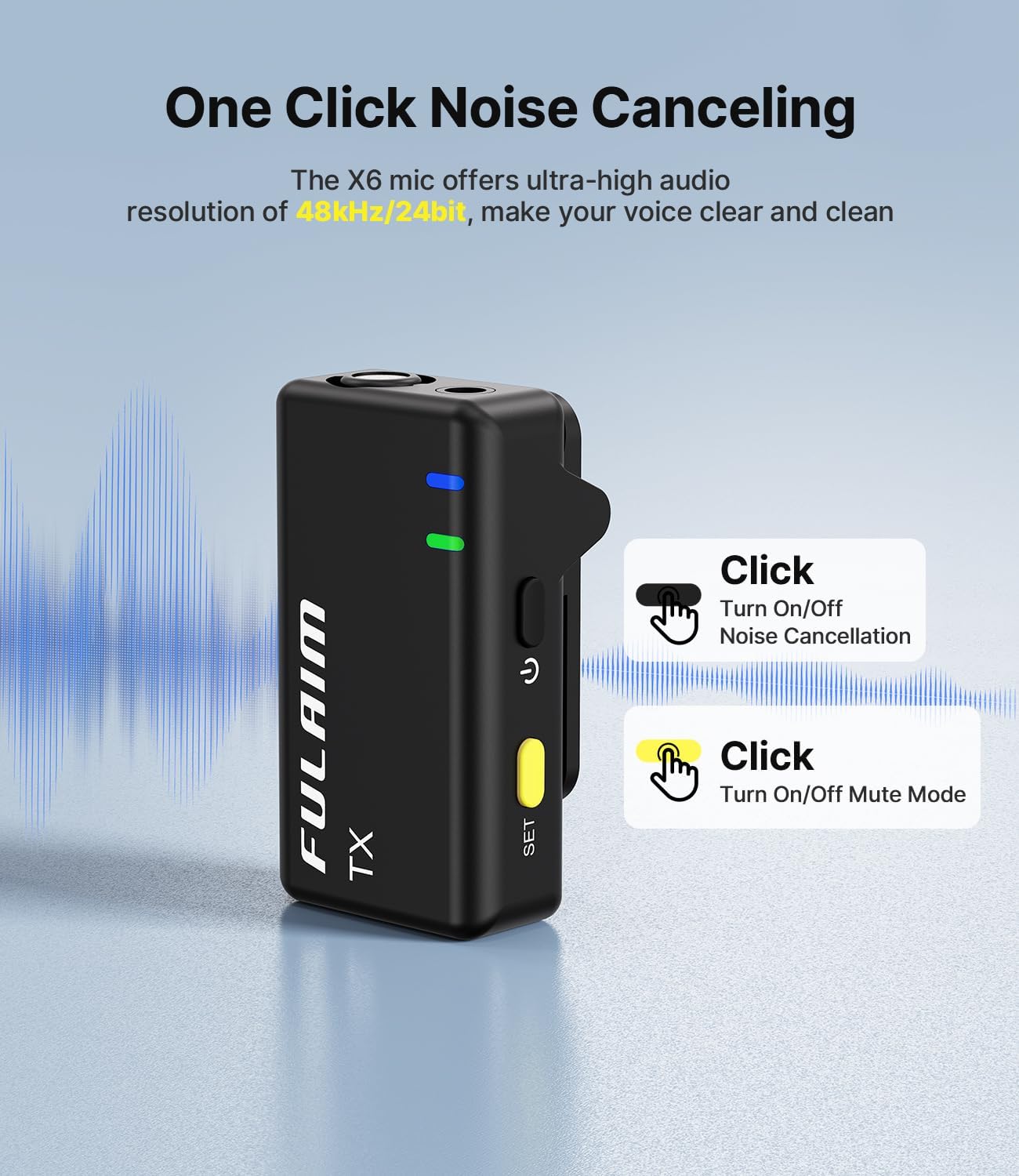
Figure 3.2: Close-up of the FULAIM X6 Receiver's TFT Display and controls.

Figure 3.3: FULAIM X6 Transmitter with one-click noise canceling feature.
4. Setup
Follow these steps for initial setup and connection:
- Power On: Press and hold the power button on both the receiver (RX) and all desired transmitters (TX) until the display lights up.
- Automatic Pairing: The transmitters and receiver will automatically pair upon power-on. The display on the receiver will show connection status for each active transmitter.
- Connect to Device:
- For Cameras: Use the provided 3.5mm camera cable. Connect one end to the 'OUT' port on the receiver and the other end to the microphone input on your camera.
- For iPhone/iPad (Lightning): Attach the Lightning adapter to the receiver's USB-C port, then plug it into your iPhone/iPad's Lightning port.
- For Android/Tablets/Laptops (USB-C): Attach the Type-C adapter to the receiver's USB-C port, then plug it into your device's USB-C port.
- Attach Transmitters: Clip the transmitters to your clothing or use the included magnets for discreet placement. Ensure the microphone is facing the sound source.

Figure 4.1: Connecting the FULAIM X6 receiver to a camera and smartphone.
5. Operating Instructions
5.1 Adjusting Volume/Gain (Receiver)
On the receiver, use the yellow buttons to adjust the volume (dB gain) for each connected transmitter. The TFT display will show the current levels.
5.2 Noise Cancellation (Transmitter)
The FULAIM X6 features intelligent noise cancellation. Press the SET button on the transmitter to activate or deactivate noise cancellation. The green indicator light on the transmitter signifies active noise cancellation.
5.3 Mute Mode (Transmitter)
To mute a transmitter, short press the power button on the transmitter. The blue indicator light will blink, indicating that the microphone is muted.
5.4 Real-Time Monitoring (Receiver)
Plug headphones into the 3.5mm 'OUT' port on the receiver to monitor your audio in real-time. This allows you to ensure optimal sound quality during recording.

Figure 5.1: Real-time audio monitoring via the receiver's 3.5mm port.
5.5 Audio Input Modes (Receiver)
The receiver supports two audio input modes: Mono and Secure Audio Track. These modes can be selected via the receiver's interface to best suit your recording needs.
Video 5.1: Official FULAIM X6 Wireless Microphone overview and features.
Video 5.2: Demonstration of FULAIM X6 in various video recording scenarios.
6. Compatibility
The FULAIM X6 is designed for wide compatibility with various recording devices:
- Smartphones: Compatible with iPhone (via Lightning adapter) and Android phones (via Type-C adapter).
- Cameras: Connects to cameras via the 3.5mm audio cable.
- Laptops & Tablets: Compatible with devices featuring USB-C ports.

Figure 6.1: FULAIM X6 compatibility with various devices including smartphones, tablets, and cameras.
7. Charging
The FULAIM X6 system is powered by Lithium Polymer batteries. Use the provided 4-in-1 charging cable to charge all transmitters and the receiver simultaneously. The system supports charging while recording, ensuring uninterrupted operation during long sessions.
8. Maintenance
To ensure the longevity and optimal performance of your FULAIM X6 system, follow these maintenance guidelines:
- Cleaning: Use a soft, dry cloth to clean the devices. Avoid using harsh chemicals or abrasive materials.
- Storage: Store the system in its portable case when not in use to protect it from dust, moisture, and physical damage.
- Battery Care: For long-term storage, charge the batteries to about 50% to prolong their lifespan. Avoid fully discharging batteries frequently.
9. Troubleshooting
If you encounter issues with your FULAIM X6 system, refer to the following common problems and solutions:
- No Sound/Low Volume:
- Ensure all devices (TX and RX) are powered on and paired.
- Check the volume/gain levels on the receiver's TFT display and adjust as needed.
- Verify that the receiver is correctly connected to your recording device (camera, phone, etc.).
- Ensure the transmitter is not muted (blue light blinking).
- Poor Sound Quality/Noise:
- Activate noise cancellation on the transmitter (green light).
- Ensure windscreens are properly attached to the transmitters to reduce wind noise.
- Check for obstructions or excessive distance between transmitters and receiver (max 164 feet).
- Avoid strong electromagnetic interference sources.
- Connection Issues:
- Power cycle both the transmitters and receiver.
- Ensure devices are within the 164 feet transmission range.
- Check battery levels on all units.
10. Specifications
| Feature | Detail |
|---|---|
| Model Name | X6 |
| Brand | FULAIM |
| Number of Transmitters | 4 |
| Audio Format | 48kHz/24bit |
| Connectivity Technology | 2.4G |
| Wireless Transmission Range | 164 feet (50 meters) |
| Connector Type | USB Type-C, Lightning, 3.5 mm Jack |
| Special Features | Clip, Volume Control, Noise Reduction, Voice Activated Recording |
| Compatible Devices | iPhone, Laptop, Tablet, Camera, Smartphone |
| Microphone Form Factor | Lavalier |
| Power Source | Battery Powered (4 Lithium Polymer batteries included) |
| Item Weight | 10.2 ounces |
| Package Dimensions | 8.19 x 3.74 x 2.68 inches |