
Introduction
This manual provides detailed instructions for the setup, operation, and maintenance of your FiiO TT13 Fully Automatic Vinyl Stereo Turntable. Please read this manual thoroughly before using the product to ensure proper function and longevity.
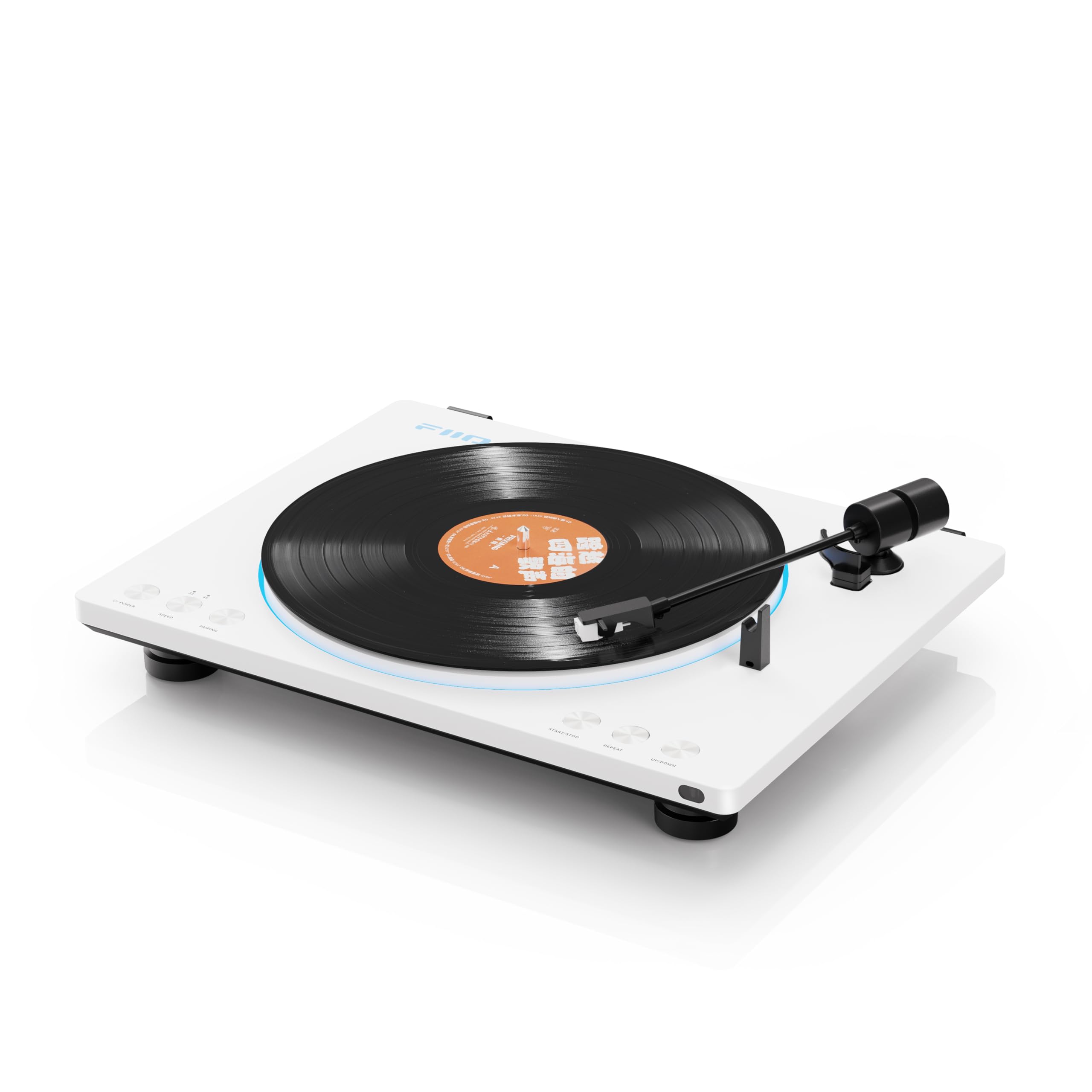
Image: The FiiO TT13 turntable in white, with the dust cover open, showcasing a vinyl record on the platter. Vinyl records are not included with the product.
Key Features
- Fully Automatic Tonearm: Designed for convenient, one-touch play, pause, and automatic loop playback, protecting both the record player and vinyl records.
- Built-in Phono Preamp: Features a professional power amplification circuit with a line output level of 800mV@1kHz 0dB, offering superior signal-to-noise ratio and channel separation. This allows direct connection to powered speakers without an external phono preamp.
- Analog Audio Architecture: Utilizes a fully analog audio circuit with two JRC5532 high-fidelity operational amplifiers in a two-stage amplification design, complemented by multiple electrolytic capacitors and independent LDO power supplies for reduced noise and pure sound.
- Durable Construction: Meticulously polished metal panel provides anti-interference performance. The unit weighs nearly 4kg and features sturdy feet for excellent shock absorption, minimizing environmental vibration impact.
- Remote Control: Allows remote operation for power on/off, playback control (start/stop, repeat), lighting brightness adjustment, and tonearm direction fine-tuning.
- aptX High-Res Bluetooth (Bluetooth version only): Employs Qualcomm's Bluetooth platform supporting aptX, aptX Low Latency, aptX HD, and SBC for low-noise wireless audio transmission.
- DC/AC Dual Power Supply Design: Features a built-in switching power supply (AC 100-240V) and supports an external DC 12V-1A power supply for high-fidelity scenarios.
- External Balance Adjustment: An adjustable balance potentiometer addresses volume imbalance between left and right channels in analog circuits.
Setup Instructions
- Unpacking: Carefully remove all components from the packaging. Retain packaging for future transport or storage.
- Platter Installation: Place the die-cast aluminum platter onto the spindle.
- Belt Installation: Gently wrap the rubber belt around the motor pulley and the inner rim of the platter. Ensure the belt is not twisted.
- Dust Cover: Attach the dust cover to the hinges at the rear of the turntable.
- Power Connection: Connect the power adapter to the turntable and then to a suitable power outlet. The TT13 supports AC 100-240V or an external DC 12V-1A power supply.
- Audio Output: Connect the RCA output cables from the turntable to your amplifier or powered speakers. The built-in phono preamp allows direct connection to line-level inputs.
- Balance Adjustment (Optional): If an imbalance in volume between left and right channels is detected, use the external adjustable balance potentiometer on the rear panel to correct it.

Image: A detailed view of the turntable's platter and tonearm, illustrating the components involved in initial setup.

Image: The FiiO TT13 turntable connected to an external power supply, demonstrating its DC/AC dual power supply capability.
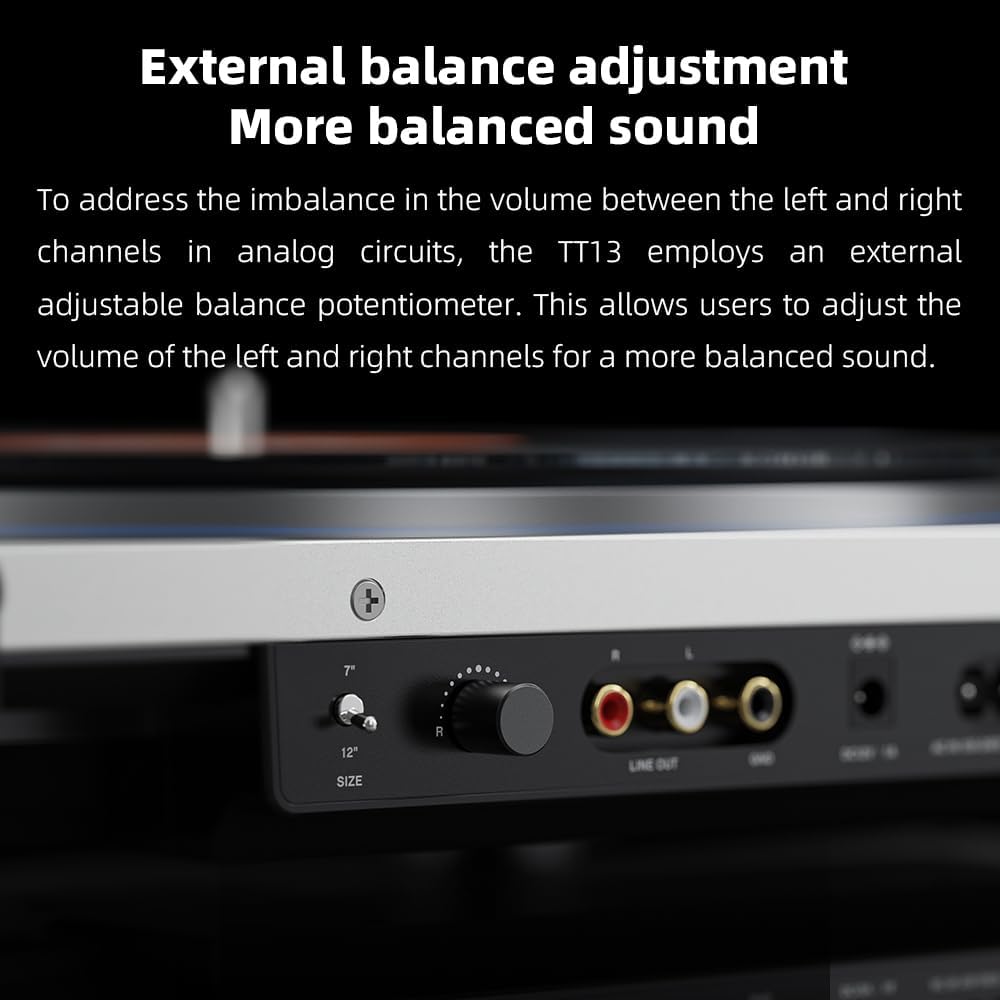
Image: A close-up of the rear panel of the FiiO TT13, highlighting the RCA line output, ground terminal, and the external balance adjustment knob for fine-tuning audio channels.
Operating Instructions
Playing a Record
- Place a vinyl record on the platter.
- Select the appropriate record size (7" or 12") using the size selector switch, if available.
- Press the Start button. The tonearm will automatically lift, move to the beginning of the record, and lower to begin playback.

Image: The FiiO TT13 turntable demonstrating its fully automatic tonearm in action, positioned over a playing record.
Pausing and Stopping Playback
- To pause playback, press the Pause button. The tonearm will lift from the record.
- To resume playback, press the Pause button again.
- To stop playback, press the Stop button. The tonearm will automatically lift, return to its rest position, and the platter will stop rotating.
Loop Playback
The TT13 supports automatic loop playback. Refer to the specific controls on your unit or the remote control for activating this feature.
Bluetooth Connectivity (Bluetooth version only)
- Ensure your TT13 is the Bluetooth version.
- Activate Bluetooth pairing mode on the turntable (refer to device controls).
- On your Bluetooth-enabled speaker or headphones, search for available devices and select "FiiO TT13".
- Once paired, audio will transmit wirelessly.

Image: A close-up of the FiiO TT13 turntable, highlighting its support for aptX High-Res Bluetooth audio transmission. Note: Standard versions do not support Bluetooth.
Using the Remote Control
The included infrared remote control provides convenient access to various functions:
- Power On/Off
- Start/Stop Playback
- Repeat Playback
- Adjust Lighting Brightness
- Fine-tune Tonearm Direction

Image: A hand holding the FiiO TT13's infrared remote control, showing buttons for various functions including power, playback, and lighting adjustments.
LED Lighting Effects
The turntable features customizable LED lighting. You can choose from 7 dazzling lighting effects and adjust their brightness, or turn them off completely. On the Bluetooth version, these settings can be controlled via the remote. On the standard version, adjustments are made directly on the unit.

Image: The FiiO TT13 turntable with its platter edge illuminated by LED lights, demonstrating the customizable lighting effects and color options.
Maintenance
- Cleaning the Dust Cover: Use a soft, dry cloth to gently wipe the dust cover. Avoid abrasive cleaners.
- Cleaning the Platter and Chassis: Use a soft, slightly damp cloth to clean the metal panel and chassis. Ensure no liquid enters the internal components.
- Stylus Care: Periodically clean the stylus with a soft brush designed for turntable styli, brushing from back to front.
- Belt Inspection: Check the drive belt periodically for wear or stretching. Replace if necessary.
- Storage: When not in use, keep the dust cover closed to protect the turntable from dust.
Troubleshooting
- No Power
- Ensure the power adapter is securely connected to both the turntable and a working power outlet. Check if the power button is pressed.
- No Sound or Low Volume
- Verify that the RCA cables are correctly connected to your amplifier or powered speakers. Ensure the amplifier/speakers are powered on and set to the correct input. Check the volume levels on both the turntable (if applicable) and your audio system. If using Bluetooth, ensure proper pairing and volume on the connected device.
- Skipping or Distorted Sound
- Check if the record is clean and free of dust or debris. Ensure the turntable is placed on a stable, level surface to minimize vibrations. Inspect the stylus for damage or dirt. If the issue persists, the stylus may need replacement.
- Tonearm Not Moving Automatically
- Ensure no obstructions are preventing the tonearm's movement. Check if the automatic functions are enabled. If the issue persists, contact customer support.
- Bluetooth Connection Issues
- Ensure your turntable is the Bluetooth version. Confirm the turntable is in pairing mode and within range of the receiving device. Try unpairing and re-pairing the devices. Ensure no other devices are interfering with the Bluetooth signal.
Specifications
| Feature | Detail |
|---|---|
| Model Name | TT13 |
| Brand | FiiO |
| Item Weight | 12.76 pounds (approx. 5.79 kg) |
| Package Dimensions | 18.11 x 17.72 x 6.3 inches (approx. 46 x 45 x 16 cm) |
| Material | Aluminum |
| Special Feature | Fully automatic tonearm, Loop playback |
| Included Components | Cable (Power cable, RCA cable) |
| Compatible Devices | Headphone, Speaker |
| Phono Preamp Output | 800mV@1kHz 0dB |
| Power Supply | AC 100-240V (built-in switching), External DC 12V-1A support |
| Bluetooth Support (Bluetooth version) | aptX, aptX Low Latency, aptX HD, SBC |
Warranty and Support
For warranty information and technical support, please refer to the official FiiO website or contact your local distributor. Keep your purchase receipt for warranty claims.