
1. Product Overview
The FiiO TT13 is a fully automatic vinyl stereo turntable designed for convenient and high-fidelity audio playback. It features a robust analog audio architecture, a powerful built-in phono preamp, and a durable aluminum construction. This manual provides essential information for setting up, operating, and maintaining your turntable.

Image: The FiiO TT13 turntable with its dust cover open, showcasing a vinyl record placed on the platter. The turntable is black with silver accents.

Image: The FiiO TT13 turntable in a warm, dimly lit room, with a record spinning on its platter, highlighting its aesthetic appeal for vinyl enthusiasts.
2. Unpacking and Initial Setup
Carefully remove all components from the packaging. Ensure all protective materials are removed before assembly. The turntable includes a power cable and an RCA cable for audio output.
2.1 Installing the Platter and Drive Belt
- Place the die-cast aluminum platter onto the spindle.
- Locate the drive belt, typically found pre-installed or separately. Carefully stretch the drive belt over the motor pulley.
- Rotate the platter a few times manually to ensure the belt is properly seated and not twisted.
2.2 Tonearm Setup
The FiiO TT13 features a fully automatic tonearm, simplifying operation. However, initial setup of the counterweight and anti-skating may be required for optimal performance and record longevity.
Video: A detailed guide on setting up the tonearm, including counterweight and anti-skating adjustments, for a turntable. This video is provided by Fluance Audio (Seller).
Video: Instructions on how to set up the tonearm for a Victrola Premiere Record Player. This video is provided by INNOVATIVE TECHNOLOGY ELECTRONICS, LLC (Vendor).
2.3 Connecting to Audio System
The TT13 features a built-in phono preamp, allowing direct connection to powered speakers or an amplifier's line input. Use the provided RCA cable to connect the turntable's ANALOG OUT to your audio system's input.
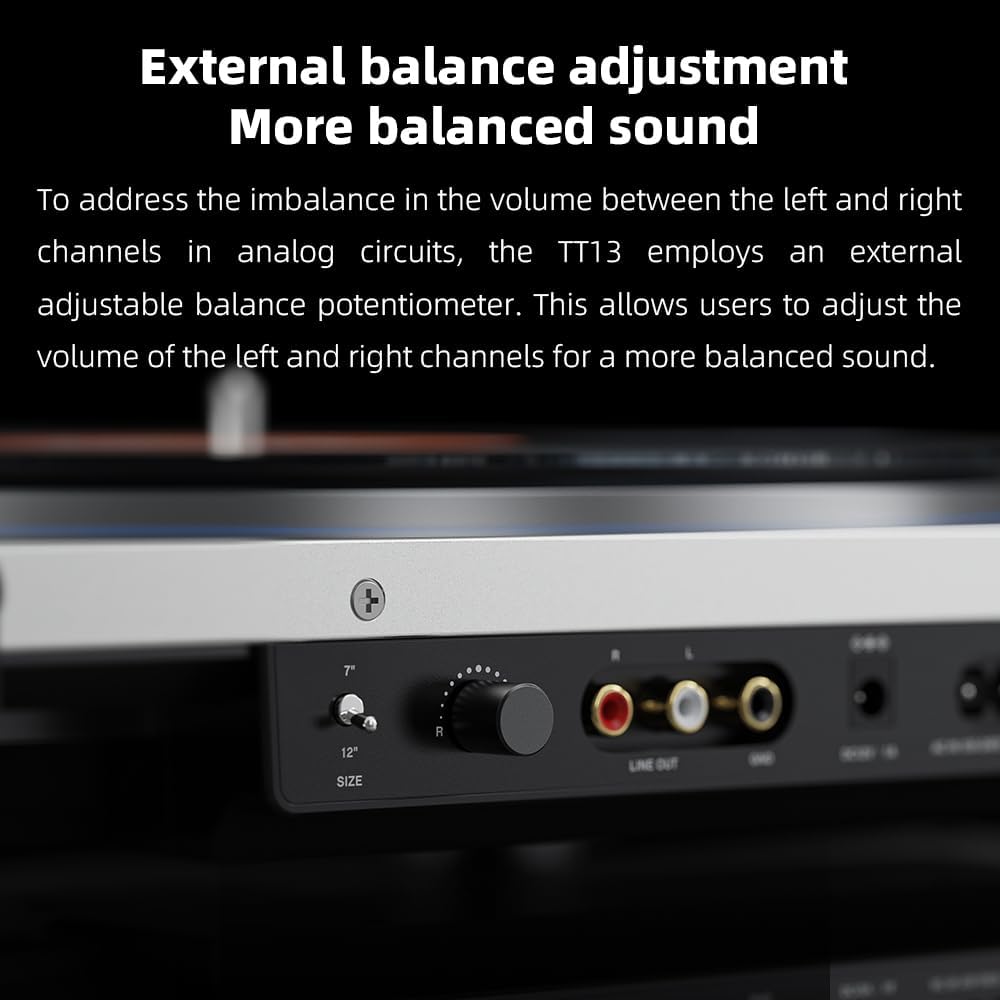
Image: A close-up view of the rear panel of the FiiO TT13 turntable, highlighting the 'ANALOG OUT' port and the external balance adjustment knob.
2.4 Power Connection
Connect the power adapter to the DC IN 12V port on the rear of the turntable, then plug it into a wall outlet. The TT13 supports a wide AC ~100-240V voltage range.

Image: The FiiO TT13 turntable with an external power supply unit connected, demonstrating its DC/AC dual power supply design.
3. Operating Instructions
3.1 Basic Playback
- Place a vinyl record on the platter.
- Select the appropriate speed (33 1/3 or 45 RPM) using the speed selector.
- Press the START button. The tonearm will automatically lift, move to the beginning of the record, and begin playback.
- To stop playback, press the STOP button. The tonearm will automatically lift, return to its rest position, and the platter will stop spinning.

Image: A close-up of the FiiO TT13 turntable's tonearm positioned over a record, with visible control buttons for automatic start, stop, and loop playback.
3.2 Loop Playback
The TT13 supports automatic loop playback. After a record finishes playing, the tonearm will automatically return to the start and replay the record. This feature can be activated or deactivated via the remote control.
3.3 Remote Control Functions
The included infrared remote control provides convenient access to various functions:
- Power On/Off: Turn the turntable on or off.
- Start/Stop: Initiate or halt record playback.
- Repeat Play: Toggle loop playback mode.
- Lighting Brightness: Adjust the intensity of the RGB & LED lights.
- Tonearm Direction: Fine-tune tonearm movement (for manual cueing or track selection).

Image: A hand holding the FiiO TT13 infrared remote control, showing buttons for power, play/pause, repeat, and light adjustments.
3.4 Bluetooth Connectivity (Bluetooth Model Only)
The FiiO TT13 Bluetooth version supports aptX/aptX Low Latency/aptX HD/SBC Bluetooth transmission for wireless audio streaming to compatible devices. Refer to your device's manual for pairing instructions.

Image: A close-up of the FiiO TT13 turntable's surface, showing the FiiO logo and indicators for aptX High-Res Bluetooth support.
3.5 External Balance Adjustment
The turntable includes an external adjustable balance potentiometer to address any volume imbalance between the left and right analog channels. This allows for fine-tuning to achieve a more balanced sound output.

Image: A detailed view of the FiiO TT13 turntable's rear panel, showing the external balance adjustment knob, RCA line outputs, and a switch for phono/line output.
4. Features and Technology
- Fully Automatic Tonearm: Simplifies operation with one-touch play, pause, and automatic loop playback, protecting both the record player and vinyl records from mishandling.
- Powerful Built-in Phono Preamp: Delivers a line output level of 800mV@1kHz 0dB, offering superior signal-to-noise ratio and channel separation. This eliminates the need for an external phono preamp, allowing direct connection to powered speakers.
- Analog Audio Architecture: Utilizes two JRC5532 high-fidelity operational amplifiers in a two-stage amplification circuit, complemented by electrolytic capacitors and independent LDO power supplies for lower noise and pure analog sound.
- All-Aluminum Alloy Panel: The meticulously polished metal panel provides excellent anti-interference performance and robust shock absorption, minimizing environmental vibrations for stable audio quality. The unit weighs nearly 4kg.
- Remote Control: Allows control of power, playback, repeat, lighting brightness, and tonearm direction from a distance.
- DC/AC Dual Power Supply: Features a built-in switching power supply (100-240V) and an option for an external DC 12V-1A power supply for high-fidelity scenarios.
- External Balance Adjustment: A potentiometer allows users to adjust the volume balance between left and right channels.

Image: A block diagram detailing the specially-designed analog audio architecture of the FiiO TT13, showing the signal path through JRC5532 op-amps and power management.

Image: The FiiO TT13 turntable positioned between two white speakers, illustrating its powerful built-in phono preamp that allows direct connection to active speakers.
5. Maintenance
5.1 Dust Cover
Always keep the dust cover closed when the turntable is not in use to protect it from dust and debris. Clean the dust cover with a soft, dry cloth.
5.2 Cleaning
- Use a soft, lint-free cloth to gently wipe the turntable's chassis and platter.
- Avoid using harsh chemicals or abrasive cleaners, as these can damage the finish.
- For the stylus, use a specialized stylus cleaning brush and fluid, following the manufacturer's instructions.
6. Troubleshooting
If you encounter any issues with your FiiO TT13 turntable, please refer to the following common troubleshooting steps:
- No Power: Ensure the power adapter is securely connected to both the turntable and a working power outlet.
- No Sound: Verify that the RCA cables are correctly connected to your audio system's input. Check the input selection on your amplifier/receiver. Ensure the volume is turned up.
- Skipping or Distorted Sound: Check if the record is clean and free of dust. Ensure the tonearm's counterweight and anti-skating settings are correctly calibrated. Verify the record is placed flat on the platter.
- Incorrect Speed: Confirm that the correct speed (33 1/3 or 45 RPM) is selected for the record being played.
- Bluetooth Pairing Issues (Bluetooth Model Only): Ensure the turntable is in pairing mode and your receiving device is discoverable. Try restarting both devices.
If problems persist after attempting these steps, please contact FiiO customer support for further assistance.
7. Specifications
| Feature | Specification |
|---|---|
| Brand | FiiO |
| Model Name | TT13 |
| Item Model Number | TT13 Black Bluetooth |
| Manufacturer | FiiO |
| Material | Aluminum |
| Item Weight | 12.76 pounds (5.8 Kilograms) |
| Package Dimensions | 18.11 x 17.72 x 6.3 inches |
| Included Components | Cable |
| Compatible Devices | Desktop, Headphone, Laptop, MP3 Player, Personal Computer, Smartphone, Speaker, Tablet |
| Signal-to-Noise Ratio | 60 dB |
| Date First Available | November 7, 2024 |
8. Warranty and Support
For warranty information and customer support, please refer to the official FiiO website or contact your retailer. Keep your proof of purchase for any warranty claims.
Official FiiO Website: www.fiio.com


